No Navigation Happened, and It Still Broke
There’s no page.goto() anywhere near the failing line. No redirect, no link click. Just a button that was visibly on screen a second ago, and then this:
Error: locator.click: Element is not attached to the DOMThis is a different animal from the navigation-flavored errors, and treating it the same way, usually by reaching for a longer timeout, is how it turns into the flaky test that fails once a week for no reason anyone can pin down.
The short answer: element is not attached to the dom in Playwright almost always means a client-side framework, React, Vue, or Angular, re-rendered the component and replaced the exact DOM node between the moment Playwright resolved your locator and the moment it acted on it. It’s not a selector problem and it’s rarely a real timing problem in the traditional sense. Below is which of the three common patterns is causing it, and the actual fix for each.
Why This Happens Without Any Navigation at All
A Locator in Playwright doesn’t hold a reference to a DOM node, it re-runs its query every time you call an action on it. That’s normally what protects you from exactly this kind of race. So when the error still shows up, something specific broke that protection.
Playwright’s own actionability docs confirm the framework auto-waits for all relevant checks to pass and only then performs the requested action, failing with a TimeoutError if the checks don’t pass in time. “Element is not attached” is a different failure than a timeout, it means the element existed and passed those checks, then got swapped out in the narrow window right before the action itself fired.
The Real Causes, Ranked by How Often They’re the Actual Problem
I’ve chased all three of these down in real React and Vue frameworks. The first one accounts for most cases I’ve seen in production suites.
| Cause | How to tell it’s this one | Fix |
|---|---|---|
Component re-renders and replaces the node mid-action (single element or a page.$$() loop) | Failure is intermittent, app is React/Vue/Angular, no navigation nearby, or it happens partway through a loop over a list | Act on the locator directly, don’t resolve it early or hold an intermediate reference; re-query inside loops instead of resolving all handles upfront |
check() / uncheck() on a proper Locator, not click() | Mostly historical, confirmed against current Playwright with 100 test runs and it didn’t reproduce; only worth checking on older Playwright versions | Separate click() and an assertion if you’re on an older version, defensive either way |
| Modal or conditional block animates out and back in | Failure clusters around opening/closing dialogs, drawers, or accordions | Assert visibility with expect(locator).toBeVisible() before acting |
Cause 1: A Re-Render Swaps the Node Mid-Click
This is the classic version. State updates in React or Vue often replace a node instance even when it looks identical on screen, and if that replacement lands in the narrow window between Playwright’s actionability checks and the actual click, you get this error.
// Broken: resolving an ElementHandle early holds a reference to the node
// that existed at that instant, not whatever replaces it a moment later
const saveButton = await page.locator('button:has-text("Save")').elementHandle();
await saveButton.click();
The fix is to not resolve early at all. Let the Locator do what it’s built for, re-query at the moment of the action:
// Fixed: locator re-queries and retries automatically, no early resolution
await page.locator('button:has-text("Save")').click();
The same trap shows up under the older page.$() API, and it’s arguably the more common version in real codebases, especially ones migrated from Puppeteer or written before locators were the default:
// Broken: page.$() returns a one-shot ElementHandle, not a re-queryable locator
const button = await page.$('button:has-text("Save")');
await button.click();
A Playwright maintainer confirmed this exact mechanism directly on the project’s GitHub issue tracker when a user hit this same error, which is why swapping page.$() for a Locator fixes this category of failure without any extra waiting logic.
The same risk compounds when you’re looping over multiple elements. page.$$() returns an array of ElementHandles resolved all at once, so if clicking through the list causes rows to re-render, get removed, or shift position, the handles further down the array can go stale before you reach them:
// Broken: all handles are resolved upfront, then the list changes
// underneath you as you click through it
const rows = await page.$$('.row .delete-button');
for (const row of rows) {
  await row.click(); // later iterations may hit an already-detached row
}
If clicking removes the row from the DOM, don’t resolve the list upfront at all, re-check the count each time instead:
// Fixed: always re-query, never hold a stale reference to what's left
const rows = page.locator('.row .delete-button');
while (await rows.count() > 0) {
  await rows.first().click();
}
If clicking doesn’t remove anything and you just need to act on every match once, index into a Locator instead of resolving handles, nth() re-queries the DOM at the moment you actually click:
// Fixed: nth() stays lazy, only queries the DOM when the click fires
const items = page.locator('.item .select-button');
const count = await items.count();
for (let i = 0; i < count; i++) {
  await items.nth(i).click();
}
Position-based indexing has a limit though, if you’re doing more than one action on the same list item, edit, then fill, then save, then confirm, position can shift between steps even without a full re-render, a new item added above it, a sort re-applied. Scope a Locator to that specific item by something identifying, not its position, then chain every subsequent action off that same scoped locator:
// Fixed: scoped to the item's identity, every chained call re-resolves
// against that same item regardless of where it sits in the list now
const comment = page.getByRole('article', { name: /Ada Lovelace/ });
await comment.getByRole('button', { name: 'Edit' }).click();
await comment.getByRole('textbox').fill('Updated comment text');
await comment.getByRole('button', { name: 'Save' }).click();
await expect(comment.getByText('Updated comment text')).toBeVisible();
Every call above re-runs the same “find the article containing Ada Lovelace” query, so even if the list reorders between the click and the fill, each step still lands on the right item, not whatever now happens to sit at the old index.
If you’re already writing single-element code this way and still hitting the error, check whether some earlier line converted the locator into a handle, or whether a parent component is unmounting and remounting the whole subtree rather than just updating the button, which is closer to Cause 3 below.
Cause 2: check() and uncheck() Specifically (Mostly a Legacy Concern Now)
This one used to surprise people. A real user hit it and got confirmation straight from a Playwright maintainer on the project’s GitHub issue tracker back in 2021: locator.click() retries automatically if the target gets detached mid-action, but check() and uncheck() were less forgiving about a detach happening between the click and the subsequent state verification.
I tested this specifically against Playwright 1.62.x before writing this section, 100 runs of a checkbox that re-renders immediately after being clicked, and it didn’t reproduce once. That’s a strong sign Playwright closed this gap somewhere in the versions since that 2021 report, check() and uncheck() now appear to retry the same way click() does. If you’re on a recent Playwright version and your failure is specifically on check()/uncheck(), this is probably not your cause, look at Cause 1 or Cause 3 first.
Worth ruling out either way: if check() or uncheck() is failing and the element was queried with page.$(), page.QuerySelectorAsync() in .NET, or any other raw handle method, that’s Cause 1, not this one, and that failure mode is still very much alive regardless of Playwright version.
If you’re on an older Playwright version, or want defensive code either way, separating the action from the assertion still doesn’t hurt, each step gets its own independent retry:
// Defensive, not strictly necessary on current Playwright versions,
// but harmless: click plus an explicit assertion, each with its own retry
await page.locator('#subscribe').click();
await expect(page.locator('#subscribe')).not.toBeChecked();
If you’re seeing this specific failure on a current Playwright version, worth checking Playwright’s release notes for anything version-specific, or treating it as closer to Cause 1 or Cause 3 in disguise.
Cause 3: Modals, Drawers, and Accordions Animating Out and Back In
Components that animate closed and reopen, or conditionally unmount based on a loading state, create a brief window where the element you’re targeting genuinely doesn’t exist, not because of a bug, but because your test caught it mid-transition.
Most people’s first instinct is to add waitForTimeout(500) before the action to “let the animation finish.” That’s a workaround, not a fix, and the exact delay that works today breaks the moment the animation duration changes or CI runs slower than your laptop.
// Workaround, not a fix: guesses at how long the animation takes
await page.waitForTimeout(500);
await page.locator('.modal button:has-text("Confirm")').click();
The real fix asserts on the state you actually care about, waiting for the element to be visible before acting, which uses Playwright’s auto-retrying assertion instead of a guess:
// Fixed: wait for the actual condition, not a guessed duration
await expect(page.locator('.modal button:has-text("Confirm")')).toBeVisible();
await page.locator('.modal button:has-text("Confirm")').click();
Before You Apply Any Fix, Check This
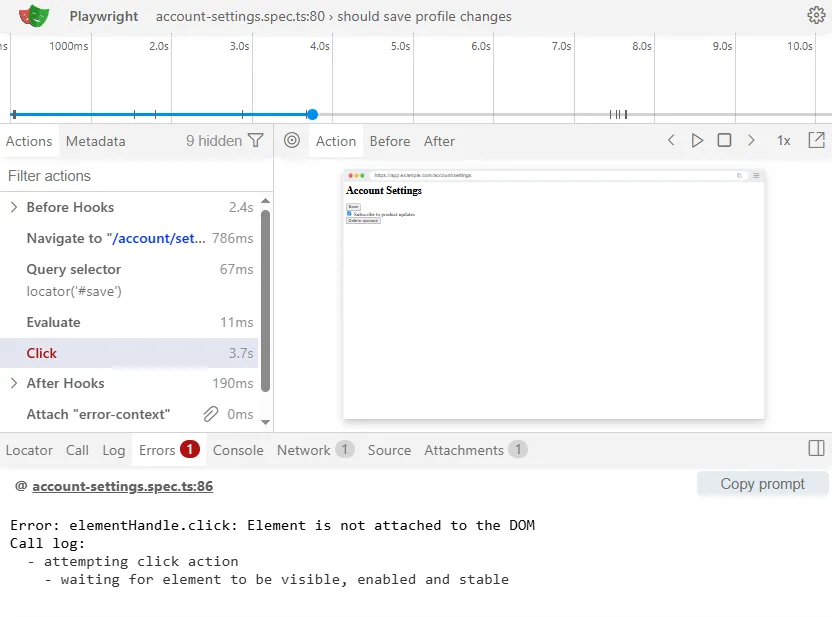
Open the Trace Viewer with npx playwright show-trace and look at the failing action’s timeline. If the element resolves and passes actionability checks almost instantly, then fails right at the click itself, that’s the re-render race from Cause 1, not a wait-time problem. If it fails partway through a loop rather than on a single action, check whether the loop resolved a full list of ElementHandles upfront with page.$$(), that’s the same cause, just triggered by iteration instead of a single re-render.
If the failure is specifically on check() or uncheck() and the same element handles click() fine elsewhere in your suite, check your Playwright version first, on current versions this specific gap is unlikely to be the cause. If you’re on an older version, that’s Cause 2, and no amount of extra waiting changes which method retries less aggressively.
Watch for a false-positive fix: if waitForTimeout() makes it pass locally but the test is still flaky under --workers=4 or on a slower CI runner, the animation timing guess just happened to be long enough that one time.
What Actually Prevents This Going Forward
Stop resolving locators into ElementHandle objects anywhere in shared component helpers, page objects, or custom wrappers. There’s rarely a legitimate reason to do it in new Playwright code, and it’s the single most common way this specific protection gets undone, a pattern also covered from the caching-across-navigation angle in the guide on “execution context was destroyed” errors. The same rule applies to page.$() and page.$$(), both return handles rather than locators, so audit loops and list-processing code for them specifically, that’s where this pattern hides longest since it often works fine until the list actually changes size in production.
For anything involving modals, drawers, or conditionally rendered UI, standardize on expect(locator).toBeVisible() before the interacting step rather than a fixed delay, since the assertion adapts to however long the actual render takes instead of guessing.
One specific temptation worth naming: if you need to compare an element’s text before and after an action, the instinct is to grab a handle once and read it twice. Call locator.textContent() twice instead, once before, once after, each call re-queries fresh, so neither read depends on a reference that might not survive the action in between.
The One Thing to Remember
Element is not attached to the DOM almost always means the app re-rendered faster than your test expected, not that your selector or your wait time was wrong. Assert on the real condition, visibility or an explicit state, rather than guessing at a delay, and the flakiness goes away for good instead of just moving to a slower CI run.
Frequently Asked Questions
Is this the same as a stale element reference in Selenium?
Conceptually similar, both describe acting on a node that no longer exists, but the mechanism differs. Selenium’s WebElement is a live reference that goes stale once the DOM changes, while Playwright’s Locator re-queries automatically, so this error usually points to a narrower race window rather than a general staleness problem.
Does force: true fix this?
It can make the click succeed against whatever element currently matches the selector, but it skips the actionability checks that were likely catching a real timing issue, so treat it as a last resort for one specific known-safe case, not a general answer.
Does this happen in Python, Java, or .NET too?
Yes, the Locator re-query model and the actionability checks are consistent across Playwright’s language bindings, since they all run on the same underlying driver. In .NET specifically, the same trap shows up as page.QuerySelectorAsync() returning an ElementHandle that later throws on .ClickAsync() or .CheckAsync(), page.Locator() is the fix there too. The exact method names vary by language binding, the underlying cause and fix don’t.
What if none of these three causes match my error?
Double check you’re not actually looking at a genuine missing-element case rather than a detachment, why Playwright cannot find an element even when it exists covers that related but distinct problem. Also check whether the element sits inside a
Is this still accurate on the newest Playwright releases?
This was verified against 1.62.x. The Locator re-query model and actionability checks have been stable for a long stretch of major versions, but if you’re on something noticeably older than 1.4x, it’s worth checking the changelog for that specific range.