Last updated on March 17th, 2026 at 05:30 am
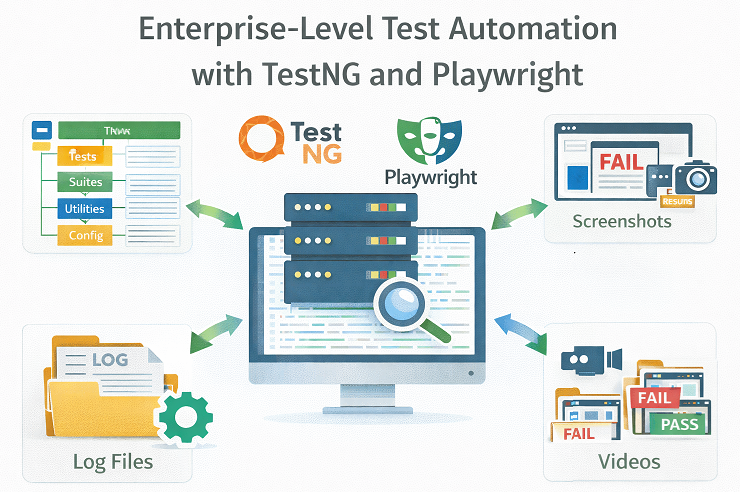
If you are planning to build an enterprise-grade Playwright automation framework using Java, this guide is for you.
Simple Playwright setups work well for small projects. However, they start breaking when test suites grow, execution becomes slow, reporting is unclear, and multiple teams contribute to the same framework.
An Enterprise Playwright Automation Framework is a scalable, configuration-driven automation setup designed to support large test suites, reliable execution, centralized reporting, and CI/CD integration.
In this article, you will understand why an enterprise framework is required and how this Playwright Enterprise Framework tutorial series helps you build it step by step for real-world projects.
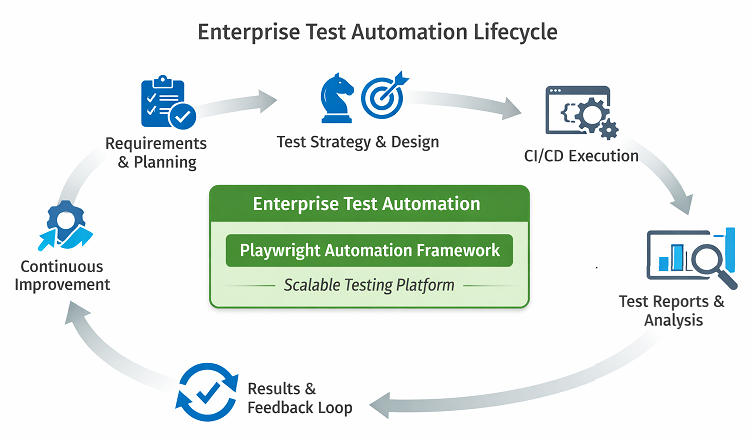
This framework is built on top of Playwright, a modern browser automation tool designed for reliability and speed. For official concepts and APIs, refer to the Playwright documentation.
- Deep Dive Blog Series: Inside the Playwright Framework
- What Is an Enterprise Playwright Automation Framework?
- Why Most Automated Testing Tools Fail at Scale
- Aligning with Enterprise Test Strategy
- Design Goals and QA Best Practices Followed
- High-Level Architecture of the Playwright Testing Framework
- Core Capabilities of the Enterprise Test Automation Framework
- Security, Test Data, and Compliance
- Project Structure Supporting Modern Test Automation
- Stability and Performance
- Scalability and CI CD Readiness by Design
- Framework Limitations and Trade-Offs
- Who Should Use This Enterprise Test Automation Framework
- Migration Strategy: Moving from Selenium to Playwright
- Conclusion: Key Takeaways for Enterprise Playwright Automation
- Frequently Asked Questions
Deep Dive Blog Series: Inside the Playwright Framework
This pillar post provides a high-level view of the framework and its design philosophy. However, many of the capabilities described here deserve deeper explanation to fully understand the reasoning, tradeoffs, and implementation approach behind them. To address this, this article serves as the entry point to an ongoing deep dive blog series focused on individual framework features.
This series is intentionally designed as a growing knowledge base rather than a fixed set of articles. Each post will explore one specific aspect of the framework in detail, helping readers understand not only how the framework works, but also how similar design principles can be applied when building automation frameworks from scratch.
What This Series Will Cover
The deep dive articles will focus on feature-level clarity and practical implementation patterns. Topics planned for the series include, but are not limited to:
- How to Set Up a Project for Playwright Enterprise Framework (Step 1)
- Reading Test Data from Excel in Playwright Enterprise Framework (Step 2)
- How to Scale Tests in Playwright Enterprise Setup (Step 3)
- Skip Suite in Playwright Enterprise Framework (Step 4)
- How to Skip Test in Playwright Enterprise Framework (Step 5)
- How to Add Playwright Data Driven Reporting (Step 6)
- How to Add Logging in Playwright Enterprise Framework (Step 7)
- How to Add Extent Report in Playwright Framework (Step 8)
- How to Add Allure Report in Playwright Framework (Step 9)
- How to Run Real Playwright Tests in Enterprise Framework (Step 10)
- How to Improve Playwright Browser Lifecycle in Framework (Step 11)
- How to Use Playwright Object Repository in Framework (Step 12)
- How to Use Fallback Locators in Playwright Framework (Step 13)
- How to Implement Playwright Self-Healing Locators at Scale (Step 14)
- How to Configure Browser in Playwright Framework (Step 15)
- Capture Screenshot on Test Pass/Fail And Attach to Extent Reports (Step 16)
- Playwright Record Video on Test Pass/Fail in Enterprise Framework (Step 17)
- Playwright Retry Mechanism in Enterprise Framework (Step 18)
- Implement Page Object Model in Playwright Enterprise Framework (Step 19)
- How to Automate Login Page in Playwright Framework(Step 20)
- How to Automate Registration Page in Playwright Framework (Step 21)
- How to Automate Home Page in Playwright Framework (Step 22)
Planned Upcoming Steps
- CI CD readiness and pipeline integration approach
- Framework extensibility and adding new features over time
Each article in the series will focus on a single capability, explain the design decisions behind it, and show how it contributes to building reliable and maintainable automation at scale.
How to Use This Series
Readers can start with this pillar post to understand the overall framework and then explore individual articles based on their immediate needs. New articles will be added over time, and this section will be updated with links as each deep dive is published.
This approach ensures that the content remains accurate, practical, and aligned with real-world framework evolution, while giving readers a clear learning path to follow as the framework grows.
What Is an Enterprise Playwright Automation Framework?
An enterprise Playwright automation framework is a structured test automation solution designed to support large-scale testing needs. It provides controlled execution, configuration-driven behavior, data-driven testing, centralized reporting, and a scalable architecture that works across teams, environments, and continuous integration pipelines.
Why Most Automated Testing Tools Fail at Scale
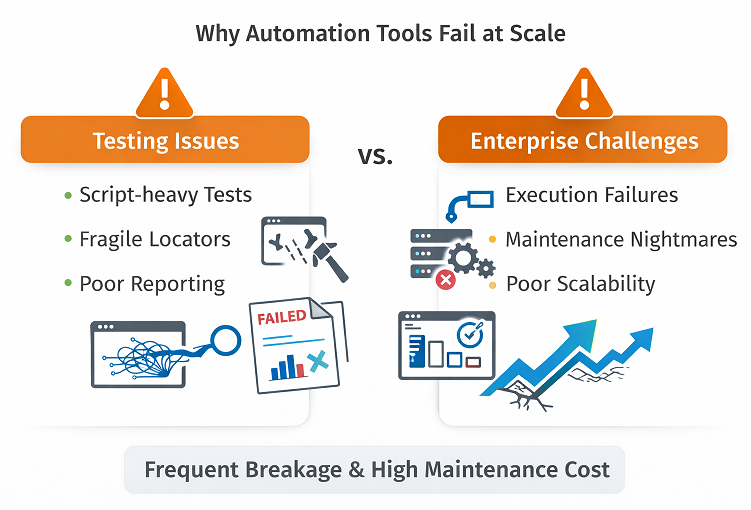
Many automated testing tools work well at the beginning of a project. Teams start with a few test cases, basic reporting, and simple execution. At this stage, almost any solution looks effective. Problems start to appear when the number of tests grows, and multiple teams depend on the same framework.
One common issue is a script-heavy design. Many QA automation tools encourage writing logic directly inside test scripts. Over time, this leads to duplicated code, fragile tests, and high maintenance costs. Small changes in the application can break dozens of tests, making the framework hard to trust.
Another major limitation is the lack of control over execution. Most tools do not provide a clear way to manage which test suites, test cases, or data sets should run without changing code. In large projects, this makes it difficult to align execution with a real test automation strategy, especially when different environments and release cycles are involved.
Reporting is another weak area. Many automated testing tools offer basic pass or fail results but fail to provide meaningful insights. Without detailed logs, screenshots, or execution evidence, debugging failures becomes time-consuming. This also reduces confidence when results are reviewed by stakeholders.
Finally, limited support for enterprise QA solutions becomes obvious at scale. Enterprise teams need flexibility, traceability, and audit-friendly results. Tools that lack data-driven execution, centralized configuration, and execution transparency often fail to meet these expectations, even if they work well for small projects.
Aligning with Enterprise Test Strategy
A strong test automation framework must support the overall enterprise test strategy, not work in isolation. Tools alone do not solve quality problems. Strategy decides what to automate, when to execute, and how results are used for business decisions.
This Playwright automation framework is designed to align closely with real enterprise testing needs.
Supporting Different Test Types
Enterprise applications require multiple layers of testing. Therefore, the framework supports clear separation of test types such as smoke, sanity, regression, and extended validation suites.
For example, smoke tests can be executed on every build, while full regression suites can run nightly or before major releases. This approach keeps feedback fast while maintaining confidence in critical flows.
Business Driven Test Selection
Not all tests carry equal risk. As a result, the framework supports business-driven execution using SuiteToRun, CaseToRun, and DataToRun controls.
This allows teams to prioritize high-risk and high-value scenarios without changing code. Test execution decisions can be made by QA leads or release managers based on business impact.
Shift Left Testing in CI Pipelines
Early feedback is critical in enterprise environments. Therefore, the framework is designed to support shift-left testing in CI pipelines.
Fast executing suites can run on pull requests, while broader regression suites run after merges. This reduces defect leakage and prevents unstable builds from moving forward.
Balancing Automation and Manual Testing
Automation is not a replacement for all testing. Exploratory testing, usability validation, and edge case discovery still require human judgment.
This framework complements manual testing by automating repeatable and high-risk scenarios. As a result, QA teams can focus more on analysis and less on repetitive execution.
Risk-Based Regression Strategy
Over time, enterprise test suites grow large. Running everything on every release becomes expensive and slow.
The framework supports risk-based regression by allowing selective execution based on recent changes, impacted modules, or historical failures. This keeps execution time under control while maintaining coverage.
Strategy First, Tool Second
Playwright provides speed and reliability. TestNG provides execution control. However, strategy defines success.
By aligning automation execution with enterprise test strategy, this framework ensures that automation supports business goals, release timelines, and quality expectations rather than becoming a maintenance burden.
This strategic alignment is what separates a scalable enterprise automation framework from a collection of automated scripts.
Design Goals and QA Best Practices Followed
The foundation of this framework is driven by clear design goals that align with proven QA best practices used in enterprise environments. Instead of focusing only on test execution, the framework is designed to support long term stability, flexibility, and ease of maintenance.
One key goal is configuration-driven execution. All runtime behavior is controlled through external configuration files rather than hardcoded logic. This allows teams to change browsers, environments, execution speed, or evidence collection without modifying test code. From a software quality assurance perspective, this reduces risk and makes test execution more predictable across different setups.
Data-driven testing is another core principle. Test data, execution flags, and result tracking are separated from test logic. This approach makes it easier to scale test coverage and enables non-technical team members to participate in test execution decisions. It also supports audit-friendly reporting, which is often required in enterprise projects.
Separation of concerns plays a critical role in the framework design. Test logic, page interactions, configuration, and data handling are kept in clearly defined layers. This structure improves readability and ensures that changes in one area do not cause unintended side effects in others. Such separation is a fundamental aspect of maintainable quality engineering practices.
Finally, the framework is intentionally designed to be extensible. New features can be introduced without rewriting existing components. More importantly, the concepts used here are not limited to Playwright. Readers can apply the same design principles when building frameworks for other tools or technologies, making this framework a practical reference for anyone interested in building robust automation solutions from scratch.
High-Level Architecture of the Playwright Testing Framework
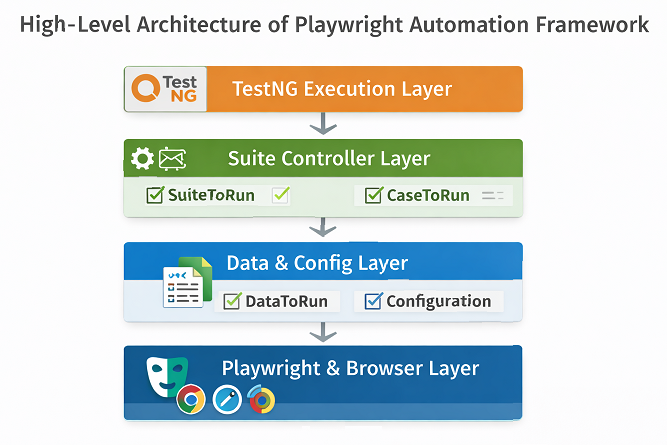
Layered Architecture Overview
The Playwright testing framework is designed with a layered architecture that supports clarity, flexibility, and scalability. Each layer has a clearly defined responsibility, which makes the system easier to understand and easier to extend. This structure also helps readers follow the deeper technical sections that come later in the series.
Test Execution Layer using TestNG
The test execution layer is built using TestNG. It is responsible for managing the test lifecycle, handling annotations, assertions, retries, and execution flow. By using TestNG as the execution engine, the framework gains stability and structure that are essential for modern test automation in enterprise environments.
Enterprise Execution Control Layer
Above the execution layer sits the control layer for enterprise test automation. This layer determines what should run and what should be skipped based on external flags. Instead of hardcoding execution decisions, the framework reads suite and test-level inputs and applies them dynamically. This approach gives teams precise control over execution without requiring code changes.
Data Layer for Automated Regression Testing
The data layer supports automated regression testing by separating test data from test logic. Test inputs, execution flags, and result tracking are handled independently, allowing the same tests to run with different data sets. This design makes it easier to scale coverage while keeping test code clean and focused.
Configuration and Environment Management Layer
Configuration and environment management form another critical layer. Browser selection, execution mode, evidence capture, and environment-specific settings are controlled through configuration files. This ensures consistent behavior across local runs, shared environments, and continuous integration systems.
Reporting and Logging Layer
Finally, the reporting and logging components provide visibility into test execution. Detailed reports, logs, screenshots, and videos help teams understand failures quickly and build confidence in results. Together, these layers form a cohesive architecture that supports both learning and real-world automation needs.
Alignment with Playwright Best Practices
The architecture follows Playwright best practices for test isolation, browser context management, and parallel execution, as described in the Playwright test runner documentation.
Core Capabilities of the Enterprise Test Automation Framework
At the heart of this test automation framework is a robust execution engine built on TestNG. This engine controls how tests are initialized, executed, and finalized, providing a predictable and well-structured execution flow that is essential for enterprise-scale testing.
Test Execution Engine using TestNG
TestNG annotations are used to manage the complete test lifecycle. Setup and teardown operations are handled in a consistent way, ensuring that test preconditions and cleanup steps are always executed correctly. This structure helps maintain stability as the number of tests grows.
Soft Assertion to Validate Test Results
Assertions play a key role in validating application behavior. Instead of stopping execution at the first failure, the framework supports soft assertion handling. This allows multiple validations to run within the same test, collecting all failures before marking the test as failed. As a result, teams gain better visibility into issues without losing valuable execution time.
Retry on Failure
A retry strategy is also built into the execution engine to support automated regression testing. Transient failures caused by network delays or environmental instability can be re-executed based on configuration. This reduces false negatives and helps teams focus on real defects rather than temporary execution issues.
Together, these capabilities make the execution engine reliable, flexible, and suitable for long-running regression cycles in enterprise environments.
Suite, Case, and Data Level Execution Control
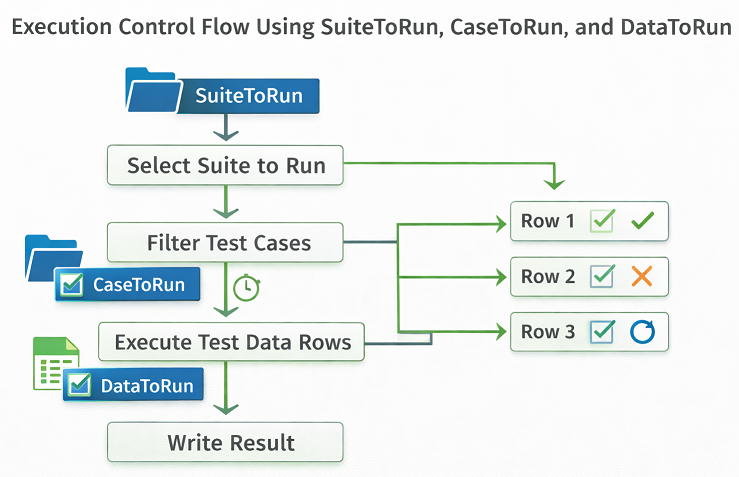
A key strength of this framework is the level of control it provides over test execution, which is essential for enterprise test automation. Instead of treating all tests the same, execution decisions are made at multiple levels based on real project needs.
Suite Level Control Using SuiteToRun
At the highest level, the SuiteToRun flag controls whether an entire test suite should execute. This allows teams to enable or disable large groups of tests without modifying code.
This capability is especially useful when managing multiple test suites across different releases, environments, or testing phases. It ensures that only relevant suites are executed, saving time and infrastructure cost.
Test Case Level Control Using CaseToRun
At the next level, the CaseToRun flag determines whether a specific test case should run. This makes it easy to skip unstable, blocked, or out-of-scope scenarios while allowing the rest of the suite to continue.
Test cases can be managed directly through external data sources, keeping execution flexible, transparent, and independent of test logic changes.
Data Level Control Using DataToRun
The DataToRun flag provides execution control at the data level. Each row of test data can be executed or skipped independently without impacting other scenarios.
This is particularly valuable when validating multiple business flows using the same test logic, or when certain data combinations are not applicable for a specific execution cycle.
Business Driven Test Execution Strategy
Together, these controls support business-driven test execution. Teams can align automation runs with business priorities, release timelines, and environment readiness without rewriting tests.
This approach ensures that automation remains practical, adaptable, and aligned with real-world enterprise testing requirements.
Excel Driven Data Management and Result Tracking
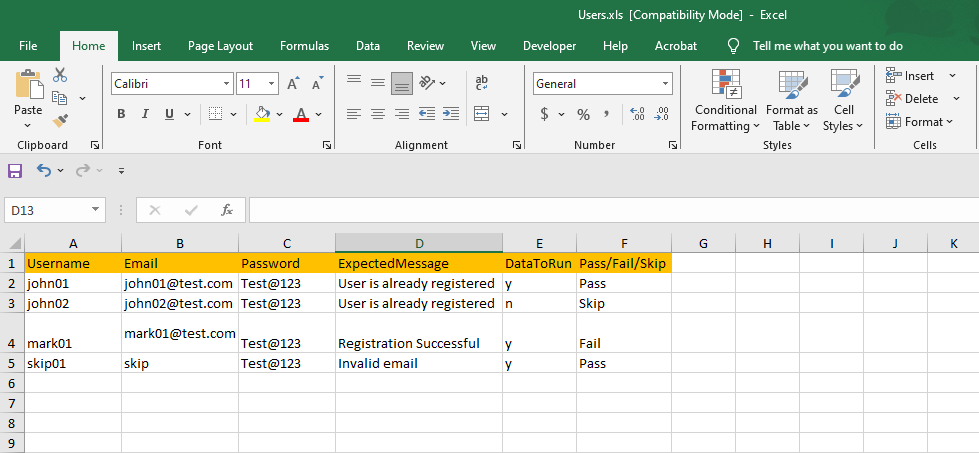
A central feature of this framework is its Excel-driven data management, which enables effective data-driven execution and comprehensive result tracking. These capabilities are essential aspects of modern quality engineering. By storing test data externally, the framework separates test logic from input data, making maintenance easier and allowing tests to scale without duplicating code.
Data Driven Test Execution at Scale
Each test case can execute multiple data sets sourced directly from Excel. Execution is controlled using flags such as DataToRun, which provides precise control over which data combinations are included in a given test run.
This approach supports business-driven and environment-specific execution, allowing teams to validate only relevant scenarios without modifying test logic.
Centralized Execution Control Using External Data
Because execution decisions are managed through Excel, testers and non-technical stakeholders can influence test runs without touching code. This improves collaboration between QA, business, and release teams.
It also ensures consistency across test cycles, as execution rules remain visible, version-controlled, and auditable.
Result Writing and Execution Traceability
In addition to input management, the framework records execution results back into the same Excel sheets. Pass, fail, and skip statuses are logged alongside the corresponding test data.
This creates an audit-friendly execution trail that simplifies historical analysis, improves accountability, and strengthens confidence in automated test results. Such traceability is a key pillar of enterprise-level quality engineering practices.
Configuration Driven Runtime Behavior
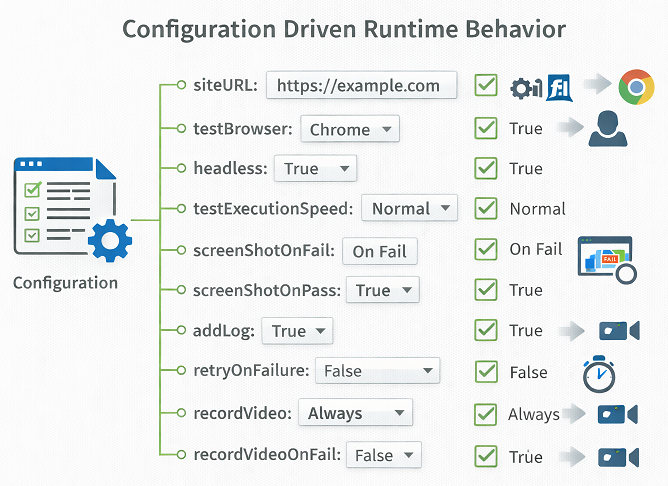
Modern QA automation tools must adapt to different environments, execution modes, and debugging needs without requiring frequent code changes. This framework follows a configuration-driven approach that controls runtime behavior centrally and applies it consistently across all test executions.
Screenshot and Video Capture Control
The framework allows fine-grained control over screenshot and video capture through configuration flags. Teams can enable screenshots or video recording only on failures, only on successful runs, or for all test executions.
This approach helps balance debugging visibility with execution performance. It also supports audit and compliance needs by capturing visual evidence only where it adds value, instead of generating unnecessary artifacts.
Test Execution Browser Selection
Browser selection is fully configuration-driven. Tests can be executed on any Playwright-supported browser, such as Chromium, Firefox, or WebKit, without changing a single line of test code.
This capability makes cross-browser testing straightforward and aligns well with enterprise testing requirements where the same test suite must validate functionality across multiple browser environments.
Headless or Visual Test Execution
The framework supports both headless and visual execution modes, controlled through a simple configuration flag. Headless execution is ideal for CI pipelines and faster regression cycles, while visual mode is useful during test development and debugging.
Switching between these modes does not impact test stability or behavior, which reflects mature design in QA automation tools.
Execution Speed Control for Debugging and Demos
Test execution speed can be adjusted at runtime to slow down interactions when required. This is particularly useful during debugging sessions, live demos, or when reviewing test behavior step by step.
Once debugging is complete, execution speed can be restored to normal for faster automated runs, without modifying test logic.
Automated Cleanup and Resource Management
The framework includes configurable cleanup strategies to manage screenshots, videos, browser contexts, and sessions. Old artifacts can be cleared before execution, ensuring clean test runs and predictable results.
This automated resource management improves test reliability and keeps execution environments stable, especially in long-running or continuous test automation setups.
Centralized Object Repository and Page Object Model
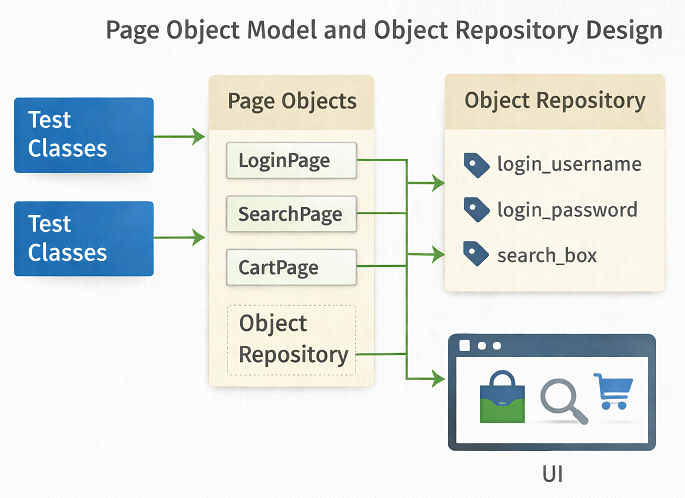
A scalable automation framework must manage locators and page interactions in a way that supports long-term software quality assurance. This framework follows a centralized object repository combined with the Page Object Model to abstract locators from test logic and keep the codebase clean and maintainable.
Locator Abstraction Through a Central Repository
All UI locators are stored in a centralized object repository instead of being hard-coded inside test scripts. Tests interact with page elements through logical names, while the actual locator definitions are maintained separately.
This abstraction ensures that changes in the application UI do not require widespread updates across test cases. When a locator changes, it can be updated in one place without impacting test logic, improving stability and reducing maintenance effort.
Improved Maintainability and Scalability
By separating locators and page interactions from test scenarios, the framework enforces a clear separation of concerns. Page classes focus on UI behavior, while test classes focus on validation logic.
This structure makes the framework easier to extend and maintain as the application grows. New pages and features can be added without increasing complexity, which is essential for enterprise-scale automation.
Collaboration Between QA and Development Teams
A centralized object repository also improves collaboration between QA engineers and developers. Locator updates can be reviewed, validated, and version-controlled independently of test logic.
This shared responsibility strengthens alignment between teams, reduces friction during UI changes, and supports consistent software quality assurance practices across the delivery lifecycle.
Intelligent Locator Fallback Strategy for Stable Test Automation
One of the most critical challenges in UI automation is locator instability caused by frequent UI changes. To address this, the framework implements an intelligent locator fallback strategy that significantly improves test reliability and supports long term software quality assurance.
Multi-Strategy Locator Definitions
Instead of relying on a single locator, each element can be defined using multiple locator strategies within the centralized object repository. These strategies may include role-based selectors, attributes such as title or name, and XPath or CSS selectors.
During execution, the framework attempts to locate an element using the preferred strategy first. If the element is not found due to UI changes, the framework automatically falls back to the next available strategy without failing the test immediately.
Self-Healing Behavior Without External Tools
This fallback mechanism introduces self-healing behavior directly into the framework without relying on third-party AI tools. Minor UI changes, such as attribute updates or selector refactoring, do not break test execution.
As a result, test failures are more likely to reflect real functional issues rather than locator maintenance problems, improving the signal-to-noise ratio in automated test results.
Reduced Maintenance and Higher Test Stability
By minimizing failures caused by fragile locators, the fallback strategy reduces ongoing maintenance effort. Teams spend less time fixing broken tests and more time validating business-critical flows.
This design improves overall test stability, enhances confidence in automation results, and aligns well with enterprise-level software quality assurance practices.
Unified Suite Controller for Enterprise QA Solutions
Enterprise-scale automation requires centralized decision-making to control what runs, when it runs, and why it runs. This framework includes a unified suite controller that acts as the single entry point for managing test execution across multiple suites, making it well-suited for enterprise QA solutions.
Centralized Execution Control
The unified suite controller is responsible for orchestrating test execution across all defined test suites. Instead of relying on static configuration or manual selection, it evaluates execution rules at runtime and determines which suites should be executed or skipped.
This centralized control ensures consistent behavior across environments and eliminates fragmented execution logic scattered across test suites.
Dynamic Suite Selection at Runtime
Test suite execution is driven dynamically based on external configuration and execution flags. Suites can be enabled or disabled without modifying TestNG files or test code.
This allows teams to respond quickly to changing release priorities, environment availability, or testing scope, while keeping execution logic clean and predictable.
Zero Code Change Test Execution
One of the key benefits of the unified suite controller is the ability to change execution behavior without touching code. All execution decisions are driven by external data and configuration files.
This zero code change approach reduces risk, simplifies execution management, and aligns well with the needs of modern enterprise QA solutions, where stability, flexibility, and speed are equally important.
Security, Test Data, and Compliance
In enterprise environments, security and compliance are as important as test coverage. A test automation framework must protect sensitive data while still supporting traceability and audit requirements.
This Playwright automation framework is designed with these enterprise concerns in mind.
Secure Handling of Test Credentials
Test automation often requires access to user accounts, APIs, and protected environments. Therefore, credentials are never hardcoded in test scripts.
All sensitive values, such as usernames, passwords, tokens, and API keys, are managed through configuration files or environment variables. This approach reduces risk and supports secure execution across multiple environments.
When handling test data and credentials, it is important to follow secure testing guidelines such as those outlined in the OWASP Web Security Testing Guide.
Test Data Management Strategy
Enterprise applications rely on large and complex data sets. As a result, unmanaged test data quickly becomes a maintenance problem.
This framework supports structured test data management using external data sources. Test data can be reused, controlled, and validated without modifying test logic. In addition, data sets can be aligned with specific environments such as QA, staging, or UAT.
Protecting Sensitive Data in Logs and Reports
Logs and reports are essential for debugging, but they can also expose sensitive information if not handled correctly.
The framework ensures that confidential data is masked or excluded from logs, screenshots, and reports. This allows teams to share execution results safely across teams without violating security policies.
Environment Isolation and Access Control
Enterprise systems often operate across multiple environments with different access rules. Therefore, the framework supports strict environment separation.
Execution configurations ensure that tests run only against intended environments. This prevents accidental execution against production systems and helps maintain compliance with internal governance rules.
Audit Readiness and Traceability
Compliance requirements often demand clear traceability between test cases, execution results, and releases.
By writing execution results back to data sources and generating detailed reports, the framework supports audit readiness. Teams can easily demonstrate what was tested, when it was tested, and with what outcome.
Aligning Automation with Enterprise Compliance Standards
Security and compliance are ongoing responsibilities, not one-time tasks. This framework is designed to adapt to evolving enterprise standards without requiring major architectural changes.
By combining secure data handling, controlled execution, and traceable reporting, the framework ensures that test automation strengthens enterprise compliance rather than becoming a risk.
This focus on security and governance makes the framework suitable for long term use in regulated and large-scale environments.
Project Structure Supporting Modern Test Automation
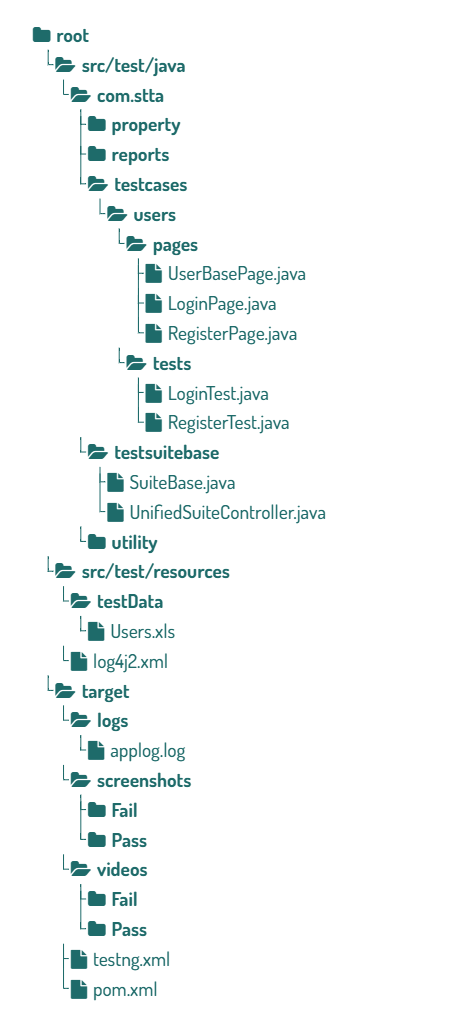
A well-designed project structure is a foundational requirement for modern test automation. This framework follows a clear and intentional folder and package design that improves readability, promotes reuse, and significantly reduces long term maintenance costs.
Base Classes for Centralized Behavior
The framework uses base classes to centralize common functionality such as browser initialization, configuration loading, logging, reporting, and teardown logic. Test suites and test cases extend these base classes instead of duplicating setup code.
This approach ensures consistent behavior across all tests and makes global changes easier to implement and validate.
Clear Separation Between Pages and Tests
Page classes and test classes are strictly separated. Page classes encapsulate UI interactions and page-specific logic, while test classes focus only on validation and assertions.
This separation of concerns keeps test code clean and readable, and allows UI changes to be handled within page classes without impacting test logic.
Reusability Through Proven Design Patterns
Reusable components such as utilities, helpers, and shared workflows are designed as independent modules. Common actions like login, navigation, or data setup can be reused across multiple tests and suites.
These reusability patterns reduce duplication, improve consistency, and help the framework scale smoothly as the application and test coverage grow.
Together, these structural decisions support maintainable, scalable, and reliable modern test automation that can evolve with changing project requirements.
Reporting, Logging, and Evidence Collection for QA Automation
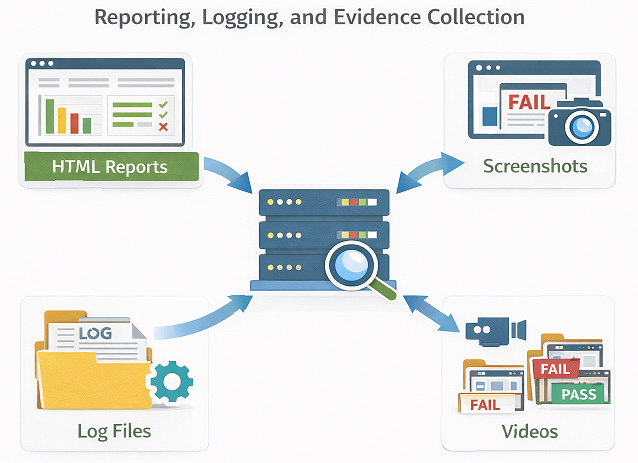
Production-ready automation frameworks must do more than execute tests. They must clearly communicate results, support fast debugging, and provide evidence for audits. This framework addresses these needs through structured reporting, controlled logging, and configurable evidence collection aligned with QA best practices.
Rich Test Reporting Using ExtentReports
The framework integrates ExtentReports to generate detailed and readable execution reports. Each test case is reported with clear status, execution steps, and failure details when applicable.
These reports help stakeholders quickly understand test outcomes without digging into raw logs, making them suitable for both technical teams and management review.
Configurable Screenshot Capture Strategy
Screenshot capture is controlled through configuration flags, allowing teams to capture screenshots on failures, on successful executions, or in both cases. This flexibility ensures that visual evidence is available when needed without creating unnecessary storage overhead.
Screenshots are automatically linked to the corresponding test steps in the report, improving traceability and speeding up root cause analysis.
Video Recording for Execution Playback
The framework supports video recording of test executions, which can be enabled or disabled through configuration. Videos provide valuable context for complex failures that are difficult to reproduce locally.
This capability is especially useful in distributed teams, where visual playback helps reduce back-and-forth communication during defect analysis.
Structured Logging and Log Management
Logging can be turned on or off using configuration settings, ensuring that detailed logs are available during debugging while keeping routine execution lightweight.
Logs are structured and consistent across the framework, making it easier to trace execution flow, identify failures, and support audits. Together, reporting, logging, and evidence collection form a strong foundation for reliable and transparent QA best practices.
For structured logging and enterprise-grade reporting, this framework aligns with tools such as Apache Log4j.
Stability and Performance
In enterprise environments, automation success is measured over months and years, not individual test runs. Therefore, stability and performance are critical design goals of this test automation framework.
The framework is built to minimize flaky behavior while keeping execution fast and predictable.
Identifying and Reducing Flaky Tests
Flaky tests reduce trust in automation. To address this, the framework focuses on stable locator strategies, controlled waits, and consistent execution flow.
Retry logic is applied carefully and only where justified. This prevents masking real issues while still handling known transient failures such as network delays or environment instability.
Smart Use of Retry Mechanisms
Retries should improve reliability, not hide defects. The framework uses targeted retry strategies at appropriate levels rather than blindly re-running entire suites.
This approach helps teams quickly identify real failures and keeps test results meaningful for decision-making.
Optimizing Execution Time
Enterprise test suites can grow large over time. Therefore, execution performance is actively managed.
Selective execution using SuiteToRun, CaseToRun, and DataToRun controls ensures that only relevant tests are executed. Parallel execution readiness further reduces overall runtime without compromising stability.
Monitoring Execution Health
Stability is not a one-time setup. It requires continuous monitoring.
By analyzing logs, reports, and historical execution data, teams can identify slow tests, unstable scenarios, and performance bottlenecks. This allows proactive maintenance before issues impact release timelines.
Preventing Automation Debt
Unmaintained automation becomes a liability. The framework encourages regular review of test relevance, execution time, and failure patterns.
Outdated or low-value tests can be refactored or removed. This keeps the automation suite lean, reliable, and aligned with business needs.
Long-Term Reliability at Scale
Playwright provides fast and reliable browser automation. Combined with structured execution control and disciplined maintenance practices, the framework delivers consistent results at scale.
By prioritizing stability and performance, the framework ensures that automation remains a trusted quality signal rather than a source of noise.
Scalability and CI CD Readiness by Design
Enterprise automation frameworks must evolve to support growing test suites, faster release cycles, and modern delivery practices. While all capabilities described earlier are fully implemented and in active use, this framework is intentionally designed to support future scalability and seamless integration with CI CD pipelines. This forward-looking design approach reflects strong QA best practices and long-term ownership thinking.
CI CD Pipeline Integration Readiness
The framework is built with configuration-driven execution, externalized test control, and zero code change execution decisions. These characteristics make it naturally suitable for integration with a CI CD pipeline when required.
Because execution behavior is controlled through properties and external data sources, the framework can be triggered from build tools or pipeline jobs without modifying test logic. This reduces risk during pipeline adoption and keeps test execution predictable across environments.
Support for Continuous Integration Testing
The current design already aligns with the principles of continuous integration testing. Tests are deterministic, environment-aware, and controlled through external configuration, which are essential requirements for reliable pipeline execution.
As the framework evolves, these foundations allow automated tests to be executed on every code change, nightly builds, or release candidates without structural changes to the framework.
Parallel Execution Readiness
Although parallel execution is not enabled yet, the framework structure supports it by design. Clear separation of test data, isolated browser contexts, and centralized execution control ensure that tests can be safely executed in parallel when this capability is introduced.
This readiness minimizes future rework and allows parallel execution to be added incrementally without disrupting existing test suites.
Environment-Based Execution Strategy
The framework already supports environment-specific execution through centralized configuration. Test URLs, browser settings, execution behavior, and evidence collection can be adjusted per environment without code changes.
This environment-based execution model forms a strong foundation for future DevOps testing workflows, where the same tests must validate functionality across multiple deployment stages.
Framework Limitations and Trade-Offs
No enterprise test automation framework is without limitations. Understanding trade-offs is essential to setting the right expectations and using the framework effectively.
This Playwright automation framework is designed for scale and control, but those strengths come with deliberate design choices.
Complexity Versus Flexibility
To support enterprise-level execution control, the framework introduces multiple layers such as configuration files, suite controllers, and data-driven execution.
While this provides flexibility and zero code change execution, it also increases initial complexity. New users may require time to understand execution flow and configuration options.
Excel Driven Data at Scale
Excel-based data management offers strong visibility and audit support. However, very large data sets can become difficult to manage over time.
For high-volume or highly dynamic data scenarios, alternative data sources such as databases or services may be more suitable. The framework allows such extensions, but they require additional implementation effort.
Learning Curve for New Team Members
The framework follows enterprise-grade design principles rather than quick scripting approaches. As a result, onboarding may take longer compared to lightweight frameworks.
This trade-off is intentional. The upfront learning effort helps reduce long-term maintenance and inconsistency across teams.
Retry Logic Trade-Offs
Retry mechanisms improve resilience but can hide real issues if overused. The framework applies retries in a controlled manner, but teams must use this feature responsibly.
Poorly configured retries can delay feedback and reduce confidence in test results.
Not Always the Right Fit
This framework is designed for medium to large-scale enterprise projects. For small applications or short-lived projects, the overhead may outweigh the benefits.
In such cases, simpler Playwright setups may deliver faster results with less effort.
Informed Decisions Lead to Better Outcomes
These trade-offs are not weaknesses. They reflect deliberate design decisions made to support enterprise requirements such as scalability, governance, and traceability.
By understanding these limitations, teams can adopt the framework with realistic expectations and tailor it to their specific needs.
Who Should Use This Enterprise Test Automation Framework
This enterprise test automation framework is designed to serve a wide range of users who need reliable, scalable, and maintainable automation solutions. Its capabilities make it suitable for both individuals and teams seeking to implement robust testing practices with QA automation tools.
Automation Engineers
Automation engineers looking to build or enhance test automation solutions will find this framework especially valuable. It provides a structured approach, configurable execution, and advanced features like locator fallback, retry logic, and centralized reporting, enabling engineers to focus on test strategy rather than repetitive setup tasks.
QA Teams
QA teams in medium to large organizations can leverage this framework to standardize testing practices across multiple projects. Its data-driven execution, suite, and case-level controls, and Excel-based result tracking help teams collaborate efficiently, improve test coverage, and reduce maintenance overhead.
Enterprise Software Teams
Development and QA teams working on enterprise software applications benefit from the framework’s design for scalability and flexibility. Features like configuration-driven execution, environment management, and a centralized object repository allow teams to execute large test suites reliably across different browsers and environments, aligning with enterprise testing requirements.
Selenium to Playwright Migration Projects
Teams migrating from Selenium to Playwright will find this framework particularly useful. It demonstrates best practices for building an enterprise-ready automation solution from scratch, including modular architecture, maintainable page object models, and integration-ready reporting and logging.
By addressing the needs of multiple user groups, this framework establishes itself as a versatile solution for enterprise test automation, supporting modern QA workflows and improving overall software quality.
Migration Strategy: Moving from Selenium to Playwright
Migrating from Selenium to Playwright in enterprise environments requires planning and discipline. A direct rewrite of all existing tests is rarely practical or necessary.
This framework supports a controlled and incremental migration strategy that minimizes risk while delivering value early.
Start with High Value Scenarios
The migration should begin with business-critical and frequently executed scenarios. These tests benefit most from Playwright’s speed, stability, and modern browser control.
By prioritizing high-value flows, teams can quickly demonstrate the benefits of Playwright automation without disrupting existing delivery timelines.
Parallel Execution Strategy
A phased migration works best when Selenium and Playwright tests run in parallel for a defined period.
This approach allows teams to compare stability, execution time, and failure patterns while maintaining confidence in releases. Gradually, Selenium suites can be retired as Playwright coverage increases.
Reuse Existing Test Strategy and Data
Migration does not mean starting from zero. Existing test cases, test data, and execution logic can be reused.
Business logic, test scenarios, and data-driven approaches such as SuiteToRun and CaseToRun can be mapped into the new framework with minimal changes. This reduces rework and preserves historical knowledge.
Incremental Framework Adoption
Instead of migrating everything at once, teams can onboard one module or suite at a time.
This allows teams to refine standards, improve stability, and adjust execution strategies based on real feedback. It also helps onboard team members gradually.
Common Migration Challenges
Teams often underestimate the effort required to change mindset and tooling. Differences in wait handling, locator strategies, and execution flow must be clearly understood.
Proper training and documentation reduce confusion and help teams avoid Selenium-style anti-patterns in Playwright.
Measuring Migration Success
Migration success should be measured using objective metrics such as execution time, failure rate, maintenance effort, and release confidence.
When Playwright suites consistently deliver faster feedback and higher reliability, Selenium suites can be safely deprecated.
Migration as a Strategic Upgrade
Migration to Playwright is not just a technical change. It is an opportunity to improve test strategy, execution control, and framework governance.
With a phased and disciplined approach, this framework enables a smooth transition while maintaining enterprise quality standards.
Conclusion: Key Takeaways for Enterprise Playwright Automation
This comprehensive overview has introduced the architecture, design principles, and core capabilities of an enterprise-ready Playwright automation framework. From configuration-driven execution and intelligent locator strategies to Excel-based data management and centralized reporting, each feature has been designed to support scalable, maintainable, and reliable automation for modern software projects.
By understanding the framework’s structure and best practices, readers can not only implement these ideas in their own automation projects but also gain insights into building robust test automation frameworks from scratch. The flexible design ensures that new features can be added easily, making it suitable for teams of all sizes and varied technical expertise.
We encourage readers to explore the upcoming deep dive articles in this series to gain a detailed understanding of each capability. Your feedback, queries, and suggestions are highly valuable—sharing your experiences or asking questions can help improve this framework for everyone.
By engaging with this content and the series, you can strengthen your automation strategy, adopt enterprise-grade Playwright automation practices, and contribute to evolving a practical, collaborative, and high-quality automation framework.
Frequently Asked Questions
Is Playwright suitable for enterprise-scale test automation?
Yes. Playwright is well-suited for enterprise environments due to its speed, reliable browser handling, and modern architecture. When combined with structured execution control and governance, it scales effectively across large test suites and teams.
Why use TestNG with Playwright instead of Playwright’s built-in runner?
TestNG provides mature features such as suite-level control, grouping, retry logic, and integration with enterprise reporting tools. These capabilities are often required in enterprise test automation frameworks.
Can this framework run in CI pipelines?
Yes. The framework is designed for CI integration. Lightweight suites can run on pull requests, while full regression suites can execute in scheduled or pre-release pipelines.
How is test execution controlled without code changes?
Execution is controlled using configuration files and external data sources such as SuiteToRun, CaseToRun, and DataToRun. This allows teams to change execution behavior without modifying test code.
Does the framework support parallel execution?
Yes. The framework is designed to support parallel execution through TestNG configuration and environment-based setup, helping reduce overall execution time.
How does the framework handle flaky tests?
Flaky tests are addressed through stable locator strategies, controlled waits, and targeted retry mechanisms. Execution data and logs help teams identify and fix instability rather than hide it.
Is Excel-based data-driven testing mandatory?
No. Excel is used for visibility and audit purposes, but the framework is extensible. Teams can integrate other data sources if needed.
Can this framework be used by multiple teams?
Yes. The framework supports multi-team usage through standardized structure, governance practices, and centralized execution control.
Is this framework suitable for small projects?
For small or short-lived projects, the framework may feel heavy. It is best suited for medium to large-scale enterprise applications where control, traceability, and scalability are critical.