Last updated on February 27th, 2026 at 03:12 am
In Step 11 of the Playwright Enterprise Automation Framework, we focus on improving Playwright browser lifecycle handling within the existing test framework. As the framework expands with multiple test classes and shared utilities, consistently managing browser creation and cleanup becomes increasingly important for long-term stability.
This step is not about setting up Playwright again or introducing new dependencies. Instead, it is a targeted framework enhancement that refines how browser instances are managed across tests. All the configuration, reporting, logging, and data-driven execution implemented in earlier steps remain unchanged.
By this stage, all previous framework steps are already in place and working as expected. Building on the previous foundation, Step 11 enhances maintainability by centralizing browser lifecycle management within the framework. This change makes the Playwright enterprise framework cleaner and more scalable.
This article is part of the Playwright Enterprise Automation Framework series. If you are following the framework step by step, you can review the previous step and continue to the next one using the links below.
Previous article: How to Run Real Playwright Tests in Enterprise Framework
Next article: How to Use Playwright Object Repository in Framework
If you are new to this series or want a complete overview of the framework, start with the main Playwright Enterprise Automation Framework guide.
Framework Overview – Step 11
Step 11 fits into the Playwright Enterprise Automation Framework as a refinement step that strengthens the overall framework design. At this stage, the framework already supports structured test execution, reporting, logging, and data-driven testing. This step focuses on enhancing the collaboration between these components rather than introducing new features.
The main goal of Step 11 is to improve maintainability and scalability. As more test classes are added to the framework, managing browser instances in a centralized and consistent way becomes critical. By handling the Playwright browser lifecycle at the framework level, future changes become easier to implement, and the framework becomes more stable for long-term use.
It is important to note that existing test cases continue to work exactly as before. No test logic is modified, and no test data structure is changed. This step is a safe framework enhancement that improves internal design while preserving the behavior of all current Playwright tests.
Why Browser Lifecycle Matters
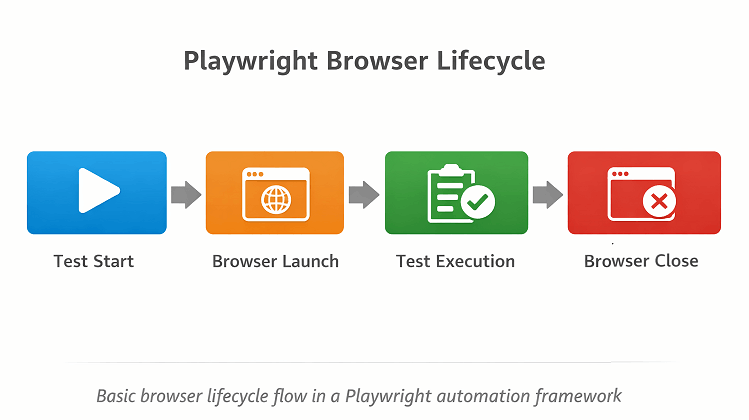
Browser lifecycle in Playwright refers to how the browser is launched, used during test execution, and closed at the end of a run. For a deeper understanding of this concept, refer to the official Playwright browser and context lifecycle documentation. In a Playwright framework, this includes creating the browser instance, opening pages for tests, and properly closing everything once execution is complete. Managing this lifecycle correctly helps ensure tests run smoothly and system resources are released at the right time.
Handling browser lifecycle at the framework level is important because it keeps test classes clean and consistent. When each test manages its own browser setup, small differences can appear over time, leading to duplicated logic and harder maintenance. Centralized browser management allows all tests to follow the same process, making the framework easier to control and update.
This becomes especially important at enterprise scale, where dozens or even hundreds of tests may run in a single execution. A well-managed browser lifecycle improves stability, reduces execution issues, and prepares the Playwright framework for future enhancements such as parallel execution and advanced configuration.
Browser Lifecycle in Test Classes
In earlier versions of the framework, each test class was responsible for starting and closing its own browser instance. This meant that the same browser setup and cleanup code was repeated in multiple places. While this approach works for small projects, it quickly becomes hard to maintain as the number of test classes grows.
This duplication can lead to several issues. If a change is needed in browser configuration, it must be updated in every test class, which increases the chance of errors. Additionally, inconsistent handling of browser instances can cause resource leaks or unexpected test failures, especially when running multiple datasets.
A practical example of this can be seen in the calculator test classes: CalcAdditionTest, CalcSubtractionTest, CalcMultiplicationTest, and CalcDivisionTest. Each of these classes previously managed its own browser lifecycle, repeating the same setup and teardown steps. Managing browsers individually in this way made the framework harder to maintain and limited its scalability.
Centralized Browser Management
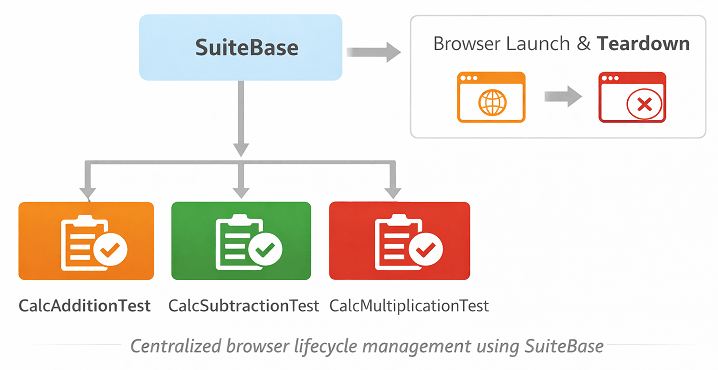
To improve maintainability, the decision was made to move browser handling from individual test classes into the SuiteBase framework. By centralizing the browser lifecycle, all setup and teardown logic is managed in one place, reducing duplication and making future changes much easier to implement.
The SuiteBase class now handles creating the Playwright instance, launching the browser, opening pages, and closing everything after tests are completed. This ensures that all test classes follow a consistent and reliable process for browser management, and developers no longer need to repeat this code in each test.
With this centralized approach, test classes like CalcAdditionTest or CalcMultiplicationTest simply call framework methods to start and stop the browser. They focus only on the test logic itself, while the underlying framework handles all browser lifecycle responsibilities. This keeps the test classes cleaner, easier to read, and much simpler to maintain as the framework grows.
Test Class Interaction
After Step 11, the responsibility of test classes has been greatly simplified. Instead of managing browser creation and closure themselves, test classes now focus solely on the test logic, such as interacting with the UI and verifying results. This separation makes each test easier to read and understand, especially for beginners.
Browser setup now happens through framework methods before test execution begins. The framework handles starting the Playwright instance, launching the browser, and opening a new page. Test classes simply rely on these pre-initialized resources to perform their actions.
Similarly, browser cleanup occurs automatically through the framework after all tests in a class have finished. The framework closes the browser and shuts down Playwright, ensuring that all resources are released consistently.
Overall, this centralized approach yields cleaner, more maintainable, and readable test classes, enabling testers to concentrate on validating functionality rather than managing repetitive browser code.
Impact on Existing Tests
One of the key benefits of Step 11 is that no changes are required in the existing test logic. All your test cases continue to work exactly as before, with the same data, validations, and reporting.
This includes all calculator test classes such as CalcAdditionTest, CalcSubtractionTest, CalcMultiplicationTest, and CalcDivisionTest. Each of these tests now relies on the framework to handle browser setup and cleanup, but their core test steps remain unchanged.
Because this step only centralizes browser management in the framework, it is a safe refactoring. Testers can adopt this improvement without worrying about breaking existing tests, while benefiting from cleaner and more maintainable test classes in the future.
Benefits of an Improved Browser Lifecycle
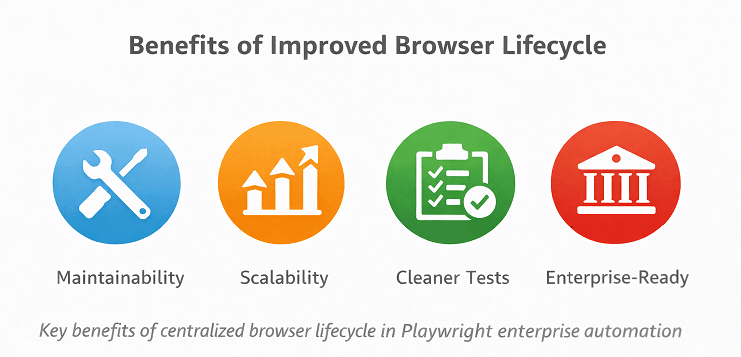
Centralizing browser management in the framework provides several important benefits.
Better maintainability: With all browser setup and teardown handled in one place, it is easier to update or fix issues without touching multiple test classes. This reduces the chance of errors and simplifies ongoing maintenance.
Easier configuration changes: Future framework improvements, such as changing browser options or adding new Playwright features, can be implemented in the base framework. Test classes automatically inherit these changes, eliminating repetitive updates.
Cleaner test architecture: Test classes now focus only on the test logic. Removing repetitive browser management code makes the tests shorter, easier to read, and more organized.
Stronger enterprise framework design: Centralized browser lifecycle improves scalability, consistency, and reliability. It ensures that the framework can handle a growing number of tests while maintaining stable execution across all environments.
Download Updated Framework Files
⚠️ Important Note: This article is part of the Playwright Enterprise Automation Framework and covers Step 11 in a step-by-step build. The downloadable code is not standalone and depends on all previous steps in the series. If you landed here directly, please complete the earlier steps first to avoid setup or runtime issues.
For Step 11, only the browser lifecycle improvements are included in this update. The supporting utilities, test data files, property files, and HTML test pages remain unchanged from previous steps, so there is no need to update those.
You can download the updated framework files, including SuiteBase.java and the calculator test classes, from here: Download Step 11 Framework Files
After downloading, replace your existing files with these updated versions to ensure the centralized browser lifecycle improvements are applied correctly while keeping the rest of your framework intact.
Conclusion
Improving the Playwright browser lifecycle is an important step for making the framework more maintainable, scalable, and consistent. By centralizing browser setup and teardown in SuiteBase, test classes become cleaner, easier to read, and free from repetitive code.
This enhancement strengthens the overall enterprise framework design, ensuring that all existing tests continue to work reliably while laying the foundation for smoother future updates.
In upcoming steps, the framework will continue to evolve with additional improvements such as parallel execution, advanced reporting features, and enhanced test data management, building on the solid browser lifecycle established in Step 11.
FAQs
What is browser lifecycle management in Playwright?
Browser lifecycle management refers to how a browser is started, used, and closed during test execution. Proper management ensures tests run reliably and resources are released correctly.
Why was the browser lifecycle moved to the framework level in Step 11?
Moving the browser lifecycle to the framework level reduces code duplication, improves maintainability, and ensures consistent browser handling across all test classes.
Do I need to change my existing test cases after Step 11?
No. Existing test cases, such as the calculator addition, subtraction, multiplication, and division tests, continue to work without any modification. The update only centralizes browser management.
How does this improvement help in enterprise-scale testing?
Centralized browser lifecycle management ensures consistent and reliable execution for many tests, reduces errors, simplifies maintenance, and prepares the framework for future enhancements like parallel execution.