Last updated on March 18th, 2026 at 03:48 am
The playwright page object model is a design pattern used to organize Playwright tests by separating page interactions from test logic. Instead of writing locators and actions inside test classes, they are moved into dedicated page-level files. This makes tests cleaner and easier to manage.
As Playwright projects grow, unstructured tests quickly become hard to maintain. Repeating locators, tightly coupled UI logic, and frequent failures after small UI changes are common challenges. Without the Page Object Model, scaling test automation becomes risky in large test suites.
In this article, step 19 of playwright enterprise framework building, you will learn how to implement Page Object Model in a Playwright Enterprise Automation Framework. We will cover structure, best practices, locator management, and common mistakes so you can build stable and scalable Playwright tests.
To maintain continuity in the Playwright Enterprise Automation Framework series, use the references below to follow the step by step implementation journey of building an enterprise ready automation framework using Playwright and Java.
Previous step: Playwright Retry Mechanism in Enterprise Framework (Step 18)
Next step: How to Automate Login Page in Playwright Framework (Step 20)
If you are new to this series or want to understand the complete framework architecture, start with the Playwright Enterprise Automation Framework guide. This guide explains the framework structure, design decisions, and enterprise level automation practices used throughout the series.
- What Is Page Object Model in Playwright
- Why Page Object Model Is Essential for Playwright Automation
- Common Problems in Playwright Tests Without Page Object Model
- How Page Object Model Fits Into a Playwright Enterprise Automation Framework
- POM Implementation in Playwright Enterprise Framework
- Where to Create Page Classes in an Enterprise Playwright Framework
- How Playwright Tests Interact With Page Objects
- Managing Locators Effectively Using Page Object Model
- Reusing Page Actions and Business Flows in Playwright
- Handling Multiple Pages and Shared UI Components
- Page Object Model Best Practices for Playwright Frameworks
- Common Page Object Model Mistakes to Avoid in Playwright
- How Page Object Model Improves Test Maintainability and Scalability
- Download Updated and New Framework Files
- Conclusion
- Frequently Asked Questions About Playwright Page Object Model
What Is Page Object Model in Playwright
Page Object Model in Playwright is a design pattern where each web page is represented by a separate class. This class contains page locators and page-specific actions. Playwright officially recommends this approach in its Playwright Page Object Model documentation, which explains how page classes improve test clarity, reuse, and long-term maintainability.
Tests do not directly interact with UI elements. Instead, they call methods defined inside the page object. This keeps test logic clean and focused only on validation.
In Playwright automation, Page Object Model improves readability, reuse, and long-term maintainability. When a locator changes, the update happens in one place without touching multiple tests.
Why Page Object Model Is Essential for Playwright Automation
Without the Page Object Model, Playwright tests quickly become hard to maintain. Locators and actions spread across test files cause frequent failures when the UI changes.
Page Object Model separates page interactions from test logic. In Playwright automation, this keeps tests short, readable, and easy to update.
For large and enterprise-scale projects, the Page Object Model enables reuse, consistency, and faster maintenance. It reduces duplication, simplifies collaboration, and helps test suites scale safely.
Common Problems in Playwright Tests Without Page Object Model
Without the Page Object Model, Playwright tests contain locators and actions mixed directly inside test methods. This makes tests hard to read and harder to maintain.
When the UI changes, the same locator must be updated in multiple test files. This increases failures and slows down automation maintenance.
Code duplication becomes common as similar actions are repeated across tests. Over time, test execution becomes fragile and unreliable.
For large Playwright automation projects, the lack of a Page Object Model makes scaling difficult and increases technical debt.
How Page Object Model Fits Into a Playwright Enterprise Automation Framework
In a Playwright enterprise automation framework, the Page Object Model acts as a stable layer between tests and the application UI. Tests focus solely on validation, while page objects handle element interactions.
The Page Object Model aligns naturally with centralized configuration, logging, reporting, and test data management in enterprise frameworks. This separation improves structure and enforces consistency across teams.
As the framework grows, the Page Object Model helps control complexity. New tests reuse existing page objects, reducing duplication and keeping the framework scalable and maintainable.
POM Implementation in Playwright Enterprise Framework
In this Playwright Enterprise Automation Framework, the Page Object Model is implemented with a clear separation of responsibilities.
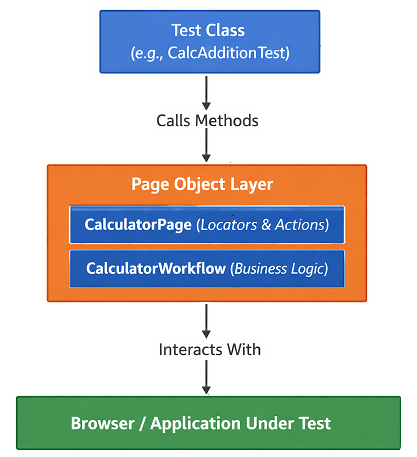
Each application page is represented by a dedicated page class, such as CalculatorPage. This class contains only UI locators and page-level actions like entering values or clicking buttons.
Reusable business flows are grouped into workflow classes, such as CalculatorWorkflow. These classes combine multiple page actions to represent real user behavior without duplicating logic in tests.
Test classes such as CalcAdditionTest focus only on test execution and validation. They never access locators directly and interact with the application only through workflows or page methods.
Page objects do not manage browser lifecycle, test data, or reporting. Those responsibilities remain in framework base layers and suite controllers, ensuring the framework remains scalable, maintainable, and stable as the test suite grows.
Where to Create Page Classes in an Enterprise Playwright Framework
In an enterprise Playwright framework, page classes should be created in a dedicated package separate from test cases. This keeps test logic and UI interaction clearly isolated.
Each page class should represent a single application page or feature. All locators and page-specific actions must live inside that class.
Placing page classes in a centralized location improves reuse, simplifies maintenance, and ensures consistency across large Playwright automation suites.
How Playwright Tests Interact With Page Objects
In Playwright automation, tests interact with the application only through page objects. Tests call page methods instead of directly using locators.
Page objects expose clear actions such as navigation, form submission, and data retrieval. This keeps test cases simple and focused on validation.
This interaction pattern reduces duplication, improves readability, and makes Playwright tests easier to maintain as the framework scales.
Managing Locators Effectively Using Page Object Model
Page Object Model centralizes all locators inside page classes instead of spreading them across tests. This makes locator management predictable and controlled.
When a UI change occurs, locators are updated in one place without touching test logic. This reduces failures and maintenance effort in Playwright automation.
Effective locator management through Page Object Model improves test stability and supports long term scalability in enterprise Playwright frameworks.
Reusing Page Actions and Business Flows in Playwright
Page Object Model allows common user actions to be defined once and reused across multiple Playwright tests. This reduces duplication and keeps tests consistent.
Business flows can be built by combining page actions instead of repeating steps in every test. This makes test scenarios easier to read and maintain.
Reusing page actions improves execution reliability and helps enterprise Playwright frameworks scale without increasing complexity.
Handling Multiple Pages and Shared UI Components
In large Playwright test suites, many pages share common UI elements such as headers, footers, menus, and dialogs. Without a clear structure, these shared components quickly lead to duplicated locators and actions.
Using the Page Object Model, shared UI components should be separated into reusable component classes. Each component exposes only the actions it controls, keeping page classes small and focused.
Multiple pages can then reuse the same component objects instead of redefining the same logic. This approach improves maintainability and ensures UI changes are updated in one place only.
Handling multiple pages and shared components this way keeps the Playwright enterprise automation framework clean, scalable, and easy to extend.
Page Object Model Best Practices for Playwright Frameworks
Keep page classes focused on UI behavior only. Avoid adding test assertions or test data logic inside page objects.
Define all locators in one place and expose actions through clear, meaningful methods. This improves readability and prevents locator duplication.
Reuse common actions and shared components instead of copying logic across pages. This reduces maintenance effort when the UI changes.
Keep page objects independent from each other. Tests should coordinate flows, not page classes.
Following these best practices helps Playwright frameworks remain stable, scalable, and easy to maintain as test coverage grows.
Common Page Object Model Mistakes to Avoid in Playwright
Putting test assertions inside page classes is a common mistake. Page objects should handle UI interactions only, not test validation.
Creating large page classes with too many responsibilities makes maintenance difficult. Each page or component should have a clear and limited scope.
Hardcoding test data inside page objects reduces reusability and flexibility. Test data should stay in test layers or external sources.
Duplicating locators across multiple page classes leads to frequent breakages. Locators should be defined once and reused through page objects.
Avoid tightly coupling page objects to specific test flows. Page Object Model should support reuse, not enforce rigid test designs.
How Page Object Model Improves Test Maintainability and Scalability
Page Object Model centralizes UI logic, so application changes require updates in one place only. This significantly reduces test maintenance effort.
Tests become shorter and easier to understand because they focus on business intent instead of low-level UI steps. This improves long-term readability.
As the test suite grows, new tests can reuse existing page actions without adding duplicate code. This allows Playwright automation to scale without increasing complexity.
By separating concerns clearly, the Page Object Model keeps enterprise Playwright frameworks stable, adaptable, and ready for continuous expansion.
Download Updated and New Framework Files
⚠️ Important Note: This article is part of the Playwright Enterprise Automation Framework and covers Step 19 in a step-by-step build. The downloadable code is not standalone and depends on all previous steps in the series. If you landed here directly, please complete the earlier steps first to avoid setup or runtime issues.
Download Step 19 Updated Files
This article help you understand how to introduces Page Object Model implementation into the Playwright Enterprise Automation Framework.
New Files to Add
These files are new additions and must be created exactly in the locations mentioned below.
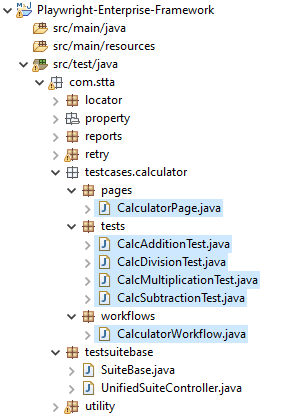
- CalculatorPage
Location:src/test/java/com/stta/pages
This class contains all calculator UI locators and page-level actions.
No test class should access locators directly after this step. - CalculatorWorkflow
Location:src/test/java/com/stta/workflows
This class handles reusable business flows such as addition, subtraction, multiplication, and division.
Test cases interact only with workflows, not with page elements.
Existing Files to Update
The following test classes are updated to use Page Object Model and workflow classes.
- CalcAdditionTest
- CalcSubtractionTest
- CalcMultiplicationTest
- CalcDivisionTest
What changes in these files:
- Direct element interactions are removed
- Page actions are delegated to
CalculatorPage - Business logic is executed through
CalculatorWorkflow - Tests remain focused only on validations
Conclusion
The Page Object Model in Playwright Enterprise Framework provides a clean, scalable, and maintainable way to build automation for long term use. By separating locators, page actions, and test logic, the framework becomes easier to understand and simpler to extend as test coverage grows.
In this article, you saw how Page Object Model fits naturally into an enterprise Playwright setup, how page classes and workflows are structured, and how tests interact with them without duplication or tight coupling. This approach reduces maintenance effort, improves test stability, and keeps large Playwright test suites under control.
With the Page Object Model now implemented, the Playwright Enterprise Automation Framework is better prepared for future enhancements such as reusable business flows, parallel execution, and advanced reporting. This foundation ensures your Playwright automation remains reliable, scalable, and enterprise-ready as applications evolve.
Frequently Asked Questions About Playwright Page Object Model
What is the Page Object Model in Playwright?
Page Object Model in Playwright is a design pattern where page locators and actions are kept separate from test logic. This makes Playwright tests easier to maintain and scale as applications grow.
Why should I use Page Object Model in a Playwright enterprise framework?
In an enterprise framework, Playwright Page Object Model helps manage large test suites by reducing duplication, improving readability, and minimizing changes when the UI is updated.
Where should page classes be created in Playwright Page Object Model?
Page classes should be created in a dedicated pages or pageobjects folder. This keeps locators and page actions centralized and reusable across multiple Playwright tests.
Should Playwright tests contain locators when using Page Object Model?
No. Playwright tests should only call page methods. All locators should remain inside page classes to keep tests clean and easy to maintain.
Does Page Object Model improve Playwright test maintenance?
Yes. Page Object Model significantly improves Playwright test maintenance by isolating UI changes to a single place, which reduces test failures and long-term maintenance effort.