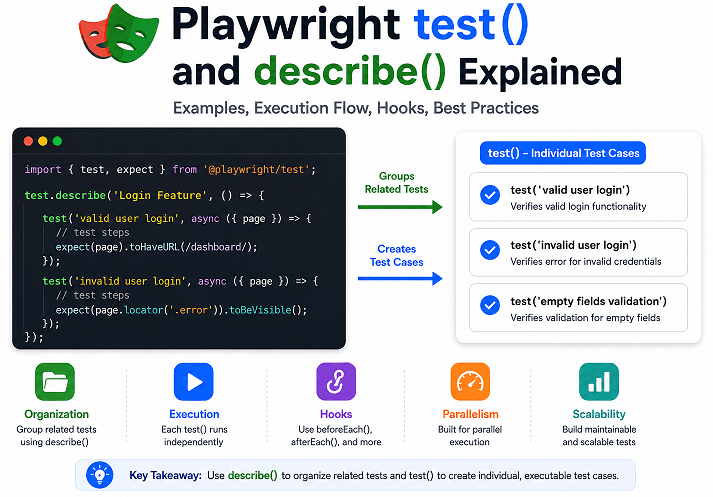
Many beginners start learning Playwright by writing simple automation scripts. However once the test suite grows, organizing tests properly becomes just as important as writing the tests themselves. This is where Playwright test() and describe() play a major role in building scalable and maintainable Playwright Test suites.
The test() function is used to create individual test cases, while describe() helps group related tests into logical sections. Together, they make Playwright test files easier to read, maintain, debug, and scale in real-world automation projects.
In this guide, you will learn how Playwright test() and describe() work with practical TypeScript examples, nested groups, hooks, execution behavior, common mistakes, and best practices. If you are using TypeScript, you can start with this Playwright TypeScript tutorial that covers everything step by step.
- How to Use test() and describe() in Playwright?
- What is test() in Playwright?
- What is describe() in Playwright?
- What Happens Internally When Playwright Executes test() and describe()?
- What is the Difference Between test() and describe() in Playwright?
- When Should You Use test() vs describe() in Playwright?
- How to Organize Tests Using describe() in Playwright?
- How to Use Hooks with describe() in Playwright?
- Can You Nest describe() Blocks in Playwright?
- What Are the Best Practices for Using test() and describe() in Playwright?
- How test() and describe() Affect Playwright Performance and Scalability
- Common Mistakes When Using test() and describe() in Playwright
- Debugging Common test() and describe() Problems in Playwright
- Advanced Usage of describe() in Playwright
- Examples in Other Languages
- Quick Summary of test() and describe() in Playwright
- Conclusion
- FAQs
How to Use test() and describe() in Playwright?
You can use test() in Playwright to create individual test cases and describe() to group related tests into a structured test suite.
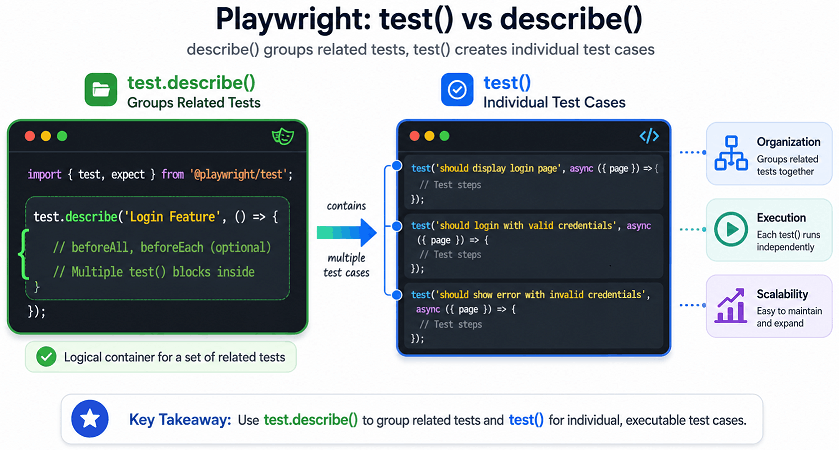
The following visual example helps explain how Playwright test() and describe() work together inside a real TypeScript test file.
Here is a simple Playwright TypeScript example showing both test() and describe() together.
import { test, expect } from '@playwright/test';

test.describe('Login Feature', () => {

  test('valid user login', async ({ page }) => {
    await page.goto('https://example.com/login');

    await page.fill('#username', 'admin');
    await page.fill('#password', 'admin123');

    await page.click('#login-button');

    await expect(page).toHaveURL(/dashboard/);
  });

  test('invalid user login', async ({ page }) => {
    await page.goto('https://example.com/login');

    await page.fill('#username', 'wronguser');
    await page.fill('#password', 'wrongpassword');

    await page.click('#login-button');

    await expect(page.locator('.error-message'))
      .toHaveText('Invalid credentials');
  });

});
In this example, the describe() block groups all login-related tests together, while each test() block represents one independent test scenario.
A simple way to think about it is this: test() handles the actual scenario execution, while describe() keeps related scenarios grouped in a clean structure.
What is test() in Playwright?
The test() function in Playwright is used to create an individual test case. Each test() block contains a single automation scenario that Playwright executes independently.
According to Playwright documentation, every test runs in an isolated browser context by default. This isolation helps prevent shared state issues and improves test reliability in parallel execution environments.
How Does test() Work in Playwright?
The test() function accepts two main parts:
- Test title or test name
- Async callback function containing automation steps
Here is the basic syntax.
test('test name', async ({ page }) => {

  // test steps

});
Basic Example of test() in Playwright
This example shows how to create a simple Playwright test using TypeScript.
import { test, expect } from '@playwright/test';

test('homepage title verification', async ({ page }) => {

  await page.goto('https://example.com');

  await expect(page).toHaveTitle('Example Domain');

});
In real-world Playwright projects, tests usually interact with elements using robust locator strategies instead of basic selectors. This complete guide on Playwright TypeScript locators explains how modern locators improve test stability and readability.
Why is test() Important in Real Projects?
The test() function is the core of the Playwright Test Runner because Playwright only executes scenarios defined inside test() blocks.
In real-world projects, teams usually create separate test cases for features such as login, checkout, payments, search, and profile management.
Can Playwright Run test() Without describe()?
Yes. Playwright can run test() blocks without using describe(). The describe() block is optional.
Here is a simple standalone example.
import { test } from '@playwright/test';

test('simple standalone test', async ({ page }) => {

  await page.goto('https://example.com');

});
Common Mistakes Beginners Make with test()
Common beginner mistakes include:
- Writing very long test cases with multiple unrelated validations
- Using unclear or generic test names
- Sharing state between tests
- Adding too many assertions inside one test
- Creating dependent tests that fail in sequence
A better approach is keeping each test() block focused on one clear business scenario.
Does Playwright Execute test() Blocks in Parallel?
Yes. Playwright can execute test() blocks in parallel.
Now that you understand how test() works for individual scenarios, the next step is learning how Playwright organizes related tests using describe().
What is describe() in Playwright?
The describe() function in Playwright is used to group related test cases into a logical test suite. It helps organize automation tests based on features, modules, workflows, or application behavior.
While test() defines individual test scenarios, describe() creates structure around those tests. Once a suite grows beyond a handful of files, grouped tests become much easier to manage and debug.
How Does describe() Work in Playwright?
The describe() block wraps multiple test cases inside a grouped section.
Here is the basic syntax.
test.describe('Feature Name', () => {

  test('test case 1', async ({ page }) => {

    // automation steps

  });

  test('test case 2', async ({ page }) => {

    // automation steps

  });

});
Basic Example of describe() in Playwright
This example groups multiple authentication tests under one feature section.
import { test, expect } from '@playwright/test';

test.describe('Authentication Tests', () => {

  test('user login', async ({ page }) => {

    await page.goto('https://example.com/login');

    await expect(page).toHaveTitle(/Login/);

  });

  test('user logout', async ({ page }) => {

    await page.goto('https://example.com/dashboard');

    await page.click('#logout');

    await expect(page).toHaveURL(/login/);

  });

});
Why is describe() Important in Large Test Suites?
As Playwright frameworks grow, the describe() block helps organize tests by features, workflows, modules, or business functionality.
Common grouping examples include:
- user authentication
- checkout flows
- API validations
- admin workflows
- regression suites
Can You Use Multiple describe() Blocks in One File?
Yes. Playwright fully supports multiple describe() blocks inside the same test file.
import { test } from '@playwright/test';

test.describe('Login Tests', () => {

  test('valid login', async ({ page }) => {

    // test steps

  });

});

test.describe('Checkout Tests', () => {

  test('successful checkout', async ({ page }) => {

    // test steps

  });

});
Keeping related features separated like this makes navigation easier when the number of tests starts increasing.
Does describe() Affect Test Execution?
Yes. The describe() block can influence how hooks, retries, parallel execution, tags, and configuration settings are applied.
For example, Playwright allows developers to configure:
- beforeEach hooks
- afterEach hooks
- parallel execution behavior
- serial execution mode
- test retries
- annotations and tags
What Happens Internally When Playwright Executes test() and describe()?
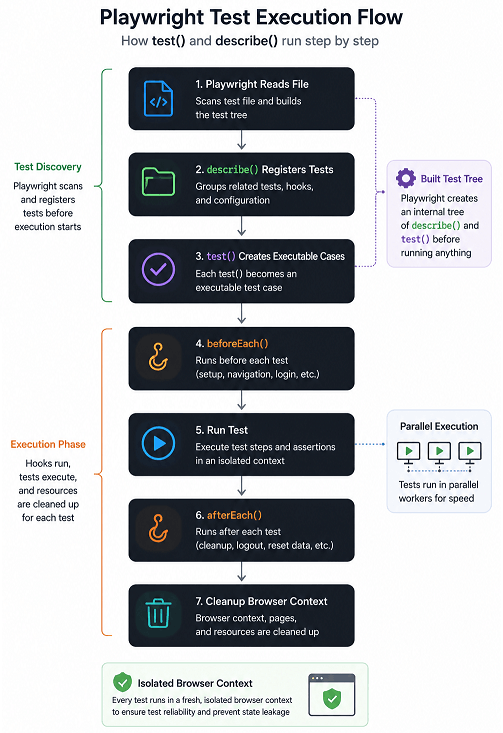
Many developers initially assume that describe() executes tests directly. In reality, the describe() block mainly helps Playwright organize and register tests before execution begins.
How Playwright Processes describe() Blocks
When Playwright reads a test file, it first scans all describe() and test() definitions to build an internal test tree.
The describe() block itself does not run browser automation steps. Instead, it acts as a structural container that organizes related tests, hooks, configuration, and metadata.
Execution Flow of test() in Playwright
Each test() block becomes an executable test case inside the Playwright Test Runner.
For every test execution, Playwright typically performs:
- Create isolated browser context
- Initialize fixtures and hooks
- Execute test steps
- Capture failures, traces, or screenshots if configured
- Clean up resources after completion
Example Execution Order with Hooks
This example demonstrates the typical execution order inside a describe block.
test.describe('User Tests', () => {

  test.beforeAll(async () => {
    console.log('beforeAll');
  });

  test.beforeEach(async () => {
    console.log('beforeEach');
  });

  test('test 1', async () => {
    console.log('test 1');
  });

  test('test 2', async () => {
    console.log('test 2');
  });

  test.afterEach(async () => {
    console.log('afterEach');
  });

  test.afterAll(async () => {
    console.log('afterAll');
  });

});
The execution order will typically be:
beforeAll

beforeEach
test 1
afterEach

beforeEach
test 2
afterEach

afterAll
Why Understanding Execution Order Matters
Many flaky Playwright tests happen because developers misunderstand how hooks, retries, shared state, or nested describe blocks execute internally.
Understanding execution flow helps improve:
- test stability
- parallel execution reliability
- hook design
- debugging speed
- CI/CD troubleshooting
Understanding this execution flow helps explain why Playwright encourages isolated, independent tests.
How test() and describe() Fit into the Playwright Test Runner
The test() and describe() APIs are part of the official Playwright Test Runner, which is the built-in testing framework provided by Playwright for TypeScript and JavaScript projects.
The Playwright Test Runner also manages fixtures, hooks, retries, reporting, and parallel execution behind the scenes.
Understanding this execution model becomes more useful as Playwright projects grow and start running across multiple environments, browsers, and CI pipelines.
Before moving further, it is important to understand that test() and describe() solve completely different problems inside Playwright. One handles execution, while the other handles organization and structure.
What is the Difference Between test() and describe() in Playwright?
The main difference is that test() creates individual executable test cases, while describe() groups related tests into organized sections. Both work together to build scalable and maintainable Playwright test suites.
Since test() and describe() are usually written together, it is common to confuse their roles initially. In practice, they serve very different purposes inside Playwright.
Quick Comparison Between test() and describe()
The following table shows the practical difference between test() and describe() in Playwright.
| Feature | test() | describe() |
|---|---|---|
| Purpose | Creates individual test case | Groups related tests |
| Execution | Executable by Playwright | Acts as organizational container |
| Contains automation steps | Yes | No direct test steps usually |
| Supports assertions | Yes | Indirectly through tests |
| Used for hooks | No | Yes |
| Improves test organization | Partially | Strongly |
| Used in reports | Shows individual result | Shows grouped sections |
| Can exist independently | Yes | No meaningful use without tests |
Practical Example of test() and describe() Together
This example shows how both functions work together in a real Playwright TypeScript test file.
import { test, expect } from '@playwright/test';

test.describe('Ecommerce Checkout', () => {

  test('add product to cart', async ({ page }) => {

    await page.goto('https://example.com');

    // test steps

  });

  test('complete payment', async ({ page }) => {

    await page.goto('https://example.com');

    // test steps

  });

});
In this structure:
- describe(‘Ecommerce Checkout’) groups checkout-related scenarios
- Each test() block handles one independent workflow
Can You Nest describe() Blocks Inside Another describe()?
Yes. Playwright supports nested describe() blocks.
This is useful for large applications where features contain multiple sub-features or workflows.
test.describe('Account Module', () => {

  test.describe('Profile Settings', () => {

    test('update profile photo', async ({ page }) => {

      // test steps

    });

  });

});
Which One Should You Use More Often?
Every executable Playwright scenario requires a test() block.
The role of describe() becomes more important later, especially when the test suite starts growing and multiple workflows need shared structure, hooks, or configuration.
Does Playwright Require describe() for Every Test?
No. Playwright does not require describe() for every test file.
Small scripts or temporary debugging tests often use standalone test() blocks. But for production-grade frameworks, grouping related tests using describe() is considered a best practice.
When Should You Use test() vs describe() in Playwright?
You should use test() for every executable Playwright scenario and use describe() when multiple related tests need logical grouping, shared hooks, configuration, or better reporting structure.
When Using Only test() Is Enough
Standalone test() blocks are often sufficient for:
- small utility tests
- temporary debugging scripts
- single-scenario validation files
- quick proof-of-concept automation
Example:
import { test } from '@playwright/test';

test('homepage loads successfully', async ({ page }) => {

  await page.goto('https://example.com');

});
When describe() Becomes Important
The describe() block becomes much more useful once tests share related business functionality.
Common real-world examples include:
- authentication workflows
- checkout processes
- admin permissions
- profile management
- API validation suites
Should Every Playwright File Use describe()?
No. Forcing unnecessary describe() blocks into very small test files can make the framework feel overly structured.
Simple Rule Most Teams Follow
A simple structure that works well in most projects is:
- use
test()for individual validation - use
describe()for related workflows and shared behavior - avoid excessive nesting unless hierarchy genuinely improves clarity
Once the difference between test() and describe() becomes clear, the next challenge is organizing large Playwright test suites efficiently.
How to Organize Tests Using describe() in Playwright?
You can organize Playwright tests using describe() by grouping related scenarios based on features, workflows, modules, or user behavior. This structure improves readability, debugging, reporting, and long-term framework scalability.
Small suites can survive messy organization for a while. Large suites usually cannot.
Feature-Based Test Organization in Playwright
The most common and recommended approach is grouping tests by application feature.
For example, an ecommerce application may contain:
- Login tests
- Product search tests
- Cart tests
- Checkout tests
- Order history tests
Each feature can have its own describe block.
import { test } from '@playwright/test';

test.describe('Cart Feature', () => {

  test('add product to cart', async ({ page }) => {

    // test steps

  });

  test('remove product from cart', async ({ page }) => {

    // test steps

  });

});
Module-Based Grouping for Large Applications
Enterprise applications often contain multiple modules managed by different teams. In such cases, grouping tests by module becomes more practical.
For example:
- User Management
- Billing System
- Admin Dashboard
- Analytics Module
- Notification Service
This type of organization works especially well in CI/CD pipelines where teams execute only specific module tests.
Role-Based Test Grouping Example
Some applications behave differently for different user roles. Using describe blocks for role-based testing keeps permissions and workflows easier to validate.
test.describe('Admin User Tests', () => {

  test('admin can delete users', async ({ page }) => {

    // test steps

  });

});

test.describe('Regular User Tests', () => {

  test('user cannot access admin panel', async ({ page }) => {

    // test steps

  });

});
Should You Create Very Large describe() Blocks?
No. Extremely large describe blocks become difficult to maintain.
A common mistake is grouping loosely related flows together just because they belong to the same page.
A better approach is:
- Keep describe blocks focused
- Group only closely related scenarios
- Avoid mixing unrelated business workflows
- Split large suites into smaller logical sections
Smaller groups are also easier to review when a failure appears in reports or pipeline logs.
Real-World Folder Structure Used in Playwright Projects
Many modern Playwright TypeScript frameworks organize files alongside describe blocks.
tests/
│
├── auth/
│   ├── login.spec.ts
│   ├── logout.spec.ts
│
├── cart/
│   ├── add-to-cart.spec.ts
│   ├── remove-from-cart.spec.ts
│
├── checkout/
│   ├── payment.spec.ts
│   ├── order-confirmation.spec.ts
Inside each file, related test scenarios are grouped using describe(). This combination creates highly scalable automation frameworks.
Can You Use describe() for Test Tags and Filtering?
Yes. Playwright developers often use describe blocks together with tags and filtering strategies.
For example:
- Smoke tests
- Regression tests
- Critical workflows
- API validations
- Cross-browser scenarios
This makes selective execution easier during pipeline runs.
Best Practice for Organizing Playwright Tests
The latest approach used in scalable Playwright frameworks is combining:
- Clear folder structure
- Focused describe blocks
- Independent test cases
- Reusable hooks
- Page Object Models where appropriate
Good organization becomes more valuable over time because it keeps debugging, collaboration, and maintenance manageable as the framework expands.
How to Use Hooks with describe() in Playwright?
You can use hooks such as beforeEach(), afterEach(), beforeAll(), and afterAll() inside describe() blocks to manage shared setup and cleanup logic for related Playwright tests.
This is one of the most practical uses of describe() in real automation frameworks. Instead of repeating setup steps in every test, hooks allow developers to centralize common actions.
What Are Playwright Hooks?
Playwright hooks are lifecycle methods that run before or after tests.
Common hooks include:
- beforeEach()
- afterEach()
- beforeAll()
- afterAll()
Using beforeEach() Inside describe()
This example shows how to open the application before every test inside a describe block.
import { test, expect } from '@playwright/test';

test.describe('Dashboard Tests', () => {

  test.beforeEach(async ({ page }) => {

    await page.goto('https://example.com/dashboard');

  });

  test('verify dashboard title', async ({ page }) => {

    await expect(page).toHaveTitle(/Dashboard/);

  });

  test('verify user profile section', async ({ page }) => {

    await expect(page.locator('.profile')).toBeVisible();

  });

});
Without hooks, the navigation step would need to be repeated inside every test case.
When Should You Use beforeAll()?
The beforeAll() hook runs only once before all tests inside the describe block.
This is useful for expensive setup operations such as:
- Database preparation
- API authentication
- Global test data creation
- Environment initialization
Here is a basic example.
test.describe('API Tests', () => {

  test.beforeAll(async () => {

    console.log('Initialize test data');

  });

  test('first api validation', async () => {

    // test steps

  });

});
However, shared state should be handled carefully because it may create flaky tests in parallel execution.
Important Difference Between beforeEach() and beforeAll()
These hooks are often confused initially, but the difference becomes important in larger test suites.
| Hook | Execution Frequency | Common Usage |
|---|---|---|
| beforeEach() | Before every test | Navigation, login, cleanup |
| beforeAll() | Once before all tests | Global setup, expensive operations |
Using beforeEach() usually improves test isolation, while beforeAll() may improve performance when setup operations are slow.
Can Hooks Be Scoped to Specific describe() Blocks?
Yes. Hooks defined inside a describe block apply only to tests inside that block.
This scoped behavior is extremely useful in large frameworks because each feature can maintain its own setup logic independently.
test.describe('Checkout Tests', () => {

  test.beforeEach(async ({ page }) => {

    await page.goto('https://example.com/checkout');

  });

  test('verify payment page', async ({ page }) => {

    // test steps

  });

});
The hook above will not affect tests outside the Checkout Tests describe block.
Common Mistakes with Playwright Hooks
Here are some practical issues commonly seen in real projects.
- Adding too much logic inside hooks
- Sharing state between tests unintentionally
- Using beforeAll() for mutable test data
- Creating hidden dependencies between tests
- Performing assertions inside hooks unnecessarily
Overcomplicated hooks are one of the biggest reasons Playwright test suites become hard to debug.
Best Practice for Hooks in Playwright
The latest recommended approach is keeping hooks lightweight and predictable.
Most experienced Playwright teams follow these practices:
- Keep tests independent
- Use beforeEach() for navigation and login
- Avoid excessive shared state
- Move reusable logic into helper utilities when needed
- Keep hooks readable and minimal
Can You Nest describe() Blocks in Playwright?
Yes. Playwright supports nested describe() blocks, allowing developers to organize large applications into multi-level feature groups and workflows.
They help create cleaner hierarchy and improve test organization in enterprise-level automation frameworks.
Basic Nested describe() Example in Playwright
This example shows how one describe block can contain another describe block.
import { test, expect } from '@playwright/test';

test.describe('Account Module', () => {

  test.describe('Profile Settings', () => {

    test('update username', async ({ page }) => {

      // test steps

    });

    test('change password', async ({ page }) => {

      // test steps

    });

  });

});
In this structure:
- Account Module is the parent group
- Profile Settings is the child group
- Individual test cases remain inside the nested group
This creates a clear hierarchy in Playwright reports and test output.
When Should You Use Nested describe() Blocks?
Nested describe blocks work best for applications with multiple layers of functionality.
Common real-world examples include:
- Admin panel with multiple sections
- Banking workflows with account types
- Ecommerce checkout with payment methods
- CRM systems with role-based modules
- Multi-step onboarding flows
Nested grouping helps teams logically separate related business scenarios.
Real-World Example with Multiple Nested Levels
Large Playwright frameworks sometimes use multiple levels of grouping.
test.describe('Ecommerce Application', () => {

  test.describe('Checkout Feature', () => {

    test.describe('Credit Card Payments', () => {

      test('successful payment', async ({ page }) => {

        // test steps

      });

    });

  });

});
This type of hierarchy becomes especially helpful when generating Playwright HTML reports for large regression suites.
Can Nested describe() Blocks Have Their Own Hooks?
Yes. Each nested describe block can define its own hooks independently.
This is one of the biggest advantages of nesting because setup logic can remain scoped to a very specific workflow.
test.describe('User Module', () => {

  test.beforeEach(async ({ page }) => {

    await page.goto('https://example.com');

  });

  test.describe('Profile Section', () => {

    test.beforeEach(async ({ page }) => {

      await page.click('#profile');

    });

    test('update profile image', async ({ page }) => {

      // test steps

    });

  });

});
In this example:
- The parent hook runs first
- The nested hook runs second
- The test executes afterward
This layered execution model provides highly flexible test setup management.
Should You Deeply Nest describe() Blocks?
Not always. Excessive nesting can make test files difficult to read and maintain.
A practical approach is:
- Use nesting only when it improves clarity
- Avoid unnecessary hierarchy
- Keep test files readable
- Limit deeply nested workflows
Most modern Playwright projects typically use one or two nesting levels only.
How Nested describe() Blocks Appear in Reports
Playwright HTML reports display nested describe blocks as grouped sections.
This improves:
- Failure tracking
- Feature-level reporting
- Regression analysis
- Test filtering
- CI debugging
Clear report grouping becomes especially helpful once large regression suites start running across multiple environments.
Best Practice for Nested describe() Usage
The best practice is using nested describe blocks only when they provide meaningful organizational value.
Experienced Playwright developers usually prefer:
- Shallow nesting
- Feature-focused grouping
- Independent test scenarios
- Scoped hooks
- Readable test hierarchy
If nesting starts making test files harder to read, it is usually a sign that the grouping structure needs simplification.
What Are the Best Practices for Using test() and describe() in Playwright?
The best practices for using test() and describe() in Playwright focus on readability, maintainability, scalability, and reliable test execution. A clean test structure becomes increasingly important as automation frameworks grow.
Many Playwright beginners focus heavily on writing automation steps but underestimate how important test organization becomes in long-term projects. Poor structure often leads to flaky tests, difficult debugging, and slow maintenance cycles.
Keep Each test() Focused on One Scenario
Each Playwright test should validate one clear business behavior or workflow.
Avoid combining multiple unrelated validations inside one test case.
Good example:
test('user can successfully login', async ({ page }) => {

  // login validation

});
Bad example:
test('login cart checkout logout profile update', async ({ page }) => {

  // too many unrelated steps

});
Smaller focused tests improve failure analysis and reduce debugging time.
Use Meaningful Test Names
Clear test titles are extremely important in Playwright reports and CI pipelines.
Instead of vague names like:
test('test1', async ({ page }) => {

});
Use descriptive names:
test('user sees error message for invalid password', async ({ page }) => {

});
Good naming improves reporting quality and makes failures easier to understand.
Group Only Related Tests Inside describe()
The describe() block should contain logically related scenarios only.
Avoid placing unrelated workflows inside the same group simply because they use similar pages.
Better grouping example:
- Authentication Tests
- Checkout Tests
- User Profile Tests
- Search Feature Tests
Focused grouping improves maintainability and makes test suites more manageable over time
Avoid Deeply Nested describe() Structures
Nested describe blocks are helpful, but excessive nesting creates readability issues.
This is one mistake many growing automation projects face. Extremely deep hierarchies make navigation harder for new team members.
A practical recommendation is limiting nesting to one or two levels whenever possible.
Keep Hooks Lightweight and Predictable
Hooks should simplify setup, not hide business logic.
Good uses of hooks include:
- Navigation setup
- Authentication
- Test data preparation
- Cleanup operations
Avoid:
- Complex assertions inside hooks
- Heavy business workflows
- Hidden dependencies between tests
Overloaded hooks are a common source of flaky Playwright tests.
Write Independent Tests
Each Playwright test should run successfully without depending on another test.
This becomes critical when Playwright executes tests in parallel.
Independent tests improve:
- Parallel execution stability
- Retry reliability
- CI/CD execution speed
- Failure isolation
Modern Playwright frameworks strongly favor isolated test design.
Use describe() for Shared Configuration
One advanced but highly effective pattern is applying feature-specific configuration inside describe blocks.
For example:
test.describe.configure({ mode: 'serial' });Or:
test.describe.configure({ retries: 2 });Many online tutorials barely mention this capability, but it becomes extremely useful in complex enterprise automation projects.
Do Not Overuse beforeAll()
The beforeAll() hook may improve performance, but excessive shared state can create unstable tests.
Current Playwright best practices generally favor:
- Isolated tests
- Fresh browser contexts
- Independent execution
- Minimal shared mutable state
This approach improves reliability across parallel execution environments.
Structure Test Files for Scalability
Organized folder structure matters just as much as good describe blocks.
Many scalable Playwright TypeScript frameworks use:
tests/
├── auth/
├── checkout/
├── cart/
├── profile/
Combined with focused describe blocks, this creates maintainable automation architecture.
Best Practice Used by Experienced Playwright Teams
The latest approach followed by many experienced Playwright teams is:
- Short focused test cases
- Readable describe grouping
- Minimal nesting
- Independent execution
- Lightweight hooks
- Clear folder organization
- Stable CI execution support
In short, good test structure often saves more engineering time than complex automation logic.
How test() and describe() Affect Playwright Performance and Scalability
The way you structure test() and describe() blocks can directly affect Playwright execution speed, debugging efficiency, and long-term framework scalability.
However once projects grow into hundreds or thousands of tests, structure becomes extremely important for CI/CD reliability.
Why Independent test() Blocks Improve Parallel Execution
Playwright is designed for fast parallel execution. Independent test() blocks allow Playwright workers to run scenarios simultaneously without shared-state conflicts.
This improves:
- CI pipeline speed
- retry stability
- failure isolation
- cross-browser execution reliability
If your Playwright suite becomes unstable during parallel execution or CI runs, this guide explains the most common reasons Playwright tests fail in CI pipelines and how to fix flaky execution issues effectively.
Tests that depend on shared state or execution order often become flaky when parallel workers execute them concurrently.
How Poor describe() Organization Slows Debugging
Large unstructured describe() blocks make Playwright reports harder to navigate during failures.
For example, a single describe group containing unrelated login, checkout, profile, and payment tests can slow debugging because failures become difficult to categorize quickly.
Focused feature-based grouping usually improves report clarity significantly.
Why Large End-to-End Flows Become Expensive
One common scaling issue is extremely long end-to-end tests containing many business workflows inside one test() block.
Although these tests may reduce test count initially, they often:
- run more slowly
- fail more frequently
- become harder to debug
- increase retry time
- reduce parallel execution efficiency
Many experienced Playwright teams now prefer smaller workflow-focused validations combined with targeted integration coverage.
How Modern Playwright Teams Optimize Large Test Suites
Scalable Playwright frameworks often include:
- feature-based describe grouping
- independent test isolation
- parallel-friendly architecture
- lightweight hooks
- minimal shared state
- focused assertions
This structure helps maintain stable execution even as automation suites continue growing over time.
Common Mistakes When Using test() and describe() in Playwright
Most problems with test() and describe() happen because of poor test organization, oversized workflows, shared state, or misunderstanding Playwright execution behavior.
The good news is that most of these issues are easy to avoid once you understand how scalable Playwright frameworks are usually organized.
Creating Very Large test() Blocks
One of the most common mistakes is placing too many workflows inside a single test.
Example of problematic structure:
test('complete ecommerce flow', async ({ page }) => {

  // login
  // search product
  // add to cart
  // payment
  // logout
  // profile update
});
This type of test becomes difficult to debug because one failure may break the entire workflow.
A better approach is splitting scenarios into focused independent tests.
Grouping Unrelated Tests in One describe() Block
Another common issue is adding unrelated business flows into the same describe block.
Bad structure:
test.describe('Application Tests', () => {

  // login tests
  // checkout tests
  // profile tests
  // search tests
});
This structure quickly becomes difficult to maintain as the project grows.
A better approach is creating focused feature-based describe groups.
Creating Dependent Tests
Some beginners accidentally create tests that depend on previous test execution.
For example:
- Test B assumes Test A already created data
- Test C depends on login state from another test
- Shared browser state affects multiple tests
This becomes unstable when Playwright runs tests in parallel.
Debugging Common test() and describe() Problems in Playwright
Many issues related to test() and describe() are not caused by Playwright itself. Most problems happen because of incorrect test structure, shared state, invalid nesting, or misunderstanding execution behavior.
Understanding these common debugging scenarios can save significant time when working with large Playwright automation suites.
Why Are Playwright Tests Not Appearing in Reports?
If tests are missing from Playwright reports, the most common reasons include:
- test files are outside configured test directories
- incorrect file naming conventions
- syntax errors preventing test discovery
- conditional logic skipping test registration
- accidental use of
test.only()ordescribe.only()
According to Playwright documentation, proper file naming and predictable test registration are important for reliable test discovery.
Why Are Hooks Not Running Inside describe()?
Hooks only apply to tests inside their own describe() scope.
A very common beginner mistake is assuming hooks automatically affect all files or unrelated describe groups.
Example:
test.describe('Checkout Tests', () => {

  test.beforeEach(async ({ page }) => {

    await page.goto('https://example.com/checkout');

  });
});
The hook above affects only tests inside the Checkout Tests group.
Why Are Tests Executing in Unexpected Order?
By default, Playwright is optimized for parallel execution.
If tests depend on execution order or shared state, results may appear inconsistent across CI environments.
Common causes include:
- shared user accounts
- reused mutable test data
- dependency between tests
- incorrect serial mode assumptions
Independent test design is generally the safest long-term approach.
Why Nested describe() Structures Become Difficult to Debug
Deep nesting may initially seem organized, but heavily layered structures often make failures harder to trace in reports and CI logs.
Most experienced Playwright teams keep nesting relatively shallow unless additional hierarchy provides clear value.
Important Debugging Tip for Large Frameworks
One practical debugging approach used in large Playwright projects is keeping test titles highly descriptive.
Good test names improve:
- failure analysis
- report readability
- trace debugging
- screenshot identification
- CI pipeline troubleshooting
Simply put, well-structured test organization reduces debugging effort far more than most beginners initially expect.
Once you become comfortable with basic grouping and nesting, Playwright also provides several advanced describe() capabilities for execution control and framework management.
Advanced Usage of describe() in Playwright
Beyond basic grouping, the describe() function in Playwright also supports advanced execution control features such as retries, serial execution, parallel configuration, tagging, and scoped test behavior.
Many beginner tutorials stop at basic grouping examples. However experienced Playwright teams often use describe blocks for retries, execution modes, tagging, conditional execution, and feature-level configuration.
How to Configure Serial Execution Using describe()
By default, Playwright is optimized for parallel execution. However some workflows require tests to run sequentially.
You can configure serial execution at the describe block level.
import { test } from '@playwright/test';

test.describe.configure({ mode: 'serial' });

test.describe('Checkout Flow', () => {

  test('add product to cart', async ({ page }) => {

    // test steps

  });

  test('complete payment', async ({ page }) => {

    // test steps

  });
});
Serial mode is useful when tests share state or depend on execution order.
Can describe() Control Parallel Execution?
Yes. Playwright allows parallel execution configuration directly inside describe blocks.
test.describe.configure({ mode: 'parallel' });This can improve CI/CD execution speed significantly for large regression suites.
However tests must remain isolated because parallel execution increases the risk of shared-state issues.
Using describe() for Retry Configuration
Retries can also be configured at the describe block level.
test.describe.configure({ retries: 2 });

test.describe('Flaky API Tests', () => {

  test('validate api response', async ({ request }) => {

    // api validation

  });
});
This approach is useful when specific test groups require different retry behavior than the global project configuration.
How to Skip Tests Using describe()
Playwright supports skipping entire groups of tests through describe blocks.
test.describe.skip('Deprecated Feature Tests', () => {

  test('legacy feature validation', async ({ page }) => {

    // test steps

  });
});
This becomes helpful during temporary feature freezes or environment limitations.
Using describe.only() for Focused Debugging
During debugging, developers often want to execute only one group of tests.
test.describe.only('Login Tests', () => {

  test('valid login', async ({ page }) => {

    // test steps

  });
});
This allows faster local debugging without running the full suite.
Important note before you proceed. Accidentally committing .only() into source control is a very common mistake in automation projects.
How to Disable Tests Temporarily with describe.fixme()
Playwright also supports marking unstable or incomplete test groups using describe.fixme().
test.describe.fixme('Mobile Layout Tests', () => {

  test('tablet navigation menu', async ({ page }) => {

    // test steps

  });
});
This clearly communicates that the test group requires future attention.
Can You Tag Tests Using describe()?
Yes. Many Playwright frameworks use describe blocks alongside tags for filtering and CI execution strategies.
Example naming patterns:
- @smoke
- @regression
- @api
- @critical
- @mobile
Example:
test.describe('@smoke Login Tests', () => {

  test('user login', async ({ page }) => {

    // test steps

  });
});
Tagged groups make selective pipeline execution much easier in enterprise environments.
Feature-Level Configuration is Often Missed by Tutorials
One capability many online articles barely explain is using describe blocks for localized test configuration.
Experienced Playwright teams often use describe-level configuration for:
- Specific browser behaviors
- Environment-based execution
- Feature toggles
- Retry tuning
- Serial execution workflows
- Slow test categorization
This adds flexibility without affecting the entire framework configuration.
Advanced describe() Usage Best Practices
The latest recommended approach is using advanced describe features only when they provide clear value.
Most maintainable Playwright frameworks prioritize:
- Readable test structure
- Predictable execution
- Minimal complexity
- Independent tests
- Scoped configuration only where needed
Advanced configuration features are powerful, but they work best when used sparingly and kept easy for the entire team to understand.
Although Playwright Test is primarily designed for TypeScript and JavaScript, many teams also use Playwright successfully in Java and Python ecosystems.
Examples in Other Languages
Although this guide primarily uses TypeScript, the overall behavior of test() and describe() remains similar across Playwright supported languages and frameworks.
However there is one important distinction many beginners miss. The official Playwright Test Runner with test() and describe() is mainly designed for JavaScript and TypeScript environments. Other languages such as Java and Python use their own testing frameworks alongside Playwright.
JavaScript Example: Using test() and describe()
This JavaScript example demonstrates how to group login-related tests using describe blocks.
const { test, expect } = require('@playwright/test');

test.describe('Login Tests', () => {

  test('valid login', async ({ page }) => {

    await page.goto('https://example.com/login');

    await expect(page).toHaveTitle(/Login/);

  });
});
The structure is almost identical to TypeScript because Playwright Test is built primarily around JavaScript ecosystems.
Java Example: Similar Test Grouping Concept
Playwright Java does not use the same test() and describe() syntax directly. Instead, developers commonly use frameworks such as JUnit or TestNG for grouping and execution.
import com.microsoft.playwright.*;
import org.junit.jupiter.api.Test;

public class LoginTest {

    @Test
    void validLogin() {

        Playwright playwright = Playwright.create();

        Browser browser = playwright.chromium().launch();

        Page page = browser.newPage();

        page.navigate("https://example.com/login");

        browser.close();
    }
}
In Java ecosystems, grouping and organization are usually handled using test classes and annotations.
Python Example: Using Playwright with Pytest
Playwright Python commonly works together with the Pytest framework.
from playwright.sync_api import Page

def test_valid_login(page: Page):

    page.goto("https://example.com/login")

    assert "Login" in page.title()
Pytest manages test discovery and grouping differently compared to Playwright Test in TypeScript.
Important Difference Between TypeScript and Other Languages
This is an important detail that many online tutorials skip.
| Language | Primary Test Runner | Grouping Mechanism |
|---|---|---|
| TypeScript | Playwright Test | test() and describe() |
| JavaScript | Playwright Test | test() and describe() |
| Java | JUnit or TestNG | Classes and annotations |
| Python | Pytest | Functions and fixtures |
Understanding this difference helps avoid confusion when learning Playwright across multiple languages.
Which Language Provides the Best Experience for test() and describe()?
The most complete and native experience for test() and describe() currently exists in the Playwright TypeScript and JavaScript ecosystem.
This is because the Playwright Test Runner itself is deeply integrated with Node.js tooling, configuration, fixtures, reporters, hooks, and execution management.
That said, Playwright Java and Python remain extremely powerful for teams already invested in those ecosystems.
Quick Summary of test() and describe() in Playwright
The following quick-reference table summarizes the most important differences, usage patterns, and best practices for test() and describe() in Playwright.
| Feature | test() | describe() |
|---|---|---|
| Primary Purpose | Creates executable test case | Groups related tests |
| Executes Automation Steps | Yes | No |
| Supports Assertions | Yes | Indirectly through nested tests |
| Improves Test Organization | Partially | Strongly |
| Supports Hooks | No | Yes |
| Useful for Parallel Execution | Yes | Helps manage grouped execution |
| Best Used For | Single validation scenario | Feature or workflow grouping |
| Can Be Nested | No | Yes |
| Used in Reports | Individual test result | Grouped reporting structure |
| Common Mistake | Oversized workflow tests | Deep unnecessary nesting |
In short, test() handles execution while describe() handles organization. Both are essential for building scalable and maintainable Playwright automation frameworks.
Conclusion
The test() and describe() functions are fundamental to organizing Playwright test suites. The test() function creates executable scenarios, while describe() groups related tests into structured workflows.
As Playwright projects grow, proper test organization becomes essential for readability, debugging, scalability, and maintainability. Using focused test cases, lightweight hooks, and meaningful describe() grouping helps create stable automation frameworks that scale efficiently over time.
FAQs
What is test() in Playwright?
The test() function in Playwright is used to create an individual test case. Each test() block contains automation steps and validations for a specific scenario.
Can Playwright run tests without describe()?
Yes. Playwright can execute standalone test() blocks without using describe(). However describe() improves organization and maintainability in larger projects.
What is the difference between test() and describe() in Playwright?
The test() function creates executable test cases, while describe() groups related tests into organized suites. Both are commonly used together in Playwright Test.
Can describe() contain multiple test() blocks?
Yes. A single describe() block can contain multiple related test() cases for better test organization and reporting.
Does Playwright support nested describe() blocks?
Yes. Playwright supports nested describe() blocks, which help organize large applications into multi-level feature groups.
Can hooks be used inside describe() in Playwright?
Yes. Hooks such as beforeEach(), afterEach(), beforeAll(), and afterAll() can be used inside describe() blocks for shared setup and cleanup logic.
Does describe() affect Playwright test execution?
Yes. describe() can control hooks, retries, serial execution, parallel execution, and feature-level configuration for grouped tests.
Can Playwright execute test() blocks in parallel?
Yes. Playwright supports parallel execution for independent test() blocks depending on project configuration.
Should I use describe() for every Playwright test file?
Not necessarily. Small or temporary test files may not require describe(). However most scalable Playwright frameworks use describe() for cleaner organization.
Can describe() be used for test tagging in Playwright?
Yes. Many Playwright projects use describe() blocks with tags such as @smoke or @regression for filtering and CI/CD execution strategies.
Is test.describe() different from describe() in Playwright?
Yes. In Playwright Test, describe() is accessed using test.describe(). This is the standard syntax used in TypeScript and JavaScript Playwright projects.
Can Playwright use test() and describe() in Java or Python?
The native test() and describe() syntax mainly exists in Playwright TypeScript and JavaScript. Java and Python usually use frameworks like JUnit or Pytest for test organization.
Why is proper test organization important in Playwright?
Proper test organization improves readability, debugging, reporting, scalability, and long-term maintenance of Playwright automation frameworks.