Last updated on February 27th, 2026 at 03:13 am
As part of the Playwright Enterprise Framework, Step 12 builds upon the improvements from Step 11, where browser lifecycle management and reporting were enhanced to achieve more stable and reliable tests. In this step, we introduce the Playwright Object Repository, a centralized locator system that simplifies test automation and improves maintainability. By consolidating all UI locators in a single, structured repository, tests become cleaner, easier to read, and more resilient to UI changes.
Along with this major enhancement, Step 12 also includes minor bug fixes, improved logging, and cleaner test result handling, ensuring more reliable reporting. These updates together reinforce the framework’s goal of delivering enterprise-grade test automation, where scalability, maintainability, and stability are top priorities.
This article is part of the Playwright Enterprise Framework series, where we build a scalable, maintainable, and production-ready automation framework step by step. Each article focuses on a single improvement so you can clearly understand why it is needed and how it fits into an enterprise testing setup.
Previous article: How to Improve Playwright Browser Lifecycle in Framework
Next article: How to Use Fallback Locators in Playwright Framework
This article is part of the Playwright Enterprise Automation Framework series, where we build a scalable, maintainable, and production-ready Playwright framework step by step.
Why Centralized Locators Are Needed
In traditional test scripts, UI locators are often hardcoded directly into the test methods. This approach can lead to several challenges. Maintaining or updating locators becomes time-consuming, especially when UI elements change frequently. Even a small change in the application’s structure can break multiple tests, increasing the risk of flaky tests and unreliable results.
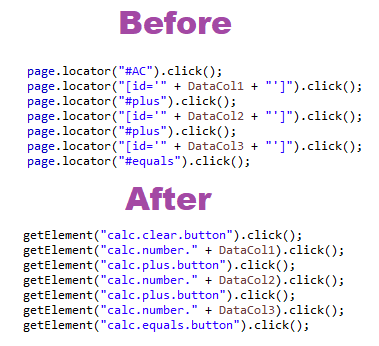
A centralized locator system, like the Playwright Object Repository, addresses these issues effectively. By storing all locators in a single, structured file, tests no longer rely on hardcoded values. Updates to locators are made in one place only, making maintenance faster and reducing test failures caused by UI changes. This approach ensures more stable, readable, and maintainable test automation in the Playwright Enterprise Framework.
What Is an Object Repository in Playwright
In Step 12 of the Playwright Enterprise Framework, the Objects.properties file serves as the central repository for all UI locators. Instead of scattering locators throughout test scripts, this file holds every element’s locator in a structured and maintainable way.
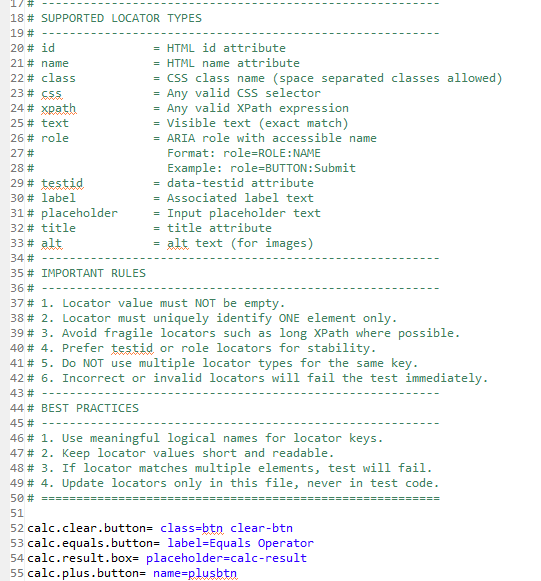
Each UI element is assigned a logical name that describes its purpose, making test scripts easier to read and understand. For example, buttons, input fields, and result boxes are named clearly to reflect their function in the application.
The repository supports multiple locator types, including:
- id: HTML element ID
- name: Name attribute of elements
- class: CSS class
- css: Any valid CSS selector
- xpath: XPath expressions
- role: ARIA roles with accessible names
- testid: data-testid attributes
- label: Associated label text
- placeholder: Input placeholder text
- title: Title attribute
- alt: Alternative text for images
Each locator must be unique and stable, as duplicate or fragile locators can cause test failures. Centralizing locators in this way improves maintainability, reduces flakiness, and ensures consistent test execution across the framework.
For a deeper understanding of each locator type and how to use them in Playwright, you can refer to our dedicated guide on Playwright Locators in Java.
How Centralized Locator Usage Works
Step 12 introduces a centralized locator mechanism in the Playwright Enterprise Framework to streamline UI element handling. At the core of this implementation is the getElement() method in SuiteBase, which acts as a single point to fetch any UI element using its logical name from Objects.properties.
This method provides automatic validation to ensure that a locator key exists and is unique. If a key is missing or duplicated, the framework immediately notifies the user, preventing unpredictable test failures. The timeout for locating elements is configurable via the locator.timeout property, allowing tests to wait dynamically for elements to appear before interacting.
The benefits of centralized locators in Step 12 include:
- Cleaner test code – Tests no longer contain hardcoded locators, making scripts more readable and concise.
- Easy updates – Changing a locator requires editing only the
Objects.propertiesfile, with no need to modify test scripts. - Reduced flakiness – Centralized locators improve stability by ensuring each element is validated and uniquely identified before interaction.
Additionally, minor logging improvements were added to provide clearer debug messages whenever locators are resolved, helping testers quickly identify issues during execution.
This centralized approach aligns well with recommended locator practices in Playwright, which emphasize stable and user-facing selectors over fragile DOM-based locators.
Updates to Test Classes
In Step 12, all calculator test classes, including CalcAdditionTest, CalcSubtractionTest, CalcMultiplicationTest, and CalcDivisionTest, have been updated to adopt a more robust and maintainable approach.
The key changes include:
- Migration from hardcoded locators to
getElement()
All direct locators previously embedded in test scripts have been replaced with calls to the centralizedgetElement()method inSuiteBase. This ensures that all UI interactions use the logical names defined inObjects.properties, reducing duplication and improving maintainability. - Removal of static test state flags
Flags such asTestskipandTestfailare no longer used. Instead, test execution flow and reporting rely on TestNG’s ITestResult, which provides a cleaner and more reliable mechanism to determine test outcomes. - Cleaner result reporting using ITestResult
After each test method, the framework now automatically records the test result as PASS, FAIL, or SKIP based on the ITestResult status. This eliminates manual flag management and ensures accurate reporting in Excel and other integrated reports.
All calculator test classes now follow this consistent pattern, making the framework more maintainable, easier to read, and less prone to flaky test behavior.
Param.properties Changes
In Step 12, the Param.properties file has been updated to include a new configuration:
locator.timeout=3000This locator.timeout setting defines the maximum time (in milliseconds) the framework will wait for a UI element to become visible when using the centralized getElement() method. By setting this value in a properties file, testers can easily adjust wait times globally without modifying any test scripts.
When getElement() is called, it automatically uses the locator.timeout value to wait for the element to appear. If the element is not found within the specified timeout, a descriptive error is logged and the test fails gracefully. This ensures consistent handling of dynamic UI elements and reduces flaky test results caused by timing issues.
Bug Fixes and Other Improvements
While the centralized locator mechanism is the main feature of Step 12, several secondary improvements have been implemented to enhance overall framework stability:
- Cleaner logging: Log messages are now more descriptive and consistent, making it easier to debug locator resolution and test execution issues.
- Fixed result handling: Test results are accurately captured using ITestResult, ensuring PASS, FAIL, and SKIP statuses are reliably reported in Excel and other integrated reports.
- Minor stability enhancements: Small refinements in browser handling, element waits, and error messages help reduce flaky tests and improve overall execution consistency.
These improvements complement the main feature but are secondary to the introduction of centralized locators.
Download Updated & New Files
⚠️ Important Note: This article is part of the Playwright Enterprise Automation Framework and covers Step 12 in a step-by-step build. The downloadable code is not standalone and depends on all previous steps in the series. If you landed here directly, please complete the earlier steps first to avoid setup or runtime issues.
To implement Step 12 in your Playwright Enterprise Framework, you need to update a few existing files and add one new file related to centralized locators.
Updated Files
Replace the following files with their Step 12 versions:
- SuiteBase.java
Contains thegetElement()implementation and centralized locator handling logic. - CalcAdditionTest.java
Updated to use centralized locators viagetElement().
The same changes apply to:- CalcSubtractionTest.java
- CalcMultiplicationTest.java
- CalcDivisionTest.java
- Param.properties
Includes the newlocator.timeoutconfiguration used by the centralized locator mechanism.
New File
Add the following new file to the framework:
- Objects.properties
Location:
src/test/java/com/stta/property/Objects.properties- Location:
src/test/java/com/stta/property/Objects.properties
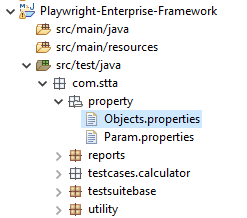
This file acts as the object repository for the framework and contains all UI locators mapped using logical names.
Download Step 12 updated and new files to implement centralized locators in the Playwright Enterprise Framework.
Important Notes
- All locator updates must be done only in Objects.properties.
- Test classes should always access elements using getElement().
After these changes, your framework will be fully aligned with Step 12 centralized locator usage, making tests easier to maintain and more stable.
Conclusion
Introducing a centralized object repository in Step 12 significantly improves how locators are managed in the Playwright Enterprise Automation Framework. By moving all UI locators to a single Objects.properties file, test scripts become cleaner, easier to read, and simpler to maintain.
This approach greatly reduces the effort required when UI changes occur. Instead of updating multiple test classes, you only update the locator once in the object repository. As a result, test stability improves, and flaky failures caused by locator changes are minimized, which is critical for enterprise-scale automation.
Step 12 sets a strong foundation for building reliable and maintainable Playwright tests. Adopting centralized locators in other Playwright projects will help teams scale faster, maintain consistency, and keep test automation robust over time.
FAQS
What is Playwright Object Repository?
A Playwright Object Repository is a centralized place where all UI locators are stored using logical names. In this framework, it is implemented using the Objects.properties file. Test classes access locators through these logical keys instead of hardcoded selectors.
Why should I use centralized locators?
Centralized locators make test scripts easier to maintain and more stable. When a UI element changes, you only update the locator in one place. This reduces duplication, lowers maintenance effort, and helps prevent flaky tests.
How does locator timeout work?
The locator timeout is configured using the locator.timeout property in the Param.properties file. This value defines how long the framework waits for an element to be available before failing the test, improving reliability in slow or dynamic pages.
Can I use Object Repository with all Playwright locators?
Yes. The object repository supports multiple locator types such as id, name, class, css, xpath, role, testid, label, placeholder, title, and alt. This allows you to use the most stable and appropriate locator strategy for each element.