Learning to automate home page functionality is an important part of UI test automation. The home page often acts as the starting point of an application and provides access to key areas through navigation links and main content sections. Automated validation helps ensure that these elements appear correctly for different user states.
In this tutorial, we will automate home page in the Playwright framework using the Page Object Model, workflow layer, reusable components, and Excel driven test data. The implementation verifies navigation elements, home page content, and footer links through structured automation.
This tutorial continues the Playwright Enterprise Automation Framework series and adds home page validation to the existing login and registration automation flow.
To maintain a smooth progression in the Playwright Enterprise Automation Framework series, the references below will help you follow the step-by-step implementation. Each section builds upon the previous, guiding you toward a robust and scalable enterprise automation solution using Playwright with Java.
Previous step: Automate Registration Page in Playwright Framework
Next step: Upcoming
For a complete understanding of the framework’s design and structure, start with the Playwright Enterprise Automation Framework guide. It provides detailed insights into the architecture and best automation practices applied throughout the series.
- What You Will Learn
- Why Home Page Automation Is Important
- Home Page Automation Flow Used in This Tutorial
- Test Data Used for Home Page Automation
- Files Added for Home Page Automation
- Updated Framework Files
- Page Object Implementation for Home Page
- Workflow Implementation for Home Page
- Home Page Test Class Implementation
- Running Home Page Automation Tests
- Test Execution Results
- Download the Complete Implementation
- Conclusion
- Frequently Asked Questions
What You Will Learn
This tutorial demonstrates how the home page is automated in the Playwright Enterprise Automation Framework. The implementation follows a structured approach using page objects, workflow logic, reusable components, and Excel driven test data.
In this tutorial, you will learn:
- Automating the home page using Playwright within the enterprise framework
- Organizing and managing home page elements using the Page Object Model
- Using header and footer components to validate reusable UI sections
- Controlling the login state through the workflow layer before performing home page validation
- Executing multiple test scenarios using Excel driven test data
- Validating important UI elements such as navigation links, home page content, and footer links
By the end of this tutorial, you will have a clear understanding of how the Playwright Enterprise Framework automates home page validation in a structured, scalable, and maintainable way.
Why Home Page Automation Is Important
The home page is typically the starting point of a web application. It provides access to important areas of the system and displays key navigation options. Because of this, verifying that the correct elements appear on the home page is an important part of UI test automation.
Several elements on the home page change depending on the user’s authentication state. For example, a logged out user should see login and register options, while a logged in user should see dashboard and logout links. Automated tests help confirm that the correct navigation options appear for each scenario.
Home page automation focuses on validating core UI elements such as:
- Header navigation menu
- Login and Register links
- Dashboard and Logout links
- Home page title and description
- Footer links
Automating these validations ensures that the home page displays the expected elements for different user states.
Home Page Automation Flow Used in This Tutorial
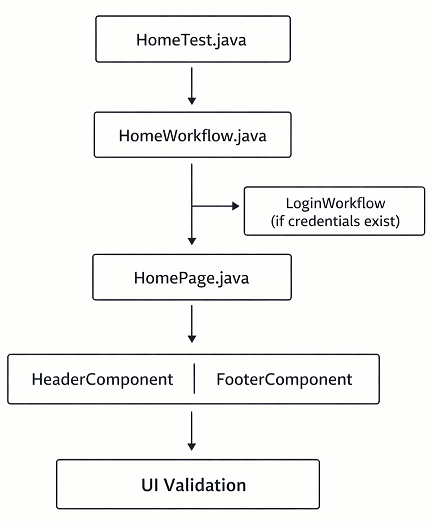
The home page validation in this tutorial follows a structured automation flow. The framework prepares the required user state first and then performs UI validations on the home page.
The automation process follows these steps:
- The test opens the application home page.
- The framework checks whether the user should be logged in or logged out based on the test data.
- When credentials are provided, the framework performs login before validating the home page.
- When credentials are not provided, the test continues in a logged out state.
- The automation verifies header navigation elements.
- The visibility of home page content, such as the title and description, is validated.
- Footer links are checked to confirm they appear correctly.
Using this approach, the same test implementation can validate multiple UI states through Excel driven test data.
Test Data Used for Home Page Automation

The home page automation uses Excel driven testing to execute multiple scenarios with different user states and validation conditions. All test data is maintained in the existing LoginRegister.xls file.
A new sheet named HomeTest is added to store the datasets used for home page validation. Each row represents a separate test scenario.
The following columns are used in the sheet:
UserName
Specifies the username used to log in before validating the home page.
Password
Defines the password used when login is required.
ExpectedNavLogin
Indicates whether the Login navigation link should appear.
ExpectedNavRegister
Indicates whether the Register navigation link should appear.
ExpectedNavDashboard
Indicates whether the Dashboard navigation link should appear.
ExpectedNavLogout
Indicates whether the Logout navigation link should appear.
ExpectedLoginLink
Defines whether the login link inside the home page content should be visible.
ExpectedRegisterLink
Defines whether the register link inside the home page content should be visible.
ExpectedHomeTitle
Indicates whether the home page title should be visible.
ExpectedHomeDescription
Indicates whether the home page description should be visible.
ExpectedFooterLinks
Defines whether the footer links should appear on the page.
DataToRun
Controls whether the dataset should be executed or skipped.
Using this approach, multiple home page scenarios can be validated through a single test implementation.
Files Added for Home Page Automation
To implement home page validation, several new files are added to the framework. These files follow the existing framework structure and separate responsibilities across test, page, workflow, and component layers.
HomeTest.java
HomeTest.java is the TestNG test class that executes home page validation scenarios.
Responsibilities include:
- Reading test data from the Excel sheet
- Executing the home page workflow
- Validating header navigation elements
- Verifying home page content visibility
- Checking footer links
HomePage.java
HomePage.java implements the Page Object Model for the home page. It contains methods used to interact with and validate home page elements.
The class includes methods for:
- Opening the home page
- Validating home page title and description
- Checking navigation links
- Validating footer links
- Performing logout actions
This class also integrates reusable header and footer components.
HomeWorkflow.java
HomeWorkflow.java implements the workflow layer for home page automation. It prepares the application state before the test validations run.
Responsibilities include:
- Ensuring the correct authentication state
- Navigating to the home page
- Preparing the application for validation
This layer keeps the test logic clean and reusable.
FooterComponent.java
FooterComponent.java is a reusable component class used to validate footer links.
Benefits of using this component:
- Separates footer validation logic from the page object
- Improves framework maintainability
- Allows footer validations to be reused across multiple pages
Updated Framework Files
Along with the new files, a few existing framework files are updated to support home page automation.
Objects.properties
New locator entries are added to the Objects.properties file for home page elements and navigation links.
The following locators are included:
Header navigation
nav-login
nav-register
nav-dashboard
nav-logout
Home page elements
home-title
home-description
home-login-button
home-register-button
Footer links
footer.link1
footer.link2
Storing locators in a centralized properties file helps manage element selectors in one place and simplifies locator updates when the UI changes.
login-register-home.xml
The TestNG suite file is updated to include the HomeTest class.
The suite now executes the following tests:
LoginTest
RegisterTest
HomeTest
This configuration allows login, registration, and home page validations to run within the same test suite.
LoginRegister.xls
The Excel file LoginRegister.xls is updated by adding a new sheet named HomeTest. This sheet stores the datasets used for home page validation scenarios.
Page Object Implementation for Home Page
The HomePage class implements the Page Object Model for the home page. It contains methods used to open the page and validate the elements displayed in different sections of the interface.
The class is responsible for the following actions:
- Opening the home page
- Validating the home page title and description
- Checking the login and register links displayed in the main content area
- Verifying navigation menu elements in the header section
- Validating footer links
To keep the page object clean and maintainable, the implementation uses reusable HeaderComponent and FooterComponent classes. These components handle validations for the header navigation and footer section, which simplifies the home page element checks.
The Page Object Model helps organize UI interactions and keeps test code maintainable. You can learn more about this design pattern in the official Playwright Page Object Model documentation.
Workflow Implementation for Home Page
The HomeWorkflow class implements the workflow layer for home page automation. It prepares the application state before the validation steps are executed.
The workflow performs the following actions:
- Determines whether the user should be logged in or logged out based on the test data
- Performs login when credentials are provided
- Ensures the user is logged out when credentials are not provided
- Navigates to the home page before starting the validation
This workflow layer allows the same automation logic to validate the home page for both logged in and logged out scenarios.
Home Page Test Class Implementation
The HomeTest class is the TestNG test class responsible for executing the home page validation scenarios. It reads the test data and performs validations based on the expected values defined in the Excel sheet.
The class performs the following actions:
- Reading datasets from the Excel sheet
- Executing the home page workflow to prepare the application state
- Validating header navigation elements
- Verifying home page content elements
- Checking footer links
The implementation uses soft assertions, which allows multiple UI elements to be validated within a single test execution before reporting the final result.
Running Home Page Automation Tests
The home page automation tests can be executed using the existing TestNG suite configuration. The suite runs all related tests, including login, registration, and home page validation.
Follow these steps to execute the tests:
- Step 1: Navigate to project root folder from command prompt.
- Step 2: Run command mvn clean test.
- Step 3: The framework executes login, registration, and home page tests
- Step 4: Review the results in the generated extent and allure reports and Excel sheet.
Test Execution Results
During execution, the framework processes each dataset defined in the HomeTest sheet and performs validations based on the expected values.
The execution behavior works as follows:
- Each dataset in the HomeTest sheet runs as a separate test scenario
- Datasets with DataToRun = y are executed
- Datasets with DataToRun = n are skipped
After execution, the framework records the results in multiple locations:
- Test execution results are available in the generated extent and allure reports
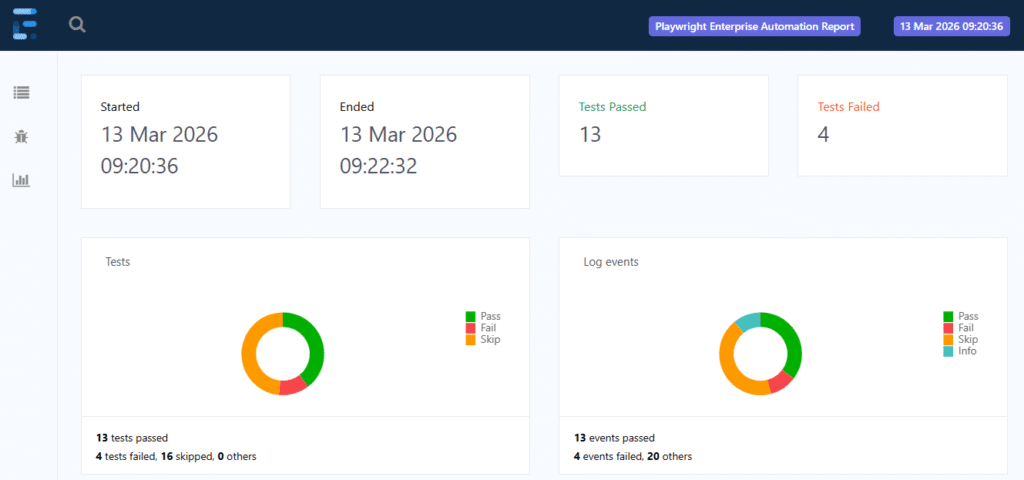
The framework generates an Extent Report that shows the execution status of each test scenario. The report provides a clear view of test steps, validation results, and overall execution status. If you want to learn how this reporting feature is implemented, see our detailed guide on adding Extent Report in the Playwright framework.
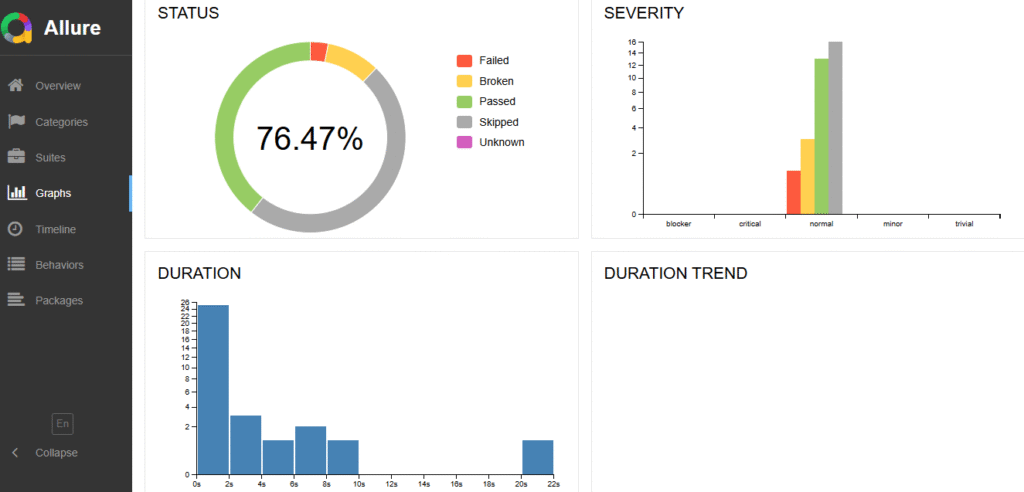
In addition to Extent Report, the framework also supports Allure Report, which provides a detailed and interactive view of test execution including steps, statuses, and execution summaries. To learn how this reporting feature is implemented, refer to our guide on adding Allure Report in the Playwright framework.
- Dataset level results are updated in the Excel sheet
Download the Complete Implementation
To implement home page automation in your framework, you need to add a few new files and update some existing ones.
Download Step 22 Updated Files
New files
HomeTest.java
HomePage.java
HomeWorkflow.java
FooterComponent.java
Updated files
Objects.properties
login-register-home.xml
LoginRegister.xls
Add the new files to the appropriate framework packages and update the existing files as shown in this tutorial to enable home page automation.
Conclusion
In this tutorial, we implemented home page automation using Playwright in the enterprise framework. The implementation validates key UI sections including header navigation, home page content, and footer links.
The automation supports both logged in and logged out scenarios by preparing the appropriate user state before performing validations. The solution follows the Page Object Model for element management and uses the workflow layer to control navigation and authentication logic.
This approach keeps the test implementation structured, reusable, and easy to maintain within the framework.
In upcoming tutorials, the Playwright Enterprise Automation Framework will continue to expand with additional features and test implementations.
Frequently Asked Questions
What is home page automation in Playwright?
Home page automation in Playwright verifies key UI elements such as navigation links, content sections, and footer links using automated tests.
Why automate the home page in test automation frameworks?
Automating the home page ensures that important navigation and UI elements appear correctly when the application loads.
How does Playwright validate UI elements?
Playwright validates UI elements by locating them using selectors and checking conditions such as visibility or text content.
What is the role of the workflow layer in automation frameworks?
The workflow layer prepares the required application state, such as login or logout, before executing test validations.