Last updated on February 27th, 2026 at 03:13 am
Step 13 in the Playwright Enterprise Framework series focuses on implementing Fallback Locators in Playwright. This improvement ensures your tests remain stable even if a primary locator fails, reducing flaky results and making automation more reliable. Fallback locators enable the framework to attempt multiple locator options in sequence until the correct element is found, thereby enhancing test resilience against UI changes.
In the previous step (Step 12), we set up a centralized Object Repository using the Objects.properties file along with the getElement() method. This enabled all test classes to access locators from a single source, improving maintainability and consistency. Step 13 builds on this setup by adding fallback support, further strengthening your locator strategy.
To help you follow the Playwright Enterprise Framework step by step, you can read the previous and next articles in this series below.
Previous article: How to Use Playwright Object Repository in Framework
Next article: How to Implement Playwright Self-Healing Locators at Scale
You can begin with the main guide How to Build an Enterprise Playwright Automation Framework to get the full context of the framework design.
What Are Fallback Locators?
Fallback locators are a mechanism in test automation that allows multiple locator options to be defined for a single element. Instead of relying on just one locator, the framework will try the first locator, and if it fails, it automatically tries the next one until the element is found.
Fallback locators are needed because web elements can have multiple identifiers or may change over time due to updates in the application’s UI. For example, an element’s id might change, or a new class may be applied, causing tests that rely on a single locator to fail.
Using fallback locators provides several benefits:
- Improved stability: Tests are less likely to fail because the framework can adapt to minor changes in element identifiers.
- Fewer test failures: Reduces false negatives caused by locator issues.
- Maintainable object repository: You can manage multiple locator options for an element in one central place, keeping the test code clean and consistent.
How Fallback Locators Are Implemented in the Framework
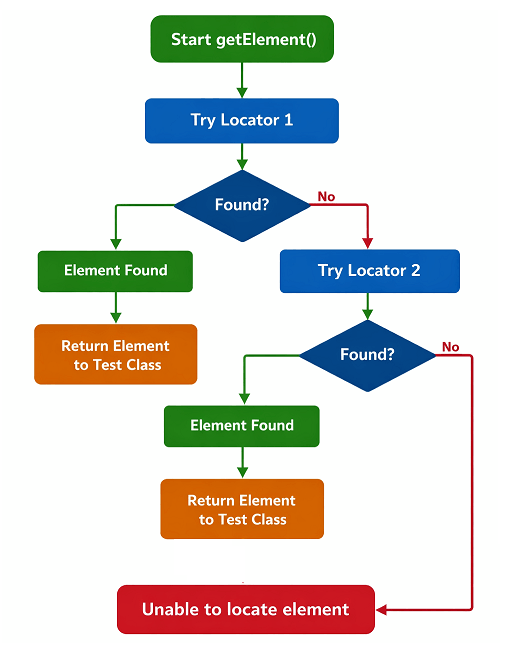
In Step 13, the SuiteBase.java class has been enhanced to support fallback locators, allowing multiple locators to be defined for a single element. This ensures that if the primary locator fails, the framework automatically attempts the next one in the sequence until the element is found.
The key changes include:
- Multiple locators per key: Locator definitions in Objects.properties can now include several locators separated by the
|symbol. For Example:
calc.clear.button = role=button:Clear Calculator | id=AC | data-testid=btn-clear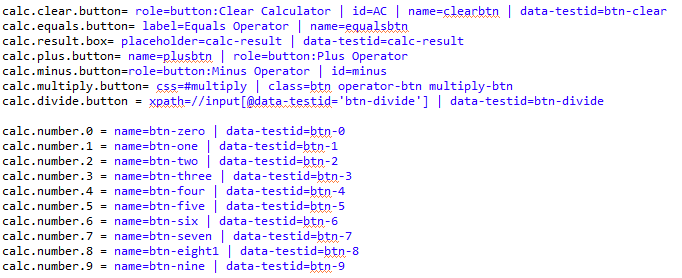
The framework will try each locator in order until it successfully resolves the element.
- Automatic fallback mechanism:
getElement()In SuiteBase iterates through all defined locators and stops at the first one that works. - Detailed logging: Every locator attempt is logged. If a locator fails, it is recorded with the reason, helping in troubleshooting. Successful locators are also logged to track which one was used during test execution.
- Objects.properties updates: Each element can have multiple identifiers. This centralizes locator management and keeps the object repository consistent and easy to maintain.
Importantly, no changes are required in existing test classes. All test methods continue to use getElement("logical.key"), and the framework handles the fallback resolution behind the scenes. This makes the transition to fallback locators seamless and ensures test stability without modifying your tests.
How Test Classes Use Fallback Locators
In the Playwright Enterprise Framework, all test classes, including CalcAdditionTest, CalcSubtractionTest, CalcMultiplicationTest, and CalcDivisionTest benefit automatically from the new fallback locator logic.
For example, in CalcAdditionTest, calls like:
getElement("calc.clear.button").click();
getElement("calc.number." + DataCol1).click();
getElement("calc.plus.button").click();
remain unchanged. Behind the scenes, getElement() now attempts each defined locator in the Objects.properties fallback sequence until it finds the element.
This means:
- No changes are needed in test classes. All existing references to locator keys continue to work seamlessly.
- Improved robustness. If the primary locator fails due to a UI change, the framework automatically tries the fallback locators, reducing test failures.
- Easier maintenance. Updating locators is centralized in Objects.properties, so test scripts remain clean and stable.
With fallback locators, your test classes remain simple while gaining higher stability and maintainability, especially in dynamic applications where element attributes may change over time.
Download Updated Framework Files
⚠️ Important Note: This article is part of the Playwright Enterprise Automation Framework and covers Step 13 in a step-by-step build. The downloadable code is not standalone and depends on all previous steps in the series. If you landed here directly, please complete the earlier steps first to avoid setup or runtime issues.
To get started with fallback locators in your Playwright Enterprise Framework, you can download all the updated files. These include the enhanced SuiteBase.java and the revised Objects.properties with multiple fallback locators for each key.
Simply replace your existing framework files with these updated versions to benefit immediately from:
- Centralized locator management
- Automatic fallback for element resolution
- Improved test stability and fewer failures
You can download the files here: Download Playwright Enterprise Framework Step 13 Files
After replacing the files, all your existing test classes will automatically use the fallback locators without any changes.
FAQs
What are fallback locators in Playwright?
Fallback locators in Playwright are multiple locator options defined for a single element key. If the first locator fails to find the element, the framework automatically tries the next one until the element is found or all locators fail. This ensures tests are more robust against minor changes in the UI.
How do fallback locators improve test reliability?
Fallback locators improve reliability by reducing test failures caused by changes in element identifiers. Even if one locator becomes outdated or an element has multiple identifiers, the framework can still find the element using alternative locators.
Can fallback locators handle dynamic elements?
Yes, fallback locators help handle dynamic elements. By defining multiple possible locators for elements that may change attributes like id, class, or testid, tests are less likely to fail when the UI updates, keeping automation stable and maintainable.