Last updated on February 26th, 2026 at 09:05 am
In Step 2 of the Playwright Enterprise Automation Framework series, we created a solid base for data-driven execution. We learned how to read test data from Excel, control execution using a unified suite controller, and run tests through a single TestNG suite. This approach works well initially, but as automation grows, the need to scale tests in Playwright becomes unavoidable.
In real enterprise projects, test cases increase rapidly. Multiple features, larger teams, and growing test data introduce complexity. Managing everything using a single Excel file or a single TestNG XML quickly becomes difficult to maintain and prone to errors.
Step 3 addresses these challenges directly. In this step, we scale tests in Playwright by adding more data-driven test cases, managing multiple Excel files, and executing tests using multiple TestNG suites. This allows the framework to grow in a structured, maintainable, and enterprise-ready way.
This article is part of the Playwright Enterprise Automation Framework step-by-step series.
Previous article: Excel Driven Tests in Playwright Enterprise Framework (Step 2)
Next article: Skip Suite in Playwright Enterprise Framework (Step 4)
If you are new to this series or want to understand the complete architecture, design principles, and long-term roadmap, start with the main guide below.
Playwright Enterprise Automation Framework Complete Guide
- What Scaling Tests Mean in a Playwright Enterprise Setup
- What We Are Building in Step 3
- Step 3 Downloadable Source Code
- Test Case Design Strategy Used in This Step
- Implementing Additional Calculator Test Cases
- Excel File Strategy for Scalable Test Automation
- Using Multiple TestNG XML Files
- Test Execution Flow After Step 3
- Validating Step 3 Using testng.xml Execution
- Why This Approach Scales in Enterprise Projects
- What Comes Next in the Framework Series
- Conclusion
- FAQs
What Scaling Tests Mean in a Playwright Enterprise Setup
In real-world automation, scaling tests do not simply mean adding more test cases. It means designing your framework in a way that supports growth without increasing complexity. As applications evolve, automation must handle more scenarios, more data, and more execution paths while remaining easy to maintain and extend.
Enterprise teams avoid a single test class or a single TestNG suite because it quickly becomes a bottleneck. One large test class is hard to read and risky to modify. A single suite makes selective execution difficult and slows down feedback cycles. When everything is tightly coupled, even small changes can impact the entire test execution.
Playwright supports scalable test design through its flexible architecture and strong integration with TestNG. By combining Playwright with data-driven testing, multiple Excel files, and modular TestNG suites, teams can group tests logically and execute them independently or together. This approach enables easier management of large automation codebases while maintaining fast, stable, and enterprise-ready execution.
What We Are Building in Step 3
In Step 3, we focus on scaling the existing Playwright Enterprise Automation Framework without touching the core framework code. The goal is to extend what we already built in earlier steps and prove that the framework can grow in a controlled and maintainable way.
In this step, we implement the following enhancements:
- Three new Excel-driven test classes
- CalcSubtractionTestCalcMultiplicationTestCalcDivisionTest
- One additional Excel file
- MulDiv.xls
- Two functional TestNG suite XML files
- addsub.xml
- muldiv.xml
- One master TestNG XML file
- testng.xml
- A ready-to-use ZIP download
- Contains all new test classes and suite XML files
- Helps you apply Step 3 changes quickly without manual setup
This design proves that the framework can scale by configuration and structure, not by rewriting core logic.
Step 3 Downloadable Source Code
Important Note
This article is part of the Playwright Enterprise Automation Framework and covers Step 3 in a step-by-step build.
The downloadable code is not standalone and depends on all previous steps in the series.
If you landed here directly, please complete the earlier steps first to avoid setup or runtime issues.
To make it easier to follow this step and apply the changes without manual errors, you can download the ready-to-use source code package for Step 3. This download contains only the files introduced or modified in this step and fits directly into the existing Playwright Enterprise Automation Framework structure.
Download Step 3 source code:
[Download Step 3 Playwright scaling source code (ZIP)]
This ZIP helps you quickly set up multiple data-driven test cases and TestNG suites without modifying any core framework logic.
What the ZIP Contains
The downloadable ZIP includes the following files:
- CalcSubtractionTest.java
- CalcMultiplicationTest.java
- CalcDivisionTest.java
- addsub.xml
- muldiv.xml
- Updated testng.xml
All files are already aligned with the framework structure used in the previous steps.
Where This ZIP Fits in the Framework Architecture
The files in this ZIP belong to the following layers of the framework:
- Test implementation layer
- New calculator test classes
- Suite orchestration layer
- Functional suite XML files (addsub.xml and muldiv.xml)
- Master testng.xml file
No Changes Required
When applying this ZIP, you do not need to modify any existing framework components:
- pom.xml remains unchanged
- SuiteBase, UnifiedSuiteController, and Core framework utilities remain untouched
- Existing Excel reader logic continues to work as is
This ensures that Step 3 builds on top of the previous steps cleanly and safely, without breaking any existing functionality.
Test Case Design Strategy Used in This Step
In this step, all newly added test classes are designed to follow the same structure as CalcAdditionTest introduced in the earlier step. This consistency is intentional and plays a key role in scaling the framework without increasing complexity.
The only changes across the new test classes are the Excel file and sheet mapping. Each test class points to the appropriate Excel file and reads data from a sheet whose name matches the test class name. This simple naming convention removes hardcoded values and makes the data mapping easy to understand and maintain.
Where to Place the Downloaded Files
After downloading the Step 3 source code ZIP, place the files as follows:
- Test class files
- Place
CalcSubtractionTest.java,CalcMultiplicationTest.java, andCalcDivisionTest.javaunder the package:com.stta.testcases.calculator.tests
- Place
- TestNG XML files
- Place
addsub.xml,muldiv.xml, and the updatedtestng.xmlin the project root directory
- Place
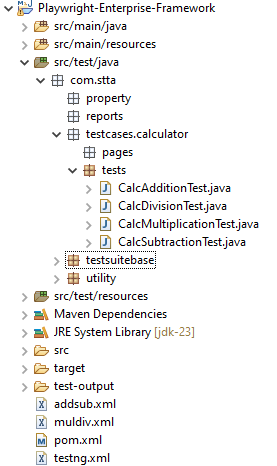
If you have an older testng.xml file from the previous step, delete it, and replace it with the new testng.xml from the Step 3 download. This new file is required to execute multiple suites correctly.
Benefits of This Design for Enterprise Scale Projects
- Maintains a single, consistent test class structure
- Avoids duplication of framework logic
- Makes it easy to add new test cases by configuration only
- Supports clean growth as the number of tests and data files increases
This strategy ensures the framework remains stable, readable, and ready for large-scale enterprise automation.
Implementing Additional Calculator Test Cases
In this step, we extend the existing calculator module by adding more data-driven test cases. Each new test class follows the same structure and execution flow already established in the framework, which keeps the design clean and predictable.
CalcSubtractionTest
The CalcSubtractionTest class is responsible for executing subtraction-related test scenarios using Excel-driven data.
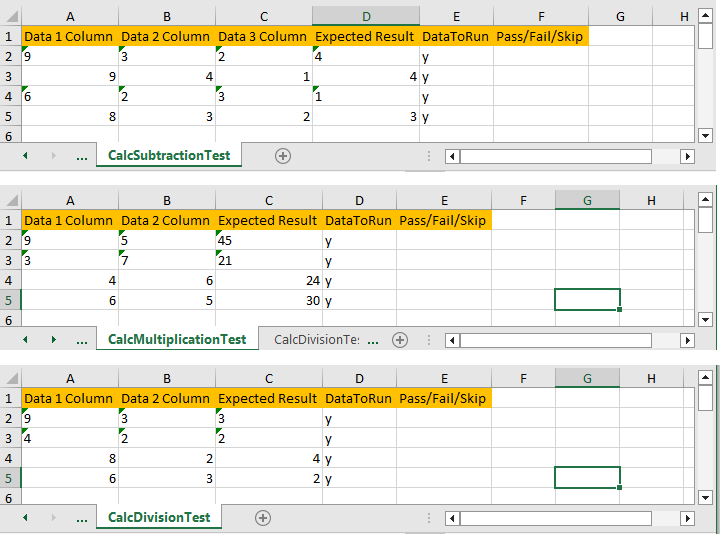
This test class uses the AddSub.xls file as its data source. All subtraction-specific test data is stored in the CalcSubtractionTest sheet inside this Excel file. During execution, the DataProvider reads rows from this sheet and supplies them to the test method.
CalcSubtractionTest extends UnifiedSuiteController, which means it automatically inherits all common framework functionality. This includes Excel initialization, suite-level configuration, and shared utilities required for execution. As a result, no additional setup code is needed inside the test class, making it easy to maintain and extend in the future.
CalcMultiplicationTest
The CalcMultiplicationTest class handles all multiplication-related scenarios in the calculator module using Excel-driven test data.
This test uses the MulDiv.xls file as its data source. The test data is read from the CalcMultiplicationTest sheet, which keeps multiplication scenarios clearly separated from addition and subtraction data. This separation improves readability and avoids mixing unrelated test data in large enterprise projects.
CalcMultiplicationTest clearly demonstrates multi-file Excel usage within the framework. While earlier tests relied on a single Excel file, this step proves that the framework can scale to multiple Excel sources without any changes to core utilities or execution logic. This approach is essential when test data grows across multiple functional areas.
CalcDivisionTest
The CalcDivisionTest class is responsible for validating calculator division scenarios using Excel-driven test data.
This test also uses the MulDiv.xls file, but it reads data from a different sheet named CalcDivisionTest. By separating multiplication and division data into individual sheets, the framework keeps test data clean, organized, and easy to maintain as the test suite grows.
CalcDivisionTest reuses the same DataProvider logic already implemented in the framework. No new utility methods are required. This reuse highlights the strength of the Playwright Enterprise setup, where adding new test cases involves only mapping the correct Excel file and sheet, while the underlying execution flow remains unchanged.
Excel File Strategy for Scalable Test Automation
In enterprise-level automation, test data can grow faster than test code. A clear Excel file strategy helps teams scale without losing control or clarity.
Why are AddSub and MulDiv data separated?
Addition and subtraction scenarios are stored in AddSub.xls, while multiplication and division scenarios live in MulDiv.xls. This logical separation avoids oversized Excel files and keeps related test data grouped together. As a result, testers can quickly locate and update data without scanning unrelated sheets.
How this approach improves maintenance
Smaller, purpose-focused Excel files are easier to maintain and less error-prone. When a functional area changes, only the related Excel file needs updates. This reduces the risk of accidental data breaks in other test cases and keeps regression cycles stable.
How large teams benefit from file-level ownership
In large QA teams, different testers or sub-teams can own specific Excel files. For example, one team can manage AddSub data while another handles MulDiv scenarios. This file-level ownership improves accountability, parallel work, and overall test automation scalability in enterprise projects.
Using Multiple TestNG XML Files
As the number of test cases increases, relying on a single TestNG XML file becomes difficult to manage. In this step, the Playwright Enterprise setup uses multiple TestNG XML files to logically group and control test execution.
addsub.xml
The addsub.xml file is responsible for controlling all addition and subtraction test cases. It includes the following test classes:
CalcAdditionTestCalcSubtractionTest
This suite uses the suiteName parameter, which is passed to the framework at runtime. The value of this parameter is matched against the TestSuiteList.xls file to decide whether the AddSub suite should execute or be skipped.
By combining Excel-driven execution with suite-specific XML files, enterprise teams gain precise control over which functional areas run during a test cycle, without changing any test code.
muldiv.xml
The muldiv.xml file controls all multiplication and division test cases within the framework. It includes the following test classes:
CalcMultiplicationTestCalcDivisionTest
This suite is designed to be executed independently, which is useful in real-world enterprise scenarios. Teams can run only multiplication and division tests during focused validation cycles, bug fixes, or feature-specific testing, without triggering the entire test suite.
Independent suite execution enhances flexibility, reduces execution time, and enables QA teams to align test runs with project priorities while maintaining the same Playwright Enterprise framework structure.
Master testng.xml
The master testng.xml acts as a central execution controller for the Playwright Enterprise Automation Framework.
It executes multiple TestNG suites in a single run by referencing individual suite files such as addsub.xml and muldiv.xml. Instead of listing test classes directly, this master file focuses only on orchestration.
This design enables enterprise teams to manage large-scale test execution from a single location. By enabling or disabling suites at the XML or Excel level, teams can run full regression, partial validation, or feature-specific tests without modifying test code or framework logic.
Test Execution Flow After Step 3
After completing Step 3, the test execution flow remains clean and predictable, even though the framework now supports more test cases and multiple suites.
Maven execution remains unchanged
Tests are still executed using the same Maven command. No new plugins or configuration changes are required in the pom.xml file.
Master testng.xml triggers all suites
The master testng.xml file acts as the single entry point. It triggers all configured suites, including addsub.xml and muldiv.xml, in one execution cycle.
Each suite reads its execution status from Excel
Every suite checks its run status from TestSuiteList.xls using the suiteName parameter. This Excel-driven control decides whether a suite should run or be skipped.
Tests automatically load the correct data sources
Each test class automatically loads the correct Excel file and sheet based on its design. This ensures the right test data is used without hardcoded values, keeping the framework scalable and enterprise-ready.
Validating Step 3 Using testng.xml Execution
After updating all files in the framework, the final step is to verify that scaling is working as expected. This validation confirms that each test class reads data from the correct Excel file and sheet.
How to run the verification
Run the master testng.xml file that was added in this step. No changes are required in Maven commands or pom.xml. The execution flow remains the same as the earlier steps.
What happens during execution
When testng.xml is executed:
- The master file triggers both addsub.xml and muldiv.xml
- Each suite checks its execution status from TestSuiteList.xls
- Every test class loads its mapped Excel file automatically
- Test data is printed directly in the console for validation
What to verify in the console output
You should confirm the following in the console logs:
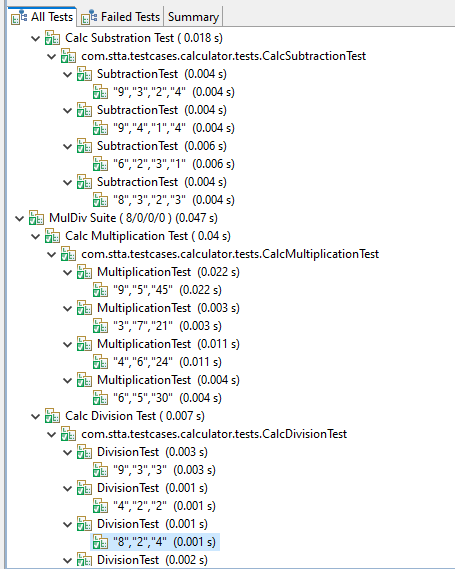
CalcSubtractionTestreads data from AddSub.xlsCalcMultiplicationTestreads data from MulDiv.xlsCalcDivisionTestreads data from MulDiv.xls- Sheet names match the test class names exactly
This confirms that the framework is correctly scaled and data-driven execution is working across multiple Excel files.
The screenshot below shows the Excel test data used by the calculator test cases. Each sheet name matches its corresponding test class to maintain consistency.
The TestNG execution report below confirms that each calculator test class is reading data from its respective Excel file and sheet. The values displayed in the report match the test data defined in the Excel sheets, proving that the Excel-driven execution is working as expected.
Why This Approach Scales in Enterprise Projects
This Step 3 design is built specifically for enterprise-scale automation, where test volume and team size grow continuously.
Zero Duplication of Framework Logic
All new test cases reuse the existing framework components introduced in previous steps.
There is no duplication of Excel reader logic, suite controller logic, or base test setup.
As a result, any framework-level improvement automatically applies to all test classes.
Easy Addition of New Test Cases
Adding a new test case does not require framework changes.
You simply create a new Excel-driven test class following the same structure and map it to a new or existing Excel sheet.
This keeps test growth predictable and safe, even when the number of test cases increases rapidly.
Easy Addition of New Suites
New TestNG suite files can be introduced without affecting existing execution flows.
Teams can group related test cases into separate suite XML files and run them independently or through the master testng.xml.
This flexibility is essential for large regression cycles and parallel execution strategies.
Backward Compatible With Previous Steps
Everything implemented in Step 3 works seamlessly with Step 1 and Step 2.
No existing test cases, Excel files, or configurations need to be modified.
This backward compatibility ensures that teams can adopt scaling gradually without disrupting ongoing automation efforts.
Overall, this approach allows enterprise teams to scale Playwright test automation confidently while keeping the framework stable, maintainable, and easy to extend.
What Comes Next in the Framework Series
With Step 3, the foundation for scaling tests in Playwright is now in place. However, enterprise automation does not stop at adding more tests and suites. The framework continues to evolve step by step to address real-world execution challenges faced by large QA teams.
Preview of Upcoming Improvements
In the next phase of this series, the focus will shift from scaling to execution control. As test suites grow, teams often need more flexibility during execution. Running everything every time is not always practical.
What Step 4 Will Introduce
In Step 4, we will introduce a suite skip feature. This enhancement will allow teams to:
- Skip entire TestNG suites without modifying XML files
- Control execution directly from Excel or the configuration level
- Enable or disable suites based on environment or execution needs
This feature is especially useful for enterprise regression runs, smoke testing, and environment-specific executions.
How the Framework Evolves Step by Step
Each step in this Playwright enterprise setup builds on the previous one without breaking existing functionality.
Instead of adding complexity upfront, the framework grows in a controlled and practical manner.
By the time you reach the next step, you will already have a scalable, data-driven setup. Step 4 will make it even more powerful by giving you dynamic control over what runs and what does not, all without changing core framework code.
Conclusion
Step 3 plays a key role in helping teams scale tests in Playwright without disturbing the existing framework structure. By adding multiple Excel-driven test classes, separating test data into logical files, and executing tests using multiple TestNG suites, the framework becomes more organized and easier to extend.
This approach reflects how enterprise automation frameworks are built in real projects. Test logic remains clean, data is managed independently, and execution is controlled through well-defined suite files. Most importantly, all of this is achieved without duplicating code or introducing fragile dependencies.
With this step completed, the Playwright enterprise setup is now better prepared for large test suites, growing teams, and long-term maintenance. To continue improving execution flexibility and control, move on to the next step, where we introduce suite-level skipping and smarter execution management.
FAQs
Where should I place the Step 3 ZIP files?
After extracting the Step 3 ZIP, place all calculator test class files such as CalcSubtractionTest, CalcMultiplicationTest, and CalcDivisionTest under the package com.stta.testcases.calculator.tests. Place the suite XML files addsub.xml, muldiv.xml, and the updated testng.xml in the project root directory. Make sure to delete the old testng.xml file from the previous step before adding the new one.
Can I run AddSub or MulDiv suites individually?
Yes. You can run addsub.xml or muldiv.xml independently using TestNG. This allows you to execute only a specific set of calculator tests without running the entire suite.
Do I need to modify pom.xml?
No. There are no changes required in pom.xml for Step 3. The existing Maven setup continues to work, which keeps the framework stable and backward compatible.
How do I add more Excel-driven tests later?
To add more Excel-driven tests, create a new test class by copying the structure of an existing calculator test. Add a matching sheet name in an existing Excel file or create a new Excel file if the data belongs to a different functional area. Then include the new test class in an existing suite XML or add it to a new suite XML and reference it from the master testng.xml.