Last updated on February 27th, 2026 at 03:06 am
In this step of the Playwright Enterprise Automation Framework series, you will learn how to skip test in Playwright at the test case level. Previously, Step 4 introduced suite-level skip and execution control. Now, individual test cases can be skipped based on Excel flags.
This feature allows tests that are not needed to be automatically skipped. It helps keep large test suites efficient and organized.
Using Excel-driven execution control, each test case can decide whether it should run or be skipped. This approach makes the framework more flexible and enterprise-ready. Audit trails are maintained automatically, ensuring reliable reporting.
This article is part of the Playwright Enterprise Automation Framework step-by-step tutorial series, where we build an enterprise-ready automation framework from scratch.
Previous article: How to Skip Suite in Playwright Enterprise Framework (Step 4)
Next article: How to Add Playwright Data Driven Reporting (Step 6)
If you are new to this series or want a complete understanding of the framework architecture, design decisions, and execution strategy, start with the main guide below.
Playwright Enterprise Automation Framework Complete Guide
Recap of Previous Steps
Before we dive into test case skip, let’s quickly recap the previous steps of the Playwright Enterprise Automation Framework series.
Step 1: Set up the Playwright Framework project. The foundation was created. Dependencies, folder structure, and configuration were set up for automation.
Step 2: Excel-driven test data. Test cases were made data-driven using Excel sheets. This allowed input values and expected results to be managed easily.
Step 3: Scaling Tests in an Enterprise Setup. Multiple tests were executed efficiently. Framework performance and resource handling were optimized for large suites.
Step 4: Suite-level skip/execute. Entire test suites could be skipped based on the “SuiteToRun” column in the TestSuiteList.xls file. This controls which test suites run in a test cycle.
Why Step 5 builds on Step 4: Step 5 adds fine-grained control at the test case level. Instead of skipping whole suites, individual test cases can now be skipped. This allows teams to selectively run or skip tests while maintaining execution logs and Excel reporting.
Understanding Test Case Skip
Test case skip is a mechanism that controls execution at the individual test case level. Each test case checks a flag from an Excel sheet before it starts running. If the flag is set to N or left blank, the test case is skipped. If the flag is set to Y, the test case is executed. This approach keeps execution control outside the code and allows changes without rebuilding or modifying the framework.
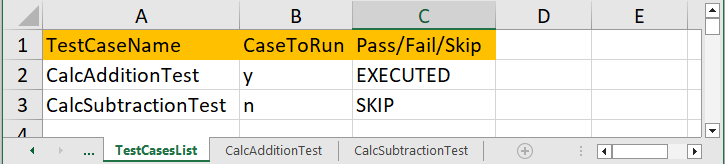
There is a clear difference between suite-level skip and test case-level skip. Suite skip, which was implemented in Step 4, works at a higher level. Entire test suites are skipped using the SuiteToRun column in the TestSuiteList.xls file. When a suite is skipped, none of the test classes inside that suite are executed. Test case skip, introduced in Step 5, works at a more granular level. Individual test classes are controlled using the CaseToRun column, while other test cases in the same suite can still run normally.
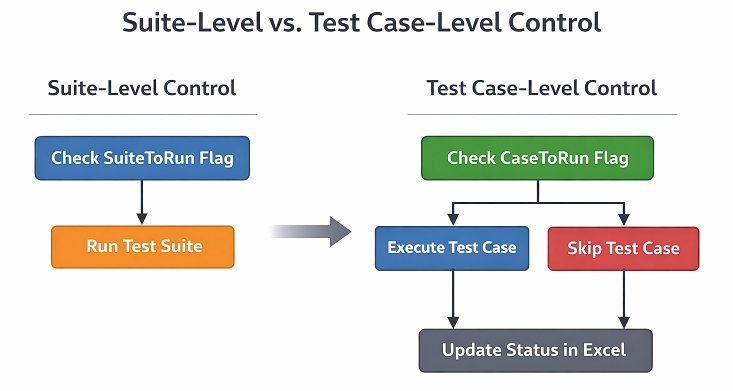
The example below shows how this works in practice. Each test case has a corresponding CaseToRun value in Excel. Test cases marked with Y are executed, while those marked with N or left blank are skipped. The execution result is written back to the Excel file as EXECUTED or SKIP, giving a clear view of what ran and what did not during the test cycle.
| Test Case Name | CaseToRun | Execution Result |
|---|---|---|
| CalcAdditionTest | Y | EXECUTED |
| CalcSubtractionTest | N | SKIP |
| CalcMultiplicationTest | Y | EXECUTED |
| CalcDivisionTest | N | SKIP |
This level of control is essential in enterprise automation. It allows teams to run only relevant test cases while maintaining full visibility through Excel-driven reporting.
Why Test Case Level Control Matters
In large enterprise test suites, not every test case needs to run in every execution cycle. Test case level control provides fine-grained execution management, allowing teams to select exactly which test cases should run and which should be skipped. This becomes critical when hundreds of test cases exist within the same suite and execution time needs to be optimized without changing code.
Unnecessary test execution is a common problem in enterprise automation. Running all test cases increases execution time, resource usage, and maintenance overhead. By using Excel-driven test case control, only relevant test cases are executed for a specific release, fix, or validation cycle. As a result, feedback is faster, and the test infrastructure is used more efficiently.
Audit-ready reporting is another key enterprise requirement. When test cases are skipped or executed based on predefined flags, the framework records this information directly in Excel. Writing SKIP or EXECUTED against each test case creates a clear execution trail. This helps in audits, compliance reviews, and test execution analysis, where visibility and traceability are mandatory.
Test case level skip also works as a natural extension of suite-level skip. Suite-level control decides which group of tests should run, while test case-level control decides what runs inside that group. Together, they provide layered execution control. This combination makes the Playwright Enterprise Framework flexible, scalable, and suitable for complex enterprise testing workflows.
Implementing Test Case Skip in Playwright
Test case skip in the Playwright Enterprise Framework is implemented using a simple and consistent flow. Each test class reads its execution flag from Excel before any test method runs. The CaseToRun column is used to decide whether the test case should execute or be skipped. This check happens in the @BeforeTest phase, ensuring that unnecessary setup and execution are avoided.
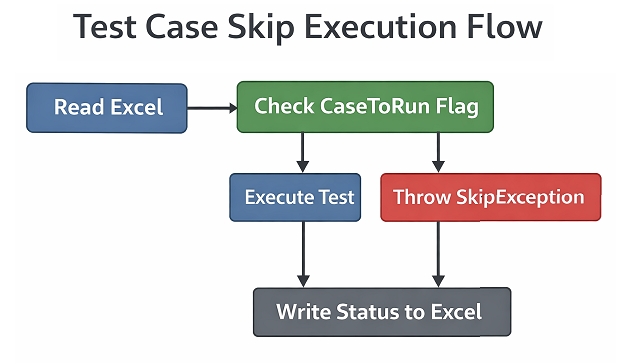
The framework first reads the CaseToRun value for the current test case from the Excel file. If the value is Y, the test case is allowed to execute normally. If the value is N or left blank, the test case is skipped. In such cases, the execution status is written back to Excel as SKIP, providing clear visibility of the decision made by the framework.
TestNG’s SkipException is used to skip test cases in a controlled and reported way. Throwing this exception immediately stops execution of the test class and marks it as skipped in TestNG reports. At the same time, the framework updates the Excel sheet with the SKIP status. If the test case is allowed to run, the framework writes EXECUTED against the test case name before proceeding with data-driven execution.
The example below shows how this logic is applied inside a test class. The skip check is placed in the @BeforeTest method, so the decision is made once per test case, not per data row.
Test Case Skip Implementation Example
@BeforeTest
public void checkCaseToRun() throws IOException {

    init();

    FilePath = AddSubExcel;
    TestCaseName = this.getClass().getSimpleName();

    String sheetName = "TestCasesList";
    String toRunColumn = "CaseToRun";

// Check the CaseToRun flag for the current test case from the Excel sheet.
// If the flag is 'N' or blank, the test case should not be executed.
    if (!SuiteUtility.checkToRunUtility(
            FilePath,
            sheetName,
            toRunColumn,
            TestCaseName)) {

// Update the Excel report by marking this test case as SKIP
        SuiteUtility.WriteResultUtility(
                FilePath,
                sheetName,
                "Pass/Fail/Skip",
                TestCaseName,
                "SKIP");

// Throw TestNG SkipException to immediately stop execution
        throw new SkipException(
                TestCaseName + " CaseToRun flag is set to N or blank");
    }

// If CaseToRun flag is 'Y', mark the test case as EXECUTED in Excel.
    SuiteUtility.WriteResultUtility(
            FilePath,
            sheetName,
            "Pass/Fail/Skip",
            TestCaseName,
            "EXECUTED");
}
This implementation integrates seamlessly with UnifiedSuiteController. All suite-level setup, Excel initialization, and shared utilities are already handled there. The test class only focuses on reading the test case flag and making an execution decision. As a result, the framework remains clean, reusable, and easy to extend as more execution control features are added in future steps.
Excel Driven SKIP and EXECUTED Reporting
In this step of the Playwright Enterprise Framework, Excel is used not only to control execution but also to report execution status. Each test case has a dedicated row in the Excel sheet, and the framework updates the status after evaluating the CaseToRun flag. This approach keeps execution control and reporting in one central place, which is important for enterprise-scale test management.
The Pass/Fail/Skip column is used as a unified reporting column. At this stage, the framework writes only SKIP or EXECUTED into this column. If the CaseToRun value is set to Y, the test case is executed, and the status is written as EXECUTED. If the value is N or left blank, the test case is skipped, and the status is written as SKIP. Detailed pass or fail results will be added in later steps when data row-level execution is evaluated.
The table below shows a simple example of how execution status is recorded in Excel.
| TestCaseName | CaseToRun | Pass/Fail/Skip |
|---|---|---|
| Addition | Y | EXECUTED |
| Subtraction | N | SKIP |
With this reporting in place, anyone reviewing the Excel file can immediately see which test cases were executed and which were skipped. This makes test runs easier to audit and aligns well with enterprise reporting and governance requirements.
Download Updated Test Class Files
⚠️ Important Note: This article is part of the Playwright Enterprise Automation Framework and covers Step 5 in a step-by-step build. The downloadable code is not standalone and depends on all previous steps in the series. If you landed here directly, please complete the earlier steps first to avoid setup or runtime issues.
To help you learn and practice the test case skip logic, the downloads for this step are intentionally split into two parts.
First, download the CalcAdditionTest class only. This file contains the complete and working implementation of the test case level skip and execute feature. You are encouraged to study this class and try to apply the same logic to the remaining test cases on your own.
Download: CalcAdditionTest with Test Case Skip Logic
Once you understand the flow, try implementing the same logic in CalcSubtractionTest, CalcMultiplicationTest, and CalcDivisionTest. This hands-on step will help you clearly understand how the framework behaves and how reusable the logic is across test classes.
If you face any issues or want to verify your implementation, you can download the remaining three updated test classes from the link below.
Download: Remaining Test Classes (Subtraction, Multiplication, Division)
This approach improves learning, encourages practice, and ensures you gain confidence before moving to the next step of the Playwright Enterprise Framework series.
Conclusion
In Step 5 of the Playwright Enterprise Framework, test case level skip and execute control was introduced. This enhancement allows individual test cases to be conditionally executed based on Excel configuration, rather than controlling execution only at the suite level.
This step builds directly on the suite-level skip feature implemented in Step 4. While suite control decides which test classes should run, test case control determines what executes inside those classes. Together, they provide layered and flexible execution management for enterprise test suites.
With Excel-driven SKIP and EXECUTED reporting, the framework now offers clear visibility and audit-ready execution status. This step also prepares the foundation for upcoming enhancements, where final PASS or FAIL results will be calculated and reported at the test case level based on data row execution outcomes.
FAQs
What is a test case skip in the Playwright Enterprise Framework?
Test case skip allows individual test cases to be executed or skipped based on the CaseToRun flag in Excel. A value of Y executes the test case, while N or blank skips it.
How is test case skip different from suite-level skip?
Suite-level skip controls whether an entire test class runs using the SuiteToRun flag. Test case skip provides finer control by managing the execution of individual test cases inside the class.
Where is the SKIP or EXECUTED status reported?
The execution status is written back to Excel in the Pass/Fail/Skip column, showing whether a test case was skipped or executed.
Will PASS and FAIL be reported in this step?
No. Step 5 reports only SKIP and EXECUTED. PASS and FAIL reporting will be added in the upcoming steps after evaluating all data rows of a test case.