Last updated on March 18th, 2026 at 03:39 am
In enterprise Playwright projects, test execution needs to be flexible and easy to control. Teams often run tests on different browsers, switch between headless and headed mode, or slow down execution while debugging. Because of this, the ability to configure browser in Playwright becomes an important part of a scalable automation framework.
However, many frameworks still rely on hardcoded browser settings. This creates common problems such as frequent code changes, environment-specific branches, and difficulty running the same tests locally and in CI pipelines. Even a small browser change can require recompiling or updating multiple files.
Step 15 solves this problem by moving browser selection, headless mode, and execution speed into a centralized properties file. With this approach, testers can change execution behavior without touching test code, making the Playwright framework more maintainable and enterprise-ready.
To maintain continuity in the Playwright Enterprise Framework series, review the previous and upcoming steps below.
Previous article: How to Implement Playwright Self-Healing Locators at Scale
Next article: How to Capture Screenshots in Playwright Extent Reports
To understand the complete framework architecture, begin with the main guide How to Build an Enterprise Playwright Automation Framework.
Why Browser Configuration Should Be Property Driven
In many automation frameworks, browser settings are hardcoded directly into the test setup. While this may work for small projects, it quickly becomes a problem in enterprise Playwright frameworks. Every time a team needs to switch browsers or change execution behavior, developers are forced to modify code and commit changes. This slows down testing and increases the risk of mistakes.
Hardcoded browser setup also makes collaboration difficult. Different team members may need different execution modes for local debugging, while CI pipelines usually require a stable and headless configuration. When these values are fixed in code, the same test suite cannot adapt easily to different environments.
A property-driven approach solves these issues by externalizing browser configuration. By reading browser type, headless mode, and execution speed from a properties file, the framework becomes flexible and easier to control. Testers can adjust execution behavior instantly without touching test logic or recompiling the project.
This approach works equally well for local and CI execution. Locally, teams can run tests in visual mode or slow down execution for debugging. In CI pipelines, the same tests can run in headless mode with faster execution, using the same codebase and configuration-driven behavior.
From an enterprise scalability perspective, property-driven browser configuration is essential. It supports large teams, multiple environments, and continuous integration without adding complexity to the framework. As the test suite grows, this design keeps the Playwright framework maintainable, predictable, and easy to extend.
Why Property-Driven Browser Configuration
Hardcoding browser settings directly in code creates friction in enterprise Playwright frameworks. Every browser change requires code updates, recompilation, and new commits, which is inefficient and error-prone.
A property-driven setup removes this dependency on code changes. Browser type, headless mode, and execution speed can be controlled externally, keeping test logic clean and stable.
This approach is practical for both local and CI execution. Local runs can use headed mode or slower execution for debugging, while CI pipelines can switch to headless and faster execution without modifying a single line of code.
From an enterprise perspective, property-driven configuration improves scalability, reduces maintenance overhead, and allows the same framework to run consistently across multiple environments and teams.
New Configurations in Param.properties
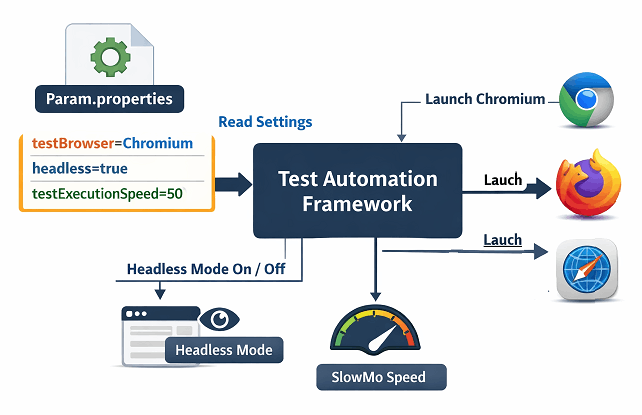
Step 15 introduces three key properties in Param.properties to control browser behavior without touching code:
- Browser Type
Allows selection between Chromium, Firefox, or WebKit. This makes it easy to run tests across different browsers for compatibility checks. - Headless Mode
Controls whether the browser runs in headless or headed mode. Headless is ideal for CI pipelines, while headed mode helps with local debugging. - Test Execution Speed (slowMo)
Adjusts the execution speed of Playwright actions. Slowing down execution helps visualize steps during debugging, while faster execution suits CI runs.
These properties make browser configuration flexible, consistent, and easy to manage across environments.
Browser Selection and Launch Logic
Step 15 enhances browser setup by reading the key execution settings from Param.properties. This allows the framework to launch the right browser with the desired behavior automatically.

Choosing Chromium, Firefox, or WebKit
The framework supports three major browser types. By setting testBrowser in Param.properties, tests can run on Chromium, Firefox, or WebKit without changing any code. This ensures cross-browser compatibility and simplifies switching between environments.
Headless and slowMo Implementation
Headless mode (headless=true/false) controls whether the browser UI is visible. This is essential for local debugging versus CI execution.
The testExecutionSpeed property (slowMo) lets testers slow down action execution. This is useful for observing test steps during development while maintaining fast execution in CI pipelines.
Together, these settings make browser behavior flexible, consistent, and easy to control across local and enterprise environments.
Benefits of This Approach
Configuring the browser via properties brings clear advantages for enterprise Playwright frameworks:
Flexibility Without Code Changes
Tests can switch browsers, toggle headless mode, or adjust execution speed without touching the code. This reduces errors and accelerates test setup.
Simplified Debugging and CI Runs
Local debugging can use visual mode and slower execution, while CI pipelines run headless and fast. All of this works using the same framework without manual code edits
Maintenance and Scalability Improvements
Centralized configuration keeps the framework maintainable as the test suite grows. Teams can scale tests across browsers and environments without adding complexity.
This approach ensures consistent, reliable, and enterprise-ready test execution.
Download Updated Files
⚠️ Important Note: This article is part of the Playwright Enterprise Automation Framework and covers Step 15 in a step-by-step build. The downloadable code is not standalone and depends on all previous steps in the series. If you landed here directly, please complete the earlier steps first to avoid setup or runtime issues.
You can download the updated files using link given below.
Download Step 15 Updated Source Code Files
The downloadable ZIP package includes:
- SuiteBase.java with browser configuration support
- Param.properties with browser type, headless mode, and execution speed settings
Conclusion
Step 15 makes it easy to configure the browser in Playwright using property-driven settings. By controlling browser type, headless mode, and execution speed externally, the framework becomes more flexible and maintainable.
This approach improves efficiency across local and CI executions, simplifies debugging, and supports scalable enterprise testing. Implementing property-driven browser configuration ensures consistent, reliable, and professional-grade test automation.
FAQs
How do I change the browser without modifying code?
Set the testBrowser property in Param.properties to Chromium, Firefox, or WebKit. No code changes are required.
Can I run tests in visual mode?
Yes. Set headless=false in Param.properties to see the browser UI during local debugging.
Is execution speed recommended in CI
For CI, keep testExecutionSpeed (slowMo) at 0 for fastest execution. Slower speeds are useful only for local debugging.
Does this affect existing tests?
No. Existing tests continue to work. These settings only control how the browser launches and executes tests.