The Error That Only Shows Up After a Click
Your test clicks a link, submits a form, or hits a button that redirects somewhere else. The click itself doesn’t throw. The very next line does:
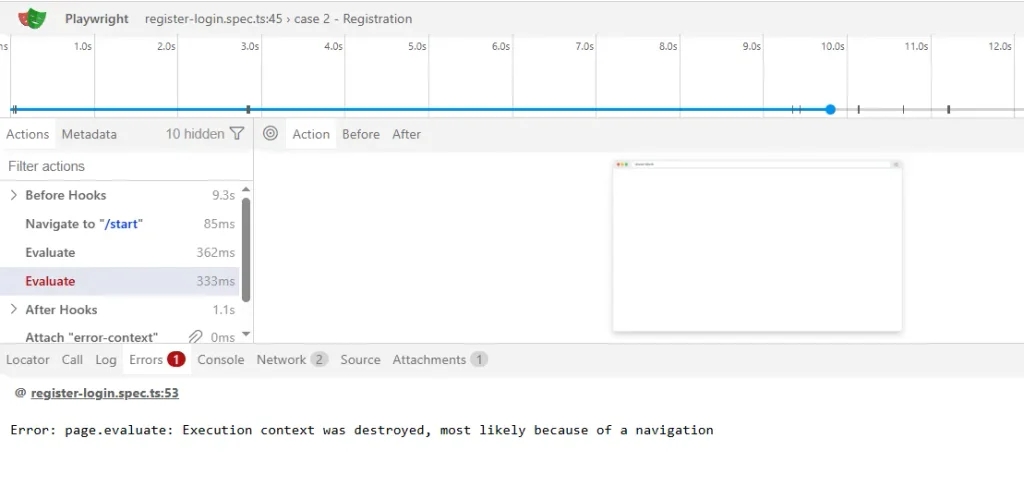
Error: locator.click: Execution context was destroyed, most likely because of a navigationSometimes it’s page.evaluate instead of a locator action, and the message reflects that directly:
page.evaluate: Execution context was destroyed, most likely because of a navigationSometimes it only fails in CI. Either way, the message is doing you a favor most errors don’t, it’s telling you exactly what happened, you just have to know what “execution context” means to act on it.
The short answer: this error means your code tried to run something (a click, an evaluate call, a property read) against the JavaScript environment of a page that Chromium already tore down because a navigation started. It’s almost always one of three things, a cached ElementHandle from before the navigation, a page.evaluate() call that landed mid-transition, or a next step that assumed the previous click’s navigation had already finished when it hadn’t. Below is how to tell which one is yours.
What “Execution Context Destroyed” Actually Means
Every page Chromium loads gets its own V8 execution context, the JavaScript environment a script runs in. When the page navigates, reloads, or the frame gets replaced, Chromium tears that context down and spins up a new one for the incoming document. Anything still holding a reference into the old context is now pointing at nothing.
Don’t confuse this with Playwright’s BrowserContext, which is an isolated browser session with its own cookies and storage, that’s a completely different object and stays alive across navigations. The execution context this error refers to belongs to the document, not the session.
This is different from a locator simply not finding an element. Locator.click() re-queries the live DOM on every call, so it doesn’t normally carry this specific error unless the click itself races the transition. page.evaluate() and cached ElementHandle objects are the two things that actually hold a live reference into a specific context, and they’re where this error originates almost every time.
The navigation that tears down the context doesn’t have to be one your test explicitly triggers. In practice I’ve seen it come from:
- a link click or form submit that redirects
window.locationassignment orlocation.reload()run throughpage.evaluate()- a redirect after login or checkout that your test didn’t ask for directly
- third-party scripts you don’t control, consent banners, tag managers, or A/B test tools that fire an unexpected redirect mid-flow
That last one matters because it’s easy to blame your own code for a race that’s actually coming from a script you didn’t write.
The Real Causes, Ranked by How Often They’re the Actual Problem
I’ve debugged all three of these in real frameworks, usually the same week a team migrated a Selenium suite over and brought old element-caching habits with it.
| Cause | How to tell it’s this one | Fix |
|---|---|---|
| Cached ElementHandle used after the page navigated away | Error follows a .click() or .$() call from before a page.goto() or link click | Stop caching handles, re-query with a Locator after the navigation |
A current-context call (page.evaluate(), elementHandle.evaluate(), page.$$(), page.content()) races a navigation it triggered | Error names one of those methods, intermittent, worse under parallel workers | Pair the triggering action with the wait via Promise.all, or ignore/retry if the call is non-critical |
| Next step assumes the previous action’s navigation already finished | Flaky only in CI, on self-hosted runners, or sharded suites, passes locally most of the time | Use page.waitForURL(), never the deprecated page.waitForNavigation() |
Cause 1: A Cached ElementHandle Outlived the Navigation
This is the most common one, and it’s almost always a leftover from Selenium or Puppeteer-style code where grabbing a handle and reusing it later felt normal.
// Broken: elementHandle holds a live reference into the pre-navigation context
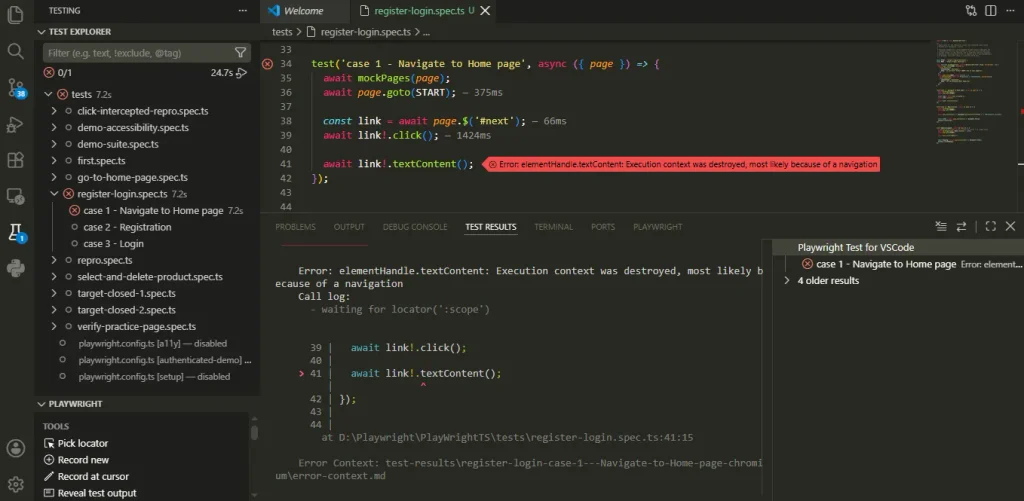
const link = await page.$('a.next-step');
await link.click();
const heading = await page.$('h1'); // may still resolve
await heading.textContent(); // throws once the old context is fully gone
Fix it by switching to a Locator, which re-queries the current document instead of holding a stale reference:
// Fixed: query after the navigation, on the current document
await page.locator('a.next-step').click();
await page.waitForURL('**/next-step');
const headingText = await page.locator('h1').textContent();
Note this isn’t just a syntax swap, the second query genuinely happens after the navigation settles, not against whatever the DOM looked like a moment earlier.
Cause 2: page.evaluate() Races the Navigation It Triggered
This version names evaluate in the stack, because page.evaluate() runs your function inside whatever context exists at that instant. The same root cause hits elementHandle.evaluate(), page.$$() (query_selector_all() in Python), and page.content() too, if any of those show up instead of a locator, you’re still looking at this cause.
// Broken: click starts a navigation, evaluate runs before the new document is ready
await page.getByRole('link', { name: 'Dashboard' }).click();
const title = await page.evaluate(() => document.title);
The click resolves before the navigation finishes, so evaluate can land in a document already being torn down. Wrap the two together so Playwright waits for the new document first:
// Fixed: wait for the URL to settle before evaluating anything
await Promise.all([
  page.waitForURL('**/dashboard'),
  page.getByRole('link', { name: 'Dashboard' }).click(),
]);
const title = await page.evaluate(() => document.title);
Note the order inside Promise.all: the wait registers before the click fires. Await the click first and start waiting on the next line instead, and a fast navigation can complete in that gap, missing the transition and racing the same error again.
Here’s the same fix as a complete test, since that ordering detail is easy to get wrong when assembling it from a fragment:
import { test, expect } from '@playwright/test';

test('reads the title after the dashboard link navigates', async ({ page }) => {
  await page.goto('https://example.com/home');

  await Promise.all([
    page.waitForURL('**/dashboard'),
    page.getByRole('link', { name: 'Dashboard' }).click(),
  ]);

  // Safe: the new document's context is already committed here
  const title = await page.evaluate(() => document.title);
  expect(title).toContain('Dashboard');
});
waitForURL() also accepts the same waitUntil option as page.goto(), commit, domcontentloaded, load, or networkidle. On a multi-page app where the default wait state resolves later than you need, pass it directly instead of reaching for the deprecated waitForNavigation():
await page.waitForURL('**/dashboard', { waitUntil: 'domcontentloaded' });That covers the one case people sometimes think still requires the old API, it doesn’t.
The same pattern applies to form submits and to navigation triggered from inside a script rather than a click:
// Form submit: fill first, then pair the submit click with the wait
await page.getByLabel('Email').fill('jane@example.com');
await page.getByLabel('Password').fill('secret');
await Promise.all([
  page.waitForURL('**/dashboard'),
  page.getByRole('button', { name: 'Sign in' }).click(),
]);
// Script-triggered navigation: wait for any URL change, not a specific pattern
const currentUrl = page.url();
await Promise.all([
page.waitForURL((url) => url.toString() !== currentUrl),
page.evaluate(() => {
window.location.href = 'https://example.com/dashboard';
}),
]);If the click doesn’t cause a navigation at all, don’t add a URL wait, wait on a locator or a response instead, covered in its own section below.
Not every evaluate() call needs this level of care. For a genuinely best-effort step, dismissing a popup, logging a non-critical value, cleanup before a screenshot, catching the failure and moving on is reasonable instead of engineering a perfect wait around something you don’t actually need to succeed:
// Acceptable for a non-critical step, not a substitute for the fixes above
try {
  await page.evaluate(() => {
    document.querySelector('.popup')?.remove();
  });
} catch {
  // Ignore: this step is best-effort and an unrelated redirect can beat it here.
}
This only applies where failure genuinely doesn’t matter to the outcome. The same try/catch around an assertion or a step you actually depend on just hides a real bug instead of fixing one.
A third situation is worth telling apart from both: the evaluate call is necessary, but the race comes from something outside your control, a keepalive redirect, an auth refresh, a third-party script on a page you don’t own. You can’t wait for a specific URL because you don’t know when it’ll fire. A small retry, not a silent catch, is the honest fix here:
async function evaluateWithRetry<T>(fn: () => Promise<T>, attempts = 3): Promise<T> {
  for (let i = 0; i < attempts; i++) {
    try {
      return await fn();
    } catch (error) {
      if (i === attempts - 1) throw error;
    }
  }
  throw new Error('unreachable');
}

const title = await evaluateWithRetry(() => page.evaluate(() => document.title));
Unlike the best-effort pattern, this still surfaces the failure if all three attempts fail, so a real bug isn’t silently swallowed. It just accepts that one failed attempt against an external, uncontrollable navigation isn’t itself a sign of a broken test.
Cause 3: The Previous Step’s Navigation Hadn’t Actually Finished
This is the one that only shows up in CI, on a self-hosted runner under load, or on one shard out of eight. It passes locally because your machine is fast enough to hide the race.
Most people’s first instinct is to bump the timeout or sprinkle in a waitForTimeout(). That treats the symptom. It’ll pass today and come back the next time the runner is a little slower.
// Workaround, not a fix: silences the race without addressing it
await page.getByRole('button', { name: 'Submit' }).click();
await page.waitForTimeout(1500);
await page.locator('.confirmation').textContent();
The real fix names the actual condition you’re waiting for. If your team is still on page.waitForNavigation(), replace it too, Playwright’s own Page API docs list waitForURL() as the method to use for navigation waits, and it has a known race window since it must be registered before the triggering action fires.
// Fixed: pair the click with the wait instead of sequencing them
await Promise.all([
  page.waitForURL('**/confirmation'),
  page.getByRole('button', { name: 'Submit' }).click(),
]);
const confirmationText = await page.locator('.confirmation').textContent();
waitForURL() checks whether the current URL already matches before waiting, so the race window here is narrower than the raw evaluate() case above. Pairing it with Promise.all closes that window entirely anyway, matching Playwright’s own examples, so there’s no reason to rely on the narrower window holding up under a slow CI runner.
When waitForURL Is the Wrong Tool
Not every action changes the URL. If a click updates content client-side without navigating, waiting for a URL is the wrong primitive, adding one just gives you a timeout that fails for the wrong reason.
If you’re waiting on new content to appear, wait for the specific locator instead:
// The button doesn't navigate, it loads content into the same page
await page.getByRole('button', { name: 'Load results' }).click();
await page.locator('.results-loaded').waitFor({ state: 'visible' });
If you specifically need to know a background request finished, wait for the response:
await page.getByRole('button', { name: 'Refresh data' }).click();
await page.waitForResponse(
  (response) => response.url().includes('/api/results') && response.ok()
);
And if the update is driven by JavaScript with no clean network signal to hook into, waitForFunction() covers the gap:
await page.getByRole('button', { name: 'Show price' }).click();
await page.waitForFunction(() => {
  return document.querySelector('.price')?.textContent?.trim().length > 0;
});
Playwright’s auto-waiting covers a lot through locators, but it doesn’t know which event you’re expecting after a custom action. Picking the primitive that matches what actually changed, a URL, a locator, a response, a JS condition, is what makes the fix hold, instead of just moving the flakiness elsewhere.
Before You Apply Any Fix, Check This
Search the failing test file for .elementHandle() or a raw $() call anywhere before the point of failure. If you find one, that’s Cause 1, and no amount of waiting fixes a reference to a context that no longer exists.
If the stack trace names evaluate, query_selector_all, content, or any other call that reads or touches the page’s current state, you’re looking at Cause 2. Open the Trace Viewer with npx playwright show-trace and check whether that call fires before or after the navigation entry in the timeline.
Watch for a false-positive fix here specifically: a passing run after adding waitForTimeout() doesn’t mean the race is gone, it means you got lucky on that run. Re-run with --repeat-each=5 or under --workers=4 before trusting it.
Also check whether the URL actually changes at all for the action you’re fixing. If it doesn’t, no amount of waitForURL() tuning helps, that’s the mismatched-tool case covered above, not a timing problem.
What Actually Prevents This Going Forward
Audit shared page objects or helpers for page.$(), page.$$(), and .elementHandle(). A Locator rarely does a worse job, since it re-queries the DOM instead of holding a dead reference. Note the two risks are separate: caching page.$$()‘s result for later reuse is the Cause 1 pattern, calling page.$$() itself at the wrong instant is the Cause 2 pattern, both fixed the same way, prefer a Locator. More on that distinction in the guide on why Playwright cannot find an element even when it exists.
Standardize on page.waitForURL() after any navigation-triggering action, pair it with the action through Promise.all rather than sequencing the two, and treat page.waitForNavigation() as deprecated in code review, not just in the docs. Sharded suites on GitHub Actions or self-hosted runners hit this race far more often than solo local runs, worth checking your CI pipeline setup if this error only shows up there.
If a consent banner, tag manager, or A/B testing script you don’t control is the actual source of an unexpected redirect, wrapping the affected step in the best-effort try/catch pattern from Cause 2 is often more realistic than synchronizing against a third-party script’s timing.
The One Thing to Remember
Execution context was destroyed, most likely because of a navigation almost always traces back to something holding a live reference across a navigation boundary, a cached handle, an evaluate call, or an assumption that the previous action’s navigation had already finished. Fix the reference and the wait condition, not the timeout.
Frequently Asked Questions
What’s the difference between this error and “Element is not attached to the DOM”?
They sound similar but point to different root causes. This error is specifically about a full page navigation tearing down the JavaScript context, while “element is not attached to the DOM” usually comes from a client-side re-render swapping a node without any real navigation happening.
Does using Promise.all always fix this?
Only when the second call genuinely depends on the navigation finishing first, and only when the action you’re waiting on actually changes the URL. Wrapping unrelated calls in Promise.all with a navigation wait doesn’t fix anything, and if the URL never changes at all, wrap a locator or response wait instead, not a URL one.
What if none of these three causes match my error?
Search the microsoft/playwright GitHub issues for your exact stack trace before assuming it’s novel. A lot of “unique” versions of this error turn out to be a custom fixture or wrapper doing something unexpected with handles or evaluate calls.
Does this happen with iframes too, and does the Python API show a different message?
Yes to both. A related error, “Frame was detached,” shows up when an iframe inside an SPA unmounts and remounts mid-transition. Playwright’s Python bindings report the same root cause under different names, most often ElementHandle.evaluate and Page.query_selector_all, plus a related page.content() failure mid-navigation. Every fix above applies the same way regardless of which method name shows up in your trace.