Last updated on August 11th, 2026 at 08:20 am
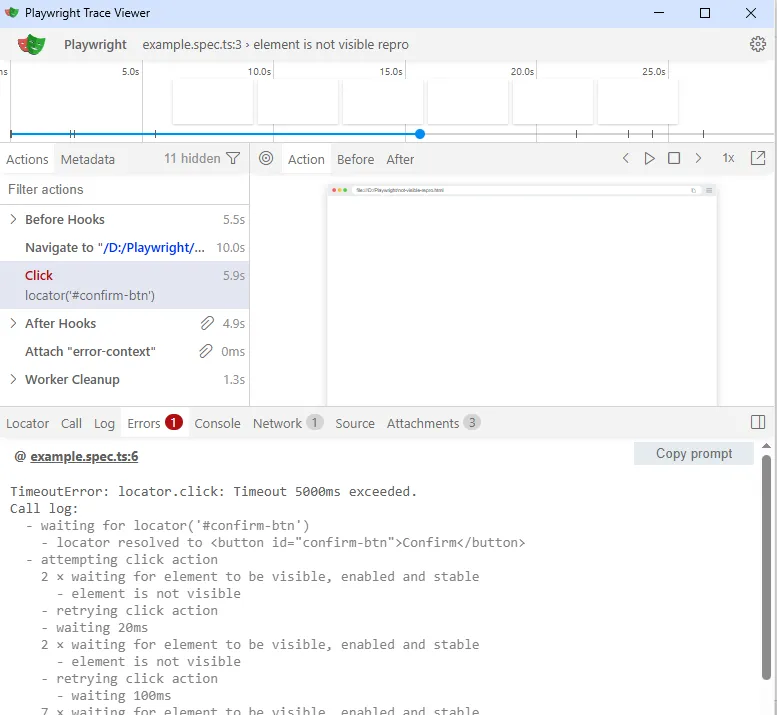
Your test clicks a button that’s sitting right there on the screen. The screen recording shows it. Your own eyes see it. And Playwright still throws a timeout, with one line buried in the log doing all the damage:
element is not visible - waiting...
That line comes right after Playwright logs something like “waiting for element to be visible, enabled and stable,” which tells you exactly which actionability check is stuck.
I’ve hit this more times than I can count, usually right before a release, usually on a locator that worked fine yesterday. If you searched the exact playwright element not visible error and landed here mid-debug, this covers the version of the problem where the element genuinely resolves in the DOM.
That’s different from a locator matching nothing at all. Playwright’s actionability checks are refusing to treat the element as visible.
If your Playwright element is not visible even though it renders fine when you watch the test run headed, the cause is almost always one of five things. I’m walking through all five in the order I actually see them in real projects.
In short: this error means Playwright can see the element in the DOM, but its actionability checks, specifically the visibility check, are failing before your click, fill, or hover action runs. The usual suspects are CSS that’s actually hiding the element, a display: contents wrapper Playwright can’t measure, a shadow DOM or slot rendering quirk, a viewport mismatch between your machine and CI, or the element rendering a few frames later than your action fired.
The fix is almost never a longer timeout. It’s finding which of those five is happening on your page and addressing that directly.
Playwright doesn’t check for “visible” the way a person glancing at a screen would. Per the actionability docs, an element is considered visible when it has a non-empty bounding box and no visibility: hidden computed style. Elements with opacity: 0 still count as visible, which surprises people the first time they check.
So when the log tells you a Playwright element is not visible, Playwright isn’t guessing. It measured the element’s box, checked the computed style, and got a result that fails the check. That’s actually good news, because it means the cause is on the page, not inside Playwright’s retry logic.
The Real Causes When a Playwright Element Is Not Visible
I’m ranking these by how often each one is actually the cause in real projects, not by how interesting they are to write about.
| Cause | How to tell it’s this one | Fix |
|---|---|---|
| CSS is actually hiding it | DevTools computed style shows display: none, visibility: hidden, or a zero-size box | Wait on the state that removes the hiding class, don’t blind-retry the click |
display: contents on the element | Trace Viewer shows a zero-size box around it even though its children render | Target a child that actually paints a box, or restructure the markup |
| Shadow DOM / slotted content | Element sits under a custom element’s #shadow-root; boundingBox() returns unexpected values | Scope the locator to the host element and verify with boundingBox() |
| CI-only viewport mismatch | Passes headed locally, fails headless in CI at a different width | Pin an explicit viewport in playwright.config.ts |
| Renders a few frames late | Trace shows the element appearing after the action already started | Assert on the signal that precedes the element instead of firing blind |
The CSS one is the boring, unglamorous majority case. Most of the time it’s a conditional render, a loading flag, or an accordion state that hasn’t flipped yet when your test tries to interact. The other four show up less often, but they’re the ones that eat an entire afternoon because they don’t look like a visibility problem at first glance.
Before You Apply Any Fix, Check This
Don’t guess. Open the Trace Viewer with npx playwright show-trace and look at the DOM snapshot at the exact moment the action failed, not a snapshot from a second earlier. This is also how you separate a genuinely hidden element from the classic playwright element hidden but exists case, where the node is real but its computed style is working against you.
Check three things before you touch any code. First, is the bounding box on the failing element actually zero, or does it just look small in the thumbnail. Second, run await locator.boundingBox() in a quick script and print the raw result, null means Playwright genuinely sees no box at all. Third, compare your local headed viewport against whatever your CI runner uses.
A false-positive “fix” looks like this: it passes once locally, you commit it, and it goes flaky in CI three weeks later. That almost always means you treated a symptom instead of the actual cause above.
How to Fix Each Cause
When CSS Is Actually Hiding the Element
This is the one everyone eventually hits. Something in your app state, a loading spinner, a feature flag, an unopened accordion panel, controls whether the element is rendered at all, and your test action fires before that state resolves.
- Find what actually controls the hiding class or inline style on the element.
- Assert on that precondition explicitly, instead of relying on the click’s auto-wait to somehow guess it.
- Let the action run only after the precondition holds.
// Broken: clicking blind and hoping the spinner is gone by the time it retries
await page.getByRole('button', { name: 'Confirm' }).click();

// Fixed: assert on the real precondition first
await expect(page.getByTestId('loading-spinner')).toBeHidden();
await page.getByRole('button', { name: 'Confirm' }).click();
When It’s display: contents
display: contents removes the element’s own box from layout, only its children get one. Playwright measures the wrapper, finds nothing to measure, and reports it as not visible, even though the content inside is sitting right there on the page. This is a documented behavior, not a bug you introduced, see microsoft/playwright#15034 for the original report.
- Identify the exact element carrying
display: contentsin your stylesheet. - Point the locator at a child element that actually paints a box instead of the wrapper.
// Broken: locator points at the display:contents wrapper
await page.locator('.contents-wrapper').click();

// Fixed: target the child that actually has a real bounding box
await page.locator('.contents-wrapper > span').click();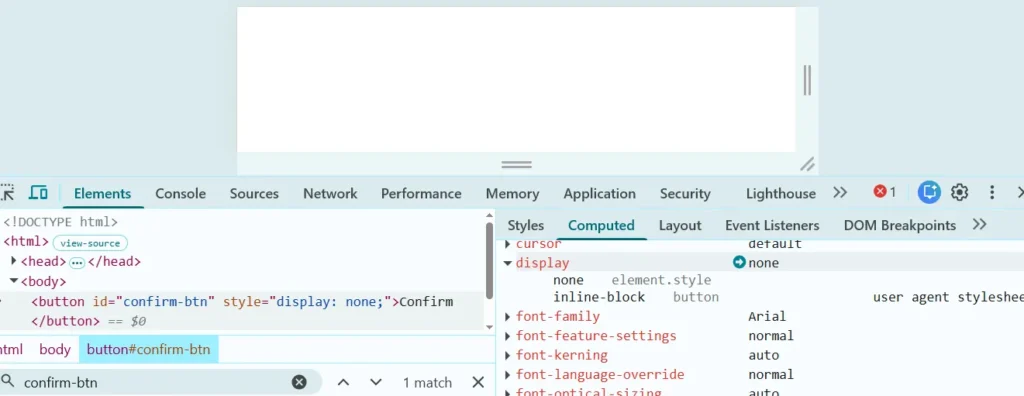
When It’s Shadow DOM or a Slot
Playwright pierces shadow DOM by default with ordinary locators, so this one is rarer than people assume. It shows up mostly with older web component libraries where slotted content doesn’t get a clean bounding box from the host element’s perspective.
- Print the bounding box directly so you’re not guessing from a screenshot.
- Scope your locator to the host custom element, then find the child inside it, rather than locating the slotted text globally.
const box = await page.locator('my-widget').locator('a', { hasText: 'Categories' }).boundingBox();
console.log(box); // null tells you Playwright genuinely can't measure a box here

await page.locator('my-widget').locator('a', { hasText: 'Categories' }).click();
When CI Uses a Different Viewport Than Your Machine
If your config doesn’t pin an explicit viewport, a headed local run can end up sized differently than your CI runner’s headless viewport. If your CSS has a responsive breakpoint anywhere near that width, the element really is display: none in one environment and really is visible in the other. Both Playwright and your test are telling the truth.
// playwright.config.ts
export default defineConfig({
  use: {
    viewport: { width: 1280, height: 720 },
  },
});
Pin the viewport explicitly for every project in your config, and this class of “works locally, fails in CI” report mostly disappears.
When It Renders a Few Frames Late
Sometimes the element genuinely isn’t there yet, an API response hasn’t landed, an animation hasn’t started, and your action fired a beat too early even though Playwright’s auto-waiting is doing its job. It just hasn’t waited on the right signal.
- Identify the real event that precedes the element becoming visible, usually a specific network response or an app-ready attribute.
- Wait on that signal explicitly before the action.
await page.waitForResponse(resp => resp.url().includes('/api/session') && resp.ok());
await page.getByRole('button', { name: 'Confirm' }).click();
Why force: true Isn’t the Fix Everyone Reaches For First
Most people’s first instinct, and Stack Overflow’s, is to slap force: true on the click and move on. That option skips Playwright’s non-essential actionability checks, including the visibility check that’s currently failing you.
Here’s my honest opinion on it, no hedging: if your element is really not visible, forcing the click doesn’t make it visible. It just makes Playwright stop telling you the truth about that. You’ve traded a clear failure for a silent one.
There are teams on the Playwright GitHub tracker who found that forcing a click still didn’t reliably interact with the intended element, because skipping the check doesn’t fix the underlying layout problem. It just stops Playwright from reporting it.
Increasing the timeout is the other reflex fix, and it’s just as much of a band-aid. It’ll pass today and come back flaky in three weeks, because you never actually addressed why the element wasn’t visible in the first place.
How to Confirm You’ve Actually Fixed It
Don’t stop at one green run. Re-run the test headed locally and, separately, inside the same container image or runner your CI uses, since that’s usually where you’ll discover a Playwright element is not visible only in one specific environment.
Open the Trace Viewer for the passing run and check that the bounding box at the moment of the action is a real, non-zero size, not just that the test happened to pass. Then run it several times in a row, or with --repeat-each=10 locally, before you trust it. A fix that only passes once isn’t confirmed, it’s lucky.
How to Prevent This Going Forward
A few habits cut down how often this error shows up at all. Assert on real preconditions instead of chaining actions and hoping auto-waiting covers for a state you haven’t checked yourself. Pin your viewport explicitly in every project block in playwright.config.ts, rather than letting local and CI drift apart silently.
Give elements that use display: contents or complex shadow DOM structures a stable data-testid on a node that actually has layout, so your locators aren’t fighting the CSS. And when this error shows up, treat it as a real signal about your page’s state, not noise to route around with force: true or a longer timeout.
Conclusion
The single thing worth remembering here: “element is not visible” is Playwright accurately reporting what the browser’s layout engine is telling it, not a flaky test runner being difficult. Every one of the five causes above explains exactly why a Playwright element is not visible in a specific, checkable way, not a Playwright quirk you have to work around blindly.
Once you stop treating this as noise and start treating it as a genuine signal, most of these get fixed in minutes instead of by bumping a timeout you’ll forget about next quarter.
If your locator is resolving to nothing at all instead of an invisible element, that’s a related but different problem. I cover it separately in why Playwright can’t find an element even when it exists.
FAQ
Does isVisible() return false even though I can see the element?
Yes, and that’s expected. isVisible() is a synchronous, non-retrying check, it evaluates the current state once and returns immediately. If you want Playwright to wait and retry until the element becomes visible, use await expect(locator).toBeVisible() instead, which auto-retries against the same actionability check.
Is this the same as “element is not attached to the DOM”?
No, that’s a different error and a different cause. “Not attached” means the element was removed or replaced, often because a framework re-rendered the component and your old locator reference is now stale. “Not visible” means the element still exists and resolves, it’s just failing the visibility check specifically.
Does this happen in Python or Java too, not just TypeScript?
Yes. The actionability checks, including the visibility rules, are shared across every Playwright language binding. The exact wording in the official docs is identical whether you’re reading the Node.js, Python, Java, or .NET version of the actionability page, since it’s the same underlying engine.
What if none of these five fixes work for my case?
Build the smallest possible repro that still shows the failure, and strip out everything unrelated to the element in question. Then search the microsoft/playwright GitHub issues for your exact scenario.
Also check the changelog for your installed version, since actionability behavior has shifted slightly across releases. As of Playwright 1.62.x this article’s guidance holds, but it’s worth confirming against your specific version if you’re on something older or much newer.