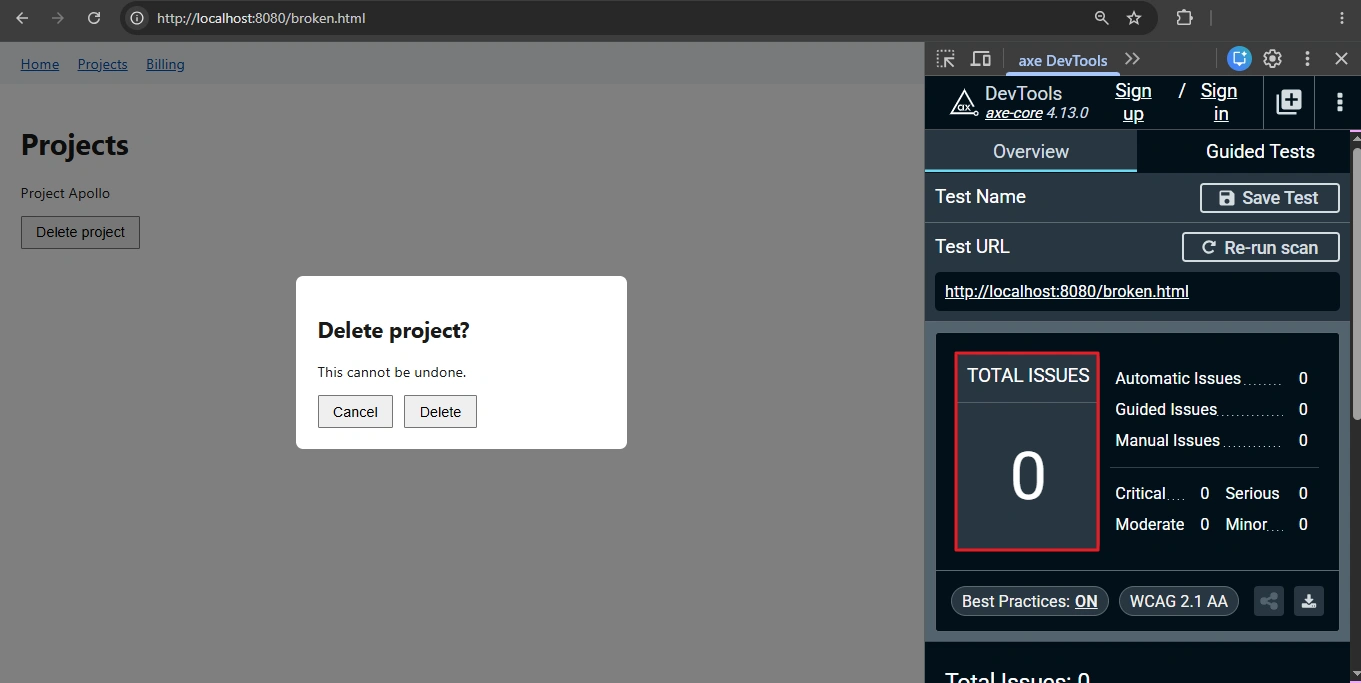
Your Playwright accessibility scan is green. Then a teammate opens the delete dialog, presses Tab three times, and keyboard focus lands on the navigation bar hiding behind the overlay. The scan did not lie. axe-core simply has no rule that checks whether your focus trap JavaScript works.
If you searched for a fix that holds up, this covers the four causes behind almost every broken modal, the markup that fixes each, and the keyboard tests that catch the next regression. This is for the tester or developer who just got the ticket. Everything targets axe-core 4.x and WCAG 2.2 AA.
The short version: a modal breaks when focus never enters the dialog, the page behind stays tabbable, focus is not restored on close, or Escape does nothing. The native <dialog> element opened with showModal() handles all four. A custom dialog needs inert on the background, Tab wrapping, an Escape handler and focus restoration. Test it with real key presses.
- What Does Broken Focus Management in a Modal Actually Look Like?
- The Four Causes, Ranked by How Often I See Them
- Before You Change Any Code, Run This Triage
- A Working Focus Trap JavaScript Implementation for Custom Dialogs
- Why aria-modal and aria-hidden Are Not the Fix
- How to Do Tab Key Navigation Testing on a Modal in Playwright
- How to Keep Focus Management From Regressing
- The One Habit That Keeps Modals Honest
What Does Broken Focus Management in a Modal Actually Look Like?
A modal is a promise to the keyboard user. Focus moves into the dialog on open, stays there until it closes, then returns to where the user was. Break any link and the user is operating a page they cannot see. WCAG 2.4.3 Focus Order covers the sequence, and 2.1.2 No Keyboard Trap covers the exit.
Here is the part that confuses people. Containing focus inside a modal is not a keyboard trap accessibility failure. The W3C explanation of 2.1.2 No Keyboard Trap lists a modal dialog as a passing example, as long as the user can leave with a button or the Esc key.
The real failure is a dialog with no keyboard way out.
Now the uncomfortable bit. axe-core has no rule for focus management. The nearest two are aria-dialog-name, which only checks that the dialog has an accessible name, and aria-hidden-focus, which fires when hidden content still contains focusable elements, with a catch I will get to below.
Deque’s 4.11 rule page tags aria-dialog-name as best-practice with no WCAG criterion attached, so a gate limited to WCAG tags never runs it.
A green scan tells you the dialog has a name. It tells you nothing about Tab.
If you are still setting up scans in your pipeline, start with the accessibility testing guide for QA engineers and come back once the basics run.
The Four Causes, Ranked by How Often I See Them
This ranking comes from the modals I have debugged. The first two causes produce most of the bug reports, and the last two tend to survive until a screen reader user finds them.
| Cause | How to tell it’s this one | Fix |
|---|---|---|
| 1. Focus stays on the trigger after open | Press Enter on the trigger, then Tab. Focus moves to the next element on the page behind the overlay, not into the dialog | Move focus into the dialog on open: autofocus on a native dialog, or .focus() on the first control in a custom one |
| 2. Background is still tabbable | Tab repeatedly inside the dialog. Focus reaches header or footer links behind it | Use native showModal(), or put inert on every sibling and wrap Tab at the first and last control |
| 3. Focus is not restored on close | Close the dialog, then read document.activeElement in the console. It says body | Save the trigger on open and call trigger.focus() on close, with a fallback if the trigger was re-rendered |
| 4. Escape and exit are missing | Press Escape with focus inside the dialog. Nothing closes | Handle Escape, or use native dialog, and always include a visible close button |
Cause 3 hides in single-page apps. When a React or Vue re-render replaces the trigger button, the saved reference points at a node that has left the document, and calling focus() on it quietly does nothing. Check trigger.isConnected before restoring, and fall back to a stable element such as the page heading.
A familiar pattern shows up with cause 2. The axe step in GitHub Actions stays green, and a day later QA files a keyboard bug against the same modal. Nothing in the pipeline was ever looking at focus.
Before You Change Any Code, Run This Triage
Three checks, in this order, tell you which cause you have.
- Paste
document.addEventListener('focusin', (e) => console.log(e.target))into the console and press Tab. The first element logged after the dialog’s last control is where focus leaks. - Read the axe JSON, including
incomplete. Anaria-dialog-nameentry means the dialog has no name, and anaria-hidden-focusentry means hidden content is still focusable. Empty results mean axe-core has nothing to say, and that is not a pass. - If axe flags something that sounds wrong, read how I filter axe-core false positives before suppressing any rule.
A Working Focus Trap JavaScript Implementation for Custom Dialogs
Start with the fix I would ship: the native element. A custom trap is only worth writing when you cannot use it.
Skip the focus trap JavaScript: fix all four causes with native dialog
<button id="open-delete">Delete project</button>

<dialog id="delete-dialog" aria-labelledby="delete-title">
  <h2 id="delete-title">Delete project?</h2>
  <p>This cannot be undone.</p>
  <form method="dialog">
    <button value="cancel" autofocus>Cancel</button>
    <button value="confirm">Delete</button>
  </form>
</dialog>
const dialog = document.getElementById('delete-dialog') as HTMLDialogElement;
document.getElementById('open-delete')!.addEventListener('click', () => dialog.showModal());Why this works: per MDN’s reference for the dialog element, showModal() makes everything outside the dialog inert, focuses the first focusable element inside it, and lets Escape close it.
On close, the browser also returns focus to the element that had it before. The autofocus attribute on Cancel puts focus on the least destructive control, which is where I want it for a delete confirmation.
When you cannot use native dialog: a custom trap
Here is the broken version I see most often. The attributes announce a modal, and nothing enforces one.
<!-- Broken: role and aria-modal describe a modal, nothing makes the page inert -->
<div class="overlay">
  <div role="dialog" aria-modal="true" aria-labelledby="t">
    <h2 id="t">Delete project?</h2>
    <button>Cancel</button>
    <button>Delete</button>
  </div>
</div>
The fix has six steps:
- Render the dialog as a direct child of
body, withrole="dialog",aria-modal="true",aria-labelledby,tabindex="-1"and thehiddenattribute. - On open, remember
document.activeElementas the trigger. - Put
inerton every other child ofbody, so clicks and the screen reader cursor cannot reach the page behind. - Move focus to an element marked
data-autofocus, or to the first focusable control. - Listen for
keydownon the dialog. Wrap Tab and Shift+Tab at the edges, and close on Escape. - On close, remove
inert, hide the dialog, and return focus to the trigger.
const FOCUSABLE =
  'a[href], button:not([disabled]), input:not([disabled]), select:not([disabled]), textarea:not([disabled]), [tabindex]:not([tabindex="-1"])';

export function openModal(dialog: HTMLElement, onClose: () => void = () => {}) {
  const doc = dialog.ownerDocument;
  const trigger = doc.activeElement as HTMLElement | null;
  const background = Array.from(doc.body.children).filter((el) => el !== dialog);

  background.forEach((el) => el.setAttribute('inert', ''));
  dialog.hidden = false;

  const focusables = () => Array.from(dialog.querySelectorAll<HTMLElement>(FOCUSABLE));
  (dialog.querySelector<HTMLElement>('[data-autofocus]') ?? focusables()[0] ?? dialog).focus();

  function onKeydown(e: KeyboardEvent) {
    if (e.key === 'Escape') {
      close();
      return;
    }
    if (e.key !== 'Tab') return;

    const items = focusables();
    if (items.length === 0) {
      e.preventDefault();
      dialog.focus();
      return;
    }
    const first = items[0];
    const last = items[items.length - 1];
    const active = doc.activeElement;

    if (e.shiftKey && (active === first || active === dialog)) {
      e.preventDefault();
      last.focus();
    } else if (!e.shiftKey && active === last) {
      e.preventDefault();
      first.focus();
    }
  }

  function close() {
    dialog.removeEventListener('keydown', onKeydown);
    background.forEach((el) => el.removeAttribute('inert'));
    dialog.hidden = true;
    trigger?.focus();
    onClose();
  }

  dialog.addEventListener('keydown', onKeydown);
  return close;
}
Call it from your open handler and keep the returned function for your close button: const close = openModal(dialogEl).
The details matter. The focusables() list is rebuilt on every Tab press, so a control added after open, such as a validation error link, joins the cycle instead of being skipped. And the dialog must sit outside the elements you mark inert, because an inert ancestor disables everything inside it, dialog included. Native modal dialogs are the one exception to that rule.
Why aria-modal and aria-hidden Are Not the Fix
Most people’s first move is adding aria-modal="true" and calling the ticket done. That attribute tells assistive technology to treat the rest of the page as unavailable. It does not stop the Tab key, so sighted keyboard users still walk straight out of the dialog. Treating the attribute as the fix satisfies the markup and fails the user.
The second move is aria-hidden="true" on the app root while the dialog is open. Whether the scanner catches that depends on a detail most guides skip. With a visible role="dialog" on the page, axe-core 4.13.0 does not report aria-hidden-focus as a violation. Its focusable-modal-open check returns “needs review” instead, so the result lands in incomplete and your gate stays green.
A violation does show up later, and it comes from a bug I have seen more than once. The dialog closes and nobody removes aria-hidden from the app root:
function openDialog() {
  app.setAttribute('aria-hidden', 'true');
  overlay.hidden = false;
}

function closeDialog() {
  overlay.hidden = true;
  // Bug: aria-hidden is never removed from #app
}
Now the whole page is hidden from screen readers while its links and buttons still answer to Tab. A scan of the closed page returns this (trimmed to the fields that matter):
{
  "id": "aria-hidden-focus",
  "impact": "serious",
  "help": "ARIA hidden element must not be focusable or contain focusable elements",
  "tags": ["wcag2a", "wcag412"],
  "nodes": [{ "target": ["#app"] }]
}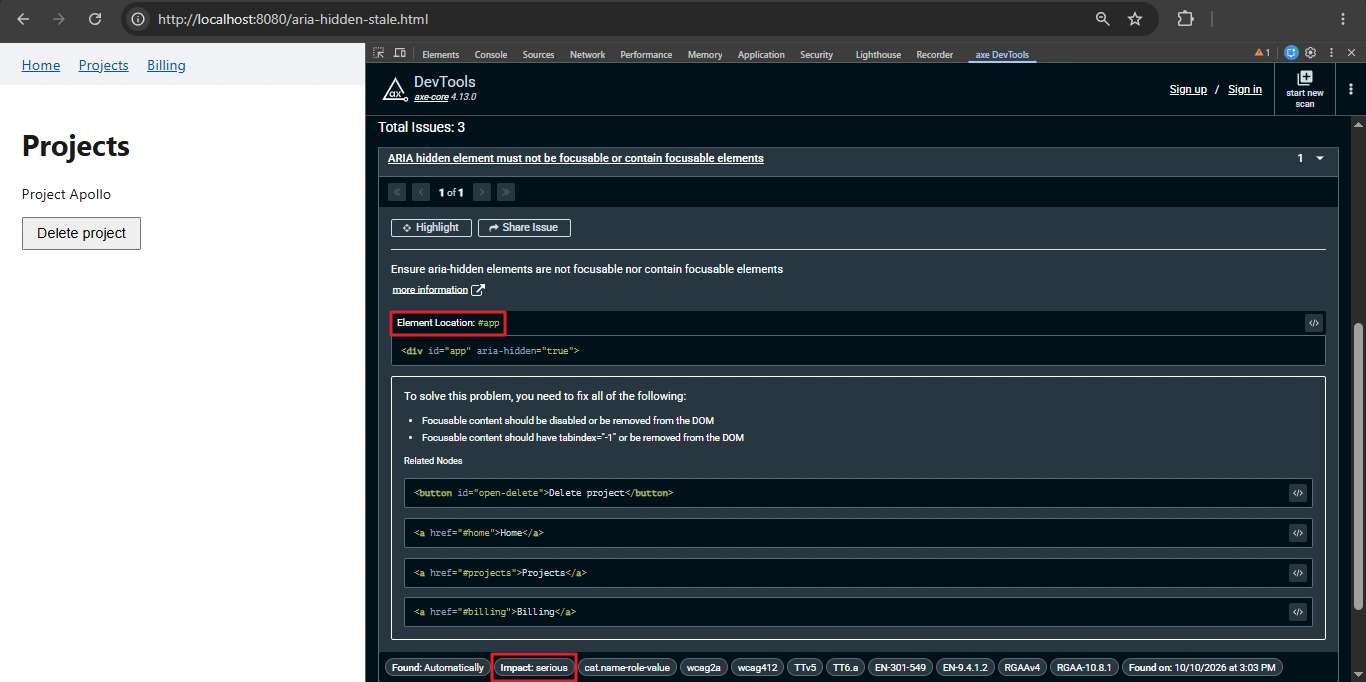
The rule maps to WCAG 4.1.2 Name, Role, Value at level A, so it fails even a WCAG-only gate. Setting aria-hidden="false" on a child will not rescue the content, because a hidden ancestor wins. The fix is inert in place of aria-hidden, set on open and cleared on close:
function openDialog() {
  app.inert = true;
  overlay.hidden = false;
}

function closeDialog() {
  overlay.hidden = true;
  app.inert = false;
}
The inert property removes focus, clicks and the accessibility tree for that subtree in one move. I scanned the fixed page open and closed in Chromium with axe-core 4.13.0 and got no violations and no needs-review items. Rerun it on your own axe version.
Now my blunt opinion. If your app only targets current browsers, delete the hand-rolled focus trap JavaScript and use the native dialog. Every custom trap I have reviewed had at least one of the four bugs, and the missing restore was the usual one.
Browser support is no longer the excuse. MDN dates dialog to March 2022 and inert to April 2023.
How to Do Tab Key Navigation Testing on a Modal in Playwright
Good modal accessibility testing needs two layers. Real key presses check where focus goes, and an axe scan checks names and hidden content. Neither layer substitutes for the other.
This is tab key navigation testing at its simplest: open the dialog, press Tab more times than there are controls, and assert after every press that focus has not landed on a page element behind it.
import { test, expect, Locator } from '@playwright/test';
import AxeBuilder from '@axe-core/playwright';

async function focusIsInside(dialog: Locator) {
  return dialog.evaluate((el) => el.contains(document.activeElement));
}

// Focus counts as escaped when it lands on a page element outside the dialog.
// document.body is allowed: native dialogs hand focus to browser controls
// for one Tab stop, which WCAG permits.
async function focusEscaped(dialog: Locator) {
  return dialog.evaluate((el) => {
    const active = document.activeElement;
    return active !== null && active !== document.body && !el.contains(active);
  });
}

test('delete dialog traps focus, closes on Escape, restores focus', { tag: '@a11y' }, async ({ page }) => {
  await page.goto('/projects');
  const trigger = page.getByRole('button', { name: 'Delete project' });
  await trigger.click();

  const dialog = page.getByRole('dialog', { name: 'Delete project?' });
  await expect(dialog).toBeVisible();
  expect(await focusIsInside(dialog)).toBe(true); // cause 1

  for (let i = 0; i < 12; i++) { // cause 2, forward
    await page.keyboard.press('Tab');
    expect(await focusEscaped(dialog)).toBe(false);
  }
  for (let i = 0; i < 12; i++) { // cause 2, backward
    await page.keyboard.press('Shift+Tab');
    expect(await focusEscaped(dialog)).toBe(false);
  }

  await page.keyboard.press('Escape'); // cause 4
  await expect(dialog).toBeHidden();
  await expect(trigger).toBeFocused(); // cause 3
});
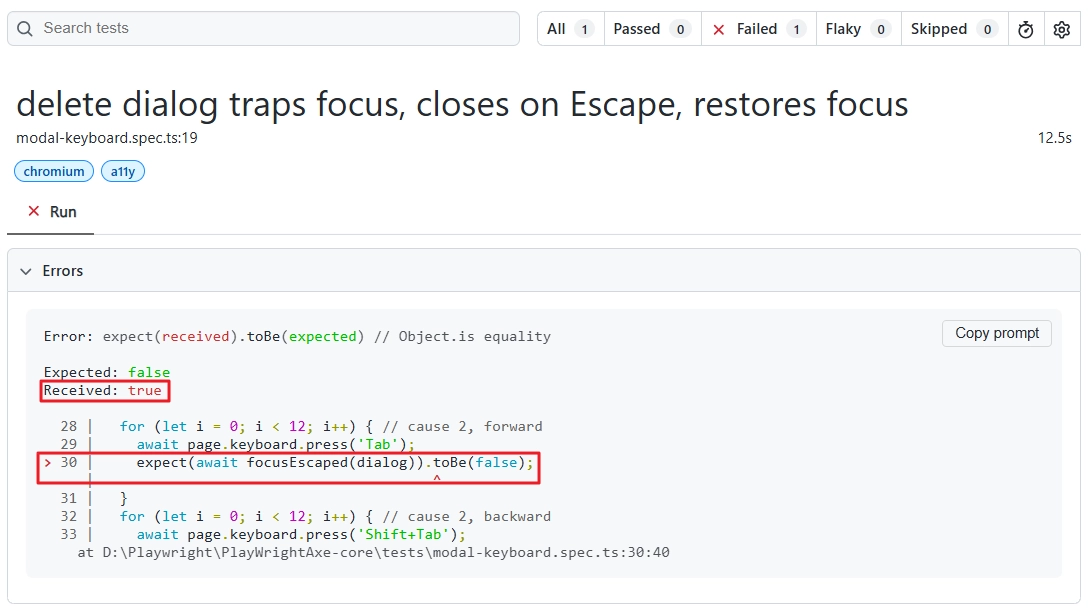
Run against the broken dialog from earlier, the HTML report fails inside the forward Tab loop:
The getByRole('dialog', { name }) locator does double duty. It fails when the dialog has no accessible name, so the same line checks what aria-dialog-name checks. The Escape step at the end is your keyboard trap accessibility check, since it proves the user can leave.
My first version of this test asserted that focus stayed inside the dialog on every press, and it failed against the native <dialog>. Tabbing through it in Chromium goes Cancel, Delete, then body, then Cancel again.
That body stop is the browser’s own controls taking one turn, which W3C says is allowed. So the helper fails only when focus lands on a page element behind the dialog.
Here are the numbers from my demo run in Chromium with axe-core 4.13.0. The broken dialog scanned at 0 violations and 0 needs-review items. The Tab loop failed on the third press, when focus reached the Home link behind the overlay. The same loop passed on the native dialog and on the custom trap above.
Now the scan. Run it on the whole page, not with .include('[role="dialog"]'), because aria-hidden-focus lives on the background and an include filter would hide it from you. Wait for the dialog before calling analyze(), so axe scans the open state.
test('open dialog has no axe violations', { tag: '@a11y' }, async ({ page }) => {
  await page.goto('/projects');
  await page.getByRole('button', { name: 'Delete project' }).click();
  await page.getByRole('dialog').waitFor();

  const results = await new AxeBuilder({ page })
    .withTags(['wcag2a', 'wcag2aa', 'wcag21a', 'wcag21aa', 'wcag22aa', 'best-practice'])
    .analyze();

  expect(results.violations).toEqual([]);
  // axe files aria-hidden-focus under "incomplete" while a modal is open
  expect(results.incomplete.filter((r) => r.id === 'aria-hidden-focus')).toEqual([]);
});
The second assertion matters. Without it, an aria-hidden background behind an open modal passes quietly, because axe-core files it as needs review. The best-practice tag is what pulls aria-dialog-name into the run. If you are building this from zero, my axe-core tutorial walks through the setup first.
Passing both tests still is not done. Open the page with NVDA on Windows or VoiceOver on macOS, trigger the dialog, and listen. You want the dialog name announced on open, a Tab cycle that stays inside, and focus back on the trigger after Escape. A fix that passes the scan and fails here is a workaround.
How to Keep Focus Management From Regressing
Move the focusIsInside and focusEscaped helpers from the test above into one shared module, and call them from every modal test in your design system. If you keep a custom focus trap JavaScript helper, put it in that module too, so the team does not end up with ten slightly different definitions of “trapped”.
Run the tests on every pull request and again overnight. The nightly run catches the case where a dependency bump changes how your component library renders its dialogs.
name: a11y
on:
  pull_request:
  schedule:
    - cron: '0 2 * * *'
jobs:
  keyboard-and-axe:
    runs-on: ubuntu-latest
    steps:
      - uses: actions/checkout@v4
      - uses: actions/setup-node@v4
        with:
          node-version: 22
      - run: npm ci
      - run: npx playwright install --with-deps chromium
      - run: npx playwright test --grep @a11y
Keep modal accessibility testing attached to the shared Modal component rather than to individual screens. When a team swaps the component, the tests travel with it, and the tab loop runs against the new implementation on the same day.
The One Habit That Keeps Modals Honest
Pick one modal in your app today and run the Tab loop test against it. If it fails, the table above tells you which cause you have, and the fix is usually a few lines of markup or one attribute.
If it passes, keep the test. Whether you ship the native dialog or your own focus trap JavaScript, that test is the only thing standing between your next refactor and a bug axe-core will never report. The scan confirms the dialog has a name. Only key presses confirm that a person can use it.
Frequently Asked Questions
Does trapping focus in a modal fail WCAG 2.1.2 No Keyboard Trap?
No. W3C lists a modal dialog as a passing example, provided the user can leave with Escape or a button. The criterion fails when there is no keyboard way out of a component.
Can axe-core detect a missing focus trap?
Not on its own. axe-core has no rule for where focus moves. It can flag a dialog with no accessible name (aria-dialog-name) and hidden content that is still focusable (aria-hidden-focus, which it reports only as needs review while a modal is open). Use Playwright key presses for the rest.
Do I still need a focus trap JavaScript library if I use the dialog element?
Rarely for a modal opened with showModal(), which handles focus, the inert background and Escape. Libraries still earn their place for custom widgets, non-modal overlays that need containment, and codebases that cannot use the native element.
Does anything change for focus management under WCAG 2.2?
Criteria 2.4.3 and 2.1.2 are unchanged. WCAG 2.2 adds 2.4.11 Focus Not Obscured (Minimum) at level AA, which matters when a sticky banner or cookie bar covers the focused control inside your dialog.