Your Playwright run goes red in CI, and the report ends with this line: aria-hidden-focus: ARIA hidden element must not be focusable or contain focusable elements (serious). The page looks fine. The mobile menu slides in and out, every link works, and the designer signed off yesterday. That gap between “looks fine” and “fails the scan” is what aria roles misuse feels like from the tester’s chair, usually a few hours before a release.
Nobody enjoys explaining to a release manager why a menu that every sighted tester can use is blocking the build.
This article covers the five causes I run into most, the exact axe-core rule behind each one, and working markup for every fix. I checked the rules against the axe-core 4.10 rule documentation, the 4.13.0 release notes, and WCAG 2.2 AA.
The short answer: aria roles misuse comes down to five causes. They are hidden content that is still focusable, invalid role or attribute values, a composite role missing its children, a role the element may not carry, and a custom role with no keyboard behavior. Correct the markup for the first four, ideally by swapping in the native HTML element. For the fifth, build the behavior the role promises and test it with a screen reader.
- What Does ARIA Roles Misuse Actually Mean in an axe-core Report?
- The 5 Causes, Ranked by How Often They Break Builds
- How Do You Fix Each Cause of ARIA Roles Misuse?
- Why Patching ARIA on Top of ARIA Is the Wrong First Fix
- How Do You Confirm the Fix Worked and Not Just the Scan?
- How to Keep These ARIA Mistakes From Coming Back
- Before You Trust the Scan, Check These Three Things
- The One Habit That Prevents Most of This
What Does ARIA Roles Misuse Actually Mean in an axe-core Report?
ARIA is a set of attributes that tells assistive technology what an element is, what it is called, and what state it is in. Misuse means those attributes contradict the real element, point at something that does not exist, or promise behavior the page never delivers.
Nearly every rule in this article maps to WCAG 2.2 success criterion 4.1.2, Name, Role, Value, which is Level A. It requires the name and role of every component to be programmatically determinable. The exception is aria-required-children, which Deque maps to 1.3.1, Info and Relationships. That matters when you file the bug, because the wrong criterion number sends the developer to the wrong spec page.
These are the rule IDs you will meet, with the impact axe-core assigns: aria-hidden-focus (serious), aria-roles (critical), aria-valid-attr (critical), aria-valid-attr-value (critical), aria-required-children (critical) and aria-allowed-role (minor).
One detail most write-ups skip: aria-allowed-role is a Deque best-practice rule, not a WCAG-tagged one. A scan filtered to wcag2a, wcag2aa, wcag21a, wcag21aa and wcag22aa never runs it, so it stays invisible until someone runs a wider scan. An AxeBuilder call with no withTags runs it, and I confirmed both behaviors on 4.13.0.
Version matters too. axe-core 4.13.0, the latest stable release when I checked in October 2026, adjusted aria-allowed-role for summary and figure elements and now flags deprecated ARIA attributes as needs-review. A version bump in package.json can change your violation count overnight.
This is the detection test I use, written with @axe-core/playwright and AxeBuilder. If you have not set it up yet, my axe-core tutorial walks through the installation:
import { test, expect } from '@playwright/test';
import AxeBuilder from '@axe-core/playwright';

test('home page has no ARIA violations', async ({ page }) => {
  await page.goto('https://your-site.com/');

  const results = await new AxeBuilder({ page })
    .withTags(['wcag2a', 'wcag2aa', 'wcag21a', 'wcag21aa', 'wcag22aa'])
    .analyze();

  expect(results.violations).toEqual([]);
});
Here is the entry axe-core 4.13.0 returned in my repro for a closed mobile menu, trimmed to the fields that matter. The exact failureSummary wording varies between axe-core versions:
{
  "id": "aria-hidden-focus",
  "impact": "serious",
  "help": "ARIA hidden element must not be focusable or contain focusable elements",
  "nodes": [
    {
      "html": "<nav id=\"drawer\" aria-label=\"Menu\" aria-hidden=\"true\">\n    <a href=\"/men\">Men</a>\n    <a href=\"/women\">Women</a>\n    <button type=\"button\">Account</button>\n  </nav>",
      "target": ["#drawer"],
      "failureSummary": "Fix all of the following:\n  Focusable content should be disabled or be removed from the DOM\n  Focusable content should have tabindex=\"-1\" or be removed from the DOM"
    }
  ]
}
Read failureSummary and html before anything else. They tell you which of the five causes you have.

The 5 Causes, Ranked by How Often They Break Builds
I rank these by how often each one has been the real reason a build went red in the projects I have worked on. Your mix will differ. Still, aria roles misuse clusters around the same patterns: custom widgets, modals, and components copied from a design system without reading its docs.
| Cause | How to tell it’s this one | Fix |
|---|---|---|
| 1. Hidden content that is still focusable | aria-hidden-focus (serious), or only under incomplete when a modal is open. The node HTML shows aria-hidden="true" on a container holding links or buttons | Use inert, or remove aria-hidden, or set tabindex="-1" on every focusable child |
| 2. Invalid role, attribute name or value | aria-roles, aria-valid-attr or aria-valid-attr-value (all critical). The node HTML contains a typo or a value like "yes" | Correct the spelling or value, or replace the whole thing with a native element |
| 3. Composite role missing required children | aria-required-children (critical), mapped to 1.3.1. The summary names the missing child roles | Add the required child roles in the correct structure |
| 4. Role not allowed on that element | aria-allowed-role (minor). Appears only in a best-practice scan | Use the native element, or nest the elements correctly |
| 5. Role with no behavior behind it | No violation at all. The keyboard fails when you test by hand | Use a native element, or implement keys, focus and state |
How Do You Fix Each Cause of ARIA Roles Misuse?
Cause 1: aria-hidden on content that can still take focus
Of all the aria-hidden mistakes I see, this is the one that fails builds most often. aria-hidden="true" removes an element and every descendant from the accessibility tree. It does not remove them from the tab order. A keyboard user can still land on a button that a screen reader will never announce, which is why Deque rates this rule as serious.
The usual source is a mobile menu drawer. It slides off screen with CSS, a developer adds aria-hidden="true" so screen readers skip it, and every link inside is still one Tab press away.
<style>
  #drawer { position: fixed; top: 0; left: 0; transform: translateX(-100%); }
</style>
<nav id="drawer" aria-label="Menu" aria-hidden="true">
  <a href="/men">Men</a>
  <a href="/women">Women</a>
  <button type="button">Account</button>
</nav>
The modal version has a twist. When a role="dialog" with aria-modal="true" is open and the page root carries aria-hidden="true", axe-core 4.13.0 reports no violation at all. It files aria-hidden-focus under results.incomplete with the message “Check that focusable elements are not tabbable in the current state”. A test that asserts only on violations stays green, so check incomplete too. My guide to the focus trap in a JavaScript modal covers the dialog side of this problem in detail.
Fix it in this order:
- Open the node’s
htmlin the violation and find the container that carriesaria-hidden="true". - If it is a closed drawer, an off-screen panel or the page behind a modal, replace the attribute with
inert. That removes the subtree from the tab order, blocks clicks, and hides it from assistive technology in one move. MDN listsinertas widely available across browsers since April 2023. - If a native
<dialog>opened withshowModal()fits your design, use it. The browser blocks the rest of the page for you. - If the element is a decorative icon inside a button, keep
aria-hidden="true"on the icon only. The button stays exposed and the icon stops cluttering its name. - If you cannot use
inert, settabindex="-1"on every focusable descendant, which is the passing pattern in Deque’s own examples.
// when the dialog opens
document.getElementById('app')?.toggleAttribute('inert', true);

// when the dialog closes
document.getElementById('app')?.toggleAttribute('inert', false);
This works because inert fixes both halves of the problem at once. The tab order and the accessibility tree now agree about what the user can reach.
Cause 2: roles, attribute names or values axe-core does not recognize
Three rules split this cause. aria-roles rejects role values that do not exist or are abstract. aria-valid-attr rejects attribute names it does not know, such as aria-visible. aria-valid-attr-value rejects bad values on good attributes, such as aria-hidden="rtue".
<!-- broken -->
<div role="buton" tabindex="0">Save</div>
<button aria-expanded="yes" aria-role="menu">Filters</button>
Three mistakes live in those two lines. buton is not a role, yes is not a valid value for aria-expanded, and aria-role is not an attribute at all. The attribute is called role, and typos in role names and attribute values are the ones I see most.
<!-- fixed -->
<button type="button">Save</button>
<button type="button" aria-expanded="false" aria-controls="filters-panel">Filters</button>
<div id="filters-panel" hidden>...</div>- Read
failureSummaryin the JSON. It names the exact value or attribute that failed. - Check the spelling against the ARIA reference for that role or attribute.
- If the element is a div pretending to be a button, replace it with a
<button>and delete the role. - Re-run the scan.
The fix works because a native <button> already exposes the right role, and aria-expanded accepts true or false (or leaves the state undefined). Incorrect ARIA attributes fail quietly in a real browser, which is exactly why the scanner exists.
Cause 3: composite roles missing their required children
Some roles are containers that only make sense with specific children. A tablist needs tab children, a list needs listitem children, a menu needs menuitem children. Without them, a screen reader announces a container with nothing inside it.
<!-- broken -->
<div role="tablist">
  <button>Details</button>
  <button>Reviews</button>
</div>
<!-- fixed -->
<div role="tablist" aria-label="Product info">
<button role="tab" id="tab-details" aria-selected="true" aria-controls="panel-details">Details</button>
<button role="tab" id="tab-reviews" aria-selected="false" aria-controls="panel-reviews" tabindex="-1">Reviews</button>
</div>
<div role="tabpanel" id="panel-details" aria-labelledby="tab-details">...</div>
<div role="tabpanel" id="panel-reviews" aria-labelledby="tab-reviews" hidden>...</div>- Read the missing roles from
failureSummary. - Add children with exactly those roles, directly inside the container.
- Give each tab an accessible name. axe-core 4.12.0 added an
aria-tab-namerule that checks this. - Add the keyboard behavior the pattern promises, arrow keys to move between tabs, or you have created Cause 5.
The fix works because the role hierarchy now matches the structure the ARIA specification defines. The scan goes green, but the pattern is only half built until the arrow keys work.
Cause 4: a role the element is not allowed to have
Not every role fits every element. aria-allowed-role checks each element against the HTML in ARIA rules, and it is the one most teams never see, because it only runs in a best-practice scan.
const bestPractice = await new AxeBuilder({ page })
  .withTags(['best-practice'])
  .analyze();

expect(bestPractice.violations.map((v) => v.id)).not.toContain('aria-allowed-role');
<!-- broken -->
<button role="heading" aria-level="2">Welcome</button><!-- fixed: a real heading containing a real button -->
<h2>
<button type="button" aria-expanded="false">Welcome</button>
</h2>A minor rating does not mean harmless. Deque warns that conflicting semantics can make assistive technology report nonsensical interface information. The corrected version works because the heading and the button each keep their own native role, instead of one overwriting the other.
Cause 5: a role with no behavior behind it
This is the aria roles misuse I find most frustrating, because there is no red line to point at. A div with role="button" has a valid role and a name from its text, so axe-core is satisfied. Axe-core does not test whether your key handlers exist, so it cannot know whether Enter or Space does anything.
<!-- scan tends to pass, keyboard fails -->
<div role="button" class="btn" id="save">Save</div>
<!-- fixed -->
<button type="button" class="btn" id="save">Save</button>If you truly cannot use a native element, you need tabindex="0" plus a key handler:
const save = document.getElementById('save');
save?.addEventListener('keydown', (event) => {
  if (event.key === 'Enter' || event.key === ' ') {
    event.preventDefault();
    save.click();
  }
});
The native button wins because focus, Enter, Space and the disabled state come built in. You will never match that for free with a div, and WCAG 2.1.1 (Keyboard) is the criterion you fail when you try.
Why Patching ARIA on Top of ARIA Is the Wrong First Fix
The most common mistake I see is stacking more ARIA on top of the problem. A role="button" div with no keyboard support gets an aria-label. A hidden container with a focusable child gets aria-hidden="false" on that child. The first keeps the scan quiet and the user stuck. The second does not even quiet the scan.
<section aria-hidden="true">
  <div aria-hidden="false">
    <a href="/help">Help</a>
  </div>
</section>
Deque’s documentation is explicit that aria-hidden="false" on a descendant does not re-expose it once an ancestor has aria-hidden="true". The link above still fails aria-hidden-focus. The same goes for aria-disabled="true" on an input inside a hidden container, because the input stays focusable.
A name on the wrong role is just a well-labeled wrong control. Adding aria-label treats the scanner, not the user.
Switching the rule off is the third trap. Playwright’s own documentation warns that exclude() skips every rule for that element and its descendants, and disableRules() is described as a temporary measure. Both are workarounds. If you must use one to unblock a release, ticket it and write an expiry date next to it, so the aria roles misuse underneath does not get buried.
Here is my less popular opinion: I would rather ship a component with no ARIA than one with patched ARIA. The old community rule that no ARIA beats bad ARIA exists for a reason. Reach for the native element first, because a <button> gives you role, name, focus and key handling for free. And for modal backgrounds, I now prefer inert over aria-hidden outright.
How Do You Confirm the Fix Worked and Not Just the Scan?
A green scan proves the markup passes axe-core’s checks. It does not prove a person can use the component, and the common ARIA errors it cannot see are exactly the ones that reach production. Playwright’s documentation says plainly that many accessibility problems can only be found by manual testing, so treat the scan as the first check, not the last.
Step 1: Check both result lists. Re-run the test and confirm the rule ID is gone from results.violations. Then look at results.incomplete, where axe-core puts elements it could not decide on. Asserting on both keeps the open-modal case from slipping through:
expect(results.violations).toEqual([]);
expect(results.incomplete.filter((r) => r.id.startsWith('aria-'))).toEqual([]);
Step 2: Read the accessibility tree. Open Chrome DevTools, select the element in the Elements panel, and open the Accessibility tab (it may sit behind the More Tabs button). Switch on Show accessibility tree and check the role and name of every node.
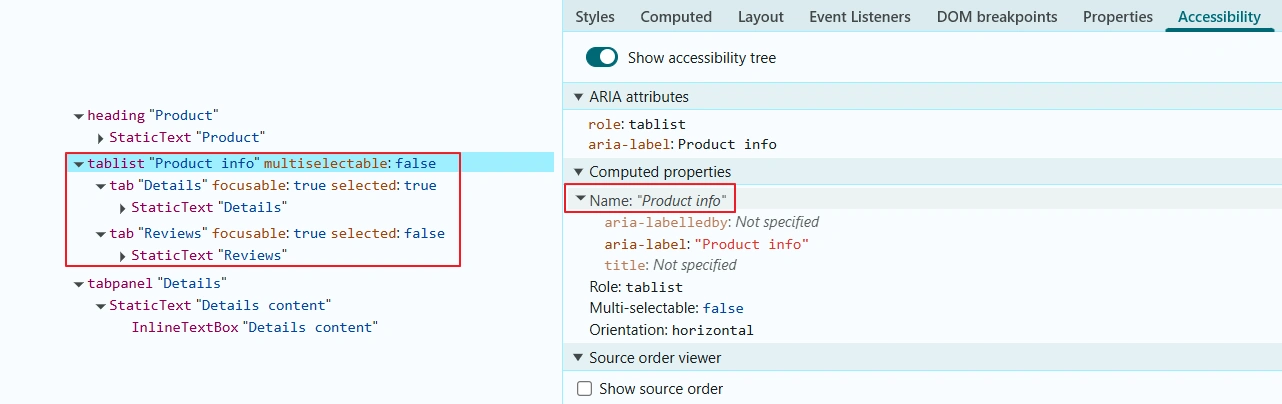
Step 3: Lock the structure into the test. An ARIA snapshot makes sure the structure cannot regress silently:
await expect(page.getByRole('tablist')).toMatchAriaSnapshot(`
  - tablist "Product info":
    - tab "Details" [selected]
    - tab "Reviews"
`);
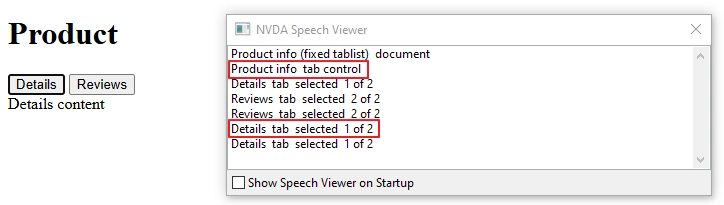
Step 4: Listen to it. Start NVDA, open Speech Viewer from the NVDA menu under Tools, and move through the component. Read the text output for role, name and state. On macOS, do the same with VoiceOver.
How to Keep These ARIA Mistakes From Coming Back
Scan the states, not just the page load. analyze() scans the page as it is at that moment, so open the dialog or menu and wait for it before calling it. Many failures live inside components that do not exist at load time.
Bump axe-core in its own pull request. In a GitHub Actions pipeline, a version bump bundled with feature work makes a new failure impossible to attribute. The 4.12.0 release notes say outright that the release can reveal new issues, and it added the aria-tab-name rule.
Add one line to your pull request template: any new role attribute needs a note on why the native element would not work. That one line is ARIA best practices testing at review time, and it is cheaper than discovering the problem in CI.
For the wider picture of automated scans, keyboard checks and screen reader checks, see my accessibility testing guide for QA engineers.
Before You Trust the Scan, Check These Three Things
First, read the node, not the headline. In the JSON, failureSummary for aria-hidden-focus mentions focusable content, aria-valid-attr-value names the bad value, and aria-required-children lists the missing child roles. Each points at a different cause from the table above, which is why one case of aria roles misuse can surface under three different rule IDs.
Second, check whether the element landed in incomplete instead of violations. Incomplete means axe-core needs a human to decide. With a modal open, hidden-but-focusable page content lands there, so the scan goes green while keyboard users can still tab behind the dialog.
Third, tab through the fixed component with NVDA. A false-positive fix looks like a div role="button" that gained an aria-label and now passes the scan, while Enter still does nothing. If the scan is green and the keyboard fails, you silenced the scanner and left the user stuck.
The One Habit That Prevents Most of This
Before you touch an ARIA attribute, ask what the native HTML element would be. A button, a heading, a dialog, a list. If one exists, delete the ARIA and use it, because the browser already wires up the role, the name, the focus and the keys.
Everything else in this article is for the cases where no native element fits. There you owe the user the full pattern, not just the role. Aria roles misuse stays rare on teams that treat ARIA as the exception rather than the default.
FAQ: ARIA Roles and axe-core Scans
Does aria-allowed-role fail a WCAG 2.2 AA scan?
Not by itself. Deque lists it as a best-practice rule rather than a WCAG success criterion, so a WCAG-tagged scan will not run it. Success criterion 4.1.2 is still Level A in WCAG 2.2, and it sits behind most of the other rules in this article. I still fix aria-allowed-role flags, because conflicting semantics can make a screen reader announce the wrong thing.
Do these ARIA rules apply to mobile apps tested with Appium?
Only partly, and the same aria roles misuse patterns do not carry over. ARIA exists in web content, so native iOS and Android elements use their own accessibility properties and axe-core rules like aria-hidden-focus do not apply to them. Inside a WebView, the web content still follows ARIA rules, so the markup fixes above still apply there.
Why does my ARIA scan pass locally and fail in CI?
Usually one of two things. The axe-core version differs between machines, and rules change between releases, or the scan ran before the component finished rendering. Pin the version in your lockfile and call locator.waitFor() on the dialog or menu before analyze().