
Your test fails with Timeout 30000ms exceeded and, underneath it, waiting for locator('#submit-button') to be visible. You can see the button sitting right there in the browser window. If that button lives inside an iframe, this is why: a Playwright locator timeout on an element inside an iframe happens because page.locator() only ever searches the top-level document, and an iframe is a completely separate document as far as the DOM is concerned.
This article covers the four real causes I’ve actually hit debugging this, tested against Playwright 1.62, and the working fix for each one.
What a Playwright Locator Timeout in an Iframe Actually Means
Your locator is searching the wrong document. An <iframe> element embeds an entire second page inside your page, with its own DOM tree and its own JavaScript execution context. page.getByRole() and page.locator() walk the main document only, so an element that’s visibly on screen inside the iframe simply doesn’t exist as far as that call is concerned, and Playwright keeps retrying until it gives up with a timeout. The fix is to enter the iframe explicitly with page.frameLocator() before you locate anything inside it, and everything downstream of that call resolves normally.
If you’ve searched something like playwright frame timeout error and landed here mid-debug, that’s the short version.
But “just use frameLocator” is the advice every Stack Overflow answer already gives you, and it still leaves people stuck, because there are four distinct ways this goes wrong even after you know that. This is usually what people actually mean when they search for playwright frameLocator not working: the call itself isn’t broken, it’s just pointed at the wrong document, or pointed at the right one too early. I’ve hit all four causes in real projects, and they don’t get fixed the same way.
A quick note on terms: Playwright docs use “frame” for the underlying object and “iframe” for the HTML element that holds it. I’ll use them interchangeably, the way most engineers actually talk, and flag it where the distinction matters for a fix.
The Four Real Causes, Ranked by How Often I Actually See Them
Most write-ups on this topic list causes in whatever order they occurred to the author. I’m ranking these by frequency, based on what actually shows up in real projects and CI pipelines, not a hypothetical checklist.
1. You never switched context with frameLocator()
This is the cause behind the large majority of Playwright locator timeout iframe reports I’ve seen, including my own early Playwright code. You write a locator the exact same way you would for a normal page element, and it fails silently until the timeout.
// Wrong: searches the main page, never enters the iframe
await page.locator('#cardNumber').fill('4111111111111111');
The fix is to get a FrameLocator for the iframe first, then chase all of your locators off of that instead of off of page.
// Correct: enters the iframe before locating anything
const paymentFrame = page.frameLocator('iframe[name="card-frame"]');
await paymentFrame.locator('#cardNumber').fill('4111111111111111');- Find a selector that uniquely identifies the
<iframe>element itself (anid,name,title, orsrcpattern). - Call
page.frameLocator(selector)to get aFrameLocatorscoped to that iframe’s document. - Call
.locator(),.getByRole(), or any other locator method on theFrameLocator, not onpage. - Chain the action (
.fill(),.click(),.check()) exactly as you would for a normal locator.
This is the one Playwright’s own codegen tool doesn’t help you catch. There’s an open GitHub issue where “Pick locator” in codegen doesn’t show that a recorded element lives inside an iframe, so if you’re pasting recorded code straight out of codegen, you can copy a locator that quietly needs a frameLocator() wrapper it never got.
2. The iframe hasn’t actually loaded yet
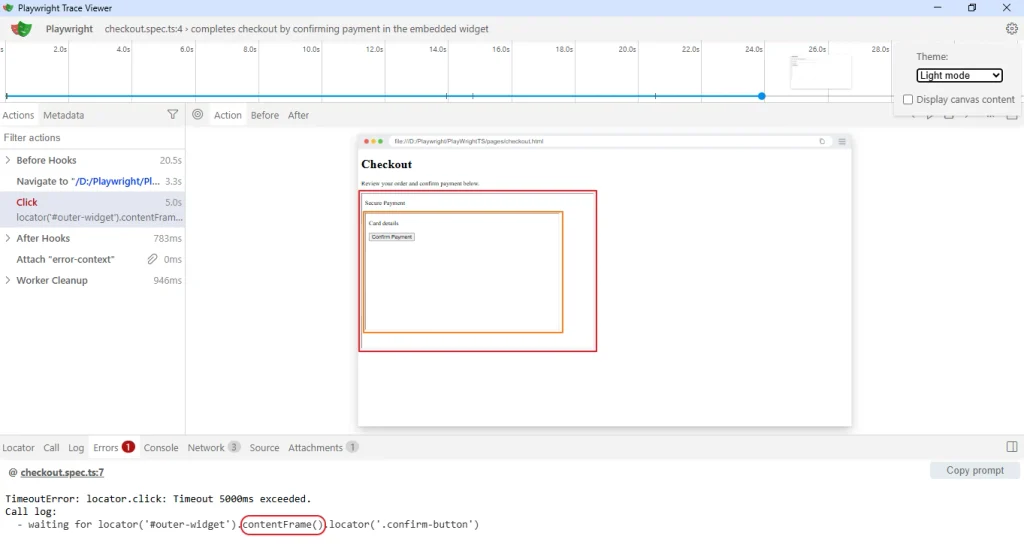
This one looks identical to cause #1 in the error output, which is exactly why it wastes so much time. You already have a frameLocator() in place, and it still times out. Check the Trace Viewer timeline for the failing action: if the iframe element is present but its content frame hasn’t attached yet, you’ll see the outer page fully loaded while the frame slot inside it is still blank.
Third-party embeds are the usual trigger here: a Stripe or Braintree payment field, a Google reCAPTCHA widget, an embedded YouTube player. These load their iframe src asynchronously, often after their own JS bundle finishes fetching, which can lag well behind page.goto() resolving.
// Wrong: assumes the iframe's document exists as soon as the element does
const frame = page.frameLocator('#stripe-iframe');
await frame.locator('input[name="cardnumber"]').fill('4242424242424242');
frameLocator() itself doesn’t wait for the frame to finish loading, it just builds a locator scoped to wherever that iframe currently points. Auto-waiting still applies once you call an action on it, but only up to your timeout, and a slow third-party script can genuinely exceed the default.
// Correct: give the frame's own content something explicit to wait for
const frame = page.frameLocator('#stripe-iframe');
await frame.locator('input[name="cardnumber"]').waitFor({ state: 'visible', timeout: 15000 });
await frame.locator('input[name="cardnumber"]').fill('4242424242424242');
I’ve seen this exact pattern block a release: the payment iframe loaded fine on every engineer’s home connection and consistently lagged past the default timeout on a shared GitHub Actions runner under load.
3. Nested iframes missing a link in the chain
Some embeds put an iframe inside an iframe, usually because a third-party widget wraps its own third-party widget. If you only write page.frameLocator() once, you’re scoped to the outer iframe’s document, and any element inside the inner iframe is still invisible to that locator, for the same root reason as cause #1.
// Wrong: only enters the outer iframe
await page.frameLocator('#outer-widget').locator('.confirm-button').click();
frameLocator() chains. Call it again on the result to step into the nested iframe before locating the element.
// Correct: chains frameLocator calls to reach the nested iframe
await page
  .frameLocator('#outer-widget')
  .frameLocator('.inner-checkout-frame')
  .locator('.confirm-button')
  .click();
Note that outer and inner locators have to belong to the same frame chain, and an inner locator can’t itself contain another FrameLocator mid-expression, per the FrameLocator API docs, which is the closest thing to an official reference on how to handle iframes in Playwright when nesting is involved. If you’re not sure how deep the nesting goes, open the Trace Viewer, click the failing action, and check the call log at the bottom: a chain like locator('#outer-widget').contentFrame().locator(...) tells you exactly how many .contentFrame() hops Playwright actually made, versus how many the real DOM needs.
4. The frame got detached or swapped mid-action
This is the least common of the four in my experience, but the most confusing when it happens, because the error message is different: Error: frame.click: Frame was detached. Some payment and auth providers destroy and recreate their iframe after tokenization or a redirect step, which orphans any FrameLocator you resolved before that happened.
// Wrong: resolves the frame once, then keeps using a reference that may be stale
const frame = page.frameLocator('#auth-frame');
await frame.locator('#otp-input').fill('123456');
await page.click('#continue');
await frame.locator('#confirm-button').click(); // frame may already be gone
frameLocator() re-resolves the iframe by selector on every call rather than holding a stale handle, so re-querying it after the action that triggers the swap is usually enough.
// Correct: re-query the frame locator after the action that can swap it
await page.frameLocator('#auth-frame').locator('#otp-input').fill('123456');
await page.click('#continue');
await page.frameLocator('#auth-frame').locator('#confirm-button').click();
I hit a version of this on a checkout flow where the payment provider swapped iframes after a 3D Secure redirect. The fix wasn’t a longer timeout, it was accepting that the old frame reference was gone for good and re-locating against the DOM as it existed after the redirect.
| Cause | How to tell it’s this one | Fix |
|---|---|---|
| No frameLocator used | Locator matches the wrong document entirely; works if you console.log the count from page.locator() directly and get 0 | Wrap the locator chain in page.frameLocator() |
| Iframe not loaded yet | Trace Viewer shows the outer page loaded, iframe slot empty at the failing timestamp | Add an explicit .waitFor({ state: 'visible' }) with a longer timeout on the frame’s own content |
| Nested iframes | Trace Viewer’s call log shows only one .contentFrame() hop when the DOM actually needs two | Chain .frameLocator() calls, one per nesting level |
| Frame detached mid-action | Error text specifically says “Frame was detached”, not a timeout | Re-resolve page.frameLocator() fresh after whatever action triggers the swap |
The Fix Everyone Reaches for First, and Why It’s Wrong
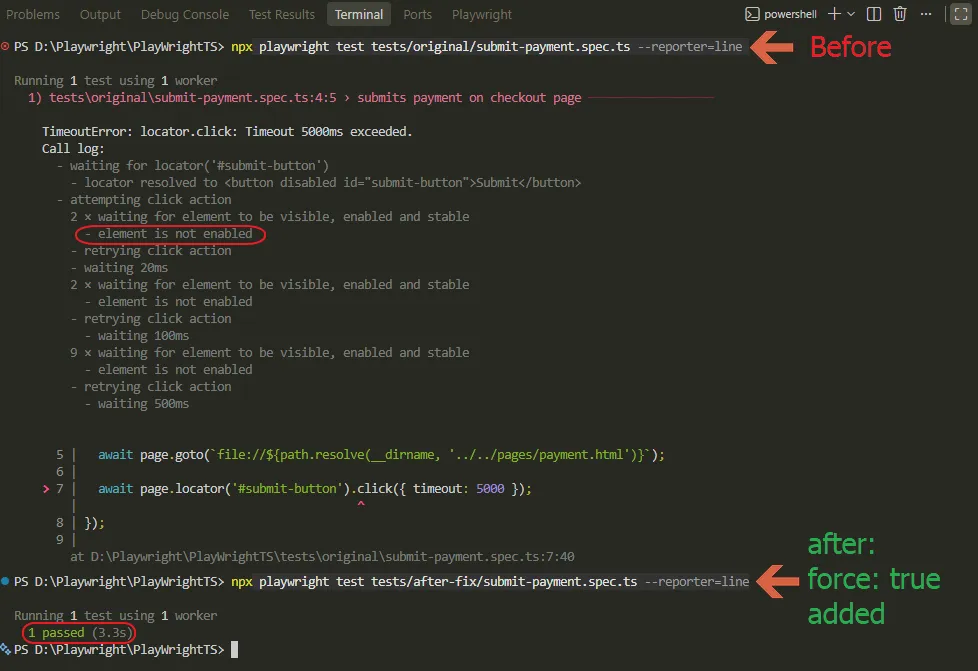
Most people’s first instinct when a locator inside an iframe won’t resolve is to bump the timeout, wrap the action in page.waitForTimeout(5000), or slap { force: true } on the click and move on. That’s treating the symptom.
A longer timeout might make cause #2 pass today, but it does nothing for cause #1, #3, or #4, and it makes your suite slower for every single run whether the iframe is slow that time or not. force: true is worse: it skips Playwright’s actionability checks entirely, visible, enabled, stable, receives-events, so it’ll happily click a disabled leftover button on the wrong page instead of the real one buried in the iframe. You get a passing test that isn’t actually testing what you think it’s testing.
I’ll say this plainly: if you don’t know which of the four causes above you’re looking at, adding force: true isn’t a fix, it’s you asking Playwright to stop protecting you from a bug you haven’t diagnosed yet.
How to Confirm This Is Actually Your Cause
Before you commit to any of the four fixes above, check these two things first. They take less time than applying the wrong fix and re-running the suite.
Open the failing test’s trace with npx playwright show-trace and look at the DOM snapshot for the failing action. If the target element shows up highlighted inside a nested iframe box in that snapshot, you’re dealing with one of the four causes above, not a plain visibility or timing issue on the main page.
Second, run the exact locator you’re using against page directly, without any frameLocator(), and log the result count. Zero confirms the element genuinely isn’t reachable from the main document; a count above zero somewhere else on the page usually means a strict mode or selector-specificity problem instead, which is a different fix entirely.
A false-positive “fix” looks like this: the test passes once after you add force: true or a longer timeout, then goes flaky again the next time the third-party iframe loads a little slower, because the underlying frame-targeting problem was never actually addressed.
How to Stop This From Coming Back
Once a test is fixed, the same bug tends to resurface the next time your team adds a third-party embed. A few habits keep it from becoming a recurring fire drill.
Keep frame selectors in one place, like a page object or fixture, instead of scattering page.frameLocator('#some-id') across every spec file. When the provider changes their iframe’s id or name, you update one line instead of hunting through the suite.
For anything that loads a third-party iframe, add an explicit waitFor() on a real element inside that frame rather than relying on the default action timeout. This also makes the failure message clearer, since you’ll see a wait-for-visible failure instead of a generic click timeout.
Run the suite against the same kind of environment your CI uses, at least occasionally, even locally. A self-hosted runner or a resource-constrained Docker container will expose a slow-loading iframe a fast local machine never will.
Wrapping Up
If you remember one thing from this, make it this: a locator timeout inside an iframe is almost never about your selector being wrong, it’s about which document that selector is searching. Get the frame targeting right first, and most of what looks like a locator problem disappears on its own. If you’re still running into locator timeouts outside of an iframe context specifically, the causes and fixes differ enough that it’s worth checking why Playwright cannot find an element even when it exists separately.
Frequently Asked Questions (FAQs)
Why does my Playwright locator time out only inside the iframe, not on the rest of the page?
This is the classic playwright locator timeout iframe pattern: page.locator() and page.getByRole() search the main document only. An element inside an iframe lives in a separate document, so those calls retry until the timeout fires even though the element is visible on screen. Wrap the locator in page.frameLocator() and the same call resolves normally.
Why does frameLocator() work locally but still time out in CI?
This is almost always cause #2: the third-party iframe loads slower on a shared CI runner than on your local machine. Add an explicit waitFor() on the frame’s content with a longer timeout rather than increasing the timeout for every action in the test.
Does this happen in Python or Java too?
Yes. The underlying cause, a locator searching the wrong document, is the same across all Playwright language bindings. The API is frame_locator() in Python and frameLocator() in Java, both work the same way as the TypeScript version shown here. If you’re working in Java specifically, the Playwright Java iframe guide walks through the same four causes with Java syntax.
Is page.frame() the same thing as page.frameLocator()?
No, and mixing them up causes its own confusion. page.frame() returns a Frame object for a frame that already exists at the time you call it, while page.frameLocator() returns a lazy FrameLocator that re-resolves the iframe on every action, which handles reloads and late-loading frames better in most test scenarios.
Does this still apply in the latest Playwright version?
As of 1.62, yes, this is still current behavior. Frame handling hasn’t changed structurally in recent releases, but it’s always worth checking Playwright’s release notes if you’re on a newer version and seeing different behavior than described here.
What if none of these four fixes work?
Get a minimal reproduction down to a single test file and a single iframe interaction, then check whether the issue is version-specific by searching open issues on the microsoft/playwright GitHub repository. If you’re staring at a playwright iframe locator error that genuinely doesn’t match any of the four causes here, cross-origin iframes with strict CSP headers occasionally introduce edge cases beyond this list, and the issue tracker is the fastest way to find out if you’ve hit one.