Your CI pipeline fails on an axe-core scan. You pull up the JSON, and the violation is sitting right there in black and white. Then you actually look at the flagged element, maybe with a screen reader, maybe just by squinting at it in the browser, and nothing looks wrong.
That’s an axe-core false positive, and it happens more often than Deque’s own “zero false positives” design goal for the engine would suggest. I’ve lost more than one evening arguing with a CI gate over exactly this, so at this point I don’t trust the label “false positive” on a violation until I’ve actually proven it.
This article covers the real causes I’ve hit in production projects, ranked by how often each one is actually the culprit, the exact axe-core configuration to filter each one out, and how to tell a genuine false positive from a violation you’re just tired of dealing with.
An axe-core false positive usually comes from one of four places: a genuine spec-level mismatch that doesn’t reflect how assistive technology actually renders the element, a scan that ran before the DOM finished settling, markup inside a shadow root or third-party widget that axe can only partially evaluate, or a best-practice rule that isn’t actually required at your target WCAG conformance level. The fix is never to slap an aria-label on the element to make the message disappear. The fix is figuring out which of these four is happening, then using axe-core’s own configuration options, exclude(), disableRules(), or a scoped include(), to filter it out at the right layer instead of suppressing it blindly.
What Counts as a False Positive
A true false positive is a case where axe-core reports a WCAG violation, but the element is genuinely accessible to a real user with real assistive technology. That’s different from a rare rule the tool got flat wrong, and different from a “best practice” rule flagging something that isn’t a WCAG failure at all, just a stylistic preference axe ships with enabled by default. If you’re newer to this space, my accessibility testing guide for QA engineers covers the broader distinction between automated scans and real conformance before you get into troubleshooting specific rules.
axe-core’s project page has stated a zero false-positive design goal since the early aXe days. In practice, that goal describes intent, not a guarantee. The engine has to make judgment calls about computed styles, stacking contexts, and shadow DOM boundaries, and those calls are sometimes wrong. Deque tracks and fixes these as real bugs, which is exactly why version matters here.
I’m verifying everything in this piece against axe-core 4.13.0, current as of writing, and WCAG 2.2 AA. Nearly every 4.x minor release has shipped a fix for a reported false positive, so before you spend an hour excluding a selector, check whether you’re even on a version that still has the bug.
Deque’s own release notes back this up. When axe-core 4.1 shipped, the team specifically called out clearing a backlog of rare false positives, including color-contrast not accounting for pseudo-element backgrounds and the region rule flagging empty SVG elements it shouldn’t have touched. Both were closed as real bugs, not disputed as user error. That’s the standard I hold a “false positive” to before I write a config change: it should be provable, the same way those were.
It’s not always a quick fix, though. A target-size false positive on overlapping elements inside a “fake” stacking context was still open and ungroomed on the axe-core GitHub tracker as of mid-2025. Some of these sit for a while. That’s exactly why scoping a fix to your project instead of waiting on an upstream patch matters.
The Most Common axe-core False Positive Causes, Ranked
I’m ranking these by how often each one has actually turned out to be the cause on real projects, not by theoretical frequency.
1. Contrast and stacking-context miscalculation. The color-contrast rule has to figure out what’s actually painted behind a text node, and it does that by walking up positioned ancestors. When an element has position: relative or position: absolute without its own explicit background, axe can occasionally grab the wrong ancestor’s background color in certain stacking contexts, computing a contrast ratio that doesn’t match what a sighted user actually sees. This is a documented, reproducible axe-core bug pattern, not a guess.
2. Scan timing. axe reads computed styles and the accessibility tree at the exact moment .analyze() runs. If a CSS transition hasn’t finished, a modal hasn’t fully mounted, or a live region hasn’t updated yet, axe is scoring a transient DOM state that no real user ever actually lands on.
3. Shadow DOM and third-party widget markup. A date picker, chat widget, or ad component you don’t control can render markup axe evaluates correctly per the letter of the rule but that a real screen reader announces just fine, because the assistive technology’s accessibility tree computation and axe’s static analysis don’t always agree at shadow boundaries.
4. Best-practice rules outside your target conformance level. Rules like region or landmark-one-main aren’t tied to a specific WCAG success criterion. They’re industry-recommended patterns axe enables by default. If your team is targeting WCAG 2.1 AA and you’re mid-migration on landmark structure, these will fire constantly and get labeled “false positives” when they’re really just out of scope for right now.
| Cause | How to tell it’s this one | Fix |
|---|---|---|
| Contrast/stacking-context bug | Manually check the rendered background with browser devtools; it doesn’t match the bgColor value in the axe JSON | Scoped exclude() on the specific selector, plus an explicit background-color as a real markup fix |
| Scan timing | Re-running .analyze() a second or two later produces a different result for the same element | Wait for the final DOM state before calling .analyze() |
| Shadow DOM / third-party widget | A screen reader announces the element correctly; the violation only exists inside a component you don’t own | exclude() the widget’s container, tracked with an internal ticket |
| Best-practice rule out of scope | The rule ID has no WCAG tag in the axe JSON, or it’s a “best practice” tag only | withTags() scoped to your actual conformance target, or disableRules() for that specific rule |
How to Fix Each Cause
1. Stacking-context contrast false positives
Check the actual violation JSON first. This is the exact shape axe-core returns:
{
  "id": "color-contrast",
  "impact": "serious",
  "description": "Elements must have sufficient color contrast",
  "nodes": [
    {
      "target": [".hero h1"],
      "any": [
        {
          "id": "color-contrast",
          "data": {
            "fgColor": "#ffffff",
            "bgColor": "#929292",
            "contrastRatio": 3.11,
            "expectedContrastRatio": "4.5:1"
          }
        }
      ]
    }
  ]
}
Before touching config, confirm it’s wrong. Open browser devtools, inspect the element, and read the actual computed background from the rendered layer, not from a single CSS rule. If the computed background axe reports doesn’t match what’s actually painted, you’ve confirmed the stacking-context bug rather than a real contrast failure. If you’re not sure whether you’re even looking at a stacking-context issue versus a genuine contrast failure, my color-contrast error troubleshooting article walks through six real causes of that rule specifically.
- Give the flagged element its own explicit
background-colorinstead of relying on an ancestor’s, which removes the ambiguity axe is misreading. - If you can’t touch the markup right away, exclude just that selector so the rest of the contrast rule keeps running everywhere else.
- File it against your axe-core version if it’s still reproducible on 4.13.0, so it gets fixed upstream instead of living in your exclude list forever.
import { test, expect } from '@playwright/test';
import AxeBuilder from '@axe-core/playwright';

test('scoped axe-core exclude selector for a known contrast bug', async ({ page }) => {
  await page.goto('/pricing');

  const results = await new AxeBuilder({ page })
    .exclude('.hero h1')
    .analyze();

  expect(results.violations).toEqual([]);
});
2. Scan-timing false positives
Don’t call .analyze() the moment the page loads if the element you care about renders after a transition, an API response, or a client-side hydration step.
- Wait for the actual final state of the element, not just page load, using a locator wait rather than a fixed timeout where possible.
- If the flake is tied to a CSS transition specifically, wait past the transition duration before scanning.
- Re-run the same test twice locally to confirm the violation disappears once timing is fixed, not just once.
await page.goto('/checkout');
await page.locator('[data-testid="cart-summary"]').waitFor({ state: 'visible' });
await page.waitForTimeout(300); // let the CSS transition finish before axe reads computed styles

const results = await new AxeBuilder({ page }).analyze();
expect(results.violations).toEqual([]);
3. Shadow DOM and third-party widget noise
You usually can’t fix markup you don’t own. Scope around it instead of disabling the rule everywhere.
const results = await new AxeBuilder({ page })
  .exclude('#third-party-chat-widget')
  .analyze();
Be honest about what this actually does before you reach for it. Playwright’s own documentation is direct about the downside: exclude() drops the element and every descendant from the scan, and it turns off every rule for that region, not just the one rule that’s misfiring. If the widget has one bad aria-label but is otherwise fine, exclude() also stops checking its color contrast, its focus order, everything.
Raw axe-core has no built-in way to suppress a single rule on a single element and keep the rest of that element’s checks running. That’s a real gap, not something I’m missing. Tools like Cypress Accessibility built their own data-a11y-ignore attribute specifically to fill it, but that’s a Cypress-layer feature, not something @axe-core/playwright or plain axe-core gives you out of the box. If you need that level of precision with Playwright, your options are fixing the widget, filing it upstream with the vendor, or accepting the full exclude() and tracking the coverage gap deliberately.
If the widget is embedded across many pages, put this exclusion in one shared helper function your whole suite imports, with a comment explaining why, and a linked ticket. An unexplained exclude selector six months from now looks like laziness even when it was the right call.
4. Best-practice rules outside your conformance target
Restrict the ruleset to what you’re actually being held to, instead of letting every axe-core default rule run and then explaining away the ones that don’t apply. landmark-one-main and region are the two you’ll hit most, and they’re a good example of why this cause gets mislabeled as a false positive in the first place: axe reports them by default, they’re real best-practice recommendations per Deque’s landmark-one-main rule documentation, but neither is tied to a specific WCAG success criterion. A page missing a
wrapper scans like this:
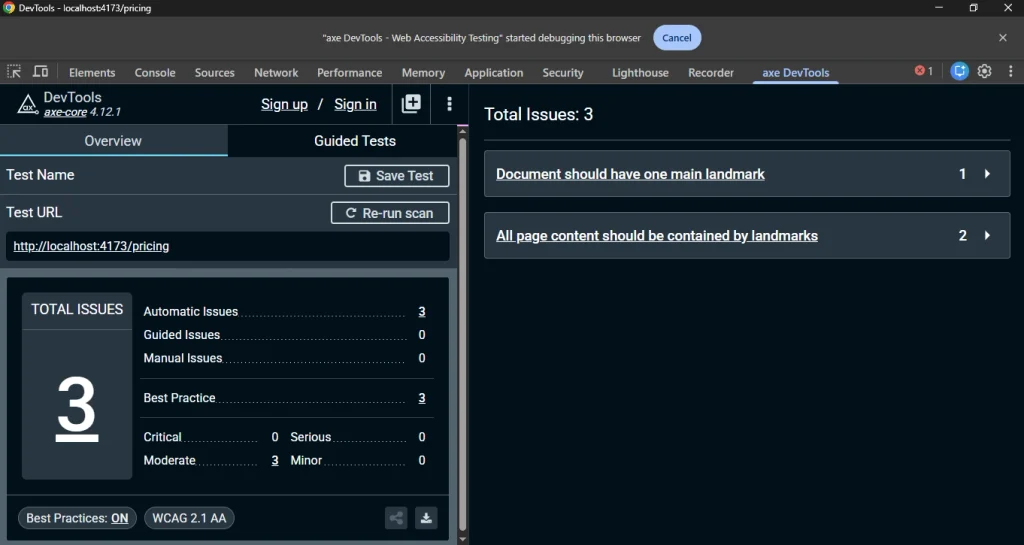
The same two rules show up when you run this through Playwright:
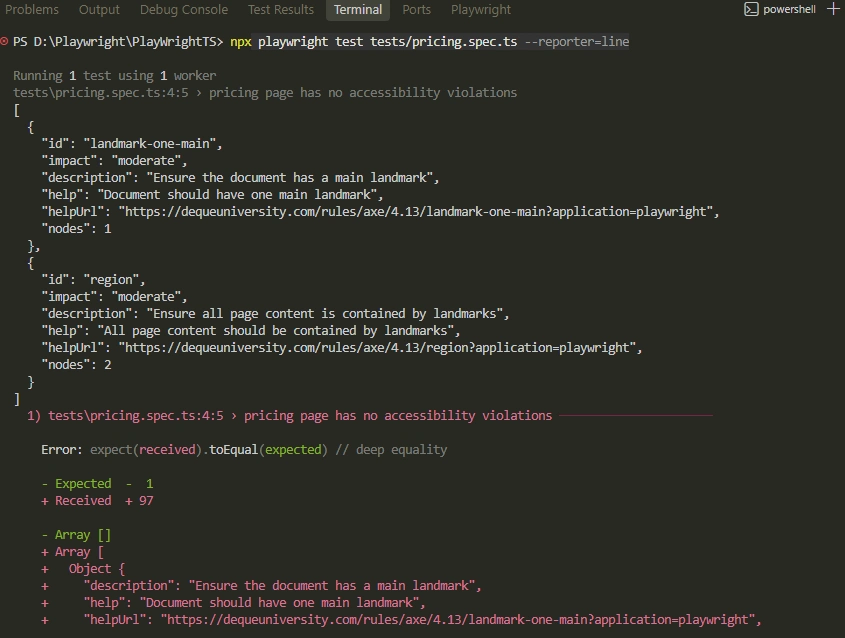
const results = await new AxeBuilder({ page })
  .withTags(['wcag2a', 'wcag2aa', 'wcag21aa'])
  .analyze();
If one specific rule inside that tag set still doesn’t apply to your situation, for example because you’re mid-migration on landmark structure, disable it explicitly and by name rather than by tag, so you’re not silently dropping other real rules with it:
const results = await new AxeBuilder({ page })
  .withTags(['wcag2a', 'wcag2aa'])
  .disableRules(['region'])
  .analyze();
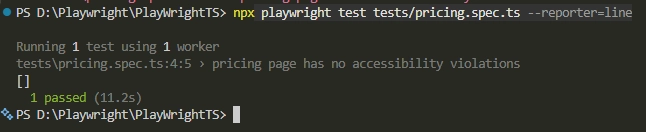
Be honest with yourself about which situation you’re actually in. landmark-one-main usually has a two-minute real fix: wrap your page’s primary content in a single <main> element. Reach for withTags() or disableRules() when you’re deliberately deferring landmark work during a larger migration, not as a default way to make the rule stop firing. Once withTags() is applied, the same test passes:
Where People Get This Wrong
Most people’s first instinct when a scan fails at 11pm before a release is to add aria-label or aria-hidden="true" to the flagged element until the red line disappears. That treats the scanner, not the user. It’ll pass the automated gate and can still fail a real screen reader user, which is a worse outcome than the failing build you started with.
A lot of teams reach for an accessibility overlay widget to make an entire class of violation disappear site-wide instead of diagnosing anything. I’ll say this plainly: in most cases that’s not a fix. Overlays layer JavaScript on top of markup they didn’t write and can’t fully understand, they’re notoriously unreliable in practice, and several overlay vendors have themselves been named in ADA lawsuits over the sites using them.
Neither of those is a false-positive fix. They’re both ways of making axe-core stop talking, which is a different problem than making your site accessible.
How to Confirm You Actually Fixed It
A passing scan is not proof. It’s a starting point. Re-run the exact same axe-core scan and confirm the violation is gone from the JSON output, not just that the CI build is green, since a broad rule disable can silently mask a different real violation on the same element.
Then check it manually. Turn on NVDA or VoiceOver, navigate to the element the old violation pointed at, and confirm it’s announced correctly. If you excluded a selector, open the axe DevTools browser extension and manually scan that excluded region on its own, so you know exactly what you chose to stop checking.
Preventing This Going Forward
- Keep a single, documented list of every
exclude()anddisableRules()call in your suite, with a one-line reason and a linked ticket, reviewed at least quarterly. - Scope your CI gate with
withTags()to your actual conformance target from day one, instead of running every default rule and firefighting best-practice noise later. - Pin your axe-core version deliberately and check the changelog before every bump, since a version upgrade can silently fix a false positive you’ve been excluding for months, or introduce a new rule you weren’t expecting.
I walked through the base setup and these exact configuration options in more depth in my axe-core tutorial, and the official Playwright accessibility testing guide covers the full AxeBuilder API if you need options beyond what’s here.
Wrapping Up
An axe-core false positive is a diagnosis, not an excuse. The scanner isn’t wrong often, but when it is, the cause is almost always one of the four I’ve covered here, and each one has a specific, scoped fix, not a blanket rule disable. If you’ve read this far because a build is failing right now, start with the JSON, not the config file. Prove the mismatch before you write a single exclude selector.
The teams that handle this well aren’t the ones with zero violations. They’re the ones who can tell you exactly why each exclusion exists.
Frequently Asked Questions (FAQs)
Does disabling an axe-core rule affect my WCAG compliance report?
Yes, if you disable a rule broadly instead of scoping it to a specific selector, you stop checking that rule everywhere, not just on the false positive. Always prefer exclude() on a specific selector over disableRules() for the whole page unless the rule genuinely doesn’t apply to your entire site.
Can I permanently allowlist a known false positive across the whole site?
You can, using a shared exclude list imported into every test file, but treat it as technical debt with an owner and a review date, not a permanent setting. A false positive from three axe-core versions ago may already be fixed upstream.
Does this work the same way under WCAG 2.2 as WCAG 2.1?
Mostly, since axe-core’s contrast and stacking-context logic isn’t tied to a WCAG version. The main difference is that WCAG 2.2 added new success criteria like Target Size (Minimum), and axe-core’s target-size rule has its own separate history of stacking-context false positives worth checking independently.
Is this the same for mobile accessibility scans with Appium?
No, not directly. @axe-core/playwright runs against a rendered web DOM, while Appium-based mobile accessibility checks evaluate native platform accessibility trees (iOS UIAccessibility or Android’s accessibility API), which have a different set of false-positive patterns entirely.
Will upgrading axe-core automatically fix known false positives?
Sometimes, since Deque regularly ships fixes for reported false positives in 4.x releases, but not always, and a version bump can also introduce new rules or change existing rule behavior. Read the changelog before you upgrade in a CI pipeline that gates releases.
Can I use a data-a11y-ignore attribute to suppress one rule on one element in axe-core?
Not with plain axe-core or @axe-core/playwright. That attribute pattern is a Cypress Accessibility feature, not part of axe-core itself. With raw axe-core your realistic options are excluding the whole element with exclude(), disabling the rule project-wide with disableRules(), or fixing the underlying markup.