Two weeks ago a Shopify store owner forwarded me a demand letter quoting a WCAG success criterion he’d never heard of and asking for $6,000 to make it disappear. He didn’t want legal theory. He wanted an ada compliance testing checklist his one QA contractor could actually run that week. That’s most likely why you’re here too, whether it’s a demand letter, an upcoming audit, or a leadership mandate to “get ADA compliant” before a launch.
An ADA compliance testing checklist for QA teams combines automated scanning tools like axe-core, WAVE, and Lighthouse with manual keyboard and screen reader testing against WCAG 2.2 AA success criteria. Automated tools alone catch a meaningful chunk of issues but nowhere near all of them, so the checklist below runs both. It covers 12 testable items across contrast, keyboard access, forms, and screen reader labeling. None of this is legal advice, and finishing it doesn’t guarantee immunity from a lawsuit, but it will catch the violations that actually show up in real demand letters.
If accessibility testing is new territory for your team, start with the broader guide to accessibility testing for QA engineers for the fundamentals, then come back here for the compliance-specific checklist.
Quick Disclaimer Before You Run This
This is a QA testing checklist, not legal advice. Whether your specific site or business is legally required to meet a particular standard, and what “compliant enough” means for your situation, are questions for a lawyer who handles ADA Title III cases, not a testing blog. Use this to find and fix real accessibility barriers. Use counsel for the legal risk assessment.
Why This Matters Right Now
Federal ADA website accessibility lawsuits jumped to 3,117 in 2025, a 27% increase over the 2,452 filed in 2024, according to Seyfarth Shaw’s federal filing data, reported March 2026. That reverses two straight years of decline, and it means the “filings are cooling off” narrative some teams used to justify skipping accessibility work in 2023 and 2024 no longer holds.
The trend hasn’t cooled off in 2026 either. UsableNet’s mid-year tracker, covering data through June 14, 2026, put digital accessibility lawsuits on pace for roughly 6,176 for the full year, a projected 20% increase over 2025 across federal and state courts combined.
It’s not just retail anymore either. Healthcare, financial services, and hospitality sites are showing up in filings alongside the usual ecommerce defendants, which matters if your ada compliance checklist website plan was built around “we’re not a store, we’re probably fine.” Ada website requirements clearly aren’t confined to any one industry anymore.
I’ve seen this play out on both ends. A budget-constrained QA team I worked with retrofitted their existing regression checklist with four accessibility items and caught a keyboard trap on checkout two sprints before launch, cheap fix, no drama. A different team found out how to test for ada compliance only after a demand letter arrived, and by then the fix list was long and the timeline was not theirs to set. Same checklist, very different cost depending on when you run it.
WCAG 2.2 AA is the standard most commonly referenced in current ADA litigation and DOJ guidance, and it’s what this ada compliance testing checklist is built against, as of early 2026. Worth knowing: DOJ’s formal WCAG 2.1 AA rule applies to Title II, meaning state and local government sites, with phased deadlines DOJ pushed back in 2026 to April 2027 and April 2028. Private businesses fall under Title III instead, where WCAG 2.2 AA isn’t a codified legal requirement, it’s simply what courts and settlements reference most consistently.
This checklist covers the compliance-testing slice of that standard; for the full criterion-by-criterion breakdown, see a full WCAG 2.2 checklist for testers. One more freshness note: WCAG 3.0 is still a W3C Working Draft as of 2026, with a final Recommendation not expected before 2028, so there’s no reason to wait on it before running this checklist against 2.2.
The ADA Compliance Testing Checklist
Each item below is written to be testable, not aspirational, and mapped to specific WCAG 2.2 success criteria. “Check contrast” isn’t a test. “Verify text meets a 4.5:1 contrast ratio” is.
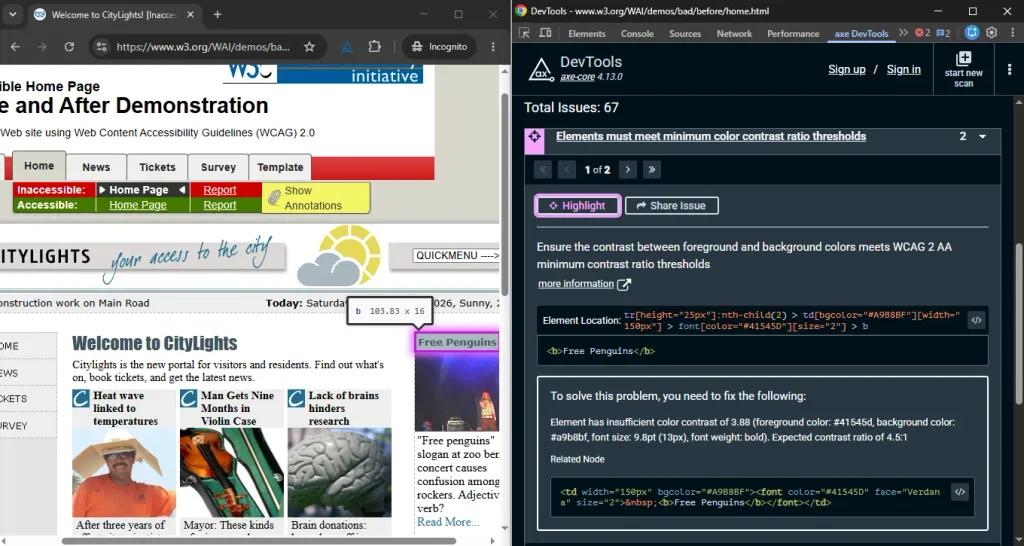
- Contrast ratio. Verify body text meets at least 4.5:1 contrast against its background, and large text (18pt+, or 14pt bold) meets 3:1, using axe-core or a contrast checker (WCAG 1.4.3).
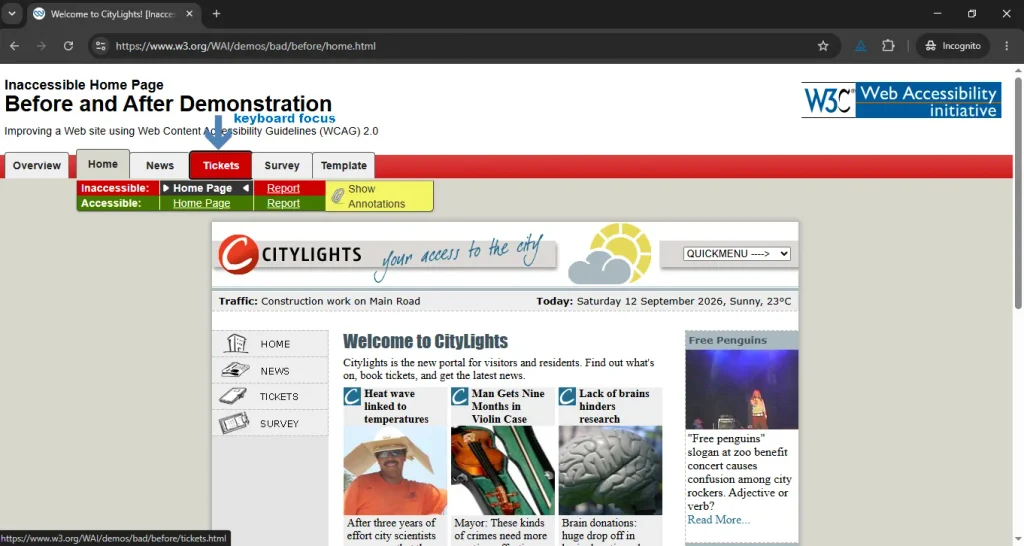
- Keyboard reachability. Confirm every interactive element (links, buttons, form fields, custom widgets) is reachable and operable using only Tab, Shift+Tab, Enter, and Space (WCAG 2.1.1), with no point where focus gets stuck (2.1.2).
- Visible focus. Check that every focusable element shows a visible focus indicator (2.4.7), and that no sticky header, modal, or cookie banner covers the focused element (2.4.11, new in WCAG 2.2).
- Alt text on images. Verify meaningful images carry descriptive alt text and purely decorative images use an empty alt attribute so screen readers skip them (1.1.1).
- Form labels. Confirm every form field has a programmatically associated label, not just placeholder text that disappears on focus (1.3.1, 4.1.2).
- Error identification. Submit a form with errors and verify the errors are announced in text, tied to the specific field, not just conveyed by a red border (3.3.1, 3.3.3).
- Heading structure. Check that headings follow a logical order (H1 to H2 to H3) without skipping levels just for font size (1.3.1, 2.4.6).
- Color independence. Verify no required information (required fields, status, links) is conveyed by color alone (1.4.1).
- Screen reader announcements. Using NVDA or VoiceOver, confirm dynamic content changes (cart totals, form errors, loading states) get announced without a page refresh (4.1.3).
- Touch target size. Measure that clickable and tappable targets are at least 24×24 CSS pixels, or have enough spacing to avoid accidental taps (2.5.8, new in WCAG 2.2).
- Skip navigation. Confirm a skip link lets keyboard users jump past repeated navigation to the main content (2.4.1).
- Reflow at 400% zoom. Zoom the page to 400% and verify content reflows into a single column without horizontal scrolling or lost functionality (1.4.10).
What Automated Tools Catch (and What They Don’t)
This is where most website accessibility audit checklist efforts quietly fall short. Teams run one scanner, see a low error count, and call it done. In the audits I’ve run, automated tools flag somewhere around a third of the total issues a full manual pass turns up. The rest needs a human.
| Category | What automated ada testing tools catch | What needs manual or screen reader testing |
|---|---|---|
| Color contrast | Failing ratios, flagged directly | Contrast in images, gradients, and hover states |
| Alt text | Missing alt attributes | Whether the alt text actually describes the image |
| Keyboard access | Some missing tabindex issues | Full tab order, keyboard traps, focus visibility |
| Form labels | Unlabeled inputs | Whether label wording makes sense in context |
| ARIA usage | Invalid or duplicate ARIA attributes | Whether ARIA actually improves the screen reader experience |
| Dynamic content | Nothing reliably | Whether updates get announced at all |
One quirk worth knowing if you’re picking ada testing tools: axe-core is conservative by design, it flags what it can verify with near-zero false positives, so a clean axe scan means “no confirmed violations of this subset,” not “accessible.” WAVE takes the opposite approach and visually flags anything questionable for a human to review, which produces more noise but catches more candidates worth a manual look. I run both, for different reasons.
The Mistake That Gets Teams Sued Anyway
Teams buy an accessibility overlay widget, the little icon in the corner that promises instant compliance, and consider the box checked. It isn’t. UsableNet’s mid-2026 lawsuit tracker found companies already running an accessibility widget getting sued in every single month through the first half of 2026, confirming a widget’s presence has never reliably stopped a filing.
Here’s my unpopular opinion on this, stated without hedging: an overlay widget is often worse than doing nothing, because it gives leadership a false sense that the accessibility work is finished, which means the actual checklist above never gets prioritized. If you’re going to spend budget on one thing, spend it on the manual keyboard and screen reader pass, not the widget.
What Automated Testing Can’t Tell You
A clean automated scan tells you the site cleared a specific set of machine-checkable rules. It can’t tell you whether a screen reader user can actually complete checkout, whether your error messages make sense read aloud, or whether your site meets the legal bar for your specific business, industry, and jurisdiction. That last question circles back to the disclaimer at the top: it’s a legal determination, and it needs a lawyer, not a scanner.
Scanners also skip a few things entirely, not just imperfectly. Caption accuracy on video content, whether a linked PDF is actually tagged for screen readers, and whether a live chat widget traps keyboard focus, none of that shows up in a scan report. Those need a manual pass every time, on every release.
Conclusion
Run this ada compliance testing checklist every sprint that touches customer-facing pages, not once a year before an audit. The teams that get burned aren’t the ones with a perfect score, they’re the ones who never ran the check until a demand letter forced the question. Twelve testable items, a couple of hours with axe-core and a screen reader, and you’re testing the things that actually show up in real complaints. That’s a better use of a QA cycle than any widget.
Frequently Asked Questions (FAQs)
Does WCAG 2.2 AA legally guarantee ADA compliance?
No. The DOJ hasn’t formally adopted one testing standard for every ADA Title III business, but WCAG 2.2 AA (and its predecessor 2.1 AA) is what courts and DOJ guidance reference most often right now. Meeting it reduces risk considerably. It doesn’t guarantee anything legally.
Does ADA website compliance apply to a small business with only a few employees?
Generally yes. ADA Title III applies to places of public accommodation regardless of employee count in most circumstances, and that’s been extended to commercial websites in the majority of court decisions so far. This is general information, not a legal determination for your specific business, ask a lawyer familiar with your state and industry.
How often should we run this ada compliance testing checklist?
Every sprint or release that touches customer-facing UI, plus a full manual pass on a quarterly cadence. Waiting for an annual audit means new violations ship and sit live for months.
Can an accessibility overlay widget make our site ADA compliant?
No single tool can promise that, and the lawsuit data backs that up directly, companies running overlay widgets keep getting sued. Use overlays as a minor supplement at most, never as the whole strategy.