I got handed a Jira ticket last year that just said “make sure the checkout flow is WCAG 2.2 compliant” and nothing else. No AC, no specific criteria, no mention of which level. That’s a normal way for this work to land on a tester, and it’s exactly why a working WCAG 2.2 checklist matters more than a PDF of the spec you’ll never open again.
A WCAG 2.2 checklist for testers is a testable breakdown of the 86 success criteria in the WCAG 2.2 standard, organized by conformance level (A, AA, AAA) so you can verify each one with a specific tool, manual check, or screen reader pass instead of a vague “looks accessible” judgment. Most teams target Level AA, which is 55 criteria total. WCAG 2.2 added nine new success criteria on top of WCAG 2.1 and retired one (4.1.1 Parsing), so if your last checklist was built against 2.1, it’s missing real gaps.
What WCAG 2.2 Actually Is
WCAG 2.2 is the current version of the Web Content Accessibility Guidelines, published by the W3C as a formal Recommendation in October 2023. Forget the dictionary definition for a second. In practice, it’s the rulebook that most accessibility lawsuits, procurement contracts, and internal audits point to when someone says a site needs to be “accessible.”
The guidelines sit under four principles, usually shortened to POUR: Perceivable, Operable, Understandable, and Robust. Every success criterion falls under one of those four. What actually matters day to day as a tester is the level tag next to each criterion, A, AA, or AAA, because that tag tells you what you’re actually obligated to verify.
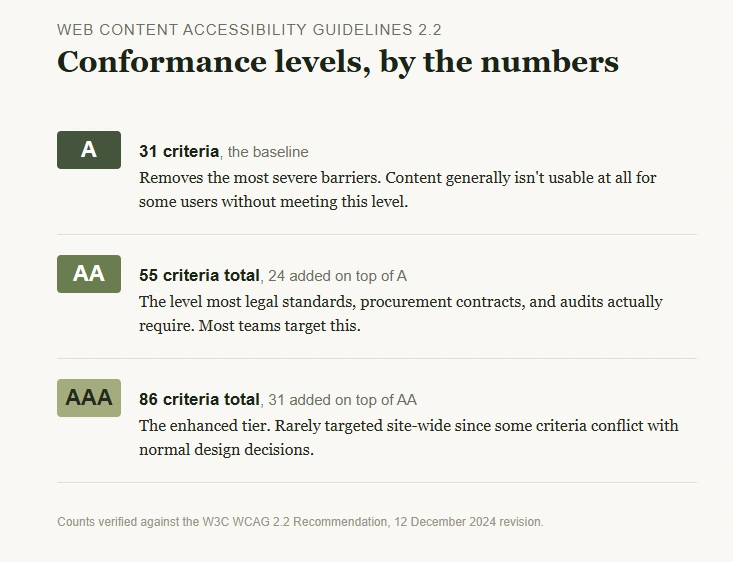
WCAG level A, AA, AAA breaks down like this: Level A is the baseline (31 criteria), Level AA adds the criteria most legal and procurement standards actually require (24 more, 55 total including A), and Level AAA adds another 31 criteria on top of that, for 86 total.
Almost nobody targets AAA site-wide because some AAA criteria conflict with normal design decisions. If a stakeholder tells you to “hit AAA everywhere,” that’s usually a sign they haven’t read AAA.
Worth knowing the lineage if you’re explaining this to a stakeholder: WCAG 2.0 launched with 61 success criteria in 2008, 2.1 added 17 more in 2018 to reach 78, and 2.2 added 9 while retiring one to land at 86. Nothing from an earlier version gets removed when a new one ships, aside from that one retirement, so a 2.0-era checklist is still mostly valid, just incomplete.
Why It Matters Right Now
A few things changed the ground under this topic recently, and all three affect how you should be building your WCAG 2.2 checklist today.
First, the DOJ’s 2024 rule under Title II of the ADA set WCAG 2.1 AA as the technical standard for state and local government websites. The original April 2026 deadline was extended by a year in an Interim Final Rule the DOJ issued in April 2026: public entities serving populations of 50,000 or more now have until April 26, 2027, and smaller entities and special districts until April 26, 2028.
WCAG 2.2 AA satisfies WCAG 2.1 AA automatically because 2.2 is backwards compatible, so testing against 2.2 covers the legal floor and future-proofs the work regardless of which deadline applies to a given team.
Second, mobile and touch interactions got real attention for the first time in this update. If your product has drag-to-reorder lists, small icon buttons, or login flows with CAPTCHAs, you now have specific, testable criteria for those patterns instead of trying to reason from general principles. That’s a meaningful upgrade from 2.1, where testers were often improvising.
Third, the regulatory picture outside the US moved too, and it’s worth knowing where things actually stand rather than repeating older predictions. The EU’s EN 301 549 standard, referenced by the European Accessibility Act, still hasn’t formally adopted WCAG 2.2 as of this writing. A draft update went to public enquiry in late 2025 and is expected to be finalized around October 2026.
The UK’s public sector regulations already effectively require it, since they reference “the latest published version” of WCAG rather than pinning a version number. WCAG 2.2 also became an official ISO standard, ISO/IEC 40500:2025, in October 2025, which matters if your organization’s procurement process asks for ISO alignment specifically.
A QA lead I talked to at a mid-size SaaS company put it well: leadership asked for “ADA compliance” without specifying a version, and the team defaulted to whatever their old Selenium accessibility suite already checked, which was built years ago against 2.0. Nobody had gone back and added the 2.2-specific checks. That gap is more common than most teams admit.
The WCAG 2.2 New Criteria and Core Components You Actually Test
Here’s where the practical part starts. WCAG 2.2 introduced nine new success criteria and removed one (4.1.1 Parsing, which is now obsolete because assistive tech reads the accessibility tree, not raw HTML). These are the wcag 2.2 new criteria you need on your radar if your last checklist predates October 2023:
- 2.4.11 Focus Not Obscured (Minimum), AA: a keyboard-focused element can’t be entirely hidden behind a sticky header, cookie banner, or chat widget.
- 2.4.12 Focus Not Obscured (Enhanced), AAA: the stricter version, where no part of the focused element can be covered.
- 2.4.13 Focus Appearance, AAA: the focus indicator needs at least 3:1 contrast against its unfocused state, and enough area to actually register, the spec’s own formula for a rectangular component is (width x 4) + (height x 4) CSS pixels around the perimeter, not just “be visible.”
- 2.5.7 Dragging Movements, AA: anything that relies on drag gestures (reordering a list, a slider) needs a non-drag alternative, like buttons.
- 2.5.8 Target Size (Minimum), AA: interactive targets need to be at least 24×24 CSS pixels. A smaller target still passes if a 24-pixel circle centered on it doesn’t overlap another target’s circle, which is the exception most teams don’t know exists and get flagged for unnecessarily.
- 3.2.6 Consistent Help, A: a help link, chat widget, or contact mechanism has to appear in the same relative place across pages.
- 3.3.7 Redundant Entry, A: don’t make users re-enter information they already gave you in the same process, like a shipping address they just typed on the previous step.
- 3.3.8 Accessible Authentication (Minimum), AA: no cognitive test (solve a puzzle, transcribe a code from an image) as the only way to log in, unless there’s an alternative. Supporting a password manager or allowing paste into the password field satisfies this, and a common identifier like a name, email, or phone number doesn’t count as a cognitive test in the first place.
- 3.3.9 Accessible Authentication (Enhanced), AAA: a stricter version that also blocks object recognition and personal-content puzzles as sole login methods.
That’s the actual wcag 2.2 success criteria list that’s new. Everything else you already know from 2.1 carries over unchanged.
Worth flagging since it’s a common mistake in other checklists floating around: only six of these nine are required for standard Level AA conformance (2.4.11, 2.5.7, 2.5.8, 3.2.6, 3.3.7, 3.3.8). The other three (2.4.12, 2.4.13, 3.3.9) are AAA-only.
I’ve seen more than one published checklist list Focus Appearance as an AA requirement. It isn’t, and testing your team against a criterion you don’t actually need wastes a sprint.
WCAG 2.2 vs 2.1 Differences at a Glance
| Aspect | WCAG 2.1 | WCAG 2.2 |
|---|---|---|
| Total success criteria | 78 | 86 |
| New criteria added | None | 9 (2 at A, 4 at AA, 3 at AAA) |
| Criteria removed | None | 1 (4.1.1 Parsing, obsolete) |
| Level AA total | 50 | 55 |
| Mobile/touch focus | Limited | Explicit (target size, dragging) |
| Backwards compatible | N/A | Yes, satisfies 2.1 AA automatically |
If you’re maintaining a wcag compliance checklist that was frozen at 2.1, the table above is your delta. You’re not rebuilding the whole thing, you’re adding nine rows and deleting one.
A Common Misconception, Stated Directly
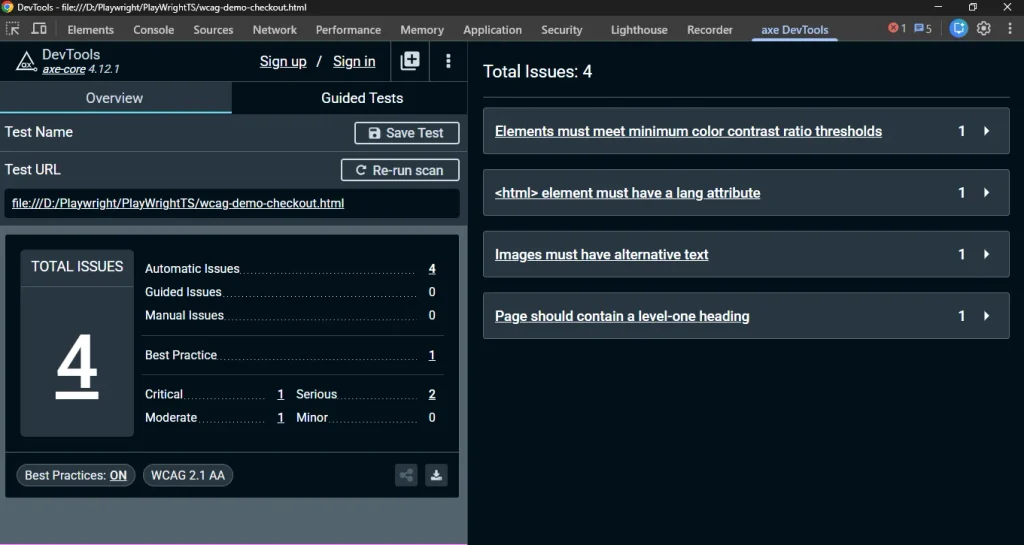
Teams assume automated scans catch most of this. They don’t. Tools like axe-core or WAVE reliably catch structural issues, missing alt text, bad heading order, low color contrast on static elements.
But roughly a third of WCAG success criteria genuinely require a human judgment call. Focus order, whether an error message is actually helpful, whether a drag interaction’s keyboard alternative is discoverable, none of that is something a DOM scan can verify on its own.
I’ll say the unpopular part plainly: if your accessibility process is “run axe-core in CI and call it done,” you are not testing against WCAG 2.2, you’re testing against the subset of WCAG 2.2 that happens to be automatable. That’s maybe 30-40% of the real surface area.
Two more misconceptions worth killing early. First, testers often assume conformance only covers criteria a page “relies on,” which isn’t quite right. The spec’s non-interference rule means four criteria, audio control, no keyboard trap, the flash threshold, and pause/stop/hide, apply to every piece of content on a page regardless of whether you’re counting on it for conformance.
Second, conformance is scoped to complete processes, not individual pages. If your checkout flow has five steps and step three fails, the entire checkout process fails, even if steps one, two, four, and five are flawless. Testing each page in isolation and calling the flow “mostly compliant” isn’t how the spec actually works.
How to Actually Build a WCAG 2.2 Checklist for Testing
This is the part that turns the spec into work you can actually assign in a sprint. One thing worth saying up front: most of the nine new criteria are design decisions, not development bugs, target size, focus appearance, and drag alternatives are easier to fix in a Figma file than in shipped code.
If your team only tests for WCAG 2.2 in QA, you’re catching these late and expensively. Flagging them at design review is cheaper for everyone.
- Pick your target level. Default to AA unless a contract or law specifies otherwise. Don’t chase AAA site-wide, some AAA criteria (like sign language interpretation for all video) aren’t realistic for most products.
- Split criteria by verification method. Tag each one as automated (axe-core/Lighthouse can catch it), manual visual (needs a human eyeball), or assistive-tech (needs a screen reader pass with NVDA, JAWS, or VoiceOver).
- Run the automated pass first. It’s fast and catches the low-hanging fruit: missing alt attributes, form inputs without labels, contrast ratios under 4.5:1 for normal text.
- Do a keyboard-only pass. Unplug the mouse and tab through the whole flow. This alone surfaces 2.4.11 focus-obscured issues and missing focus indicators fast.
- Do at least one screen reader pass on your critical user path (checkout, signup, whatever makes the business money). NVDA is free and a reasonable default if you’re on Windows.
- Retest the new 2.2 criteria specifically against any drag interactions, small tap targets, or login/CAPTCHA flows, since these are the ones an old 2.1-era checklist won’t have covered.
If your team is already comfortable in Playwright, pairing axe-core into your existing test suite is a natural next step.
It’s worth reading through this site’s broader Accessibility Testing for QA Engineers: The Complete Guide before you build the checklist out further, since it maps how the automated, manual, and assistive-tech layers fit together.
According to the W3C’s WCAG 2.2 specification, every success criterion is written to be independently testable, which is exactly why breaking them into a checklist works instead of trying to eyeball “accessible” as one fuzzy judgment.
If you want the plain-English line-item version of all 86 criteria to keep next to your own checklist, WebAIM’s WCAG checklist is the reference most working testers already have bookmarked.
Getting Started Checklist
If you’re starting from nothing, don’t try to boil the ocean in one sprint.
- Pick one critical flow first, usually checkout, signup, or whatever the support team gets the most complaints about. Don’t attempt the whole site at once.
- Run the automated scan, then the keyboard pass, then one screen reader session, all on that single flow. That’s a realistic first two-week effort for one tester.
- Expand outward to secondary flows once you have a real baseline, instead of a spec you’ve only skimmed.
If you haven’t already, it’s worth reading Accessibility Testing Meaning: 4 Types Explained to see how this checklist work fits alongside the other testing types you’ll eventually need to run.
Conclusion
A WCAG 2.2 checklist only earns its place if it’s built to actually get executed by a tester under a sprint deadline, not admired as a document. Start with Level AA, split criteria by how they get verified, and don’t let an automated scan convince you the work is finished when it’s caught maybe a third of what’s really there.
The nine new criteria are small in number but they close real gaps, especially around focus visibility and mobile interactions, that the old 2.1-era checklists were quietly missing.
Frequently Asked Questions
Is WCAG 2.2 mandatory, or is it optional guidance?
WCAG itself isn’t a law, it’s a technical standard. It becomes mandatory when a specific law or regulation references it, like the DOJ’s 2024 ADA Title II rule, which points to WCAG 2.1 AA for government sites. Meeting WCAG 2.2 AA satisfies that requirement since 2.2 is backwards compatible with 2.1.
How many success criteria are in WCAG 2.2?
86 total. That’s the 78 from WCAG 2.1, minus one retired criterion (4.1.1 Parsing), plus nine new ones added in 2.2.
Do I need to test every criterion manually, or can automation handle it?
Automated tools reliably catch roughly a third of WCAG criteria: missing alt text, unlabeled form fields, contrast failures on static text, broken heading structure. The rest, focus order, meaningful error messages, keyboard alternatives for gestures, genuinely need a human tester or a screen reader pass.
What’s the difference between WCAG 2.2 Level A and Level AA?
Level A (31 criteria) is the baseline that covers the most severe barriers. Level AA (55 criteria total, including all of A) adds the criteria most legal standards and procurement contracts actually require, things like sufficient color contrast and consistent navigation. Most organizations target AA.
Should small teams bother with WCAG 2.2 if they’re not a target for lawsuits?
Accessibility barriers affect real users regardless of company size, and building the habit early is cheaper than retrofitting later. That said, whether a specific business faces legal exposure depends on factors outside a testing checklist, and that’s a question for legal counsel, not a QA process.