Last updated on August 11th, 2026 at 08:19 am
What Playwright Element Click Intercepted Actually Means
Your test was green yesterday. Today it’s stuck on one line, retrying the same click over and over, and the run finally dies with something like element is not receiving pointer events or subtree intercepts pointer events.
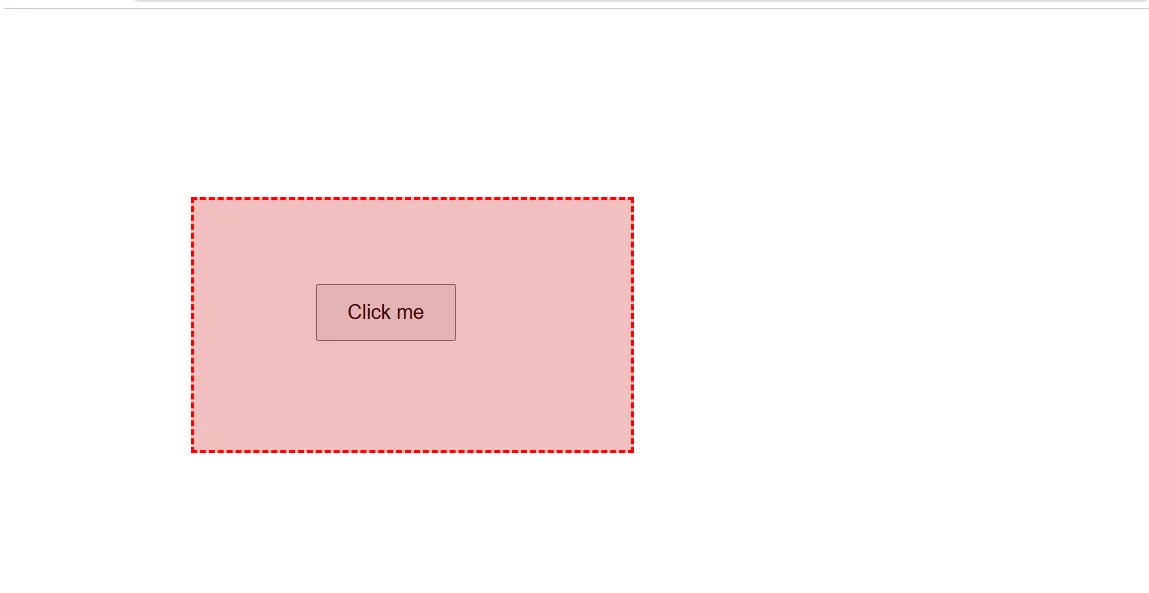
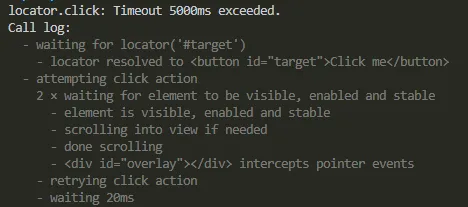
That’s a playwright element click intercepted error. It means Playwright found your element, confirmed it’s visible and enabled, then discovered a different element sits on top of it at the exact pixel it was about to click.
This is not the same failure as a plain timeout. Playwright’s click doesn’t just find a locator and fire a mouse event at it, it waits for the element to be attached, visible, stable, and receiving events at the click point before it clicks.
When something else is receiving those pointer events instead, the action keeps retrying until the timeout runs out. You end up with a log full of retry attempts instead of a clean pass or fail.
Here’s the direct answer if you’re mid-debug right now: a playwright element click intercepted error almost always means a modal, toast, sticky header, or loading overlay is stacked above your target at the click moment. The fix isn’t a longer timeout, it’s removing whatever covers the element, and the Trace Viewer shows you that overlapping element in about ten seconds.
Root Causes, Ranked by How Often They’re Actually the Problem
I’ve hit this error in four distinct shapes across real projects. They’re not equally common, so check them in this order before you touch anything.
| Cause | How to tell it’s this one | Fix |
|---|---|---|
| Modal, toast, or cookie banner overlapping the target | Trace Viewer snapshot shows a dialog or banner element directly over your locator | Close or dismiss it explicitly before clicking, don’t just click through it |
| Sticky header or footer covering the element after scroll | Error mentions an element with a fixed or sticky class name intercepting the click | Scroll with an offset, or click the element with scrollIntoViewIfNeeded plus a manual offset |
| CSS animation or transition still in motion | Element position keeps changing across retries in the trace timeline | Wait for the animation’s end state instead of the element’s mere presence |
| Loading spinner or skeleton screen not yet removed from the DOM | Spinner or skeleton div is still present, just visually faded | Wait for the spinner locator to be hidden before interacting with the real content |
By far the most common one in real applications is the first: a cookie consent banner, a promo modal, or a toast notification that renders on top of the page and hasn’t been dismissed by the test yet. I’d guess it accounts for well over half of the playwright element click intercepted by another element reports I’ve debugged for teammates.
Cause 1: A modal, toast, or banner is covering the element
This is the classic playwright click blocked by modal scenario. The page loaded, your locator resolved correctly, but a cookie banner or a “sign up for updates” modal rendered on top of it a beat later.
// Broken: clicking straight through, ignoring the banner
await page.goto('/pricing');
await page.getByRole('button', { name: 'Start free trial' }).click();

// Fixed: dismiss the overlay first, explicitly
await page.goto('/pricing');
const cookieBanner = page.getByRole('button', { name: 'Accept cookies' });
if (await cookieBanner.isVisible().catch(() => false)) {
  await cookieBanner.click();
}
await page.getByRole('button', { name: 'Start free trial' }).click();
The .catch(() => false) matters here. If the banner never shows up for that particular test run, isVisible() still resolves cleanly instead of throwing.
Cause 2: A sticky header or footer is blocking the click point
Playwright scrolls the element into view before clicking, but it scrolls to put the element in the viewport, not necessarily clear of a fixed-position header sitting on top of that viewport.
// Broken: element ends up half-hidden under a sticky nav bar
await page.locator('#save-settings').click();

// Fixed: scroll with room for the fixed header, then click
const target = page.locator('#save-settings');
await target.scrollIntoViewIfNeeded();
await page.evaluate(() => window.scrollBy(0, -80));
await target.click();
An 80 pixel offset is a guess for your specific header height. Check your CSS for the actual fixed header’s height and use that number instead of copying mine.
Cause 3: An animation or transition hasn’t settled
Playwright’s stability check waits for the element to stop moving between two consecutive animation frames, but a slow CSS transition can still be in progress when your test tries to click, and the element that’s overlapping is often the very element that’s animating into place.
// Broken: clicking while a slide-in panel is still translating into position
await page.getByRole('button', { name: 'Confirm' }).click();

// Fixed: wait for the panel's transition to finish, then click
const panel = page.locator('.slide-in-panel');
await panel.waitFor({ state: 'visible' });
await expect(panel).toHaveCSS('transform', 'matrix(1, 0, 0, 1, 0, 0)');
await page.getByRole('button', { name: 'Confirm' }).click();
Checking the final transform value is more reliable than a fixed waitForTimeout, because it actually confirms the animation reached its end state rather than just guessing how long that takes.
Cause 4: A loading spinner is still in the DOM
Skeleton screens and spinners often fade out with opacity rather than being removed from the DOM immediately, and a semi-transparent spinner overlay still intercepts pointer events even at low opacity unless it explicitly sets pointer-events: none.
// Broken: clicking as soon as the button locator resolves
await page.getByRole('button', { name: 'Submit order' }).click();

// Fixed: wait for the loading overlay to actually disappear first
await page.locator('[data-testid="loading-overlay"]').waitFor({ state: 'hidden' });
await page.getByRole('button', { name: 'Submit order' }).click();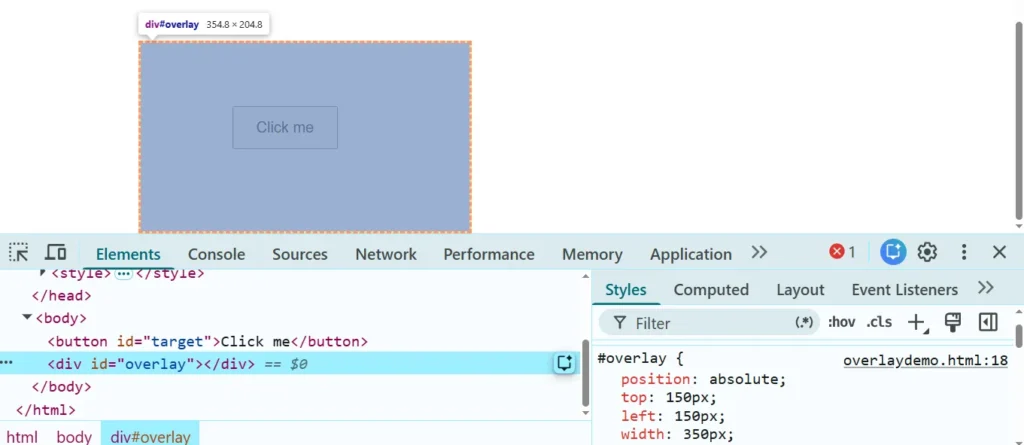
Why force: true Is Not the Fix
Stack Overflow will tell you to add force: true to make this error go away. In most cases that’s not a fix, it’s you asking Playwright to stop protecting you from a real bug.
The force option skips the actionability checks entirely, including the pointer events check that’s currently failing. Your click will “succeed” in the sense that Playwright stops complaining. But the click still lands on whatever element is on top, not necessarily your intended target, and in a real browser a real user’s mouse would have hit that same overlay too.
I’ve seen this bite a team hard exactly once: a force: true click on a checkout button technically passed in CI for three months while silently clicking a disabled overlay div instead of the actual button underneath it. The test suite was green. The checkout flow it was supposed to protect had been broken the entire time.
If you genuinely need to bypass the check, for example an element with pointer-events: none set intentionally for styling reasons, use force: true and say so in a comment explaining why it’s safe in that specific case. Don’t reach for it as a default response to a playwright element click intercepted error.
How to Confirm This Is Actually Your Cause
Before you commit to any fix above, open the trace with npx playwright show-trace trace.zip and look at the snapshot for the exact moment the click was attempted. The Trace Viewer will show you the actual overlapping element by name, not just its existence, which is the single fastest way to stop guessing.
Second, check whether the error text mentions the same overlapping element on every retry attempt or a different one each time. The same element every time points to causes 1 or 2, a static overlay. A changing element across retries points to cause 3, something still animating.
Watch out for a false-positive fix: adding page.waitForTimeout(1000) before the click will often make the test pass once, because you got lucky and the animation or overlay happened to clear within that second. It’ll pass today and come back flaky in three weeks when a slower CI runner, an added network call, or a heavier page changes that timing again.
Preventing This From Coming Back
Once you understand which overlay is causing it, the sturdiest long-term fix is a small reusable helper rather than a one-off wait sprinkled at the failing line.
- Write a
dismissOverlays()helper that checks for your app’s known interstitials, cookie banners, promo modals, whatever recurs, and call it once right after navigation in a fixture orbeforeEach. - For sticky headers, calculate the offset from a single CSS variable or config value instead of a hardcoded number, so a design change doesn’t quietly break every test that scrolls.
- Prefer waiting on the actual overlay element’s state (
hidden,detached) overwaitForTimeout, since it removes the guesswork entirely and self-corrects if the app gets slower or faster. - If you’re running a sharded suite across several GitHub Actions runners, confirm the flake shows up consistently on the same shard. A single self-hosted runner rendering fonts differently than the others has caused this exact overlap issue for a team I worked with, and it looked like a random flake until someone diffed the trace across runners.
This is also where a short, well-organized Playwright page object model pays for itself, dismissal logic that lives in one place instead of copy-pasted across fifteen test files. Playwright’s own actionability documentation covers exactly which checks run before a click, worth reading directly from the source
The One Thing to Remember
A playwright element click intercepted error is Playwright doing its job correctly. It caught a real gap between what your test expected and what a user would have actually clicked.
Treat the overlapping element as the bug report it is. Find out what it actually is with the Trace Viewer, and fix that, instead of forcing the click and hoping nobody checks what it really landed on.
If this turned out to be a sticky element issue specifically, it’s also worth reading through how Playwright handles element visibility more broadly, since visibility and pointer interception are close cousins and often get confused for each other in error logs.
Frequently Asked Questions
Why does this error only happen in CI, not on my machine?
CI runners are usually slower and often run headless with different font rendering, so animations and network-dependent overlays take longer to settle than they do locally. Run the same test with –headed and throttled network locally to reproduce it before assuming it’s CI-only.
Does force: true ever make sense here?
Occasionally, if an element intentionally has pointer-events: none applied for a decorative overlay that a real user’s click would pass through anyway. Verify that in DevTools first rather than assuming, and leave a comment explaining why it’s safe.
Is this the same as a strict mode violation error?
No. A strict mode violation means your locator matched more than one element; a click intercepted error means your locator matched exactly one element but something else was sitting on top of it. They can look similar in a rushed read of the log but the fix is completely different.
Does this happen the same way in Python and Java?
Yes, the underlying actionability checks are the same across all Playwright language bindings, so you’ll see the equivalent “intercepts pointer events” message in Python and Java logs too, just with slightly different stack trace formatting.
What if none of these four fixes work?
Open the Trace Viewer and read the exact element that’s intercepting, then search the microsoft/playwright GitHub issues for that specific element type, shadow DOM and iframe-nested elements sometimes need different handling. If nothing matches, isolate a minimal repro page and check whether the behavior changed in a recent Playwright release before assuming your test is wrong.