The first accessibility check I added to a pull request pipeline was switched off within a week. It blocked merges over legacy issues nobody had time to fix, so the team did the sensible thing and stopped listening to it. That was my first real lesson in making axe-core CI CD checks stick. The scan was fine. The gate design was the problem.
For a delivery team, the real decision is what a machine may block and what a person must judge. This guide sets up axe-core scans in GitHub Actions and Jenkins with @axe-core/playwright, then shows how to keep the gate strict without making it hated. It reflects axe-core 4.13.0 and WCAG 2.2 as of October 5, 2026.
To set up axe-core CI CD scanning, run @axe-core/playwright inside a Playwright test, limit it with WCAG tags, fail the build on new violations, and upload the full results as an artifact. Let the pipeline catch repeatable, rule-based failures on every pull request, and leave what a rule cannot judge to people. Deque’s own study puts axe-based automation at about 57% of issues by volume, so the rest still needs a keyboard and a screen reader.
- What axe-core Actually Does Inside a Pipeline
- Accessibility Testing in GitHub Actions: 4 Steps
- axe-core Jenkins Setup: Same Test, Docker Agent
- Keeping the Accessibility Gate Strict Without Making It Hated
- Which axe Runner Fits Your Pipeline
- axe-core CI CD Pipeline: What the Scan Cannot Catch
- Which Setup to Pick
- Getting Started Checklist
What axe-core Actually Does Inside a Pipeline
axe-core is a rules engine that runs inside the browser against the rendered DOM. @axe-core/playwright injects it into your page, runs it, and hands back a results object. Most people only read violations, but the object also carries passes and incomplete, which holds the elements where axe could not reach a verdict and a human needs to look.
Three behaviors catch people out. Tags are not cumulative: asking for wcag2aa alone skips the Level A rules, so you list wcag2a and wcag2aa together. Next, analyze() scans the page as it is at that moment, so a closed menu is not scanned. And if you call it before the page settles, axe scans a half-built page and reports a clean result.
Version drift deserves its own warning in any axe-core CI CD setup. axe-core ships a new minor release every 3 to 5 months, and each one usually adds or changes rules. Version 4.13.0, for example, changed ARIA rules such as aria-allowed-attr and aria-prohibited-attr. The @axe-core/playwright package follows the same major and minor numbers, so 4.13.0 of one pairs with 4.13.0 of the other.
I pin both to an exact version and upgrade on purpose, in a separate pull request. An unpinned scanner means your gate can change its mind without a single code change. That is a gate nobody trusts.
Accessibility Testing in GitHub Actions: 4 Steps
This is the accessibility testing GitHub Actions setup I’d start with, because it is the shortest route to axe-core CI CD coverage. The workflow is small, and the same four steps carry over to any other runner.
- Install
@playwright/testand a pinned@axe-core/playwright. - Add a Playwright config that starts your app and writes JUnit and HTML reports.
- Write one scan test per key route, with a baseline file for known issues.
- Add the workflow, run it on every pull request, and upload the report.
axe-core pipeline integration looks easy in a tutorial and gets awkward in a real repo, mostly at steps 2 and 3. Here is each file.
Step 1: install the packages
npm install --save-dev @playwright/test
npm install --save-dev --save-exact @axe-core/playwright@4.13.0
Step 2: playwright.config.ts
import { defineConfig } from '@playwright/test';

export default defineConfig({
  testDir: './a11y',
  // One worker on CI favors stability over speed, as Playwright's CI docs recommend
  workers: process.env.CI ? 1 : undefined,
  reporter: [
    ['html', { open: 'never' }],
    ['junit', { outputFile: 'test-results/a11y-junit.xml' }],
  ],
  use: { baseURL: 'http://localhost:3000' },
  webServer: {
    command: 'npm run start',
    url: 'http://localhost:3000',
    reuseExistingServer: !process.env.CI,
  },
});
The webServer block means the scan runs against the build in the pull request, not against a staging site that may be several merges behind. Swap npm run start for whatever serves your production build.
Step 3: a11y/axe-scan.spec.ts
import { readFileSync } from 'node:fs';
import { test, expect } from '@playwright/test';
import AxeBuilder from '@axe-core/playwright';

// Entries look like "/pricing::color-contrast". This list may only shrink.
const baseline: string[] = JSON.parse(readFileSync('a11y-baseline.json', 'utf8'));

const routes = [
  { name: 'home', path: '/' },
  { name: 'pricing', path: '/pricing' },
  { name: 'login', path: '/login' },
];

for (const { name, path } of routes) {
  test(`axe scan: ${name}`, async ({ page }, testInfo) => {
    await page.goto(path);
    // Wait for proof that the page has rendered before scanning
    await expect(page.locator('h1').first()).toBeVisible();

    const results = await new AxeBuilder({ page })
      .withTags(['wcag2a', 'wcag2aa', 'wcag21a', 'wcag21aa', 'wcag22aa'])
      .analyze();

    // Keep the full results, including "incomplete", for debugging
    await testInfo.attach(`axe-results-${name}`, {
      body: JSON.stringify(results, null, 2),
      contentType: 'application/json',
    });

    const newViolations = results.violations.filter(
      (v) => !baseline.includes(`${path}::${v.id}`)
    );
    expect(newViolations).toEqual([]);
  });
}
Commit a11y-baseline.json containing [] on a new project. On an existing app, run the scan once and decide which findings go into the file. The full list of builder methods lives in the @axe-core/playwright documentation.
Step 4: .github/workflows/a11y.yml
name: Accessibility Gate

on:
  pull_request:
    branches: [ main ]

jobs:
  a11y:
    runs-on: ubuntu-latest
    timeout-minutes: 20
    steps:
      - uses: actions/checkout@v6
      - uses: actions/setup-node@v6
        with:
          node-version: lts/*
      - name: Install dependencies
        run: npm ci
      - name: Build the app
        run: npm run build
      - name: Install Chromium
        run: npx playwright install --with-deps chromium
      - name: Run axe scans
        run: npx playwright test
      - uses: actions/upload-artifact@v5
        if: ${{ !cancelled() }}
        with:
          name: a11y-report
          path: playwright-report/
          retention-days: 14
The if: ${{ !cancelled() }} condition on the upload step matters. Without it, a failing scan skips the upload and you lose the report in exactly the run where you need it. Install only Chromium here, since a rules scan gains nothing from three browsers.
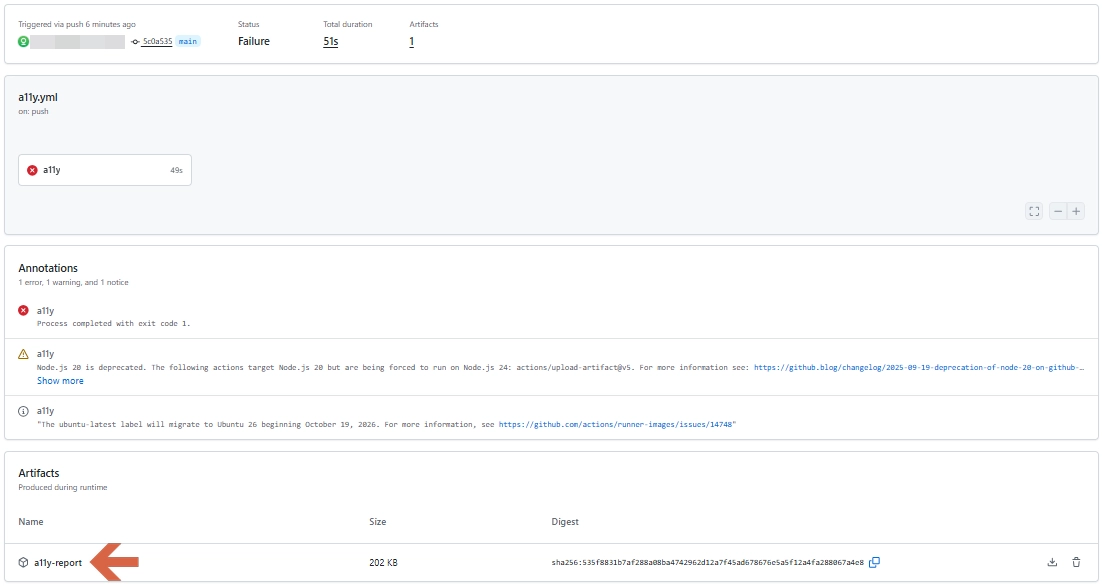
When the scan finds a violation, the job turns red and the full report waits in the run’s Artifacts list.
axe-core Jenkins Setup: Same Test, Docker Agent
The test file does not change on Jenkins, which keeps an axe-core CI CD setup portable between runners. Only the runner does. Jenkins can run the job inside Playwright’s official Docker image, which saves you from installing browser dependencies on the agent. That needs the Docker Pipeline plugin, because without it Jenkins cannot use the docker agent type.
Keep the image tag in step with the Playwright version in your lockfile, since the image ships the browsers that version expects.
pipeline {
  agent { docker { image 'mcr.microsoft.com/playwright:v1.63.0-noble' } }
  environment { CI = 'true' }
  stages {
    stage('Install') {
      steps { sh 'npm ci' }
    }
    stage('Accessibility scan') {
      steps { sh 'npx playwright test' }
    }
  }
  post {
    always {
      junit allowEmptyResults: true, testResults: 'test-results/a11y-junit.xml'
      archiveArtifacts artifacts: 'playwright-report/**', allowEmptyArchive: true
    }
  }
}
The post block runs whether the scan passes or fails. By default a build fails when archiving finds zero files, so allowEmptyArchive keeps that secondary error from hiding the real one. The junit step comes from the JUnit plugin, which most Jenkins installs already have.
Keeping the Accessibility Gate Strict Without Making It Hated
I have watched a sprint team switch on a full WCAG scan against an existing app and get several hundred violations on day one. Blocking on all of them is how the gate gets removed. Blocking only on new ones is how it survives.
That is what the baseline file does, and it is automated accessibility regression testing in its plainest form: fail on anything that was not there yesterday. Treat the file as a ratchet. Entries can be deleted freely, and a pull request that adds one should need a reviewer’s explicit sign-off. A good accessibility gate CI/CD teams keep switched on has that one rule and not much else.
Each entry stores a route and a rule ID, not the violation object. Playwright’s own docs warn against snapshotting the whole violations array, because it contains rendered HTML snippets and breaks whenever unrelated markup changes.
The mistake I see most is quieting the build with exclude(). It removes the element and every descendant from the scan, and it turns off all rules for them, not just the failing one.
Exclude a whole header component to hide one contrast issue and you also hide the missing button label someone adds next month. Use a baseline entry instead, or disableRules() for a rule you cannot meet yet, with a ticket number beside it.
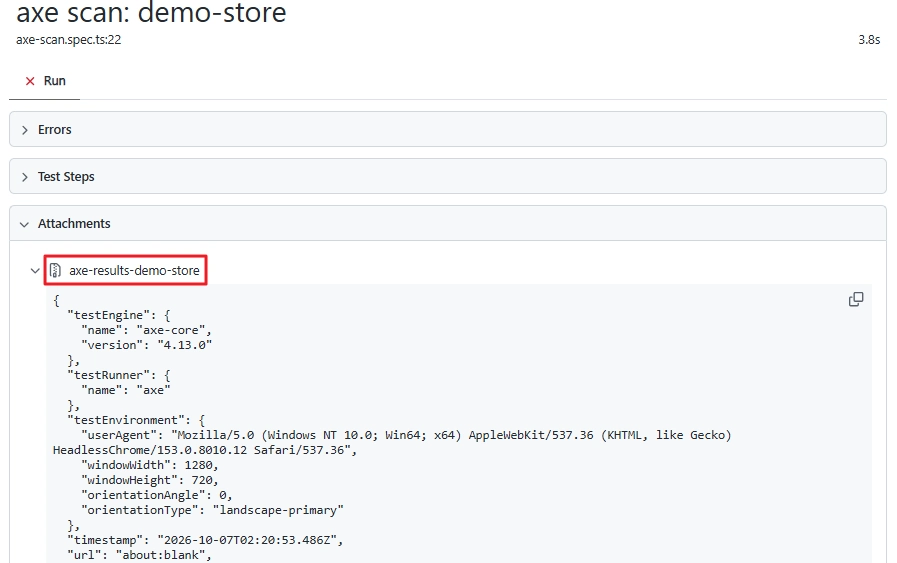
A second trap is reading a green build as “accessible”. The assertion above only checks violations. The incomplete list is where axe flags what it could not decide, which is why the test attaches the full results to every run. The Playwright HTML report lists that attachment under each test.
Which axe Runner Fits Your Pipeline
One QA team I worked with had no budget line for paid tooling and needed something running by the next sprint. For that situation, free and already inside the Playwright suite beats everything else. Here is how the three realistic options compare.
| Tool | Best for | Real limitation | Pricing |
|---|---|---|---|
| @axe-core/playwright | Teams already running Playwright, and scans after clicks or logins | Needs a Playwright test setup, and scans only the current page state | Free, MPL-2.0 license |
| @axe-core/cli | A quick smoke scan of a few URLs with no test code | Needs a ChromeDriver that matches your browser, and scans a URL as loaded, so no clicking through states | Free, MPL-2.0 license |
Raw axe-core (axe.run) | Custom harnesses and unit-level checks | You wire up injection, frames, and reporting yourself | Free, MPL-2.0 license |
The engine is free in all three rows, so the real cost of axe-core CI CD is your time. @axe-core/playwright wins for most teams because the hardest accessibility bugs only appear after interaction: an open modal, an expanded menu, an error state on a form. The CLI cannot reach those states. Deque also sells paid products built on the same rules engine, which this guide does not cover.
axe-core CI CD Pipeline: What the Scan Cannot Catch
Deque analyzed more than 13,000 pages and page states and close to 300,000 issues from first-time audit customers. It found that 57.38% of those issues came from automated testing, as reported in Deque’s automated accessibility coverage report. That counts issues by volume, not success criteria by number, and a handful of frequent categories dominate the total. It is also vendor data. Treat it as a useful reference, not a promise about your site.
What the pipeline cannot judge is the part that tends to stop real users:
- Alternative text quality (WCAG 1.1.1). axe can confirm that alt text exists. It cannot tell you whether the text describes the image.
- Keyboard operation (2.1.1). A custom dropdown can pass every rule and still trap focus or ignore the Enter key.
- Focus Not Obscured (2.4.11, new in WCAG 2.2). A sticky cookie banner can cover the element that has keyboard focus. Only tabbing through the page shows it.
- Screen reader experience. Announcement order and meaning need a person listening.
- Contrast over images and gradients. The color-contrast rule often lands in
incompletewhen text sits on a background it cannot resolve.
So the split I use between manual and automated accessibility testing is simple. The pipeline owns regressions on every pull request. A person owns a keyboard and screen reader pass on each new component or flow before release. A green axe-core CI CD run is not a statement that a site conforms to WCAG, and it is certainly not legal sign-off.
Which Setup to Pick
Pick by what you already have, not by what looks most impressive:
- If your code is on GitHub and you run Playwright, use the four steps above.
- If you are on Jenkins with Docker available, run the same test inside Playwright’s Docker image.
- If you have no automated tests at all, start with @axe-core/cli on three URLs to see your starting point, then move to the Playwright version once you need to scan states.
- If the app is legacy with hundreds of issues, build the baseline first and tighten the gate second.
New to the engine itself? My axe-core tutorial covers it before any pipeline work. For fixtures and locators in more depth, the Playwright accessibility testing walkthrough goes further than I did here.
Getting Started Checklist
Getting axe-core CI CD running takes an afternoon, and it fits inside the wider accessibility testing guide for QA engineers.
- Pick the three routes that carry the most traffic or revenue and add one scan test per route.
- Commit an
a11y-baseline.jsoncontaining[], run the scan, and decide which findings go into the baseline and which get fixed this sprint. - Add the workflow or Jenkinsfile, make the check required on pull requests, and book a recurring slot for a person to do the keyboard pass.
Conclusion
A pipeline scan is a smoke alarm, not an inspection. axe-core CI CD earns its place by catching repeatable regressions on every pull request, while people own the judgment calls.
Set it up with pinned versions, a baseline that only shrinks, and results attached to every run. Then protect the human half of the work, because the issues a rule cannot see often stop a real user. Build the gate this week, and book the keyboard pass for next sprint so a person checks what the scan cannot.
Frequently Asked Questions (FAQs)
Can axe-core CI CD replace manual accessibility testing?
No. Deque’s own study found automation covers about 57% of issues by volume, and that figure comes from the vendor that sells the tooling. Keyboard operation, alt text quality, and screen reader behavior still need a person.
Should the build fail on every axe violation?
Fail on new violations, and handle existing ones through a baseline so the gate does not get switched off. If you want a lighter start, you can also filter on each violation’s impact value and block only on critical and serious while you clear the backlog.
How do I scan pages behind a login in CI?
Sign in once in Playwright and reuse the saved session for your scan tests, as Playwright’s authentication guide describes. Keep credentials in your CI secrets. Playwright’s CI docs also warn that reports and traces can contain test credentials, so upload them only to trusted artifact stores.