Your Test Passes Locally, Then Dies in CI on This Line
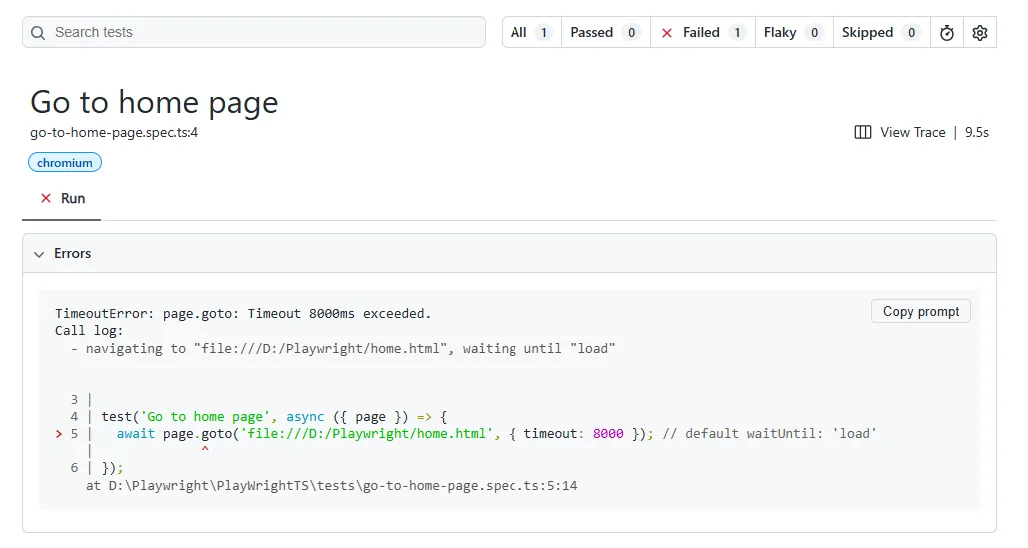
Your test runs fine on your machine. Push it to CI and it hangs, then fails with something like this:
Error: page.goto: Timeout 30000ms exceeded.
=========================== logs ===========================
navigating to "https://staging.yourapp.com/", waiting until "load"
============================================================
That’s a playwright page.goto timeout error, and it’s one of the most common failures I’ve debugged across every Playwright project I’ve worked on. It’s also one of the most misdiagnosed, because the fix people reach for first usually isn’t the actual problem.
In short: this error means Playwright asked the browser to navigate to a URL and the page never reached the lifecycle state Playwright was told to wait for, within the timeout given. The timeout and waitUntil options that control this behavior are documented on Playwright’s own page.goto() API reference. The fix depends entirely on which of four things is actually happening, and guessing wrong costs you real debugging time.
This article walks through all four causes, ranked by how often each one turns out to be the real cause in production test suites, not in a toy demo app. It’s a narrower, more specific version of the broader family of Playwright timeout errors you’ll run into elsewhere in a test suite.
What “waiting until load” Actually Means
Playwright’s page.goto() doesn’t just fire a URL and move on. It waits for a navigation lifecycle event before it considers the call finished. By default that event is load, meaning every stylesheet, script, and image has finished loading.
That single detail explains most of this error. If your app never cleanly fires load (a chat widget that polls forever, an ad script that never resolves, a websocket connection that stays “loading” in some browsers), Playwright keeps waiting past the timeout even though the page is functionally usable to a human. This is different from an actionability timeout on a click or a fill, which is a separate class of Playwright timeout entirely.
The Real Causes Behind a Playwright page.goto Timeout Error
I’m ranking these by frequency, based on what I’ve actually seen cause this across real projects and real CI pipelines, not by theoretical likelihood.
| Cause | How to tell it’s this one | Fix |
|---|---|---|
| App is genuinely slow under load (CI, cold start, shared runner) | Same test passes locally, fails only in CI or only on the first run after deploy | Raise the navigation timeout for that specific call, don’t touch the global default |
Wrong waitUntil state for how your app actually loads | Trace Viewer shows the DOM is fully rendered and interactive well before the timeout fires | Switch to domcontentloaded or commit instead of the default load |
| Target host unreachable from the test environment | Error text shows net::ERR_CONNECTION_REFUSED or net::ERR_NAME_NOT_RESOLVED instead of a plain timeout | Fix the URL, DNS, or service startup ordering, this isn’t a Playwright problem at all |
| Redirect chain or auth wall never resolves to a stable page | Network tab in the trace shows repeated 302s or a login redirect loop | Navigate to the actual first-load URL, or handle auth via storage state instead of a UI redirect |
Cause 1: The App Is Genuinely Slow, Especially in CI
This is the most common one, by a wide margin, in my experience. A shared GitHub Actions runner or a Docker container with capped CPU can take three to five times longer to render a heavy SPA than your local machine does. Thirty seconds feels generous until your app is competing for CPU with three other sharded workers on the same runner.
You’ll know this is your cause when the same test is reliably fine locally and reliably slow (not flaky, actually slow) in CI. Bump the timeout for that specific navigation:
await page.goto('https://staging.yourapp.com/', { timeout: 60000 });Don’t raise actionTimeout or the global test timeout to fix a navigation problem. Scope the fix to the call that’s actually slow. A blanket increase hides a legitimate navigation cost everywhere else in the suite too.
Cause 2: You’re Waiting for the Wrong Lifecycle Event
This one gets missed constantly, and it’s the one I actually disagree with most default advice about. Most people’s first instinct when they hit this error is to add a bigger timeout. That treats the symptom. If your app fires domcontentloaded at 1.5 seconds but never cleanly fires load because of a long-polling analytics script, no timeout value fixes that. You’re waiting on an event that was never coming.
Open the trace with npx playwright show-trace trace.zip and look at when the DOM actually settled versus when the timeout fired. If the gap is large, you’re not waiting for the page, you’re waiting for the wrong signal.
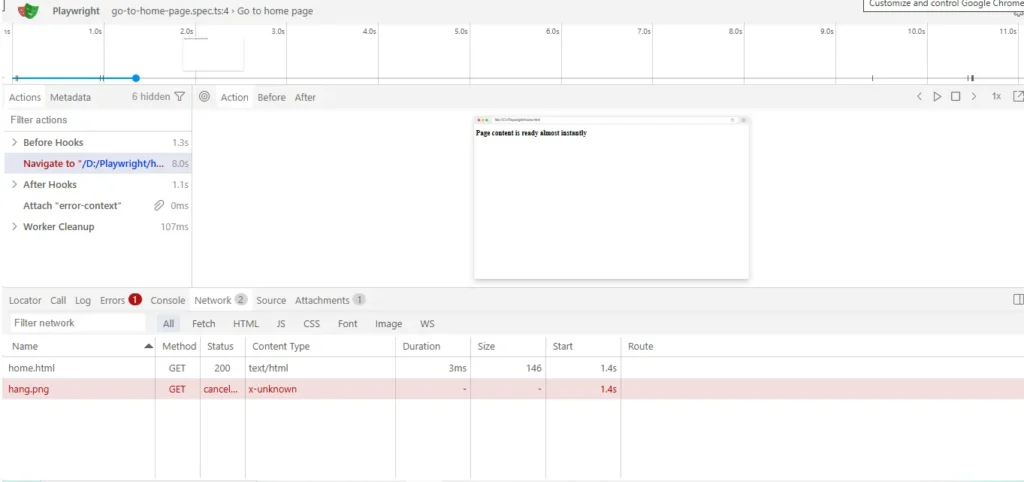
- Open the trace of the failing run in Trace Viewer.
- Find the point where the visible DOM stopped changing.
- Compare that timestamp against the 30-second (or whatever) timeout mark.
- If the DOM was ready long before the timeout, switch your wait condition.
// Before: waits for every resource, including ones that may never settle
await page.goto('https://staging.yourapp.com/');

// After: waits for the DOM to be parsed and interactive, not every asset
await page.goto('https://staging.yourapp.com/', { waitUntil: 'domcontentloaded' });
commit is even lighter, it resolves once the response starts arriving and the document begins loading. Use it when you’re about to explicitly wait for a specific element anyway, since Playwright’s auto-waiting on your next locator action will handle the rest.
Cause 3: The Target Isn’t Actually Reachable
Sometimes the error isn’t a timeout at all, it just looks like one until you read the exact text. If you see net::ERR_CONNECTION_REFUSED, the port your app should be listening on isn’t open yet, usually because your test suite started before the app server finished booting. If you see net::ERR_NAME_NOT_RESOLVED, DNS can’t resolve the hostname at all, common on self-hosted runners without the internal DNS entries your staging environment relies on.
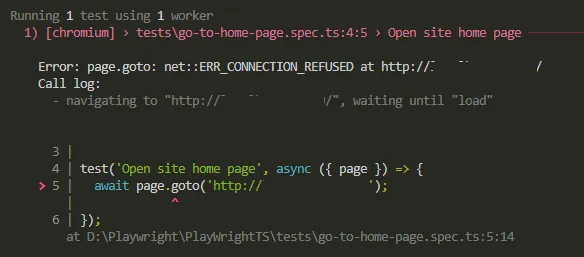
Neither of these is a Playwright bug. Add a readiness check before the suite starts, or use your CI tool’s built-in wait-for-port step:
// playwright.config.ts
export default defineConfig({
  webServer: {
    command: 'npm run start',
    url: 'http://localhost:3000',
    timeout: 120 * 1000,
    reuseExistingServer: !process.env.CI,
  },
});
That webServer block makes Playwright itself wait for your app to respond before any test runs, which removes this cause entirely for local and CI runs alike.
Cause 4: A Redirect Chain or Auth Wall That Never Settles
Some apps bounce through two or three redirects before landing on a stable URL, and if one of those hops depends on a cookie or token your test context doesn’t have yet, the chain can loop or stall. This shows up clearest in the Network tab inside Trace Viewer, you’ll see repeated 302 responses instead of a single clean navigation.
The real fix is usually to stop navigating through the login flow at all. Authenticate once, save the session, and reuse it:
// auth.setup.ts
import { test as setup } from '@playwright/test';

setup('authenticate', async ({ page }) => {
  await page.goto('/login');
  await page.getByLabel('Email').fill('test@example.com');
  await page.getByLabel('Password').fill('secret');
  await page.getByRole('button', { name: 'Sign in' }).click();
  await page.waitForURL('/dashboard');
  await page.context().storageState({ path: 'playwright/.auth/user.json' });
});
Every other test loads that saved storage state directly, so it lands on the final URL in one hop instead of walking the redirect chain every single run.
The Fix Everyone Reaches for First, and Why It’s a Workaround
Stack Overflow will tell you to just wrap the call in a much bigger number, { timeout: 120000 }, and move on. Sometimes that’s genuinely the right call, if cause 1 above is confirmed. But applied blindly, it’s not a fix, it’s you asking Playwright to wait longer for a problem you haven’t actually diagnosed.
I’ve seen this exact pattern cost a team an entire afternoon before a release: a flaky navigation timeout got “fixed” by tripling the timeout, the test suite got slower across the board, and the underlying cause, a login redirect loop, kept silently costing four extra seconds on every single test that touched an authenticated page. It passed. It was still broken.
If you increase a timeout without first checking Trace Viewer or the exact error text, you’re guessing. That’s fine as a quick unblock before a demo. It’s not something to merge into your suite without going back and confirming which of the four causes above you actually hit.
Before You Apply Any Fix, Check This
Before you commit to a fix, confirm which cause you’re actually dealing with, not the one that’s fastest to try.
Read the exact error text first. net::ERR_CONNECTION_REFUSED or net::ERR_NAME_NOT_RESOLVED means this isn’t a Playwright timeout at all, skip straight to Cause 3. A plain Timeout 30000ms exceeded with no network error means it’s genuinely 1, 2, or 4.
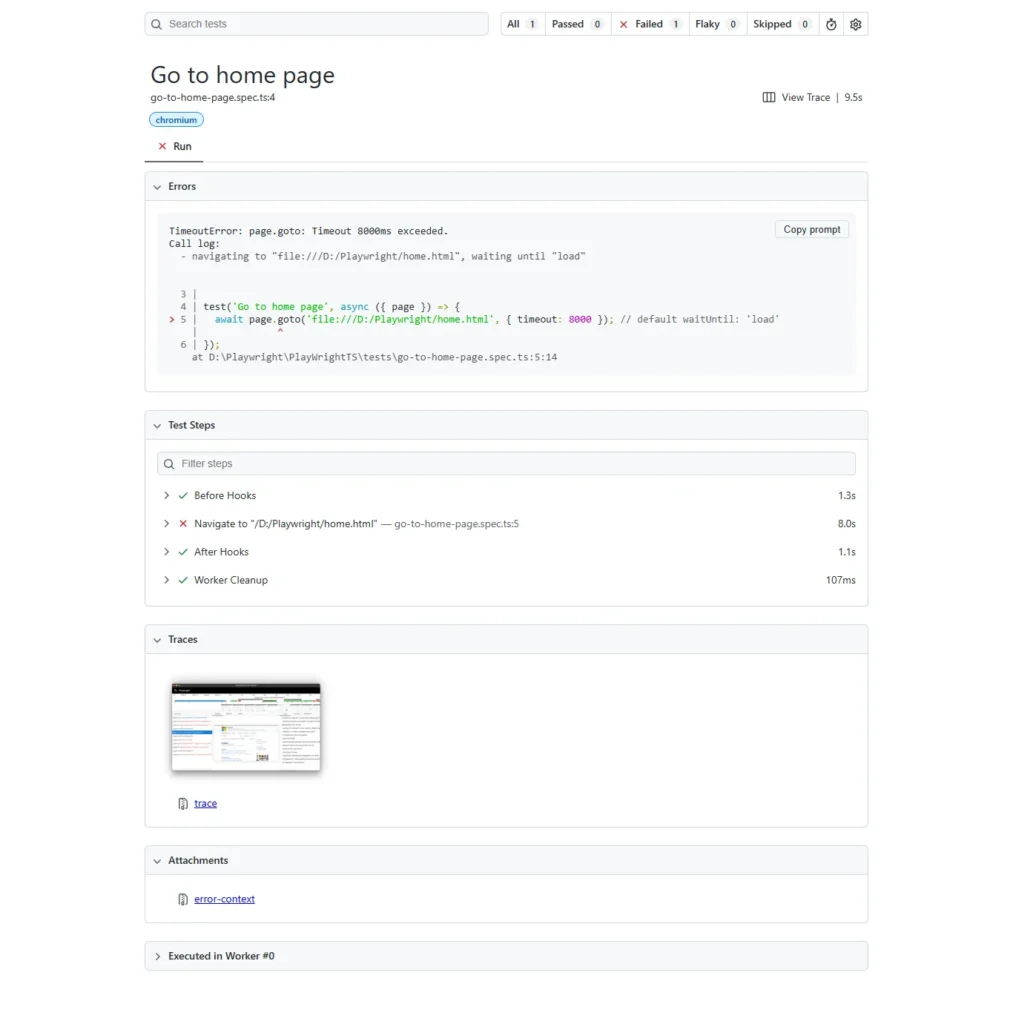
Then open the trace with npx playwright show-trace and check when the DOM actually stabilized. If it stabilized in the first two seconds and the timeout still fired at 30, you have a wait-condition problem, not a speed problem.
A false-positive fix looks like this: you bump the timeout, the test passes once, you move on. Then it’s flaky again in two weeks because the underlying cause never went away, it just had more time to sometimes resolve on its own.
The One Thing to Remember About This Error
A playwright page.goto timeout error is Playwright telling you the exact truth: the lifecycle event you asked it to wait for didn’t happen in time. It’s rarely a Playwright bug. It’s almost always a mismatch between what your app actually does on load and what you told Playwright to wait for.
Read the exact error text before you touch a timeout number. If you’re building out a fuller framework around this, our guide on why Playwright tests fail in CI covers the pipeline-level version of this same diagnostic approach.
Frequently Asked Questions
What’s the default timeout for page.goto in Playwright?
30 seconds, unless you’ve changed it with page.setDefaultNavigationTimeout(), browserContext.setDefaultNavigationTimeout(), or a timeout option on the call itself. Passing timeout: 0 disables it entirely, which I’d avoid outside of deliberate debugging sessions.
Does this happen in Python and Java too, or just TypeScript?
Yes. The navigation timeout exceeded behavior comes from Playwright’s core engine, not the language binding, so page.goto() in Python and Java hits the exact same four causes described here. Only the syntax for setting waitUntil and timeout changes between languages.
Why does the same test fail only in CI and never locally?
This is almost always Cause 1 or Cause 3: either the runner is genuinely slower than your machine, or your app server hasn’t finished starting when the test suite begins. Check the exact error text first, a connection-refused error points straight at Cause 3.
What if none of these four fixes work?
Get a minimal repro, a single test file with no fixtures or page objects, navigating to the exact URL that’s failing. If that isolated case still times out, check the open issues on the Playwright GitHub repo for your exact Playwright version, this kind of intermittent goto timeout has been reported and discussed there before, and the version-specific changelog will tell you if it’s a known regression rather than something in your code.
Is waitUntil: ‘networkidle’ a good fix for this?
Usually not, and Playwright’s own docs actively discourage relying on it for test readiness. Modern apps rarely go fully idle, background polling, analytics beacons, and websocket keep-alives mean networkidle can wait far longer than the page is actually unready for interaction. Prefer domcontentloaded plus an explicit wait on the element you actually need.