Your test is mid-click when the run just stops. The only useful line in the output is this one:
Error: locator.click: Target closedor its longer cousin:
Error: locator.click: Target page, context or browser has been closedI’ve hit both more times than I can count, usually right before a release, usually in CI, almost never on my own machine. This article covers the version of the problem where a page, context, or browser gets closed while Playwright is still trying to use it, which is what that error message is actually telling you.
The Playwright target closed error means Playwright tried to run an action against a page, frame, or browser that no longer exists by the time the command reached it. It’s not a locator problem and it’s not really a timeout problem, even though it can look like one in the log. The five causes below cover almost every real case I’ve debugged: a missing await before a close call, a click that triggers navigation and kills the target mid-action, a test timeout cutting off an in-flight action, a browser crash in CI, and an async event handler firing after teardown.
What the Playwright Target Closed Error Actually Means
Playwright’s “target” is whatever object your command is being sent to: a page, a browser context, or the browser process itself. When any of those three gets torn down, every command already queued against it fails with some form of “Target closed.”
That’s different from a timeout. A timeout means Playwright waited and the thing you wanted never showed up. A target closed error means the thing you wanted used to exist, and something closed it while your command was still in flight.
This matters because the fix is never “wait longer.” Waiting longer for a target that’s already gone just delays the same failure. You’re not racing a slow app, you’re racing your own cleanup code, your test runner’s timeout handler, or the browser process itself.
The Real Causes, Ranked
I’m ranking these by how often each one is actually the cause in real projects, not by how interesting they are to write about. In my experience, the first two account for the large majority of cases people search this error for.
| Cause | How to tell it’s this one | Fix |
|---|---|---|
Missing await before a close call | Error fires right after a browser.close(), context.close(), or page.close() somewhere in your code or hooks | Await every close call, wrap cleanup in try/finally |
| A click triggers navigation that kills the current target | Trace Viewer shows a navigation or new-page event exactly where the action failed | Wait for the navigation or popup explicitly instead of chaining straight into the next action |
| Test timeout hits mid-action | Failure timestamp lines up with your configured test timeout, not an action timeout | Fix the slow step itself, don’t pad the timeout |
| Browser process crashed (usually OOM) in CI | No local repro, CI logs or the HTML report show a browser exit code | Cut worker count or shard size, give the runner more memory |
| Async event handler fires after teardown | A page.on() or fire-and-forget promise touches the page after the test already resolved | Track pending listeners and await them in finally, or use page.waitForEvent() instead |
1. A missing await before a close call
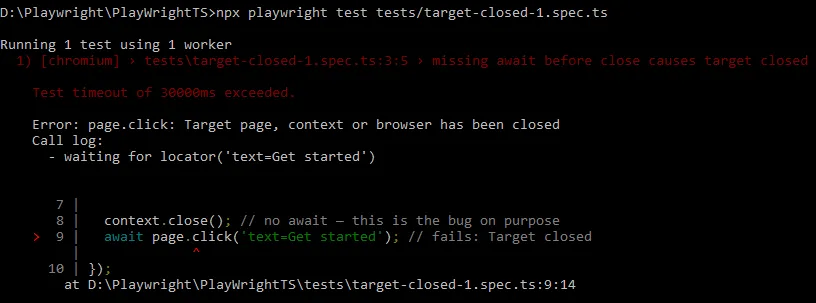
This is the one that gets people who moved from Selenium or Cypress, where cleanup being slightly out of order rarely mattered. In Playwright it does, because close() returns a promise, and if you don’t await it, the next line can run while the browser is still tearing down.
// broken: close() isn't awaited, next action races the teardown
test('checkout flow', async ({ browser }) => {
  const context = await browser.newContext();
  const page = await context.newPage();
  await page.goto('/cart');
  context.close(); // missing await
  await page.click('#checkout'); // Target closed
});
// fixed: every close call is awaited, and cleanup is isolated to its own step
test('checkout flow', async ({ browser }) => {
const context = await browser.newContext();
const page = await context.newPage();
try {
await page.goto('/cart');
await page.click('#checkout');
} finally {
await context.close();
}
});If you’re using @playwright/test fixtures instead of managing contexts yourself, this specific cause mostly disappears, since the test runner handles the close sequencing for you. It still shows up in custom fixtures and in Playwright-based scraping scripts that manage their own browser lifecycle.
2. A click triggers navigation that kills the current target
This one looks identical to a timing issue in the error output, but if you open the trace, you’ll see the element resolves instantly. The real problem is somewhere else: the click itself causes the page you’re holding a reference to stop existing.
Two common shapes of this: a click opens a new tab and your code keeps using the old page object, or a click causes a full-page navigation that destroys the frame while Playwright’s actionability checks are still running against it.
// broken: page reference goes stale the instant the popup opens
await page.click('a[target="_blank"]');
await page.click('#confirm'); // wrong page, or a closed one
// fixed: capture the new page explicitly and wait for it
const [newPage] = await Promise.all([
context.waitForEvent('page'),
page.click('a[target="_blank"]'),
]);
await newPage.waitForLoadState();
await newPage.click('#confirm');3. Test timeout hits while an action is in-flight
If your action is slow enough to bump into the overall test timeout, @playwright/test‘s teardown kicks in and closes the context out from under whatever was still running. The error you see is a symptom, the actual cause is upstream.
Check the failure timestamp against your timeout value in playwright.config.ts. If they line up, you’re not looking at a target closed bug, you’re looking at a slow step that needs fixing, or a config problem.
// playwright.config.ts
export default defineConfig({
  timeout: 30_000, // if failures cluster right at this number, this is your cause
  expect: { timeout: 5_000 },
});
4. The browser process crashed in CI
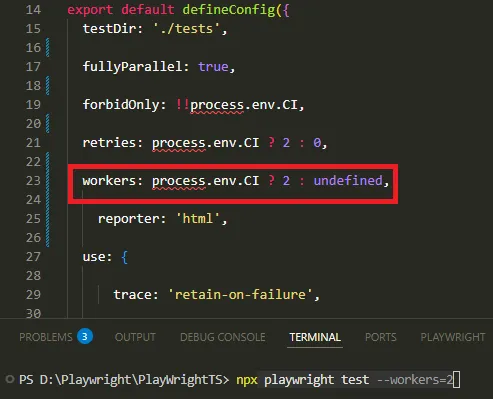
Headless Chromium can get killed by the OS when a runner runs low on memory, and Playwright has no way to prevent that from the outside. You’ll usually see this on sharded suites with a high worker count on a resource-limited GitHub Actions runner or a small self-hosted container.
There’s no code fix for a genuine OOM kill. What actually works is reducing concurrency for that job, or giving the runner more memory.
# .github/workflows/tests.yml
- run: npx playwright test --workers=2
I’ve seen teams “fix” this by adding retries instead, which does make CI green again, but it hides a resource problem that tends to come back worse once the app under test gets heavier.
5. An async event handler fires after the test already tore down
If you attach a page.on('response', ...) or page.on('dialog', ...) handler and don’t clean it up, it can still fire after the test has finished and Playwright has closed the page. The handler then tries to touch a page that’s gone.
// broken: handler has no way to know the test already ended
page.on('response', async (response) => {
  const body = await response.text(); // can run after teardown
});
// fixed: use waitForEvent so the promise resolves inside the test's own lifetime
const responsePromise = page.waitForEvent('response', r => r.url().includes('/api/cart'));
await page.click('#add-to-cart');
const response = await responsePromise;The Fix Everyone Reaches For First, and Why It Doesn’t Work
Most people’s first instinct is to wrap the failing action in a try/catch and swallow the error, or bump the retry count in playwright.config.ts until the test passes. That’s treating the symptom. It’ll pass today and come back flaky in three weeks, usually right before another release.
Stack Overflow will also tell you to add a longer actionTimeout. In most of these five cases that changes nothing, because you’re not waiting for something slow, you’re calling into something that’s already gone. No amount of waiting brings back a closed target.
The one situation where a retry genuinely helps is cause four, the OOM crash, and even then it’s masking a resource problem rather than fixing it.
Before You Apply Any Fix, Check This
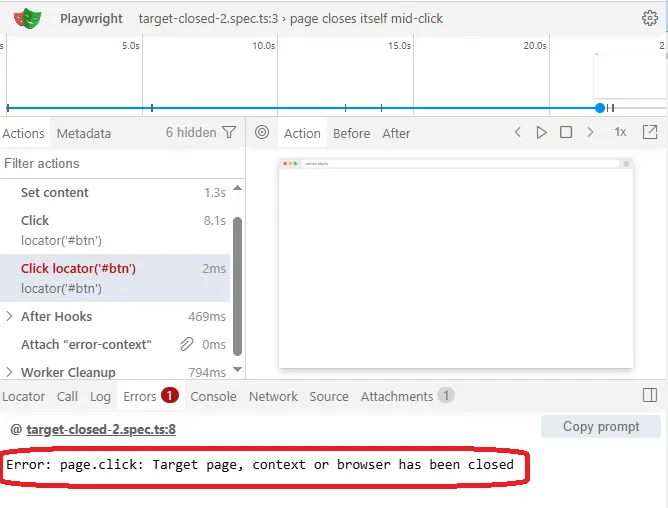
Open the failing test in Trace Viewer with npx playwright show-trace trace.zip and look at what happens in the few seconds before the failure. A navigation or new-page event right at the failure point points to cause two. A close call in your own code just before it points to cause one.
Check your CI logs for a browser process exit code, not just the Playwright error text, that’s the fastest way to confirm cause four instead of guessing. And if a “fix” makes the test pass once but it’s still flaky on the next few runs, you silenced the symptom instead of removing the race condition.
How to Confirm You’ve Actually Fixed It
Run the affected test at least 10 times in a row locally with --repeat-each=10, and run it once with the same worker count your CI uses, not just --workers=1. A fix that only holds at one worker isn’t done yet.
- Reproduce the failure reliably first, with
PWDEBUG=1or headed mode if it only shows in CI. - Apply one fix at a time from the causes above, matched to what the trace actually showed you.
- Re-run with
--repeat-each=10and your real worker count before calling it fixed. - Confirm the fix in the actual CI environment, not just locally, since causes four and five often only show up there.
Preventing the Target Closed Error Going Forward
Most of what prevents this error long-term isn’t a code pattern, it’s discipline about lifecycle. Always await close calls. Never keep a bare page reference across a navigation without confirming what it now points to. Keep worker counts matched to what your CI runner can actually handle.
If you’re building a framework rather than a handful of scripts, this is worth designing in from the start rather than patching in after the fact. Improving how browser lifecycle is handled in a Playwright framework is where I’d start if this keeps coming back across multiple suites, not just one flaky test.
For a deeper look at why Chromium runs out of memory under parallel workers in the first place, the GitHub issue tracking OOM-related target closed reports is worth reading; it’s where I first saw the pattern confirmed across dozens of unrelated projects.
Wrapping Up
If you remember one thing from this article, make it this: a target closed error is never really about the element you were trying to click. It’s about something else in your test, your config, or your CI environment closing the page, context, or browser before your action got there. Find that something else, and the error stops coming back, instead of just moving to a different line next week.
If your team is also fighting this inside a GitHub Actions pipeline specifically, fixing common CI pipeline issues in Playwright covers the runner-level side of cause four in more depth than I could fit here.
Frequently Asked Questions
Why does the target closed error only happen in CI and never locally?
Usually cause three or four: your local machine has more memory and fewer parallel workers than your CI runner, so a slow action or a memory-hungry browser process never gets cut off locally the way it does under CI’s constraints. Try matching your local worker count to CI’s before assuming it’s environment-specific magic.
Does this happen in Python or Java too, not just TypeScript?
Yes, the underlying cause is the same across all Playwright language bindings, since it’s about object lifecycle in the browser protocol layer, not the language. The exact error string differs slightly (Python often shows it as a TargetClosedError), but the five causes and fixes above apply the same way.
Will this still apply in newer Playwright versions?
The lifecycle behavior behind this error has been stable since strict mode landed, and I haven’t seen it change meaningfully through 1.62.x. If you’re reading this on a much newer release, it’s worth a quick check of the release notes for anything about browser lifecycle or context teardown before assuming everything here still holds exactly.
What if none of these five fixes work for me?
Isolate a minimal repro, one test, one browser, no parallelism, and confirm the error still happens. If it does, check open issues on the microsoft/playwright GitHub repository for your exact error string and Playwright version, since a small number of cases really are version-specific regressions rather than lifecycle bugs in your own code.
Is adding force: true to the click a valid fix for this?
No. force: true skips Playwright’s actionability checks, it doesn’t change whether the target still exists. If the page, context, or browser is already closed, forcing the click just fails faster or produces a different, less clear error.