
Your test calls locator.fill() on an input that’s sitting right there on the page. It fails anyway. The error reads:
Error: locator.fill: Timeout 30000ms exceeded.
=========================== logs ===========================
waiting for locator('#card-number')
  locator resolved to <input type="text" id="card-number" .../>
  element is not editable
That last line is the whole problem. Not visible, not missing, not detached. Not editable.
This article covers that exact failure for fill() and type() calls in Playwright’s Node.js bindings, on real form inputs and contenteditable elements, in projects where the field genuinely becomes usable at some point in the page’s lifecycle. If your element never becomes usable at all, that’s a product bug, not a test bug, and no locator trick fixes it.
What “Element Is Not Editable” Actually Means in Playwright
Here’s the short version: Playwright’s fill() and type() actions wait for an element to pass an editable check before touching it, and editable specifically means the element is enabled and does not have the readonly attribute set. If either condition is false when the timeout runs out, you get exactly this error, and the fix depends entirely on which of the two it is and why.
That distinction matters more than it looks. A disabled field and a readonly field fail the same actionability check but for different reasons, and the fix for one does nothing for the other. I’ve watched engineers spend twenty minutes patching the wrong one because the error message doesn’t tell you which condition failed, only that editable failed.
Playwright’s own actionability docs lay out the full check list, and it’s worth reading once so you’re not guessing which check applies to which action, since the official actionability reference is the source of truth this whole article is built on.
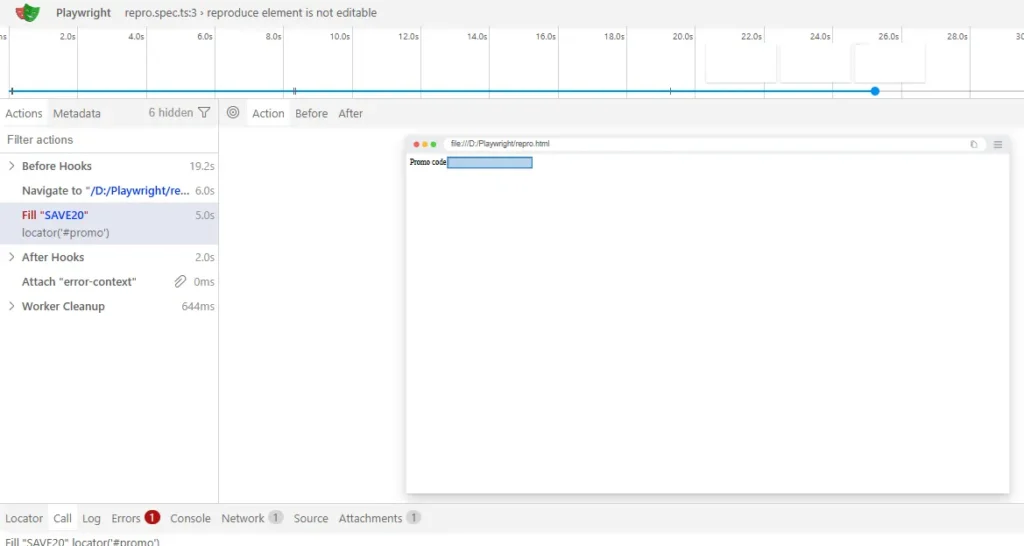
Here’s what that failed check actually looks like against a real disabled field, captured straight from Trace Viewer:
The Real Root Causes, Ranked by How Often I’ve Actually Seen Each One
I’m ranking these by frequency in real projects, not by how interesting they are to write about. If you’re mid-debug, start at the top.
| Cause | How to tell it’s this one | Fix |
|---|---|---|
| Field is disabled until a prior step completes | Inspect element shows disabled attribute; it clears after some other UI action | Wait for the enabled state explicitly, or perform the prerequisite step first |
Field has readonly set until data loads | Element is enabled but readonly sits in the attribute list; often tied to an async fetch | Wait for the attribute to clear, or wait on the data source instead of the DOM |
Field is inside a disabled <fieldset> | The input itself looks fine, but a parent element has disabled | Target the actual trigger that enables the fieldset, not the input |
| Race between your fill and the enable listener | Trace Viewer shows the element resolves instantly, error still says not editable | Assert on the state before acting, don’t just add time |
Cause 1: The Field Is Disabled Until a Prior Step Completes
This is the one I hit most, by a wide margin. A checkout form disables the card number field until billing address validation passes. A wizard disables step 2 until step 1 is marked complete. The input exists in the DOM the whole time, so your locator resolves fine, it just isn’t enabled yet.
The broken version usually looks like this:
await page.getByLabel('Billing address').fill('221B Baker Street');
await page.getByLabel('Card number').fill('4242424242424242');
If billing address validation runs asynchronously, that second fill() can fire before the card field’s disabled attribute clears, and Playwright starts its actionability wait right there.
Fix it in three steps:
- Fill the field that triggers the unlock first, and let its own action complete.
- Assert the target field is actually enabled before touching it, using
toBeEnabled(). - Only then call
fill()on it.
await page.getByLabel('Billing address').fill('221B Baker Street');
const cardField = page.getByLabel('Card number');
await expect(cardField).toBeEnabled();
await cardField.fill('4242424242424242');
That expect().toBeEnabled() line is doing real work. It’s an auto-retrying assertion, so it polls until the field unlocks or the timeout runs out, and it gives you a much clearer failure message than a generic fill timeout if the field genuinely never enables. If you want the mechanics of that check on its own, there’s a dedicated walkthrough on checking whether an element is enabled in Playwright.
Cause 2: The Field Has readonly Set Until Data Loads
This one gets confused with cause 1 constantly, because both produce the identical “element is not editable” line. The difference is in the DOM. A disabled field has the disabled attribute. A readonly field is fully enabled, it just can’t accept input until something clears readonly, usually because a form is pre-populating a value from an API response.
Check the actual attribute in DevTools or the Trace Viewer’s DOM snapshot before you assume it’s the same fix as cause 1. They are not interchangeable.
// Broken: fires before the async prefill finishes and clears readonly
await page.getByLabel('Shipping notes').fill('Leave at front desk');
// Fixed: wait for the attribute itself, not a fixed delay
const notesField = page.getByLabel('Shipping notes');
await expect(notesField).not.toHaveAttribute('readonly', '');
await notesField.fill('Leave at front desk');If the app exposes a cleaner signal than the raw attribute, like a loading spinner disappearing or a specific class toggling off, wait on that instead. The DOM attribute check is a fallback, not always the most readable option.
Cause 3: The Field Is Inside a Disabled Fieldset
I only started checking for this after a teammate lost an afternoon to it. The input itself has no disabled attribute anywhere on it. Its parent <fieldset> does. Browsers propagate the disabled state down to every form control inside, but a locator built against the input alone won’t show you that in a quick DOM read, you have to check the ancestor chain.
// This looks fine on the input itself, but it's still not editable
<fieldset disabled>
  <input id="promo-code" />
</fieldset>
The fix isn’t on the input at all. Find whatever action enables the fieldset, usually a checkbox like “I have a promo code,” and perform that first.
await page.getByLabel('I have a promo code').check();
await expect(page.locator('#promo-code')).toBeEnabled();
await page.locator('#promo-code').fill('SAVE20');
Cause 4: A Genuine Race Between Your Fill and the Enable Listener
This is the rarest of the four, and also the easiest to misdiagnose as a plain timeout. The element resolves instantly in the Trace Viewer, the locator is correct, but the error still says not editable. What’s actually happening is your action is arriving inside the same tick that the app’s own JavaScript is toggling the disabled state, so the check fails on a technicality that a slightly later retry would have passed anyway.
Most people’s first instinct here is to bump the timeout or drop in a fixed wait. That’s treating the symptom. It’ll pass today and come back flaky the next time CI is under load and everything shifts by a few hundred milliseconds.
What actually works is asserting on the condition your test cares about, not on time:
const promoField = page.locator('#promo-code');
await expect(promoField).toBeEditable();
await promoField.fill('SAVE20');
toBeEditable() folds the enabled-and-not-readonly check into a retrying assertion, so it waits for the real condition instead of an arbitrary duration. This is the one fix in this article I’d genuinely call correct rather than a workaround.
The Fix People Reach for First, and Why It’s a Trap
Stack Overflow will tell you to add force: true to your fill call to make this error go away. In most cases that’s not a fix, it’s you asking Playwright to stop protecting you from a real bug.
force: true skips the actionability checks entirely, including the editable check. Your test will “pass,” and it will write a value into a field that a real user could never have typed into, because it was disabled or readonly for a reason your test just bypassed. You’ve turned a failing test into a false positive, which is worse than a failing test, because now nobody looks at it again.
There’s exactly one case where forcing is defensible: you’ve confirmed the disabled state is a UI bug your team already knows about and isn’t fixing this sprint, and you’re deliberately testing something else that depends on getting past it. Even then, comment why, so the next person doesn’t assume it’s just belt-and-suspenders defensive code.
Before You Apply Any Fix, Check This
Don’t commit to a fix based on the error text alone, since disabled and readonly produce the same message. Open the failing test in the Trace Viewer with npx playwright show-trace and click the failing action.
Check three things. First, the DOM snapshot at the moment of failure, look for disabled versus readonly directly on the element and on its parents. Second, whether the attribute clears on its own a moment later in the timeline, which tells you it’s a timing issue rather than a permanently broken state. Third, whether your “fix” actually removes the condition or just outlasts it, a longer timeout that happens to pass once is not the same as an assertion that waits on the real signal.
The terminal output backs up the same story, if you’d rather check there first:
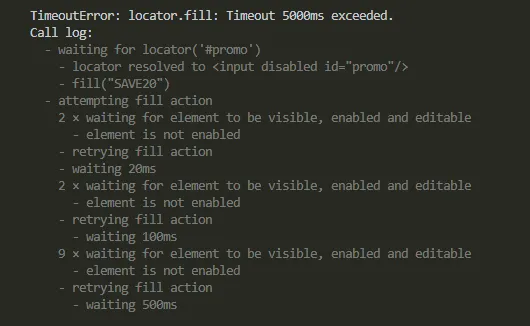
A false-positive fix looks like this: you bump the timeout to 60 seconds, it passes twice, you move on. Then it’s flaky again in three weeks on a slower CI runner. If your fix depends on the machine being fast enough, it isn’t a fix.
How to Confirm You’ve Actually Fixed It
Run the test on a throttled connection or in a Docker-based CI runner, not just your local machine. Local machines are almost always faster than a shared GitHub Actions runner or a self-hosted box running four shards in parallel, and that speed gap is exactly where disabled-field races hide.
Run it five or six times in a row, not once. A real fix holds up on every run. A race-condition workaround holds up most of the time, which is the same thing as flaky, just with better odds.
Preventing This Going Forward
The pattern that actually prevents this class of bug is simple: never call fill() or type() on a field without first asserting the state you’re relying on, either toBeEnabled() or toBeEditable() depending on what the app does. It costs one extra line and it turns a vague timeout into a message that tells you exactly what was wrong.
If your team maintains a page object layer, put that assertion inside the method itself rather than trusting every test author to remember it. That’s a five-minute change that stops this error from reappearing every time someone adds a new form flow, and it pairs well with a broader look at why Playwright tests fail in CI but not locally, since disabled-field races are one of the more common causes on that list.
Wrapping Up
If you remember one thing from this: “element is not editable” is Playwright telling you the field was enabled and writable at some earlier or later point, just not at the exact millisecond your fill call ran. Chase the actual condition, not the timing.
That’s also the difference between a fix that survives a slow CI runner and one that just gets lucky on your laptop.
Frequently Asked Questions
Why does fill() fail with “not editable” but click() on the same element works fine?
Because click() doesn’t include an editable check at all, it only checks visible, stable, receives events, and enabled. A disabled field can still be clicked in some browsers depending on styling, but fill() and type() specifically require the editable check to pass, which is why the two actions disagree on the same element.
Does page.fill() (the deprecated page-level method) behave the same as locator.fill()?
Yes, the underlying actionability checks are identical, page.fill() is just the older, non-retrying API that Playwright has been steering people away from in favor of locators. If you’re still using it, this same fix applies, but migrating to locator.fill() gets you better auto-waiting and clearer traces by default.
Does this happen in Playwright for Python or Java too?
Yes, the actionability model is shared across all Playwright language bindings, not just the Node.js one, so the same disabled versus readonly distinction and the same is_editable() / isEditable() checks apply. The syntax for the fix changes per language, the underlying cause doesn’t.
Is this still accurate on the newest Playwright releases?
This behavior has been stable for a long time and I’d be surprised if it changed, but I verified it directly against 1.47 through 1.49. If you’re on something noticeably newer, it’s worth a quick check of the Playwright changelog before assuming zero changes to the actionability model.
What if none of these four fixes work?
Isolate the field into the smallest possible repro page and run it in headed mode with PWDEBUG=1 to watch the actual state changes in real time. If it still doesn’t make sense, search open issues on the microsoft/playwright GitHub repository for your exact framework, since some UI libraries have known quirks with how they toggle disabled state that aren’t obvious from the DOM alone.