On April 20, 2026, four days before the original deadline, the Department of Justice moved its web accessibility date for large state and local governments out by a full year. A QA lead who had just finished a WCAG 2.1 audit of a county website reasonably asked what that changed for the test plan. Nothing, as it turns out. But the question shows why section 508 vs WCAG vs ADA trips up so many testers: one is a procurement standard, one is a civil rights law, and one is a technical specification, yet people treat them as three competing checklists.
This guide separates them, shows how they connect, and gives you one test approach that covers all three.
The short answer to section 508 vs WCAG: WCAG is the test, and Section 508 and the ADA are the rules that decide when you have to pass it. Section 508 makes federal agencies, and the vendors who sell to them, meet WCAG 2.0 Level A and AA for web content. The ADA’s Title II web rule requires state and local governments to meet WCAG 2.1 AA, while Title III, which covers private businesses, has no federal web regulation and is enforced mostly through lawsuits.
Testing to WCAG 2.2 AA covers the web criteria of all three, with one small footnote about criterion 4.1.1 below. Status as of October 15, 2026.
- Section 508 vs WCAG vs ADA: what each one actually is
- Why the dates and lawsuit numbers matter in 2026
- How the three standards fit together in practice
- A common misconception: passing one means passing all three
- Section 508 checklist: how to test once and map the results to all three
- How to know if this applies to you
Section 508 vs WCAG vs ADA: what each one actually is
The cleanest way I explain section 508 vs WCAG vs ADA to a new tester is this: two of them are legal requirements and one is a ruler. WCAG is the ruler. Section 508 and the ADA are the rules that decide when somebody has to hold their website up against it. New to testing for accessibility at all? My guide on what accessibility testing involves for QA engineers covers the basics first.
Section 508
Section 508 of the Rehabilitation Act requires federal agencies to make the technology they build, buy, maintain or use accessible. The technical details live in the Revised 508 Standards (36 CFR Part 1194), which the US Access Board issued in January 2017 and which became enforceable on January 18, 2018. For web content, electronic documents and software, those standards incorporate WCAG 2.0 Level A and AA by reference. That is 38 success criteria.
Beyond WCAG, Section 508 also has chapters on functional performance, hardware, software and support documentation, which is why a 508 test plan covers more than a browser scan. If you sell software to a federal agency, expect to hand over a conformance report, usually a VPAT-based accessibility conformance report, before anyone signs.
Public visibility alone does not put a private company’s website under Section 508. The standard applies to federal agencies and, through procurement, to vendors selling them technology. Many states have copied it, or WCAG, into their own purchasing rules, which is how plenty of non-federal teams end up with a section 508 checklist anyway.
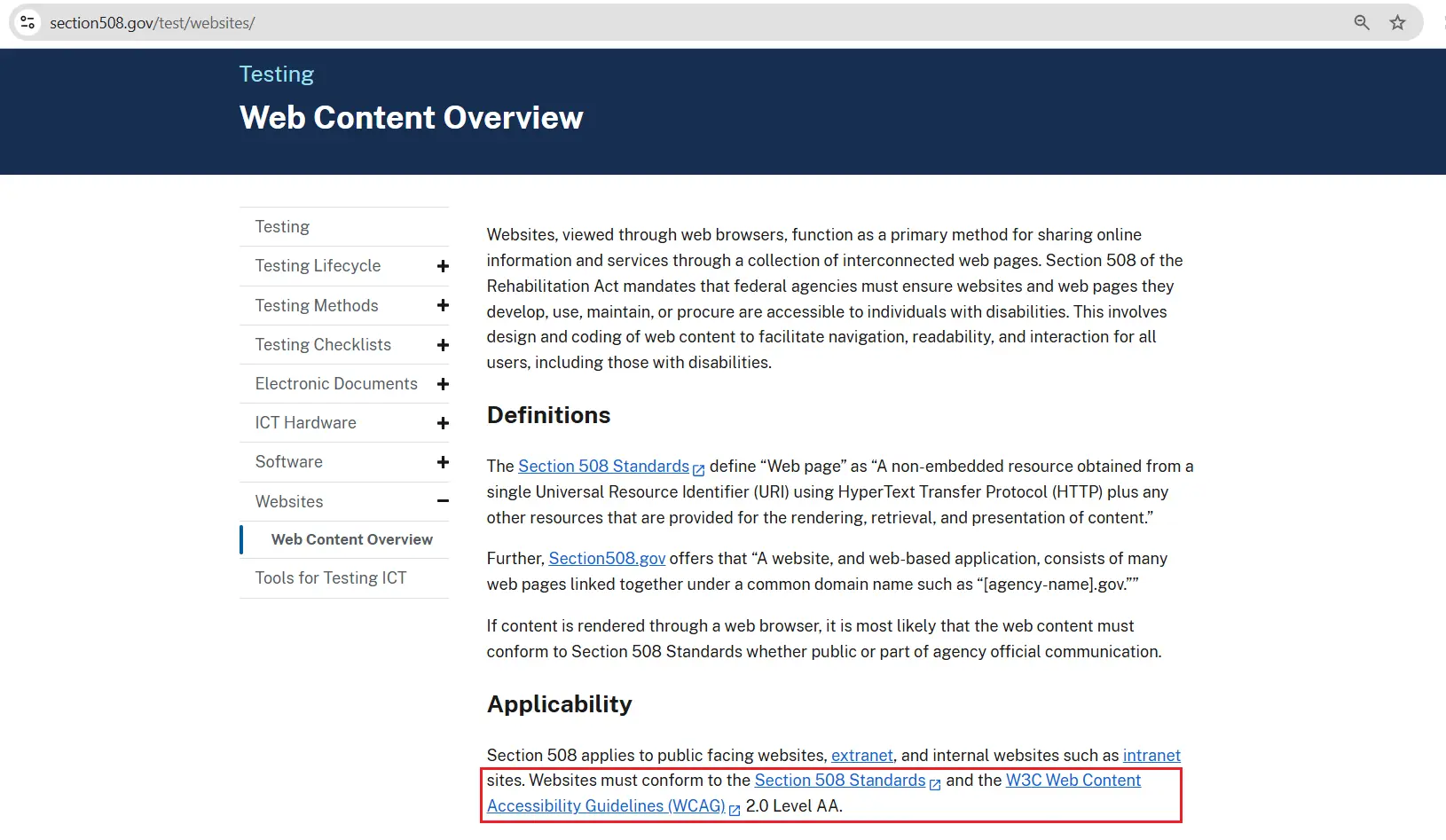
The official source says the same thing. Section508.gov states plainly in its web content overview that websites must conform to the Section 508 Standards and WCAG 2.0 Level AA, and it publishes an ICT Testing Baseline Portfolio with a Baseline for Web and a Baseline for Documents to guide conformance testing.
WCAG
WCAG, the Web Content Accessibility Guidelines, is a technical standard from the W3C. It is not a law by itself anywhere. It has three conformance levels (A, AA, AAA) and three versions you will actually meet at work: 2.0 from 2008, 2.1 from 2018, and 2.2, published on October 5, 2023.
Each version builds on the last. Level A plus AA is 38 criteria in 2.0, 50 in 2.1 and 55 in 2.2. WCAG 2.2 added nine new success criteria and removed one, 4.1.1 Parsing, which leaves 86 criteria in total across all three levels.
The ADA
The Americans with Disabilities Act of 1990 is a civil rights law, and the statute itself says nothing about WCAG. That is the real difference between ADA and WCAG: one is the obligation not to exclude people, the other is a yardstick for measuring whether you managed it. Title II covers state and local governments. Title III covers businesses open to the public.
Why the dates and lawsuit numbers matter in 2026
Title II is where the dates moved. DOJ’s 2024 rule adopted WCAG 2.1 Level AA for state and local government web content and mobile apps. On April 20, 2026, an interim final rule pushed the compliance date for entities with a population of 50,000 or more from April 24, 2026 to April 26, 2027. Smaller entities and special district governments now have until April 26, 2028.
The technical standard did not change, and DOJ said covered entities still have an ongoing obligation to provide accessible services. A federal lawsuit filed in May 2026 challenges the extensions, so treat these dates as current rather than settled. I found no further change as of October 15, 2026.
Private businesses sit under Title III, and there is still no DOJ regulation setting a web standard for them. Courts have applied the statute to websites anyway, and the Ninth Circuit’s Domino’s decision is the best-known example. So the pressure comes from lawsuits, not from a rulebook. If that is your situation, the ADA website compliance testing checklist for QA teams walks through it in test-case form.
The numbers are real but easy to misread. Seyfarth Shaw’s 2026 mid-year report counts 5,006 federal ADA Title III lawsuits in the first half of 2026, the highest first half since 2021 and about 9% above the first half of 2025. The four-year first-half average was 4,463. Those figures cover every Title III case, including physical access claims. For all of 2025, Seyfarth counted 3,117 website cases out of 8,667 federal Title III suits, or 36%.
Litigation counts shift every quarter, so check the current figures before you quote them to anyone.
A note on scope: this is a QA testing guide, not legal advice. Decisions about legal compliance belong with a lawyer who knows your situation.
How the three standards fit together in practice
Here is the section 508 vs WCAG vs ADA picture in one table, including the ADA vs Section 508 comparison most people search for.
| Standard | Who it binds | Technical yardstick | Status as of October 15, 2026 |
|---|---|---|---|
| Revised Section 508 | Federal agencies and their technology vendors | WCAG 2.0 A and AA, plus hardware, software and documentation chapters | In force since January 18, 2018; still points to WCAG 2.0 AA, no newer version adopted that I could find |
| ADA Title II web rule | State and local governments | WCAG 2.1 AA | Due April 26, 2027 (population 50,000 or more) or April 26, 2028 (smaller entities, special districts) |
| ADA Title III | Private businesses open to the public | No federal web regulation; plaintiffs commonly cite WCAG | Enforced through lawsuits and demand letters |
| WCAG 2.2 | Nobody, on its own | W3C Recommendation, October 5, 2023 | Current version; meeting 2.2 AA also meets 2.1 AA and 2.0 AA, except the removed 4.1.1 |
Among the federal accessibility standards in that table, Section 508 and the Title II rule name a WCAG version, and Title III does not. That one fact explains most of the confusion testers run into.
Two situations show how this plays out. A QA lead at a SaaS company whose federal prospect asks for a conformance report needs results against WCAG 2.0 AA plus the software chapter, not just a clean browser scan. An IT team at a county of 80,000 residents has until April 26, 2027 and a 2.1 AA target, and their test plan should say so in the first line.
Because 2.2 AA includes everything in 2.1 AA and 2.0 AA, I test to WCAG 2.2 AA and report against whichever version the contract names. One footnote applies. Criterion 4.1.1 Parsing is gone from 2.2, and W3C now treats it as always satisfied for HTML, but it is still in the 2.0 text that Section 508 incorporates. For section 508 compliance testing I keep duplicate ID and malformed markup checks in the suite, because the 2.0 text still applies there.
The reverse gap matters too. WCAG 2.2 adds six criteria at A and AA, including 2.5.8 Target Size (Minimum), which wants targets of at least 24 by 24 CSS pixels, and 2.4.11 Focus Not Obscured, which a sticky cookie banner can fail by hiding the focused element. Neither exists in 508 or Title II, so a clean 508 report can still fail them.
A common misconception: passing one means passing all three
The belief I hear most is that clearing one of these clears the others. It does not. A 508 report against WCAG 2.0 AA says nothing about the criteria 2.1 added, and a 2.1 report says nothing about 2.5.8, which arrived in 2.2.
A close cousin is the idea that the ADA requires WCAG 2.2 AA. It does not. The Title II rule names 2.1 AA, and no federal rule for private businesses names a version at all. Building to 2.2 AA is a sensible target, not a legal citation.
The costliest version of this mistake is the overlay widget. A Shopify store owner gets a demand letter, installs a widget, and treats the matter as closed. EcomBack’s 2026 mid-year report counted 496 of 2,045 website lawsuits (24.25%) filed against sites that already had a widget or overlay installed. The same report found Shopify stores in 952 of those 2,045 suits. A widget can resize text for a visitor. It cannot fix a checkout form with unlabeled fields.
And here is my unpopular opinion: maintaining three separate test plans is a waste of a sprint. Write one suite to WCAG 2.2 AA, add the 508-only chapters when a federal customer is involved, and spend the time you saved on manual screen reader sessions.
Section 508 checklist: how to test once and map the results to all three
This is the section 508 checklist I start from for web content, built on WCAG and extended where Section 508 asks for more.
- Work out which rule binds you. Federal agency or federal vendor means Section 508. State or local government means the Title II rule. Private business means Title III exposure plus whatever your contracts say.
- Set your test baseline at WCAG 2.2 AA, and write the version your contract or regulator names at the top of the report (2.0 for Section 508, 2.1 for Title II).
- Run an automated scan on every key page and flow, using the axe-core tags shown below.
- Do a keyboard pass without a mouse. Every control must be reachable and operable (2.1.1), focus must be visible (2.4.7), and nothing sticky may cover the focused element (2.4.11).
- Check contrast: 4.5:1 for normal text (1.4.3) and 3:1 for large text and interface components (1.4.11), using axe-core or a contrast checker.
- Run a screen reader pass on your three most important journeys with NVDA on Windows or VoiceOver on macOS, and confirm labels, headings and error messages make sense when read aloud.
- For federal work, test the non-web parts too: PDFs, Word files, software interfaces, and support documentation, using the ICT Testing Baseline as your reference.
- Write the results against the named version, and keep the 2.2-only findings in a separate section so nobody mistakes them for 508 failures.
Step 3 is where Playwright earns its place. The scan below runs on a page you control and fails the test on any violation axe-core can detect:
import { test, expect } from '@playwright/test';
import AxeBuilder from '@axe-core/playwright';

test('home page has no detectable WCAG 2.2 AA violations', async ({ page }) => {
  await page.goto('http://localhost:3000/');

  const results = await new AxeBuilder({ page })
    .withTags(['wcag2a', 'wcag2aa', 'wcag21a', 'wcag21aa', 'wcag22aa'])
    .analyze();

  expect(results.violations).toEqual([]);
});
When I ran it against a demo page with four problems I seeded on purpose, the test failed and printed every violation it found. The first one in my run was button-name, with critical impact.
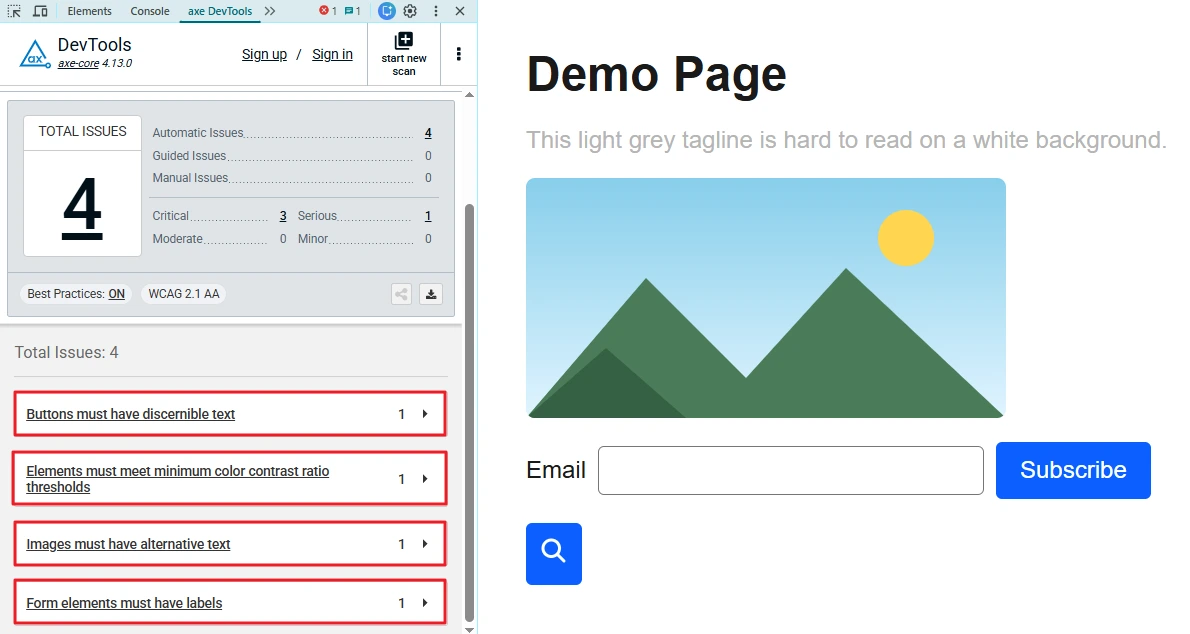
The axe DevTools browser extension runs the same engine, so scanning that page by hand shows the same four issues. Each row maps to a WCAG criterion: 1.1.1 for the image, 1.4.3 for contrast, and 4.1.2 for the button and the form field.
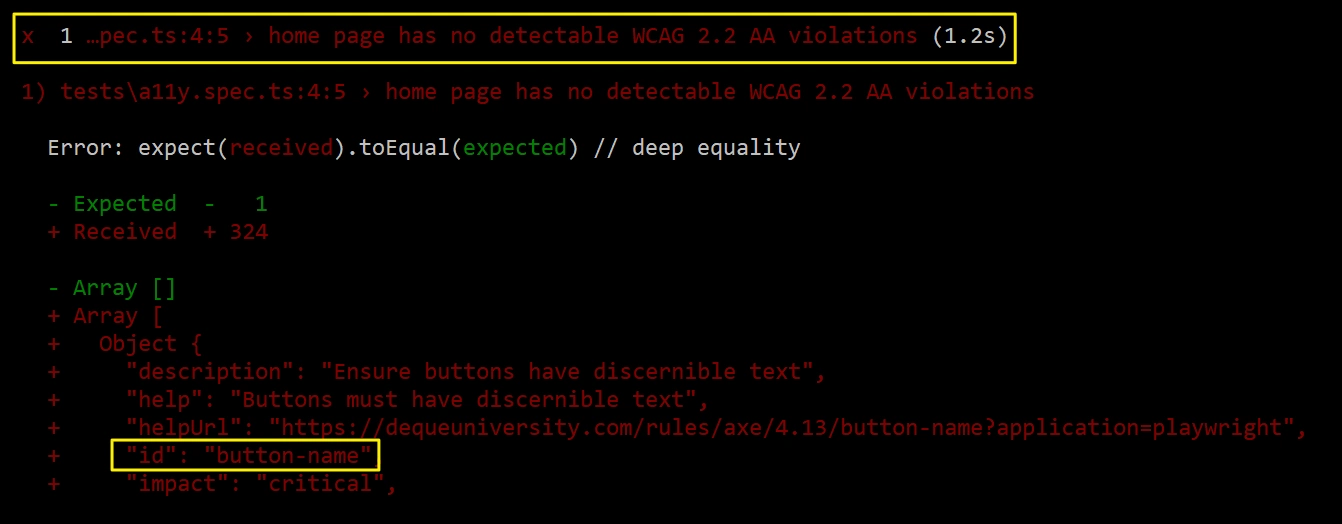
Tags matter more than they look. In axe-core they are not cumulative: wcag22aa holds only the criteria that are new at AA in 2.2, so a scan tagged with that alone skips contrast, labels and everything older. List every tag, as in the sample. Teams get this wrong constantly and then wonder why their “2.2 scan” finds nothing.
There is a bonus for 508 work. Some axe-core rules also carry a section508 tag in the results (button-name and image-alt did in my run), so you can filter a scan down to the rules mapped to Section 508 when a federal customer asks for that view.
The step I have to argue for most often is the keyboard pass. In my experience it finds more real problems per minute than any scanner, because it exposes traps, lost focus and hidden controls that automated rules cannot judge. Unplug the mouse for ten minutes. You will see it. For the full list of criteria to check, my WCAG 2.2 checklist for testers goes criterion by criterion.
How to know if this applies to you
Start with who you answer to, then take the matching first step this week:
- Federal vendor: Section 508 is probably already in your contract, so find the conformance report requirement.
- State or local government: your date is April 26, 2027 or April 26, 2028, depending on population, so set a WCAG 2.1 AA baseline now.
- Private business: no regulation names your standard, so check your contracts and customer questionnaires for a named WCAG version.
Whichever you are, run the axe suite above on your three highest-traffic journeys and read what it flags.
Conclusion
Section 508 vs WCAG is mostly a question of versions, so ask which WCAG version each customer or regulator names instead of which of the three you must satisfy. Test to 2.2 AA, record the version each contract cites, and let a person with a keyboard and a screen reader check what the scanner cannot.
Next step: open your latest test report and check that its first line names the standard and the WCAG version you tested against. The deadlines will keep moving. The criteria underneath them mostly will not.
Frequently asked questions
What is the difference between ADA and WCAG?
The ADA is a civil rights law, and WCAG is a technical standard from the W3C. The ADA says you must not exclude people with disabilities. WCAG gives you testable criteria to measure that, and rules such as the Title II web rule name a WCAG version to use.
Section 508 vs WCAG: which one do I test against?
Test against WCAG. Section 508 is not the same thing as WCAG: it is a federal requirement that uses WCAG 2.0 Level AA as the yardstick for web content, and testing to 2.2 AA covers it, apart from the 4.1.1 Parsing footnote covered earlier. Add the non-web chapters if a federal customer is involved.
Does the ADA require WCAG 2.2?
Not as of October 15, 2026. The Title II rule for state and local governments names WCAG 2.1 AA, and Title III has no federal web regulation.
Does Section 508 apply to my private company’s website?
Not directly. It applies to federal agencies and to vendors selling technology to them, and some states tie their own purchasing rules to it. If neither describes you, your exposure is more likely under ADA Title III.
Does the ADA apply to a small business with few employees?
In most cases, yes. ADA Title III applies to places of public accommodation regardless of business size, and local governments of any size fall under Title II, with smaller ones due April 26, 2028. This is general information, not a legal determination, so check with counsel about your own situation.