You’re staring at the Playwright element is outside of the viewport error, and the element is clearly on your screen. That contradiction is what makes this one so annoying to debug at 11pm before a release.
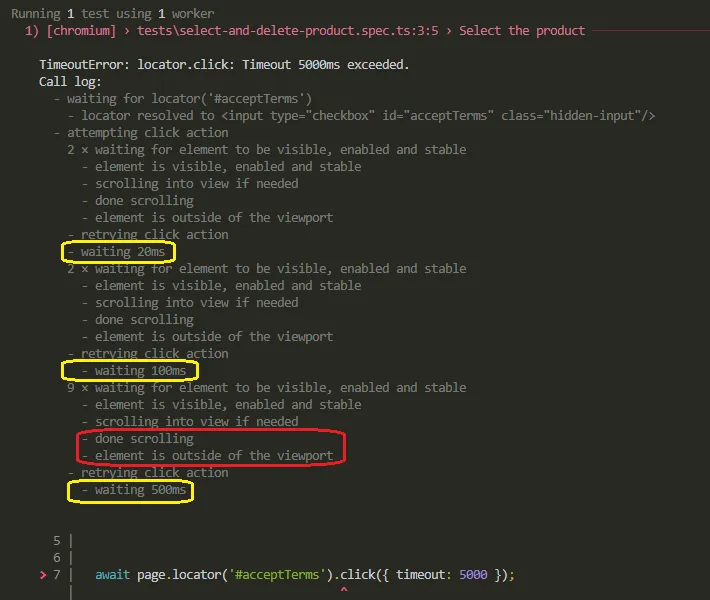
Here’s the short version: Playwright already tried to scroll the element into view before failing. You can see it in the log, scrolling into view if needed, then done scrolling, then the error anyway. That sequence means the scroll attempt finished, and the element’s bounding box still doesn’t fit inside the browser’s actual viewport rectangle. The fix depends on why it doesn’t fit, not on retrying the scroll harder.
This is not the same failure as Playwright’s “element is not visible” error or “subtree intercepts pointer events.” Those happen when an element has zero size, display: none, or something else sitting on top of it. This one is purely geometric. Playwright measured the element’s box against the viewport’s box, and the numbers didn’t overlap.
I’ve hit this exact error in three separate projects. Once it was a genuinely broken component. Twice it wasn’t broken at all, my test just wasn’t asking for the right element.
- The Actionability Checks Behind This Error
- The Real Causes, Ranked by How Often You'll Actually Hit Them
- Why force: true and a Longer Timeout Usually Make This Worse
- Before You Apply Any Fix, Check This
- How to Stop This Error From Coming Back
- What to Remember When You Hit This Again
- Frequently Asked Questions
The Actionability Checks Behind This Error
Before any click, check, or tap, Playwright runs a chain of actionability checks: the element must be attached, visible, stable, receiving pointer events, enabled, and inside the viewport. Playwright’s own actionability documentation lays out the full list, and the viewport check is the last one in that chain for click-style actions.
That ordering matters. If your element clears every other check and still fails here, you can stop looking at visibility or timing entirely. The problem is layout and scroll position, full stop.
The Real Causes, Ranked by How Often You’ll Actually Hit Them
Most write-ups on this error list five or six generic causes with no way to tell which one is yours. In practice, almost every real case I’ve debugged falls into one of four buckets, and they’re not equally common.
| Cause | How to tell it’s this one | Fix |
|---|---|---|
| Input hidden off-screen on purpose | Trace Viewer shows the raw input’s box off-canvas, even though a styled checkbox or label is clearly visible | Target the visible label or clickable surface, not the raw input |
| Viewport doesn’t match the rendering breakpoint | Element sits inside a closed drawer or collapsed nav at the viewport size the test runs with, but you can see it fine on your own monitor | Set the config viewport to match the real breakpoint, or open the nav first |
| Nested or virtualized scroll container | Element only exists in the DOM near the list’s current scroll position, not the page’s scroll position | Scroll the actual inner container, not just the page |
viewport: null in a headless CI runner | Passes locally in headed mode, fails only in CI or headless runs | Set an explicit viewport size instead of null for headless runs |
1. The Input Is Hidden Off-Screen on Purpose
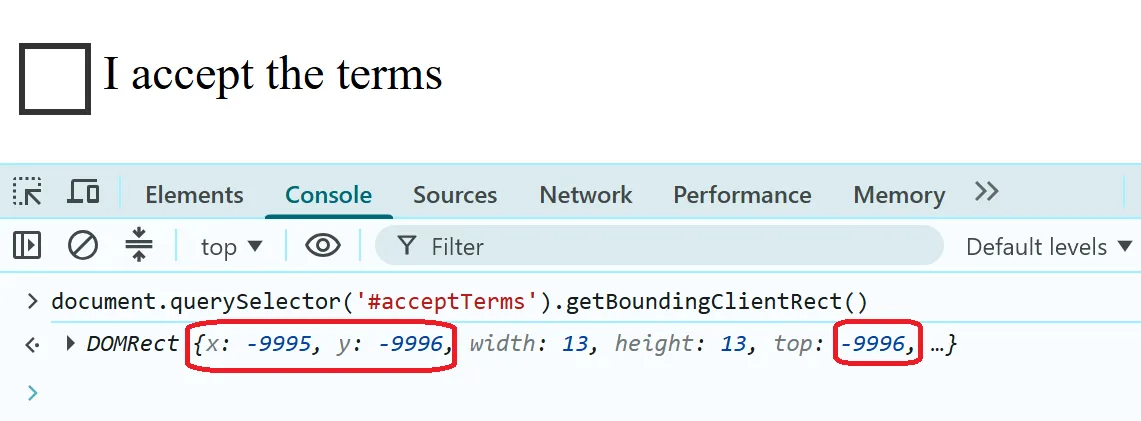
This is the most common version by a clear margin, and it’s not really a Playwright bug at all. A lot of design systems style checkboxes and radio buttons by hiding the real <input> with something like position: absolute; left: -9999px, then rendering a fake control next to it with CSS.
The input genuinely is outside the viewport. Playwright is telling you the truth. Your test just targeted the wrong element.
// Broken: targets the raw input, which is deliberately off-screen
await page.locator('#acceptTerms').check();
The fix is to interact with whatever the user actually clicks, usually the associated <label>, not the hidden input itself.
// Fixed: click the label a real user sees and clicks
await page.locator('label[for="acceptTerms"]').click();

// Then assert on state, not on the click target
await expect(page.locator('#acceptTerms')).toBeChecked();
Clicking a <label> fires a native click on its associated input per the HTML spec, so the checkbox still gets checked. You’re just aiming at a real, visible element instead of one CSS moved off-canvas.
2. Your Test Viewport Doesn’t Match the Rendering Breakpoint
This one shows up constantly on teams where the developer tests on a 27-inch monitor and the automation runs at a default 1280×720 viewport. A nav item, filter panel, or button that’s part of the desktop layout at 1440px and up simply doesn’t exist in that position at 1280px, it’s collapsed into a drawer or hamburger menu with a transform: translateX(-100%) sitting off-canvas.
// playwright.config.ts — element only renders in the expanded layout above 1440px
export default defineConfig({
  use: {
    viewport: { width: 1280, height: 720 },
  },
});
You have two honest options here, and neither is “just add force: true.”
// Option A: match the viewport to the breakpoint you actually intend to test
export default defineConfig({
  use: {
    viewport: { width: 1512, height: 900 },
  },
});
// Option B: keep the smaller viewport, but drive the UI the way a real user on
// that screen size would, by opening the collapsed nav first
await page.getByRole('button', { name: 'Open menu' }).click();
await page.getByRole('link', { name: 'Pricing' }).click();Option B is usually the more honest test, since it exercises the actual mobile or tablet interaction pattern instead of quietly testing desktop layout at the wrong viewport size.
3. The Element Lives Inside a Nested or Virtualized Scroll Container
Playwright’s automatic scroll only handles the nearest scrollable ancestor chain in a fairly standard way. Custom virtualized lists (data tables, infinite feeds, some autocomplete dropdowns) don’t play well with that, because the row you want might not exist in the DOM yet. Virtualization only renders what’s near the current scroll position.
// Broken: row 480 hasn't been rendered by the virtualization library yet
await page.getByText('Row 480').click();
Playwright can’t scroll to an element that isn’t in the DOM. You need to move the actual scroll container yourself until the row renders, then interact with it.
// Fixed: scroll the real container, then wait for the row to exist
const list = page.getByTestId('virtualized-list');
await list.evaluate((el) => {
  el.scrollTop = el.scrollHeight;
});
await page.getByText('Row 480').waitFor();
await page.getByText('Row 480').click();
For very long lists, you may need to scroll in a loop, checking after each step, rather than jumping straight to the bottom.
4. viewport: null in a Headless CI Runner
viewport: null tells Playwright to use the real, actual size of the browser window instead of emulating a fixed viewport. That’s a reasonable setting in headed mode, where there’s a real window on a real screen. In headless mode, there’s no window to measure in the same way, and depending on your CI image and Playwright version, the effective viewport can end up tiny, inconsistent, or mismatched with what your app expects.
// playwright.config.ts — works headed, breaks in headless CI
export default defineConfig({
  use: {
    viewport: null,
    headless: true,
  },
});
// Fixed: give headless runs an explicit, predictable viewport
export default defineConfig({
use: {
viewport: { width: 1280, height: 720 },
headless: true,
},
});I’ve seen this exact combination cause failures that only happen on GitHub Actions runners and self-hosted CI boxes, never on a developer’s laptop. If your suite passes headed and fails headless, check your viewport setting before anything else.
Why force: true and a Longer Timeout Usually Make This Worse
Most people’s first instinct with this error is to wrap the click in a longer timeout. That treats the symptom. It’ll pass today and come back flaky in three weeks, because you haven’t changed anything about where the element actually is.
The second most common instinct is force: true. Stack Overflow threads will tell you to add it and move on. In most cases here, that’s not a fix, it’s you asking Playwright to stop checking that a real user could actually reach that element.
For cause 1, forcing a click on the hidden input can work, but it skips the exact interaction pattern your users go through. For cause 2 and cause 4, forcing the click can succeed against coordinates that don’t match where the element visually renders, which means you’ve made a false pass, not a real one.
There’s one narrow exception. If you’re deliberately testing programmatic form state and not simulating a user (for example, seeding a form via automation before a manual QA pass), force: true on a genuinely hidden control is a reasonable, honest workaround. Just say so in a comment, don’t let it silently pass as a normal click.
Before You Apply Any Fix, Check This
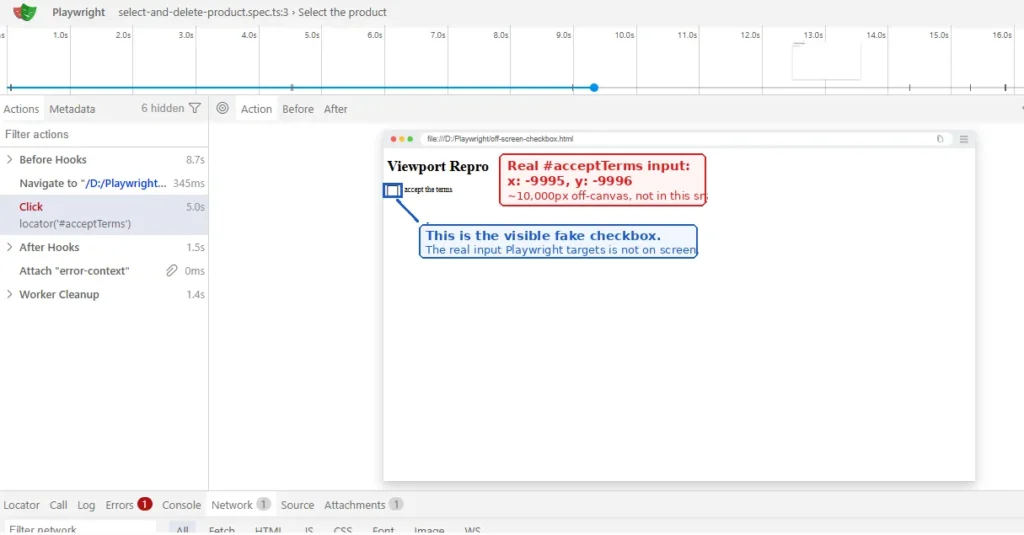
Open the trace for the failing run with npx playwright show-trace trace.zip and look at the action’s screenshot. If the element’s highlighted box sits fully off the visible frame, you’re looking at cause 1 or cause 3. If it’s near the edge or inside a collapsed panel, that’s cause 2.
Run the same test headed locally, then compare against a headless run. A test that only fails headless, or only in CI, points straight at cause 4.
Don’t trust a single green run after any fix. A “fix” that passes once and goes flaky again next week usually means you added a wait instead of solving the actual layout mismatch.
How to Stop This Error From Coming Back
Set an explicit viewport in your config for every project, and treat viewport: null as a headed-mode-only setting, never the CI default. This alone prevents most of cause 4 before it starts.
For custom form controls, add a data-testid to the actual clickable surface, not just the underlying input. It gives you a stable target that doesn’t depend on guessing which label or wrapper is the real click zone.
When you’re testing responsive layouts on purpose, be explicit about it. Set the viewport to match the breakpoint you’re actually claiming to test, and drive collapsed navigation the way a real visitor at that screen size would, instead of assuming desktop markup is always present.
If you maintain a table or list with virtualization, write at least one test that scrolls the container directly instead of relying on Playwright’s built-in scroll to reach deep rows. It’s a few extra lines and it stops this exact class of failure from resurfacing every time the list grows.
What to Remember When You Hit This Again
If you remember one thing, remember to check the Trace Viewer screenshot before touching your code. The element’s actual position relative to the viewport frame tells you within seconds whether you’re dealing with intentional off-screen CSS, a breakpoint mismatch, a scroll container problem, or a CI-only viewport setting. Guessing wastes far more time than that one screenshot does.
If this keeps showing up specifically in your pipeline and not locally, it’s worth reading through why Playwright suites behave differently in CI, since viewport handling is one of several environment gaps that cause this pattern.
Frequently Asked Questions
Does this happen with page.click() and not just locator.click()?
Yes. The same actionability checks apply to the older selector-based page.click() calls and to modern locator-based calls, since they share the same underlying engine. Switching syntax alone won’t fix this.
Does this happen in Python, Java, or .NET too?
Yes. Actionability checks, including the viewport check, live in Playwright’s core engine, not in a single language binding. The error wording differs slightly per language, but the cause and fixes here apply the same way.
Is force: true ever the right call for this error?
Rarely, and only when you’re intentionally bypassing the real-user interaction path, such as seeding form state programmatically rather than simulating a click. Treat it as a documented workaround, not a default fix.
What if none of these four causes match my situation?
Search the microsoft/playwright issue tracker for your exact error text and Playwright version, build a minimal repro page if nothing matches, and check the changelog between your version and the latest release. Layout-related actionability edge cases do get patched.
Why does the log say “done scrolling” right before the error?
Because Playwright’s scroll attempt genuinely finished, it just didn’t get the element far enough. That log line proves the scroll ran, not that it succeeded. For deliberately off-screen elements, no amount of scrolling will help, since scrolling elements into view in Playwright only works when the element is meant to be reachable in the first place.