Playwright TypeScript assertions are used to verify whether your test results match the expected behavior, such as checking page titles, element visibility, text content, or API responses. In simple terms, assertions help you confirm that your application is actually working as intended, not just performing actions.
If you are using Playwright with TypeScript, learning how to write effective assertions is what turns basic scripts into real automated tests. Without assertions, your test is just clicking and typing without validating anything.
In this guide, you will learn how to use Playwright TypeScript assertions with practical examples, real-world scenarios, and best practices. Whether you are a beginner or already writing tests, this tutorial will help you write more reliable and stable automation scripts.
If you are just getting started, you can follow this Playwright TypeScript tutorial to understand the basics before diving into assertions.
- How to Use Playwright TypeScript Assertions?
- What Are Playwright TypeScript Assertions?
- What Types of Assertions Are Available in Playwright TypeScript?
- How to Use expect() in Playwright TypeScript?
- How to Use Locator Assertions in Playwright TypeScript?
- How to Use Page Assertions in Playwright TypeScript?
- How to Use API and Value Assertions in Playwright TypeScript?
- Common Mistakes in Playwright TypeScript Assertions
- What Are Soft Assertions in Playwright TypeScript?
- Difference Between Hard and Soft Assertions in Playwright
- How to Use Negative Assertions in Playwright?
- How to Set Timeout for Assertions in Playwright?
- How to Use expect.poll() in Playwright TypeScript?
- Best Practices for Playwright TypeScript Assertions
- Advanced Playwright Assertions You Should Know
- Real-World Use Cases of Playwright TypeScript Assertions
- Related Playwright Tutorials
- Conclusion
- FAQs
How to Use Playwright TypeScript Assertions?
Playwright TypeScript assertions are used to validate test results using the
expect()function. They allow you to check UI elements, page properties, API responses, and values with built-in auto-waiting, making tests more reliable and less flaky.
This is the standard and recommended way to verify outcomes in Playwright tests using built-in assertion methods.
import { test, expect } from '@playwright/test';

test('example assertion', async ({ page }) => {
  await page.goto('https://example.com');

  await expect(page).toHaveTitle('Example Domain');
});
The diagram below shows how Playwright assertions validate test outcomes step by step.
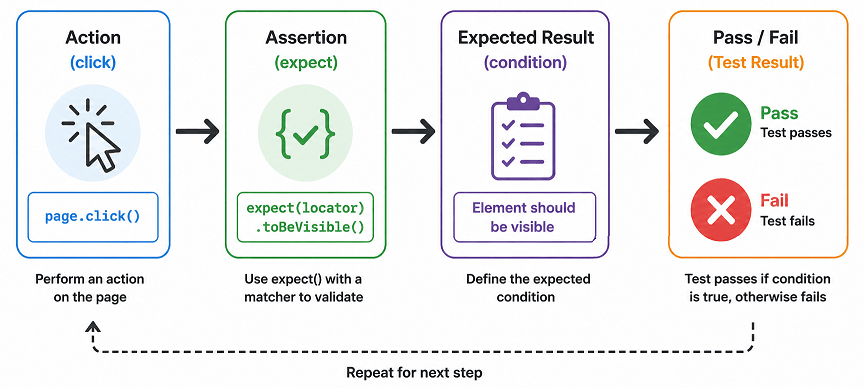
At its core, assertions help you validate that your test is producing the expected result.
What Are Playwright TypeScript Assertions?
Playwright assertions are validation methods used in automated tests to verify that an application behaves as expected. They are written using the
expect()API and support UI, API, and value-based checks with automatic waiting.
Assertions in Playwright are validation methods used to check whether a web application behaves as expected during test execution. These assertions are provided through the expect() API in Playwright Test and are designed to automatically wait until conditions are met, making tests more stable and reliable.
Unlike traditional testing libraries where you manually handle waits, Playwright assertions come with built-in auto-waiting. This means Playwright keeps checking the condition for a specific time before failing the test, which reduces flaky tests significantly.
In real-world projects, these assertions are used after every important action. For example, after clicking a login button, you might verify that the dashboard is visible or the URL has changed. Without assertions, your test is just performing actions without validating outcomes.
Key Features of Playwright Assertions
Here are the important capabilities that make Playwright assertions powerful:
- Auto-waiting for conditions to be satisfied
- Readable and beginner-friendly syntax using
expect() - Works seamlessly with Playwright Test runner
- Supports UI, API, and value-based validations
- Provides clear error messages for debugging
Without assertions, test automation loses its purpose because nothing is being verified because they validate whether your application is working correctly or not.
Now that you understand what assertions are, let’s look at the different types available in Playwright.
What Types of Assertions Are Available in Playwright TypeScript?
Playwright provides four main assertion types: page assertions, locator assertions, API assertions, and value assertions. Each type is used for a specific validation scenario in test automation.
Here is a visual breakdown of the different types of assertions available in Playwright.
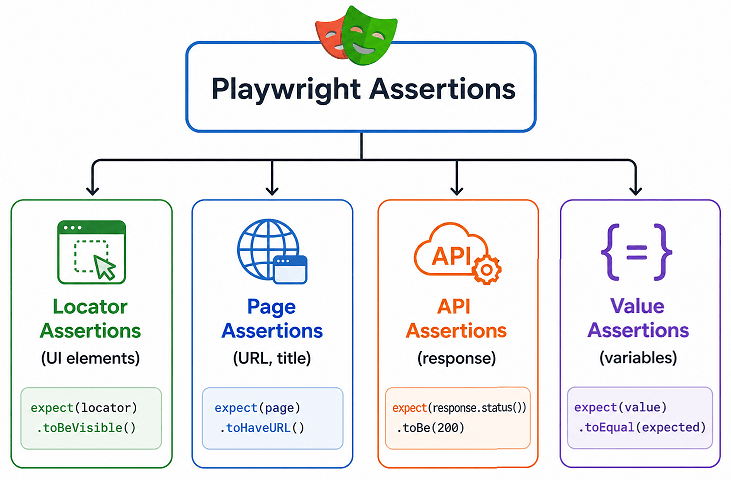
Each type is designed for a specific validation scenario, which makes Playwright flexible for both UI and API testing.
Main Types of Playwright Assertions
Here are the most commonly used assertion categories in Playwright:
- Page Assertions – Validate page-level properties like title and URL
- Locator Assertions – Validate UI elements such as visibility, text, attributes
- API Assertions – Validate API responses like status codes and JSON data
- Generic Value Assertions – Validate simple values like numbers, strings, arrays
Quick Comparison of Assertion Types
This table helps you quickly understand when to use each assertion type.
| Assertion Type | Used For | Example |
|---|---|---|
| Page Assertion | Title, URL | expect(page).toHaveTitle() |
| Locator Assertion | Element visibility, text | expect(locator).toBeVisible() |
| API Assertion | Response validation | expect(response.status()).toBe(200) |
| Value Assertion | Variables, arrays | expect(value).toEqual() |
In short, choosing the right type of assertion depends on what you want to validate in your test.
Does Playwright Support Both UI and API Assertions?
Yes. Playwright supports both UI and API assertions using the same expect() API, making it easy to validate frontend and backend behavior in a single framework.
Which Assertion Type Should Beginners Start With?
Beginners should start with locator assertions like toBeVisible() and page assertions like toHaveTitle() because they are simple and commonly used in real projects.
To use these assertions effectively, you need to understand how the expect() function works.
When Should You Use Each Assertion Type?
Choosing the right assertion depends on what you want to validate in your test. Using the correct type improves both test clarity and reliability.
- Use Locator assertions when validating UI elements users interact with
- Use Page assertions when verifying navigation or page state
- Use API assertions when testing backend responses
- Use Value assertions for logic, calculations, or data validation
How to Use expect() in Playwright TypeScript?
You can use the expect() function in Playwright TypeScript to assert conditions like element visibility, text content, page title, or URL. It is the core assertion API provided by Playwright Test.
According to Playwright documentation, expect() includes built-in auto-waiting, which means it keeps checking the condition until it passes or times out. This is the current best practice for writing stable tests.
In short: The
expect()function in Playwright is used to compare actual and expected results using matchers liketoBeVisible()ortoHaveText(). It automatically waits for conditions to pass, reducing the need for manual delays in tests.
Basic Syntax of expect() in Playwright
This is the standard structure used in almost every Playwright test.
expect(actual).matcher(expected);Here is what each part means:
- actual – The value or element you want to test
- matcher – The condition you want to verify
- expected – The expected result
TypeScript Example: Using expect() with Page
Here’s how you can validate the page title using expect(). It is one of the most common assertions used in real projects.
import { test, expect } from '@playwright/test';

test('validate page title', async ({ page }) => {
  await page.goto('https://example.com');

  await expect(page).toHaveTitle('Example Domain');
});
This code navigates to a page and verifies that the title matches the expected value.
TypeScript Example: Using expect() with Locator
This example demonstrates how to check if an element is visible on the page.
import { test, expect } from '@playwright/test';

test('check element visibility', async ({ page }) => {
  await page.goto('https://example.com');

  const heading = page.locator('h1');

  await expect(heading).toBeVisible();
});
You don’t need to add any manual waits here because Playwright automatically retries the assertion until the element becomes visible or the timeout is reached.
Common Matchers in Playwright Assertions
Here are some widely used matchers you will use frequently:
toBeVisible()– Checks if an element is visibletoHaveText()– Validates element texttoHaveURL()– Checks current page URLtoHaveTitle()– Validates page titletoBeEnabled()– Checks if element is enabledtoBeDisabled()– Checks if element is disabled
In short, expect() is the foundation of Playwright assertions, and mastering it will significantly improve your test reliability.
Let’s start with locator assertions, since they are the most commonly used in real-world testing.
How to Use Locator Assertions in Playwright TypeScript?
You can use locator assertions by applying expect() on a locator to validate UI elements like visibility, text, attributes, or state.
Locator-based assertions are the most commonly used in real-world automation because they directly verify what users see on the screen.
If you are not familiar with locators, check this detailed guide on Playwright typescript locators to understand how elements are identified before applying assertions.
Common Locator Assertions with Examples
Below are the most useful locator assertions you will use in daily testing.
Check Element Visibility
This example verifies that an element is visible on the page.
const button = page.locator('#loginButton');

await expect(button).toBeVisible();
Validate Element Text
This example checks whether the element contains the expected text.
const heading = page.locator('h1');

await expect(heading).toHaveText('Welcome');
Verify Element Attribute
This example ensures that an element has a specific attribute value.
const input = page.locator('#email');

await expect(input).toHaveAttribute('type', 'email');
Check If Element Is Enabled or Disabled
This example validates whether a button is enabled.
const submitBtn = page.locator('#submit');

await expect(submitBtn).toBeEnabled();
Similarly, you can use toBeDisabled() to verify disabled elements.
Real-World Scenario: Login Validation
Here is how locator assertions are typically used in real projects after performing an action.
test('login success validation', async ({ page }) => {
  await page.goto('https://example.com/login');

  await page.locator('#username').fill('testuser');
  await page.locator('#password').fill('password');
  await page.locator('#login').click();

  const dashboard = page.locator('#dashboard');

  await expect(dashboard).toBeVisible();
});
This confirms that the login actually worked because the dashboard becomes visible.
Can Locator Assertions Fail Immediately?
No. Locator assertions in Playwright automatically wait for the condition to be met within the timeout, which helps avoid flaky tests.
Here is where most beginners make mistakes. They try to add manual waits, but Playwright already handles waiting internally for locator assertions.
In short, locator assertions are the most important and frequently used assertions in Playwright TypeScript automation.
Along with element-level checks, you’ll also need to validate page-level behavior like navigation and URLs.
How to Use Page Assertions in Playwright TypeScript?
You can use page assertions by applying expect() on the page object to validate properties like title and URL.
Page-level assertions are commonly used to confirm navigation, page loads, and correct routing in your application.
You can learn more about navigation handling in this guide on Playwright navigation methods, which works closely with page assertions.
Validate Page Title
This example checks whether the page title matches the expected value.
await expect(page).toHaveTitle('Example Domain');This is useful when verifying that the correct page has loaded after navigation.
Verify Current Page URL
This example validates that the current URL matches the expected URL.
await expect(page).toHaveURL('https://example.com');You can also use partial matching for dynamic URLs.
await expect(page).toHaveURL(/.*example/);Real-World Scenario: Navigation Validation
This example shows how page assertions are used after clicking a link or button.
test('navigation test', async ({ page }) => {
  await page.goto('https://example.com');

  await page.locator('text=More information').click();

  await expect(page).toHaveURL(/.*iana/);
});
This ensures that clicking the link successfully navigates to the correct page.
Difference Between Page and Locator Assertions
Both are important, but they are used in different situations.
| Aspect | Page Assertions | Locator Assertions |
|---|---|---|
| Target | Entire page | Specific element |
| Use Case | Title, URL validation | UI element validation |
| Example | toHaveTitle() | toBeVisible() |
In short, use page assertions for navigation and page-level checks, and locator assertions for UI validation.
Can Page Assertions Handle Dynamic Content?
Yes. Page assertions also support auto-waiting, so they will wait until the title or URL matches the expected condition within the timeout.
How to Use API and Value Assertions in Playwright TypeScript?
You can validate API responses and values by applying expect() to responses, variables, arrays, or JSON data.
These assertions are useful when your test involves API testing, data validation, or business logic verification beyond UI.
Validate API Response Status
This example shows how to verify the HTTP status code of an API response.
import { test, expect } from '@playwright/test';

test('api status validation', async ({ request }) => {
  // Example placeholder API URL
  const response = await request.get('https://api.example.com/users');

  expect(response.status()).toBe(200);
});
This ensures that the API is returning a successful response.
Validate API Response Body
This example checks whether the response JSON contains expected data.
test('api response validation', async ({ request }) => {
  // Example placeholder API URL
  const response = await request.get('https://api.example.com/users');

  const data = await response.json();

  expect(data).toHaveProperty('users');
  expect(Array.isArray(data.users)).toBeTruthy();
});
This verifies not just the response, but also ensures the API structure matches what your application expects.
Validate Simple Values
You can also use Playwright assertions for validating basic values like strings, numbers, or arrays.
const total = 10 + 5;

expect(total).toBe(15);
Compare Complex Objects
This example shows how to validate objects or arrays.
const user = { name: 'John', age: 30 };

expect(user).toEqual({ name: 'John', age: 30 });
When Should You Use API vs UI Assertions?
Use API assertions when validating backend responses or data integrity, and use UI assertions when validating user interface behavior.
| Scenario | Best Assertion Type |
|---|---|
| Check API response status | API Assertion |
| Validate UI element | Locator Assertion |
| Verify navigation | Page Assertion |
| Validate variables | Value Assertion |
In real projects, combining API and UI assertions gives better test coverage and faster debugging.
Does Playwright Support JSON Assertions?
Yes. Playwright allows validating JSON responses using standard matchers like toEqual() and toHaveProperty().
Simply put, API and value assertions help you go beyond UI testing and validate the complete application behavior.
Common Mistakes in Playwright TypeScript Assertions
Many beginners misuse Playwright TypeScript assertions by adding unnecessary waits, using incorrect matchers, or validating unstable elements. Avoiding these mistakes can significantly improve test reliability.
This is where most tests become flaky, not because Playwright is unreliable, but because assertions are not used correctly.
Adding Manual Waits Instead of Using Auto-Waiting
One of the most common mistakes is using waitForTimeout() before assertions.
// Incorrect approach
await page.waitForTimeout(3000);
await expect(page.locator('#dashboard')).toBeVisible();
Playwright already handles waiting internally.
// Correct approach
await expect(page.locator('#dashboard')).toBeVisible();
The comparison below highlights why auto-waiting is the recommended approach in Playwright.
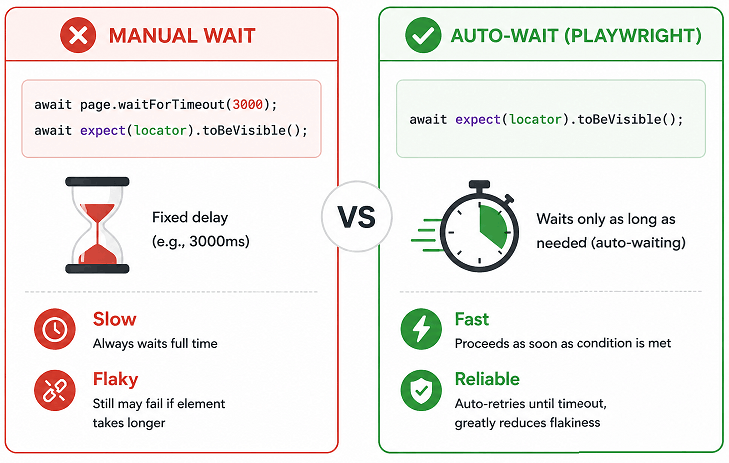
Manual waits slow down tests and make them unreliable.
Using Wrong Assertion Matchers
Using the wrong matcher can lead to incorrect validations.
// Wrong matcher
await expect(page.locator('h1')).toBeVisible();
The correct matcher should be:
// Correct matcher
await expect(page.locator('h1')).toHaveText('Welcome');
Each matcher has a specific purpose, so choosing the right one is important.
Not Handling Dynamic Content Properly
Some elements take time to load or update, and beginners often assume immediate availability.
Playwright assertions already retry until the condition is met, so you should rely on built-in behavior instead of forcing checks.
Overusing Exact Text Matching
Using exact text matching can cause failures if the UI text changes slightly.
// Too strict
await expect(page.locator('.message')).toHaveText('Login Successful');
A better approach is to use partial matching when possible:
// More flexible
await expect(page.locator('.message')).toContainText('Login');
Ignoring Assertion Failures
Sometimes developers log values instead of asserting them, which defeats the purpose of testing.
Always use assertions to validate outcomes, not just to observe them.
In short, avoiding these mistakes will make your Playwright tests faster, more stable, and easier to maintain.
Once you understand how assertions work, the next step is using them the right way in real projects.
What Are Soft Assertions in Playwright TypeScript?
Soft assertions in Playwright allow your test to continue execution even if an assertion fails. Instead of stopping the test immediately, Playwright records the failure and reports it at the end of the test run.
This is useful when you want to validate multiple conditions in a single test without stopping at the first failure.
import { test, expect } from '@playwright/test';

test('soft assertion example', async ({ page }) => {
  await page.goto('https://example.com');

  await expect.soft(page).toHaveTitle('Wrong Title'); // test continues

  await expect(page.locator('h1')).toBeVisible();
});
Use soft assertions carefully. They are helpful for validations, but for critical checks, regular assertions are still recommended.
Difference Between Hard and Soft Assertions in Playwright
| Type | Behavior | Use Case |
|---|---|---|
| Hard Assertion | Stops test execution immediately on failure | Critical validations |
| Soft Assertion | Continues execution even if assertion fails | Multiple validations in one test |
Use hard assertions for critical checks and soft assertions when you want to capture multiple failures in a single test run.
How to Use Negative Assertions in Playwright?
Negative assertions are used to verify that a condition is not true. You can use .not with expect() to perform these checks.
await expect(page.locator('#error')).not.toBeVisible();This ensures that the error message is not visible on the page.
How to Set Timeout for Assertions in Playwright?
By default, Playwright assertions wait for a specific timeout before failing. You can customize this timeout based on your test requirements.
await expect(page.locator('#dashboard')).toBeVisible({ timeout: 10000 });This example waits up to 10 seconds for the element to become visible before failing the test.
Adjusting timeouts is useful when working with slow-loading pages or dynamic content.
How to Use expect.poll() in Playwright TypeScript?
expect.poll() is used to repeatedly check a condition until it becomes true. It is especially useful when validating values that change over time, such as API responses, database updates, or background processes.
import { test, expect } from '@playwright/test';

test('poll API status', async ({ request }) => {
  await expect.poll(async () => {
    const response = await request.get('https://api.example.com/status');
    return response.status();
  }).toBe(200);
});
Unlike regular assertions, expect.poll() keeps executing the function until the expected result is returned or the timeout is reached.
Best Practices for Playwright TypeScript Assertions
Following assertion best practices helps you write stable, readable, and maintainable test scripts. These practices are based on real-world usage and current Playwright recommendations.
If you want to structure your tests better, this guide on Playwright project structure in TypeScript will help you organize assertions effectively.
Well-written assertions not only validate your application but also make debugging easier when tests fail.
Use Auto-Waiting Instead of Manual Delays
Always rely on Playwright’s built-in auto-waiting in assertions instead of adding manual delays.
- Avoid
waitForTimeout() - Use
expect()directly with locators or page - Let Playwright handle timing internally
This is the fastest and most reliable approach in modern Playwright testing.
Prefer Locator-Based Assertions
Locator assertions are more stable than direct DOM checks because they work with Playwright’s smart waiting mechanism.
- Use
locator()instead of querying raw elements - Combine with assertions like
toBeVisible() - Avoid unnecessary element handles
This ensures your tests behave consistently across different environments.
Use Meaningful and Specific Assertions
Write assertions that clearly describe what you are validating.
- Use
toHaveText()for text validation - Use
toHaveURL()for navigation checks - Avoid vague or generic assertions
Clear assertions make your tests easier to understand and maintain.
Handle Dynamic Content Smartly
Modern applications often load content dynamically, so your assertions should account for that.
- Use partial matchers like
toContainText() - Avoid strict exact matching when not required
- Use regex when validating dynamic URLs or text
This makes your tests more resilient, especially when UI text or layout changes slightly.
Keep Assertions Close to Actions
Always place assertions right after the action they are validating.
- After click → validate navigation or UI change
- After form submit → validate success message
- After API call → validate response
This makes your test flow easier to understand and debug.
Real-World Tip: Use Assertions for Debugging
In real projects, assertions act as checkpoints. When a test fails, the assertion tells you exactly what went wrong.
Instead of logging values, use assertions to validate them directly. This gives you clearer failure messages and faster debugging.
In short, applying these best practices will make your Playwright TypeScript assertions more effective and production-ready.
Expert Tip: In production-grade test suites, avoid over-asserting every minor detail. Focus on critical user flows and business logic validations. This keeps tests stable and reduces maintenance effort.
Advanced Playwright Assertions You Should Know
Beyond basic assertions, Playwright provides advanced matchers that help handle complex scenarios and improve test precision.
Using toHaveCount()
await expect(page.locator('.item')).toHaveCount(5);Useful for validating lists, tables, or repeated elements.
Using toContainText() with Multiple Elements
await expect(page.locator('.list')).toContainText(['Item 1', 'Item 2']);Helps validate multiple values in a single assertion.
Using Soft Assertions
await expect.soft(page.locator('#status')).toHaveText('Success');Soft assertions allow tests to continue even if validation fails.
Real-World Use Cases of Playwright TypeScript Assertions
Playwright TypeScript assertions are used in real-world projects to validate user flows, ensure application stability, and catch bugs early during automated testing.
Instead of just interacting with the application, assertions confirm that each step behaves as expected, which is critical for production-grade test automation.
Validate Login Functionality
This is one of the most common use cases where assertions ensure that the login process works correctly.
test('login validation', async ({ page }) => {
  await page.goto('https://example.com/login');

  await page.locator('#username').fill('user');
  await page.locator('#password').fill('password');
  await page.locator('#login').click();

  await expect(page).toHaveURL(/.*dashboard/);
});
This confirms that the user is redirected to the dashboard after successful login.
Check Error Messages
Assertions are used to validate error messages when invalid input is provided.
await page.locator('#login').click();

await expect(page.locator('.error')).toContainText('Invalid credentials');
This ensures that the application handles incorrect input properly.
Verify Form Submission
This example validates that a form submission is successful.
await page.locator('#username').fill('abc');
await page.locator('#submit').click();

await expect(page.locator('.success')).toBeVisible();
This confirms that the success message appears after submission.
Validate Dynamic Content Updates
Modern applications update content dynamically, and assertions help verify these changes.
await page.locator('#loaddata').click();

await expect(page.locator('#data')).toContainText('Loaded');
This ensures that the content is updated correctly after an action.
API and UI Combined Validation
In advanced scenarios, developers combine API and UI assertions for better coverage.
const response = await request.get('https://api.example.com/data');
expect(response.status()).toBe(200);

await page.goto('https://example.com');
await expect(page.locator('#data')).toContainText('Loaded');
This validates both backend and frontend behavior in a single test flow.
In short, real-world use of Playwright assertions focuses on validating complete user journeys, not just individual steps.
Related Playwright Tutorials
- How to Launch Browser in Playwright
- How to Navigate to URL in Playwright
- How to Locate Elements in Playwright
- How to Handle Forms in Playwright
By combining different types of assertions with real-world scenarios and best practices, you can create reliable Playwright tests that accurately validate both UI and backend behavior.
Conclusion
Assertions are essential for validating application behavior in Playwright tests in automated tests. They help ensure that every action in your test produces the expected result, whether it is UI interaction, navigation, or API response validation.
By using the expect() function along with locator, page, API, and value assertions, you can build stable and reliable test scripts. Features like auto-waiting and powerful matchers make Playwright a modern and efficient choice for test automation.
If you focus on writing clear assertions, avoiding common mistakes, and following best practices, your tests will become easier to maintain and debug. As a next step, try applying these assertions in real scenarios like login flows or form validations to strengthen your understanding.
FAQs
What are Playwright TypeScript assertions?
Playwright TypeScript assertions are used to verify that your application behaves as expected during test execution. They are written using the expect() function and help validate things like element visibility, text, page URL, or API responses.
How do you write assertions in Playwright TypeScript?
You write assertions using the expect() function followed by matchers like toBeVisible(), toHaveText(), or toHaveURL(). These matchers compare actual results with expected values and automatically wait until the condition is met.
What is expect() in Playwright?
The expect() function in Playwright is a built-in assertion API used to validate test conditions. It automatically retries until the condition passes or times out, which helps reduce flaky tests.
Does Playwright support auto-waiting in assertions?
Yes, Playwright assertions support auto-waiting. When you use expect(), it keeps checking the condition until it becomes true or the timeout is reached, improving test stability.
What is the difference between locator and page assertions?
Locator assertions validate specific elements like visibility or text, while page assertions validate page-level properties such as URL or title. Both are used together depending on what you want to verify.
Can Playwright be used for API assertions?
Yes, Playwright supports API assertions. You can validate response status codes, headers, and JSON data using the same expect() function used for UI testing.
Which assertion is most commonly used in Playwright?
Locator assertions like toBeVisible(), toHaveText(), and toContainText() are the most commonly used because they directly validate what users see on the screen.
Is expect() better than manual validation in Playwright?
Yes, expect() is better than manual validation because it includes auto-waiting, clear syntax, and better error messages, making tests more reliable and easier to debug.
How do you avoid flaky tests in Playwright assertions?
To avoid flaky tests, use Playwright’s auto-waiting, avoid manual delays like waitForTimeout(), use stable locators, and choose the correct assertion matchers.
Can Playwright assertions handle dynamic content?
Yes, Playwright assertions handle dynamic content by automatically waiting for elements or conditions to update within a timeout, making them reliable for modern web applications.