Last updated on March 6th, 2026 at 05:42 am
In web automation testing, verifying the page title is a common validation step. Testers often check the title to confirm that the correct page has loaded. In Playwright automation, it is also important to get page title in Playwright Java to ensure navigation worked as expected. If the title does not match the expected value, it may indicate a navigation issue or an application error.
If you are using Playwright for automation, retrieving the page title is simple and straightforward. Playwright provides a built-in method that allows you to get the current page title in just one line of code. This makes it easy to validate page navigation and improve test reliability.
In this guide, you will learn how to get the page title in Playwright Java with clear examples. You will also see when to use this method during automation testing and how it fits into real test scenarios.
- How to Get Page Title in Playwright Java?
- What is page.title() in Playwright Java?
- How to Get Page Title in Playwright Java Step by Step
- How to Verify Page Title in Playwright Java?
- Examples in Other Languages
- When Should You Check the Page Title in Playwright Java?
- Conclusion
- What’s Next
- Frequently Asked Questions
How to Get Page Title in Playwright Java?
As per Playwright java official documentation, You can get the page title in Playwright Java by using the page.title() method. This method returns the title of the currently loaded web page as a string. Testers often use this method to verify that the correct page has loaded during automation testing.
Follow these steps to retrieve the page title in Playwright Java.
- Launch the browser using Playwright.
- Create a new browser context and page.
- Navigate to the target website.
- Call the
page.title()method. - Store or print the returned page title.
Playwright Java Example
import com.microsoft.playwright.*;

public class GetPageTitleExample {
  public static void main(String[] args) {
    try (Playwright playwright = Playwright.create()) {

      Browser browser = playwright.chromium().launch(
        new BrowserType.LaunchOptions().setHeadless(false)
      );

      BrowserContext context = browser.newContext();
      Page page = context.newPage();

      page.navigate("https://playwright.dev/");

      String pageTitle = page.title();

      System.out.println("Page Title: " + pageTitle);

      browser.close();
    }
  }
}
This code launches a Chromium browser, navigates to a web page, and retrieves the page title using the title() method. The returned value can then be printed, logged, or used in test assertions.
What is page.title() in Playwright Java?
The page.title() method in Playwright Java returns the title of the currently loaded web page. The title is the text displayed in the browser tab. It is defined inside the HTML <title> tag of the page.
Automation testers often check the page title to confirm that navigation was successful. For example, after logging in or clicking a menu link, the test can verify that the browser opened the correct page. If the title does not match the expected value, the test can fail immediately.
Playwright makes this process simple. Once the page is loaded, you can call the page.title() method and store the returned value in a string variable. This value can then be printed in logs or validated using test assertions.
Method Syntax
String title = page.title();Return Value
- Returns the page title as a String.
- The value comes from the HTML
<title>element. - If the page is still loading, Playwright automatically waits until the title is available.
Example Scenario
Suppose your automation test opens the Google homepage. The page title should be Google. You can retrieve the title using page.title() and verify that it matches the expected value.
page.navigate("https://www.google.com");

String title = page.title();

System.out.println(title);
This approach helps ensure that the correct page has loaded before continuing with further test steps.
How to Get Page Title in Playwright Java Step by Step
You can retrieve the page title in Playwright Java by following a few simple steps. The process involves launching the browser, opening a page, navigating to a website, and then calling the page.title() method.
The returned title can be printed in logs or used for validation in your automation tests. This helps confirm that the correct page has loaded before continuing with the next steps.
- Start Playwright.
- Launch the browser instance.
- Create a browser context.
- Open a new page.
- Navigate to the target website.
- Call the
page.title()method to retrieve the title. - Store or print the returned title.
Complete Playwright Java Example
import com.microsoft.playwright.*;

public class GetPageTitleExample {

  public static void main(String[] args) {

    try (Playwright playwright = Playwright.create()) {

      Browser browser = playwright.chromium().launch(
        new BrowserType.LaunchOptions().setHeadless(false)
      );

      BrowserContext context = browser.newContext();

      Page page = context.newPage();

      page.navigate("https://example.com");

      String pageTitle = page.title();

      System.out.println("Page Title is: " + pageTitle);

      browser.close();
    }
  }
}
Step Explanation
- Launch Browser Playwright launches a browser such as Chromium, Firefox, or WebKit.
- Create Browser Context A browser context acts as an isolated environment for running tests.
- Open a New Page The
newPage()method creates a new browser tab. - Navigate to the Website The
navigate()method opens the target URL. - Retrieve the Page Title The
page.title()method returns the title of the current page.
Once the title is retrieved, you can use it in assertions to validate navigation in your automated tests.
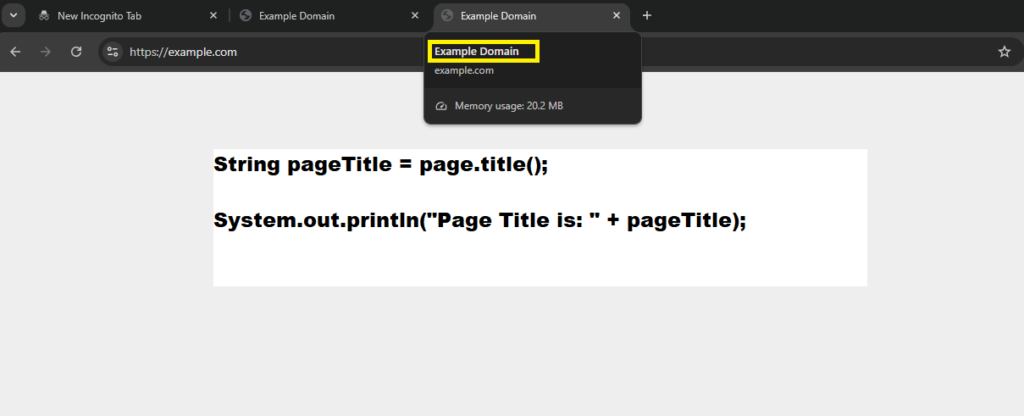
The screenshot below shows the Example Domain page opened in the browser. The highlighted browser tab displays the page title that Playwright Java retrieves using the page.title() method.
How to Verify Page Title in Playwright Java?
In automation testing, retrieving the page title is often followed by verification. Testers compare the actual page title with the expected title to confirm that the correct page has loaded.
Playwright Java allows you to retrieve the title using page.title() and then validate it using assertions. This validation step helps ensure that navigation actions such as login, clicking links, or form submissions lead to the correct page.
Steps to Verify Page Title
- Navigate to the target web page.
- Retrieve the page title using
page.title(). - Store the title in a variable.
- Compare it with the expected title using an assertion.
Playwright Java Example with Assertion
import com.microsoft.playwright.*;
import static org.testng.Assert.assertEquals;

public class VerifyPageTitleExample {

  public static void main(String[] args) {

    try (Playwright playwright = Playwright.create()) {

      Browser browser = playwright.chromium().launch(
        new BrowserType.LaunchOptions().setHeadless(false)
      );

      BrowserContext context = browser.newContext();
      Page page = context.newPage();

      page.navigate("https://example.com");

      String actualTitle = page.title();
      String expectedTitle = "Example Domain";

      assertEquals(expectedTitle, actualTitle);

      System.out.println("Title verified successfully");

      browser.close();
    }
  }
}
In this example, the test retrieves the page title and compares it with the expected value using the TestNG assertion. If the titles match, the test continues. If they do not match, the assertion fails and the test stops.
If you’re not sure how to run Playwright tests with TestNG, you can refer to this Playwright with TestNG tutorial guide.
If you’re JUnit using JUnit assertions, you can refer to this Playwright with JUnit tutorial guide.
This approach helps detect navigation errors early and improves the reliability of your automation tests.
Examples in Other Languages
Playwright supports multiple programming languages. While the main example in this guide uses Java, the same concept works in JavaScript, TypeScript, and Python. The method used to retrieve the page title is similar across all languages.
The following examples show how to get the page title in different Playwright-supported languages.
JavaScript Example
const { chromium } = require('playwright');

(async () => {
  const browser = await chromium.launch();
  const page = await browser.newPage();

  await page.goto('https://example.com');

  const title = await page.title();

  console.log("Page Title:", title);

  await browser.close();
})();
TypeScript Example
import { chromium } from 'playwright';

(async () => {
  const browser = await chromium.launch();
  const page = await browser.newPage();

  await page.goto('https://example.com');

  const title: string = await page.title();

  console.log("Page Title:", title);

  await browser.close();
})();
Python Example
from playwright.sync_api import sync_playwright

with sync_playwright() as p:
    browser = p.chromium.launch()
    page = browser.new_page()

    page.goto("https://example.com")

    title = page.title()

    print("Page Title:", title)

    browser.close()
As you can see, each language uses the same title() method to retrieve the page title. The syntax changes slightly based on the programming language, but the concept remains the same.
When Should You Check the Page Title in Playwright Java?
Checking the page title is a simple way to confirm that the correct page has loaded during an automation test. Testers often use this validation step after navigation actions such as clicking links, submitting forms, or completing login flows.
Since the page title usually reflects the purpose of the page, verifying it helps detect navigation issues early. If the title does not match the expected value, the test can stop immediately and report the problem.
Common Scenarios for Page Title Validation
- After Login
After a successful login, the test can verify that the dashboard or home page has loaded by checking the page title. - After Navigation
When a test clicks a menu item or link, the title can confirm that the correct page opened. - Before Performing Important Actions
Tests can verify the title before interacting with page elements to ensure the automation is on the correct page. - During Smoke Testing
Quick smoke tests often verify page titles to confirm that major pages of the application are accessible.
Using page title validation improves test reliability and helps detect navigation failures quickly during automated test execution.
Conclusion
Learning how to get page title in Playwright Java is an important step when building reliable automation tests. The page.title() method allows you to quickly retrieve the title of the current page and confirm that the correct page has loaded.
Testers commonly use this method after navigation steps such as login, clicking links, or submitting forms. By validating the page title, you can detect navigation issues early and ensure that your automation flow continues on the correct page.
Playwright makes this task simple with a single method call. Once the title is retrieved, it can be printed, logged, or validated using assertions in your test framework.
If you are learning Playwright automation, mastering small validations like page title checks will help you create more stable and reliable test scripts.
What’s Next
Now that you have learned how to get the page title in Playwright Java, it is time to move on to one of the most common actions in web automation, clicking elements.
Read this step-by-step guide:
How to Click an Element in Playwright Java
You will learn how to interact with buttons, links, and other clickable elements using different locator strategies to make your Playwright tests more dynamic and effective.
Frequently Asked Questions
How do you get page title in Playwright Java?
You can get the page title in Playwright Java by using the page.title() method. This method returns the title of the currently loaded web page as a string.
What does page.title() return in Playwright Java?
The page.title() method returns the text inside the HTML title tag of the current page. The returned value is stored as a String.
Does Playwright automatically wait before returning the page title?
Yes. Playwright automatically waits for the page to load before returning the title. This ensures that the title value is available when the method is executed.
Can page title validation improve test reliability?
Yes. Validating the page title helps confirm that the expected page has loaded. This prevents tests from continuing on the wrong page and improves automation reliability.