You can handle LocalStorage and SessionStorage in Playwright Java using page.evaluate() and addInitScript to set, get, and clear browser storage values. This allows you to control login sessions, tokens, and application state without relying on UI interactions.
In real automation scenarios, directly working with browser storage helps you skip login steps, speed up test execution, and reduce flakiness. Instead of performing repetitive UI actions, you can manage data instantly inside the browser.
However, many beginners face issues like LocalStorage returning null, data not persisting, or tests behaving inconsistently. In this guide, you will learn how to handle LocalStorage and SessionStorage in Playwright Java with practical examples, debugging tips, and best practices.
Now that you understand why browser storage is important, let’s first understand what LocalStorage and SessionStorage are.
- How to Handle LocalStorage and SessionStorage in Playwright Java?
- What is LocalStorage and SessionStorage in Playwright Java?
- LocalStorage vs Cookies in Playwright Java
- How to Set LocalStorage in Playwright Java Step by Step?
- How to Set LocalStorage Before Page Load in Playwright Java Using addInitScript?
- How to Get LocalStorage Value in Playwright Java with Example?
- How to Remove and Clear LocalStorage in Playwright Java with Example?
- How to Handle SessionStorage in Playwright Java Step by Step?
- How to Store JSON Data in LocalStorage in Playwright Java?
- Can You Use Storage State Instead of LocalStorage in Playwright Java?
- Real World Example: Handling Authentication Using LocalStorage in Playwright Java
- What are Common Mistakes When Using LocalStorage and SessionStorage in Playwright Java?
- How to Debug LocalStorage and SessionStorage Issues in Playwright Java?
- What Happens to LocalStorage in Incognito or New Browser Context?
- What are Best Practices for Using LocalStorage and SessionStorage in Playwright Java?
- Does Using LocalStorage Improve Test Performance in Playwright?
- When Should You NOT Use LocalStorage in Playwright?
- How to Use LocalStorage in Playwright JavaScript, TypeScript, and Python?
- Related Playwright Java Tutorials for Better Understanding
- Conclusion: Playwright Java LocalStorage and SessionStorage
- FAQs
How to Handle LocalStorage and SessionStorage in Playwright Java?
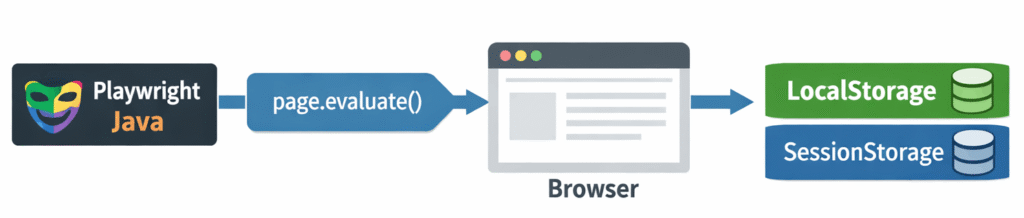
You can handle LocalStorage and SessionStorage in Playwright Java by using page.evaluate() or addInitScript to execute JavaScript methods like setItem(), getItem(), and clear() inside the browser.
// Set LocalStorage item
page.evaluate("() => localStorage.setItem('token', '12345')");

// Get LocalStorage item
String value = (String) page.evaluate("() => localStorage.getItem('token')");

// Clear LocalStorage
page.evaluate("() => localStorage.clear()");
This is the fastest way to control browser storage for managing login sessions, tokens, and application state during automation testing.
Now that you have seen the quickest way to handle browser storage, let’s understand how LocalStorage and SessionStorage work in Playwright Java.
What is LocalStorage and SessionStorage in Playwright Java?
LocalStorage and SessionStorage in Playwright Java are browser storage mechanisms used to store key value data directly inside the browser. You can access and modify this data using JavaScript execution, which helps manage authentication tokens, session data, and application state during automation tests.
Both are part of the Web Storage API, but they differ in how long data is stored and how it is shared. Understanding this difference is important for writing stable and reliable automation tests.
These storage mechanisms are officially defined under the Web Storage API, which you can explore in detail on the MDN documentation:
Let’s now understand how each storage type works in real scenarios.
How does LocalStorage work in Playwright Java?
LocalStorage stores data with no expiration time and persists even after the browser is closed and reopened. It is commonly used for saving user preferences, tokens, and application settings.
- Data persists across browser sessions
- Shared across all tabs of the same origin
- Maximum storage size is typically around 5MB
- Used for long term storage like login tokens
How does SessionStorage work in Playwright Java?
SessionStorage stores data only for the duration of a page session. Once the tab or browser is closed, the data is cleared automatically.
- Data is cleared when the tab is closed
- Not shared across multiple tabs
- Limited to a single browser tab session
- Useful for temporary data like form states
What is the Difference Between LocalStorage and SessionStorage in Playwright Java?
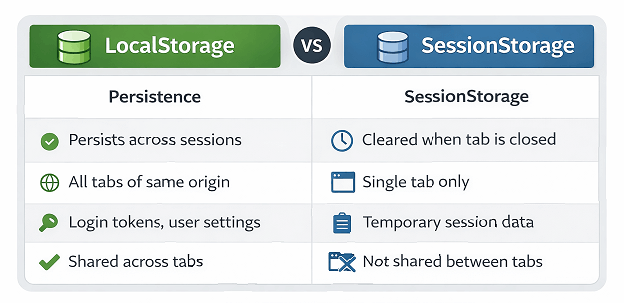
Here is a quick comparison to understand when to use each storage type.
| Feature | LocalStorage | SessionStorage |
|---|---|---|
| Persistence | Permanent until manually cleared | Cleared when tab is closed |
| Scope | All tabs of same origin | Single tab only |
| Use Case | Login tokens, user settings | Temporary session data |
| Access | Shared across sessions | Limited to one session |
Knowing this difference helps you decide whether to use LocalStorage or SessionStorage in your Playwright automation tests.
When Should You Use LocalStorage vs SessionStorage in Playwright Java?
Use LocalStorage when you need persistent data across browser sessions, such as login tokens or user preferences. Use SessionStorage when the data should exist only during a single tab session, such as temporary form data or step based workflows.
Now that you understand when to use LocalStorage and SessionStorage, let’s compare LocalStorage with cookies, which is another commonly used browser storage mechanism.
LocalStorage vs Cookies in Playwright Java
LocalStorage and cookies are both used to store data in the browser, but they serve different purposes in Playwright Java automation testing.
| Feature | LocalStorage | Cookies |
|---|---|---|
| Storage Size | Up to 5MB | Small size (around 4KB) |
| Expiration | No expiration by default | Can have expiration time |
| Access | Client-side only | Sent with every HTTP request |
| Use Case | Tokens, app state, preferences | Authentication, session tracking |
Use LocalStorage when you need to store larger data that does not need to be sent with every request. Use cookies when the server needs to read the data on every request.
Is LocalStorage better than cookies in Playwright?
LocalStorage is better for storing large structured data, while cookies are preferred for small data that needs to be sent with every request.
Now that you understand the basics and differences, let’s move to practical implementation and see how to set LocalStorage in Playwright Java step by step.
How to Set LocalStorage in Playwright Java Step by Step?
This is one of the most commonly asked questions in Playwright interviews and real-world automation projects.
You can set LocalStorage in Playwright Java by using page.evaluate() with localStorage.setItem() after navigating to the target domain.
This method is commonly used in Playwright Java LocalStorage example scenarios for authentication and test setup.
Before setting storage, make sure your browser is properly initialized by following this step by step guide on launch browser in Playwright Java, which explains how to start and manage browser instances correctly.
Here is a simple example.
// Navigate to domain first
page.navigate("https://example.com");

// Set LocalStorage value
page.evaluate("() => localStorage.setItem('user', 'Aravind')");

// Reload page to apply changes
page.reload();
If you try to set LocalStorage before navigating to a domain, it will not work because storage is domain specific.
Why does setting LocalStorage before navigation fail in Playwright Java?
LocalStorage belongs to a specific domain, so Playwright must be on that domain before setting any value. Always navigate first, then update storage.
What are real world use cases of LocalStorage in Playwright Java?
You can use this approach to simulate logged in users by storing authentication tokens directly in LocalStorage, which helps avoid repetitive login steps.
- Skip login flows in automation
- Test role based access quickly
- Preload user preferences
- Speed up test execution
Can Playwright modify browser storage without UI interaction?
Yes. Playwright can modify LocalStorage and SessionStorage without UI interaction by executing JavaScript inside the browser using page.evaluate() or addInitScript.
In some scenarios, setting storage after page load is not enough. You may need to initialize data before the application starts.
How to Set LocalStorage Before Page Load in Playwright Java Using addInitScript?
You can set LocalStorage before page load in Playwright Java by using browserContext.addInitScript(), which runs JavaScript before the page initializes.
Example:
// Create browser context
BrowserContext context = browser.newContext();

// Add script to set LocalStorage before page load
context.addInitScript("() => localStorage.setItem('token', '12345')");

// Create page
Page page = context.newPage();

// Navigate to application
page.navigate("https://example.com");
This method is commonly used to simulate authenticated users by setting tokens before the application loads. It ensures the application reads the correct state from the beginning without executing login steps.
Why Use addInitScript Instead of page.evaluate in Playwright Java?
addInitScript runs before any application code is executed, while page.evaluate runs after the page is loaded. This makes addInitScript the preferred approach when you need to set initial application state such as authentication tokens or feature flags.
Common Reasons LocalStorage Fails in Playwright Java
LocalStorage may not work if you set values before navigation or access it on the wrong domain. See the debugging section below for detailed fixes.
Can you set SessionStorage before page load in Playwright Java?
Yes. You can set SessionStorage before page load in Playwright Java using addInitScript, which runs JavaScript before the page initializes.
Once the data is stored correctly, the next step is to read and validate LocalStorage values during test execution.
How to Get LocalStorage Value in Playwright Java with Example?
You can get a LocalStorage value in Playwright Java by calling localStorage.getItem() using page.evaluate() and storing the result in a variable.
Here is an example.
// Get LocalStorage value
String user = (String) page.evaluate("() => localStorage.getItem('user')");

System.out.println(user);
This method returns the value as a string. If the key does not exist, it returns null.
How to Validate LocalStorage Value in Playwright Java Tests?
Store the value and validate it using your test framework.
// Example validation
String token = (String) page.evaluate("() => localStorage.getItem('token')");

Assert.assertEquals(token, "12345");
To perform strong validations, you can use assertions as explained in this detailed guide on Playwright Java assertions with TestNG and JUnit, which helps verify test results effectively.
How to Get All LocalStorage Values in Playwright Java?
You can get all LocalStorage values in Playwright Java by converting the storage object into a JavaScript object using Object.assign() inside page.evaluate().
// Get all LocalStorage items
Object storage = page.evaluate("() => Object.assign({}, localStorage)");

System.out.println(storage);
Wait for page load before accessing LocalStorage, otherwise getItem() may return null.
Is LocalStorage shared across tabs in Playwright?
Yes. LocalStorage is shared across tabs within the same browser context and origin.
Can Playwright get LocalStorage value after page reload?
Yes. Playwright can get LocalStorage values after page reload as long as the data is stored under the same domain and has not been cleared.
After retrieving and validating LocalStorage values, you may also need to remove or reset storage to maintain clean test execution.
How to Remove and Clear LocalStorage in Playwright Java with Example?
You can remove a specific LocalStorage item using removeItem() or clear all data using localStorage.clear() through page.evaluate() in Playwright Java.
Example:
// Remove specific item
page.evaluate("() => localStorage.removeItem('user')");

// Clear entire LocalStorage
page.evaluate("() => localStorage.clear()");
Use removeItem() when you want to delete a specific key without affecting other data. Use clear() when you want to reset the entire storage and start with a clean state.
When should you clear LocalStorage in Playwright tests?
Clearing LocalStorage is important to avoid flaky tests caused by leftover data from previous runs.
- Before starting a new test scenario
- When testing first time user experience
- After logout validation
What is a common mistake when clearing LocalStorage in Playwright?
A common mistake is assuming that clearing LocalStorage updates the UI automatically. Most applications read storage only during page load, so you may need to reload the page to see the changes.
// Clear storage and reload page
page.evaluate("() => localStorage.clear()");
page.reload();
Does clearing LocalStorage affect SessionStorage?
No. LocalStorage and SessionStorage are separate storage types. Clearing one does not impact the other.
So far, we have focused on LocalStorage. Now let’s move to SessionStorage, which is used for handling temporary data within a single session.
How to Handle SessionStorage in Playwright Java Step by Step?
You can handle SessionStorage in Playwright Java by using page.evaluate() to execute sessionStorage methods like setItem(), getItem(), and clear().
This is often used in Playwright Java SessionStorage example scenarios where temporary data handling is required.
The example below shows how to work with SessionStorage.
// Set SessionStorage value
page.evaluate("() => sessionStorage.setItem('sessionKey', 'value123')");

// Get SessionStorage value
String sessionValue = (String) page.evaluate("() => sessionStorage.getItem('sessionKey')");

// Remove specific item
page.evaluate("() => sessionStorage.removeItem('sessionKey')");

// Clear SessionStorage
page.evaluate("() => sessionStorage.clear()");
SessionStorage is useful when testing temporary workflows.
It ensures test isolation for scenarios like:
- Multi step forms
- One time actions
- Temporary session data
When should you use SessionStorage in automation?
Use SessionStorage for temporary data during a single user session.
- Multi step form data
- Temporary session tokens
- One time user actions
- Wizard based workflows
What is the key difference between LocalStorage and SessionStorage in Playwright?
Unlike LocalStorage, SessionStorage is not shared across tabs. Each tab has its own isolated storage, which can impact multi tab testing scenarios.
Can Playwright persist SessionStorage across tests?
No. SessionStorage is cleared automatically when the browser context or tab is closed. It cannot be reused across sessions like LocalStorage.
In some scenarios, you may need to set storage before the page loads. This is where addInitScript becomes useful.
In many real applications, you may need to store structured data instead of simple key value pairs. Let’s see how to handle JSON data in LocalStorage.
How to Store JSON Data in LocalStorage in Playwright Java?
You can store JSON data in LocalStorage by converting objects into strings using JSON.stringify() and retrieving them using JSON.parse() in Playwright Java.
This is useful in Playwright LocalStorage JSON example scenarios where structured data needs to be stored.
// Store JSON object
page.evaluate("() => localStorage.setItem('user', JSON.stringify({name: 'John', role: 'admin'}))");

// Retrieve JSON object
String data = (String) page.evaluate("() => localStorage.getItem('user')");
This approach helps manage structured data efficiently inside browser storage.
Can You Use Storage State Instead of LocalStorage in Playwright Java?
Yes. Playwright allows you to save and reuse storage state, including LocalStorage and cookies, across tests for better performance and scalability.
This is a more scalable approach compared to manually setting LocalStorage for every test.
- Save authenticated session once
- Reuse storage state in multiple tests
- Avoid repeated login steps
- Improve test performance
This method is commonly used in large scale automation frameworks.
To better understand this approach, let’s look at a real world example of handling authentication using LocalStorage.
Real World Example: Handling Authentication Using LocalStorage in Playwright Java
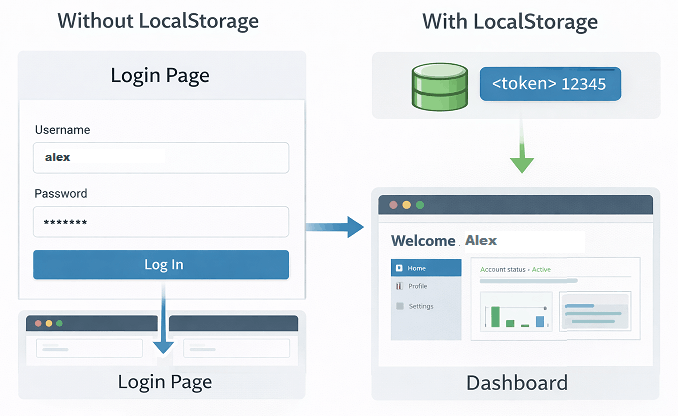
You can use LocalStorage in Playwright Java to simulate a logged in user by storing authentication tokens before the application loads. This helps skip login steps and directly access secured pages.
This is one of the most common real world use cases in automation testing for improving test speed and stability.
How to log in using LocalStorage token in Playwright Java?
This example shows how to inject an authentication token and access a protected page without performing UI login.
// Create browser context
BrowserContext context = browser.newContext();

// Set token before page load
context.addInitScript("() => localStorage.setItem('authToken', '12345')");

// Open new page
Page page = context.newPage();

// Navigate to dashboard
page.navigate("https://example.com/dashboard");
This approach ensures the application treats the user as authenticated from the beginning.
What are Common Mistakes When Using LocalStorage and SessionStorage in Playwright Java?
Common mistakes include setting storage before navigation, not reloading the page, and misunderstanding domain scope in Playwright Java.
Setting storage before navigating to domain
LocalStorage and SessionStorage are domain specific.
- Always call page.navigate() first
- Then use page.evaluate()
Forgetting to reload the page
Changes in storage do not reflect automatically in UI.
- Use page.reload()
- Or use addInitScript
Mixing LocalStorage and SessionStorage usage
- Use LocalStorage for persistent data
- Use SessionStorage for temporary data
Not handling null values
String value = (String) page.evaluate("() => localStorage.getItem('key')");
if (value != null) {
    System.out.println(value);
}
Ignoring browser context isolation
- Use same context to reuse storage
- Create new context for clean state
Why do Playwright tests become flaky when using LocalStorage?
Playwright tests become flaky when LocalStorage is not reset between tests, data is shared across contexts incorrectly, or values are accessed before page load. This leads to inconsistent test behavior and failed assertions.
If you still face issues after avoiding these mistakes, the next step is to debug LocalStorage and SessionStorage effectively.
How to Debug LocalStorage and SessionStorage Issues in Playwright Java?
You can debug LocalStorage and SessionStorage issues by logging values, verifying keys, and ensuring correct domain usage in Playwright Java.
These steps help resolve common issues like Playwright LocalStorage returning null or incorrect values.
Here are the most effective debugging techniques used in real projects.
- Print all storage values using Object.assign({}, localStorage)
- Check if the key exists before accessing it
- Ensure page is fully loaded before reading values
- Verify correct domain and URL
- Reload page after updating storage
Most storage related issues happen due to timing problems or incorrect domain usage.
How to log LocalStorage values in Playwright?
You can log LocalStorage values in Playwright by converting the storage object into a JavaScript object using page.evaluate() and printing it to the console.
Object storage = page.evaluate("() => Object.assign({}, localStorage)");
System.out.println(storage);
This helps you see all stored key value pairs and quickly identify missing or incorrect data during test execution.
How to verify correct domain for LocalStorage in Playwright?
LocalStorage works only for the current domain, so you must navigate to the correct URL before setting or getting values in Playwright.
- Always call page.navigate() before accessing storage
- Ensure the domain and subdomain are correct
- Avoid setting storage before page load
If the domain does not match, LocalStorage will return null or behave unexpectedly.
How to debug null LocalStorage values in Playwright?
You can debug null LocalStorage values in Playwright by checking if the key exists, ensuring the page is fully loaded, and verifying that storage is accessed after navigation.
- Check if the key exists in LocalStorage
- Wait for page load before accessing storage
- Verify correct domain and context
- Log all storage values for debugging
Most null value issues are caused by timing problems or incorrect domain usage.
Real Example: Why LocalStorage Failed in a Login Test
In a real automation scenario, a test tried to inject a login token using LocalStorage before navigating to the application URL. As a result, the token was never stored, and the test failed.
After fixing the issue by navigating first and then setting LocalStorage, the test started working correctly.
This highlights the importance of domain context when working with browser storage in Playwright.
What Happens to LocalStorage in Incognito or New Browser Context?
In Playwright Java, each browser context has isolated LocalStorage and SessionStorage, meaning data is not shared across contexts.
This means data stored in one context will not be available in another.
- Each context has independent storage
- No shared data across contexts
- Useful for parallel test execution
- Ensures test isolation
This behavior is important when designing scalable test frameworks.
To understand this concept deeply, refer to this guide on browser contexts and sessions in Playwright Java, which explains how isolation works in real automation scenarios.
What are Best Practices for Using LocalStorage and SessionStorage in Playwright Java?
Best practices include using storage to skip login steps, resetting storage between tests, and using addInitScript for preloading data in Playwright Java.
Prefer addInitScript for initial setup
Setting storage before page load ensures your application reads correct values from the beginning.
- Use browserContext.addInitScript()
- Avoid setting storage after page load when possible
Always reset storage between tests
Leftover data can cause inconsistent test results.
- Use localStorage.clear()
- Use sessionStorage.clear()
- Create a fresh browser context when needed
Validate storage data when required
Do not blindly trust storage values. Always validate critical data such as tokens or flags during tests.
- Use assertions to verify values
- Log storage data for debugging
Handle storage in parallel execution carefully
In parallel tests, each browser context has isolated storage. Do not assume shared data across tests.
- Use separate contexts for parallel runs
- Avoid dependency between tests
What is a useful debugging tip for LocalStorage issues in Playwright?
If your test behaves differently locally and in CI, check storage values first. Many failures are caused by missing or incorrect LocalStorage data.
These practices are essential for handling browser storage in Playwright and SessionStorage efficiently.
Does Using LocalStorage Improve Test Performance in Playwright?
Yes. Using LocalStorage in Playwright Java improves test performance by reducing UI interactions and directly managing application state.
By directly setting storage data, tests execute faster and become less flaky.
- Reduces test execution time
- Avoids repeated UI actions
- Minimizes network dependency
- Improves stability in CI pipelines
This is one of the most effective optimization techniques in modern automation testing.
While LocalStorage improves performance, it is also important to understand when it should not be used in automation tests.
When Should You NOT Use LocalStorage in Playwright?
You should avoid using LocalStorage in Playwright Java when data needs to be secure, shared with the server on every request, or limited to a single session.
- Do not use LocalStorage for sensitive data like passwords
- Avoid it when server-side validation is required
- Do not use it for short-lived session data
- Avoid using it across multiple domains or subdomains
In such cases, cookies or SessionStorage are better alternatives depending on the requirement.
How to Use LocalStorage in Playwright JavaScript, TypeScript, and Python?
If you are working with other languages, the same LocalStorage concepts apply with minor syntax differences.
JavaScript Example: Working with LocalStorage
This example shows how to set and get LocalStorage values using JavaScript in Playwright.
// Set value
await page.evaluate(() => localStorage.setItem('user', 'test'));

// Get value
const value = await page.evaluate(() => localStorage.getItem('user'));
console.log(value);
TypeScript Implementation: Storage Handling
This TypeScript example works exactly like JavaScript with type support.
// Set value
await page.evaluate(() => localStorage.setItem('user', 'test'));

// Get value
const value: string | null = await page.evaluate(() => localStorage.getItem('user'));
Python Example: Using LocalStorage
In Python, you can use the same evaluate method to interact with browser storage.
# Set value
page.evaluate("() => localStorage.setItem('user', 'test')")

# Get value
value = page.evaluate("() => localStorage.getItem('user')")
print(value)
Related Playwright Java Tutorials for Better Understanding
To strengthen your understanding further, you can explore these related Playwright tutorials.
- Install Playwright with Java step by step guide
- Playwright locators in Java complete tutorial
- Handle waits in Playwright Java for stable tests
- Handle multiple tabs in Playwright Java example
- Cross browser testing with Playwright TestNG framework
Conclusion: Playwright Java LocalStorage and SessionStorage
Playwright Java LocalStorage and SessionStorage give you powerful control over browser state without relying on UI interactions. By directly setting, getting, and clearing storage, you can speed up tests and reduce flakiness significantly.
In this guide, you learned how to handle both storage types, use addInitScript for preloading data, and avoid common mistakes that often break automation tests. These techniques are widely used in real world projects to manage authentication, session data, and application behavior.
As a next step, try integrating storage handling with your test framework to build faster and more reliable automation suites. Mastering this concept will greatly improve your Playwright automation skills.
Understanding browser storage handling is a key skill in modern test automation, especially when working with authentication and state management in real applications.
FAQs
How to use LocalStorage in Playwright Java?
You can use LocalStorage in Playwright Java by executing JavaScript inside the browser using page.evaluate() and calling methods like setItem(), getItem(), and clear(). This allows you to store, read, and remove key value data directly during test execution.
Can Playwright access browser storage directly?
Yes. Playwright can access browser storage by running JavaScript inside the page using the evaluate() method.
How to clear LocalStorage in Playwright Java?
You can clear LocalStorage by using page.evaluate() with localStorage.clear() to remove all stored data.
Can I reuse LocalStorage across tests in Playwright?
Yes. You can reuse LocalStorage by using the same browser context or by preloading data using addInitScript().
Why is my LocalStorage value returning null in Playwright?
LocalStorage may return null in Playwright Java when the key does not exist, the page has not fully loaded, or the storage is accessed before navigating to the correct domain.
Does SessionStorage persist across browser sessions?
No. SessionStorage is cleared when the browser tab or session ends and cannot be reused across sessions.