Playwright Java assertions are used to validate that your application behaves as expected during test execution by comparing actual results with expected outcomes. They rely on frameworks like TestNG or JUnit to perform these validations, ensuring your automation tests are reliable and meaningful.
Playwright Java assertions are used to validate expected results by comparing actual values with expected outcomes using frameworks like TestNG or JUnit.
Many beginners start automation with Playwright Java by launching a browser and interacting with elements. However validating expected behavior is what makes a test truly useful. This is where assertions play an important role in real world testing.
Playwright Java does not include built in assertion methods. Instead it works with popular testing frameworks such as TestNG and JUnit to perform validations. This approach gives you flexibility to create powerful and maintainable test checks.
In this guide you will learn how to use Playwright Java assertions with real world examples using TestNG and JUnit. You will also explore best practices, common validation scenarios, and advanced techniques to build stable and reliable automation tests. For more details, you can also refer to the official Playwright Java documentation.
You can also download a ready to use test page included in this guide to practice all assertion examples step by step.
What are Playwright Java Assertions?
Playwright Java assertions help validate that your application produces the correct results during test execution. They work by comparing actual values returned by Playwright methods with expected outcomes.
Since Playwright Java does not include built in assertion methods, it relies on frameworks like TestNG or JUnit to perform these validations across UI elements, API responses, and application behavior.
How to Use Assertions in Playwright Java?

You can use assertions in Playwright Java in 4 simple steps:
- Perform an action using Playwright such as navigation or interaction
- Retrieve the actual value using methods like page.title() or page.url()
- Define the expected result
- Validate using TestNG or JUnit assertion methods
Playwright handles interaction and data retrieval, while the assertion framework verifies whether the actual result matches the expected outcome.
// Example using TestNG assertion
String title = page.title();
Assert.assertEquals(title, "Expected Page Title");
In this example, Playwright fetches the page title and TestNG validates it against the expected value.
As a result, your test not only performs actions but also confirms that the application behaves correctly.
Understanding Assertions in Playwright Java
Assertions in Playwright Java are used to verify application state after performing actions. They ensure that interactions such as clicks, inputs, or navigation produce the expected results.
In Playwright Java, assertions are not built in. Instead you use frameworks like TestNG or JUnit to compare values returned by Playwright methods.
- Validate page title
- Verify URL
- Check element visibility
- Confirm text content
- Ensure element state such as enabled or disabled
Without assertions, your tests would only perform actions but never confirm if those actions produced the correct result.
Why are assertions important in Playwright Java?
Assertions are important in Playwright Java because they verify that your application behaves as expected by comparing actual and expected results during test execution.
They help ensure test accuracy and reliability by:
- Confirming that UI elements display correct data
- Validating navigation such as page title and URL
- Detecting failures early in the test flow
- Preventing false positive test results
Without assertions, Playwright tests would only perform actions without verifying outcomes, making them unreliable for real world automation.
Does Playwright Java have built in assertions?
No, Playwright Java does not have built in assertion methods. It relies on external testing frameworks such as TestNG and JUnit to perform validations.
Playwright is responsible for interacting with the application and retrieving values, while frameworks like TestNG or JUnit are used to compare those values with expected results.
Can you run Playwright Java tests without assertions?
Yes. However such tests only perform actions and do not validate results, which makes them ineffective for real automation testing.
Playwright vs TestNG Assertions in Java
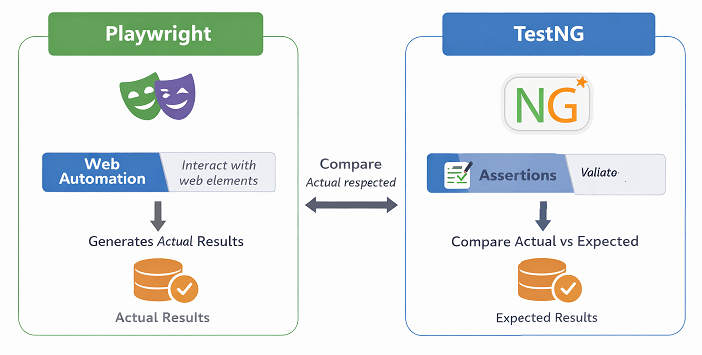
Understanding the difference between Playwright and TestNG assertions is important for designing a reliable automation framework.
Playwright:
- Performs browser actions such as click, type, and navigate
- Retrieves values like title, URL, text, and element state
- Does not provide built in assertion methods
TestNG / JUnit:
- Provides assertion methods such as assertEquals, assertTrue, and assertFalse
- Validates actual results against expected values
- Controls test pass and fail status
In Playwright Java, both work together where Playwright handles interactions and TestNG or JUnit performs validation.
How do you handle assertion failures in Playwright Java?
You can handle assertion failures in Playwright Java by using proper error messages, soft assertions, and retry strategies to improve test stability.
Common ways to handle assertion failures include:
- Adding clear assertion messages for better debugging
- Using TestNG SoftAssert to continue execution after failure
- Implementing retry logic for flaky or dynamic scenarios
- Capturing screenshots or logs for failure analysis
These approaches help identify issues quickly and make your automation tests more reliable.
What happens when an assertion fails in Playwright Java?
When an assertion fails in Playwright Java, the test execution stops immediately if using hard assertions. The framework reports the failure with details, helping identify the issue in the application or test logic.
How to Use Assertions in Playwright Java with TestNG?
You can use assertions in Playwright Java with TestNG by combining Playwright methods with TestNG Assert class to validate expected results.
This is the most common approach because TestNG is widely used with Java based automation frameworks.
If you are new to TestNG setup, you can first learn how to run Playwright tests using TestNG in Java before implementing assertions.
Follow these steps to use assertions with TestNG in Playwright Java:
- Launch the browser using Playwright
- Navigate to the required URL
- Capture the actual value using Playwright methods
- Use TestNG Assert methods to validate the result
You can practice all the Playwright Java assertion examples provided in this article using a local test page.
Download Playwright Java test page and run your tests against it for consistent and reliable results.
The following Playwright Java assertions example shows how to validate page title using TestNG assertion.
import com.microsoft.playwright.*;
import org.testng.Assert;
import org.testng.annotations.Test;

public class PlaywrightAssertionsTest {

    @Test
    public void validatePageTitle() {
        Playwright playwright = Playwright.create();
        Browser browser = playwright.chromium().launch();
        Page page = browser.newPage();

        page.navigate(""file:///D:/Playwright-assertion-demo.html"");

        String actualTitle = page.title();

        Assert.assertEquals(actualTitle, "Playwright Assertions Test Page");

        browser.close();
        playwright.close();
    }
}
This example demonstrates how Playwright retrieves the title and TestNG validates it against the expected value. You can explore more assertion methods in the official TestNG documentation.
Which TestNG assertions are commonly used in Playwright Java?
The most commonly used TestNG assertions include assertEquals, assertTrue, assertFalse, and assertNotNull for validating different conditions.
Which Assertion Should You Use in Playwright Java?
Choose the right assertion based on your validation need:
- Use assertEquals for exact value comparison
- Use assertTrue or assertFalse for boolean conditions
- Use assertNotNull to validate object presence
- Use SoftAssert when validating multiple conditions
Selecting the right assertion improves test clarity and maintainability.
Can TestNG soft assertions be used with Playwright Java?
Yes. TestNG SoftAssert can be used to continue test execution even if one assertion fails, which is useful for validating multiple conditions in a single test.
How to Use Assertions in Playwright Java with JUnit?
You can use assertions in Playwright Java with JUnit by using JUnit assertion methods along with Playwright to validate expected outcomes.
JUnit is another popular testing framework used in Java projects. It provides a simple and clean way to write assertions for your automation tests.
If you are getting started with JUnit, you can follow this guide to run Playwright tests using JUnit in Java before adding assertions.
Follow these steps to use assertions with JUnit in Playwright Java:
- Initialize Playwright and launch the browser
- Open a new page and navigate to the target URL
- Retrieve actual values using Playwright methods
- Use JUnit Assertions class to validate results
The following example shows how to verify the current URL using JUnit assertion.
import com.microsoft.playwright.*;
import org.junit.jupiter.api.Assertions;
import org.junit.jupiter.api.Test;

public class PlaywrightJUnitAssertions {

    @Test
    public void validatePageURL() {
        Playwright playwright = Playwright.create();
        Browser browser = playwright.chromium().launch();
        Page page = browser.newPage();

        page.navigate("file:///D:/Playwright-assertion-demo.html);

        String actualURL = page.url();

        Assertions.assertEquals("file:///D:/Playwright-assertion-demo.html, actualURL);

        browser.close();
        playwright.close();
    }
}
This example demonstrates how to use JUnit Assertions to validate the page URL returned by Playwright.
When should you use JUnit instead of TestNG in Playwright Java?
JUnit is preferred in projects that follow standard Java testing practices or use modern frameworks like Spring Boot where JUnit is commonly integrated.
Are JUnit assertions faster than TestNG assertions?
No. In most cases, JUnit and TestNG assertions provide similar performance. The choice depends on project requirements, ecosystem compatibility, and preferred testing framework rather than speed differences.
Playwright Java UI Assertions Examples
The following Playwright Java UI assertion examples cover the most common real world validation scenarios used in automation testing.
These are the most common real world assertion scenarios used in automation testing.
Validate Page Title in Playwright Java
You can validate the page title by comparing the value returned by page.title() with the expected title.
String title = page.title();
Assert.assertEquals(title, "Example Domain");
Verify Current URL in Playwright Java
You can verify the current URL using page.url() and compare it with the expected URL.
String url = page.url();
Assert.assertEquals(url, "https://example.com/");
Check Element Visibility in Playwright Java
You can check if an element is visible by using locator.isVisible() and asserting the result.
boolean isVisible = page.locator("#login").isVisible();
Assert.assertTrue(isVisible);
Validate Text Content in Playwright Java
You can validate text content by retrieving it using locator.textContent() and comparing it with expected text.
String text = page.locator("h1").textContent();
Assert.assertEquals(text, "Example Domain");
Validate Element Attribute in Playwright Java
You can validate an element attribute by using locator.getAttribute() and comparing it with the expected value.
This is useful for verifying properties such as href, value, placeholder, or custom attributes.
String attributeValue = page.locator("#login").getAttribute("href");
Assert.assertEquals(attributeValue, "/home");
This approach helps ensure that elements contain the correct attributes required for proper functionality.
Validate Input Field Value in Playwright Java
You can validate the value of an input field by using locator.inputValue() and comparing it with the expected value.
This is commonly used to verify user entered data or default values in form fields.
String inputValue = page.locator("#username").inputValue();
Assert.assertEquals(inputValue, "testuser");
This ensures that the correct data is present in the input field during test execution.
Verify Checkbox or Radio Button State in Playwright Java
You can verify whether a checkbox or radio button is selected by using locator.isChecked() and asserting the result.
This is useful for validating user selections and default states in forms.
boolean isChecked = page.locator("#terms").isChecked();
Assert.assertTrue(isChecked);
This helps ensure that the correct option is selected during test execution.
Validate Number of Elements in Playwright Java
You can validate the number of elements by using locator.count() and comparing it with the expected count.
This is useful for verifying lists, search results, table rows, or repeated UI components.
int elementCount = page.locator(".product-item").count();
Assert.assertEquals(elementCount, 5);
This ensures that the correct number of elements is displayed on the page.
Verify Element Enabled or Disabled State
You can check whether an element is enabled or disabled using locator.isEnabled() method.
boolean isEnabled = page.locator("#submit").isEnabled();
Assert.assertTrue(isEnabled);
These examples cover the most important assertion types used in UI automation and help ensure your application behaves as expected.
How to Validate API Responses Using Playwright Java Assertions?
You can validate API responses in Playwright Java by using APIRequestContext and applying assertions on response status and response data.

This approach allows you to perform API testing along with UI testing in a single framework.
Follow these steps to validate API responses:
- Create APIRequestContext using Playwright
- Send a request to the API endpoint
- Capture the response
- Validate status code and response body using assertions
The following example shows how to validate an API response status.
import com.microsoft.playwright.*;
import com.microsoft.playwright.options.*;

APIRequestContext request = playwright.request().newContext();

APIResponse response = request.get("api url");

Assert.assertEquals(response.status(), 200);
This ensures that the API returns the expected status code during test execution.
Can Playwright Java validate attributes of elements?
Yes. You can use locator.getAttribute() to retrieve attribute values and assert them using your test framework.
Is it possible to use multiple assertions in one Playwright Java test?
Yes. In Playwright Java, you can use multiple assertions or soft assertions to validate several conditions within the same test method.
What Are Advanced Assertion Techniques in Playwright Java?
In real world Playwright Java automation, advanced assertion techniques are essential for handling dynamic applications and avoiding flaky tests.
These techniques help ensure stable validations when dealing with asynchronous content, delayed UI updates, and dynamic data.
Use Waiting Before Assertions for Dynamic Elements
You can wait for elements or conditions before performing assertions to avoid flaky test failures.
page.waitForSelector("#status");
String text = page.locator("#status").textContent();
Assert.assertEquals(text, "Completed");
Leverage Playwright Auto Waiting Behavior
Playwright automatically waits for elements to be ready before performing actions, which reduces the need for manual waits in many cases.
Validate Using Polling for Changing Values
You can implement custom polling logic to repeatedly check a value until it meets the expected condition.
int attempts = 0;
while (attempts < 5) {
    String status = page.locator("#status").textContent();
    if ("Completed".equals(status)) {
        break;
    }
    Thread.sleep(1000);
    attempts++;
}
Assert.assertEquals(page.locator("#status").textContent(), "Completed");
Use Soft Assertions for Multiple Validations
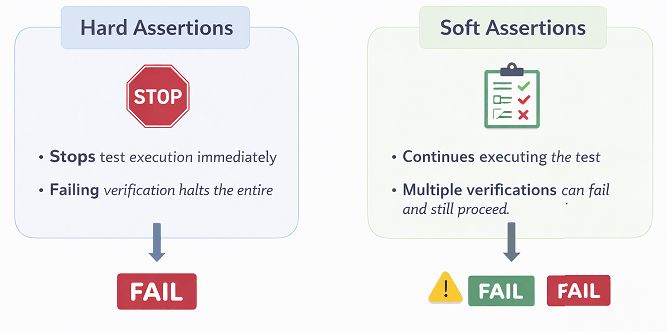
You can use soft assertions to validate multiple conditions without stopping test execution after the first failure.
SoftAssert softAssert = new SoftAssert();

softAssert.assertEquals(page.title(), "Example Domain");
softAssert.assertTrue(page.locator("#login").isVisible());

softAssert.assertAll();
These techniques help make your Playwright Java tests more stable and suitable for real world scenarios.
Do you always need explicit waits before assertions?
No. In many cases Playwright auto waiting is sufficient, but explicit waits are useful for dynamic content or delayed updates.
Can polling reduce flaky test failures?
Yes. Polling helps handle asynchronous updates by retrying checks until the expected condition is met.
When to Use Assertions in Playwright Java
You should use assertions in Playwright Java whenever you need to validate application behavior after performing an action.
Assertions are typically used after:
- Navigation to a page
- Form submission
- User interactions such as clicks or inputs
- API requests and responses
Using assertions at the right points ensures that your test verifies actual outcomes instead of only executing steps.
Common Mistakes in Playwright Java Assertions
Avoiding common assertion mistakes is critical to prevent flaky tests and unreliable automation results.
Avoid these common mistakes to improve test reliability:
- Using hard waits instead of Playwright auto waiting
- Validating unstable or dynamic values
- Writing assertions far from the action
- Not using proper assertion messages
- Overusing soft assertions without validation
Fixing these issues helps reduce flaky tests and improves debugging efficiency.
What Are Best Practices for Playwright Java Assertions?
You can make your Playwright Java tests more stable and maintainable by following a few important assertion best practices.
These practices help reduce flaky tests and improve overall test reliability in real projects.
- Always validate critical user flows such as login, checkout, and navigation
- Avoid hardcoded waits and rely on Playwright auto waiting when possible
- Use clear and meaningful assertion messages for better debugging
- Keep assertions close to the action they validate
- Use soft assertions only when multiple validations are required
- Ensure expected values are stable and not dynamic
Applying these practices ensures your tests remain consistent and easier to maintain over time.
Why should assertions be placed close to actions?
Placing assertions immediately after actions helps quickly identify where a failure occurred in the test flow.
Should you use hardcoded values in Playwright Java assertions?
Hardcoded values should be avoided when dealing with dynamic data. Instead use stable or configurable expected values.
How do assertion messages help in debugging?
Assertion messages provide clear failure reasons which make it easier to identify and fix issues quickly.
Examples in Other Languages
Playwright assertions follow a similar approach across different languages. The main difference is the syntax used to write the validation logic.
JavaScript Example: Validating Page Title
This example shows how to validate the page title using Playwright in JavaScript with a simple assertion.
const { test, expect } = require('@playwright/test');

test('validate title', async ({ page }) => {
  await page.goto('https://example.com');
  await expect(page).toHaveTitle('Example Domain');
});
TypeScript Implementation: Assertion Example
This TypeScript example demonstrates the same validation using Playwright Test framework.
import { test, expect } from '@playwright/test';

test('validate title', async ({ page }) => {
  await page.goto('https://example.com');
  await expect(page).toHaveTitle('Example Domain');
});
Python Example: Using Assertions
In Python, Playwright uses expect assertions for validation when used with its test runner.
from playwright.sync_api import sync_playwright, expect

with sync_playwright() as p:
    browser = p.chromium.launch()
    page = browser.new_page()
    page.goto("https://example.com")
    expect(page).to_have_title("Example Domain")
    browser.close()
These examples show how different languages provide built in assertion support when using Playwright Test, unlike Playwright Java which relies on external frameworks.
Related Playwright Tutorials
- Handle checkbox in Playwright Java with examples
- How to perform click action in Playwright Java
- Handle text box in Playwright Java with examples
- Playwright locators in Java with examples
- getByPlaceholder locator in Playwright Java with examples
Key Takeaways
- Playwright Java uses TestNG or JUnit for assertions
- Assertions validate UI, API, and application behavior
- Use soft assertions for multiple validations
- Avoid hard waits and rely on auto waiting
- Apply advanced techniques for stable automation
Conclusion
Playwright Java assertions are essential for validating application behavior and ensuring your automated tests produce meaningful results. By combining Playwright methods with TestNG or JUnit, you can verify titles, URLs, elements, and dynamic content effectively.
In this guide, you learned how to implement different types of assertions, handle real world scenarios, and apply best practices to improve test stability. Advanced techniques such as waiting strategies and soft assertions further enhance your automation framework.
As a next step, try integrating these assertion techniques into your existing Playwright Java tests. This will help you build more reliable and maintainable automation suites.
FAQs
What is the difference between hard and soft assertions in Playwright Java?
In Playwright Java, hard assertions stop test execution immediately when a failure occurs, while soft assertions allow the test to continue execution and report all failures at the end using frameworks like TestNG SoftAssert.
What is the best way to use assertions in Playwright Java?
The best approach is to use Playwright methods to retrieve actual values and validate them using TestNG or JUnit assertions. Focus on validating critical user flows, avoid hard waits, and rely on Playwright auto waiting for stable and reliable results.
Can Playwright Java handle assertions for dynamic content?
Yes. You can handle dynamic content by using waits, polling, or retry logic before performing assertions.
What is assertEquals in Playwright Java?
assertEquals in Playwright Java is used to compare the actual value returned by Playwright methods with the expected value using frameworks like TestNG or JUnit.
What types of validations can be done using Playwright Java assertions?
You can validate page title, URL, element visibility, text content, attributes, and element states like enabled or disabled.
Is it possible to validate API responses using Playwright Java assertions?
Yes. You can use Playwright APIRequestContext to fetch API responses and validate status codes and response data using assertions.
Do Playwright Java assertions support parallel execution?
Yes. Assertions work seamlessly in parallel test execution when used with frameworks like TestNG or JUnit.
How can you improve stability of Playwright Java assertions?
You can improve stability by avoiding hard waits, using Playwright auto waiting, and validating only stable and expected values.
Can assertions be reused in Playwright Java framework design?
Yes. You can create reusable utility methods or helper classes to centralize common assertion logic across your framework.