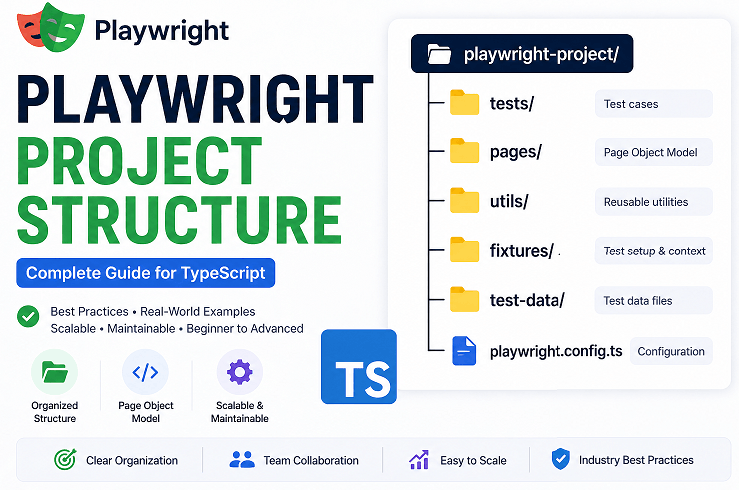
Playwright Project Structure is the organized way of arranging test files, page objects, utilities, fixtures, and configuration in a Playwright automation framework. It helps keep tests scalable, maintainable, and easy to manage as your project grows.
Many beginners start with everything in one place, but that quickly turns into messy and hard-to-maintain test code. A proper structure solves this problem from day one.
In this guide, you will learn how to structure a Playwright project using TypeScript, understand the purpose of each folder, and follow real-world practices used in scalable automation frameworks. If you are new to Playwright, you can also explore this complete Playwright TypeScript guide to understand the basics before applying this structure.
- How to Structure a Playwright Project (Folder Structure in TypeScript)?
- What is Playwright Project Structure in TypeScript?
- Why Is Playwright Project Structure Important?
- What Are the Key Folders in a Playwright Project Structure?
- Playwright Project Structure vs Test Automation Framework Design
- What Does a Real Playwright Project Structure Look Like?
- What Does an Advanced Playwright Project Structure Look Like in Real Teams?
- How to Create a Playwright Project Structure Step by Step?
- What Are the Best Practices for Playwright Project Structure?
- How to Scale Playwright Project Structure for Large Applications?
- What Are Common Mistakes in Playwright Project Structure?
- What Naming Conventions Should You Follow in Playwright Projects?
- How Does Playwright Project Structure Work Across Different Languages?
- Conclusion
- FAQs
How to Structure a Playwright Project (Folder Structure in TypeScript)?
You can structure a Playwright project in TypeScript by separating tests, page objects, utilities, fixtures, and configuration into dedicated folders. This keeps your automation framework clean, modular, and scalable.
The following diagram helps you quickly understand how a real Playwright project is structured in TypeScript.
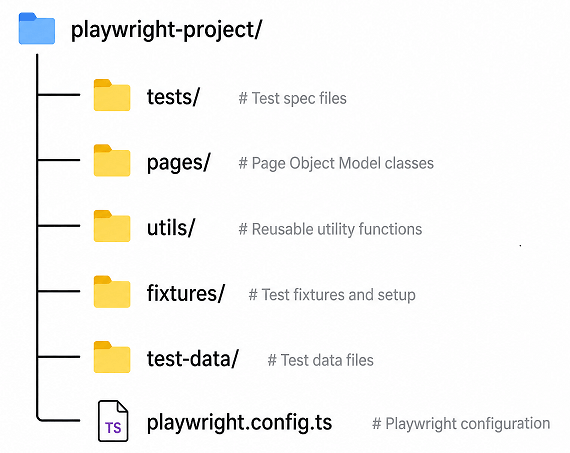
A commonly used Playwright project structure looks like this:
playwright-project/
│
├── tests/
├── pages/
├── utils/
├── fixtures/
├── test-data/
├── playwright.config.ts
├── package.json
└── tsconfig.json
This structure ensures that each part of your framework has a clear responsibility.
- tests → Contains test cases
- pages → Stores UI interaction logic
- utils → Holds reusable helper functions
- fixtures → Manages test setup and shared context
- test-data → Stores input data separately
In practice: organizing your Playwright project this way improves readability, reduces duplication, and makes scaling easier.
What is Playwright Project Structure in TypeScript?
The Playwright Project Structure refers to how files and folders are organized in a Playwright automation framework to keep tests scalable, maintainable, and easy to understand. In TypeScript projects, this structure also ensures proper type safety, modular code organization, and better developer experience.
In simple terms, it defines where your test files live, where reusable code is written, and how configuration is managed. A good structure avoids mixing everything in one place and instead separates responsibilities clearly.
Here is how it works in a real project:
- Test files contain actual test scenarios
- Page classes handle UI interactions using the Page Object Model
- Utilities store reusable helper functions
- Fixtures manage test setup and shared context
- Configuration file controls browser, environment, and execution settings
According to the official Playwright documentation, organizing tests properly becomes essential as your test suite grows beyond a few files. Without a clear structure, maintaining and scaling tests becomes difficult and error-prone.
Now you might wonder, why not just keep everything in one folder? That works for small demos, but in real-world projects with dozens or hundreds of tests, a structured approach is the only way to keep things manageable.
What this means: Playwright project structure is not just about folders. It is about writing automation code that teams can scale, understand, and maintain over time.
Why Is Playwright Project Structure Important?
Playwright project structure is important because it helps organize automation code in a way that is easy to maintain, scale, and debug. Without a proper structure, test files quickly become messy and difficult to manage.
A well-structured Playwright project improves code quality and team collaboration, especially in large automation suites.
- Reduces code duplication
- Improves test readability
- Makes debugging easier
- Supports team collaboration
- Helps scale automation frameworks
Real-world insight: Teams working on large applications rely heavily on structured frameworks to manage hundreds of test cases efficiently.
In short: a proper Playwright project structure saves time, reduces errors, and makes your automation framework future-proof.
Now that you understand the basic structure, let’s look at each folder in detail and see how they are used in real projects.
What Are the Key Folders in a Playwright Project Structure?
A Playwright project structure typically includes folders like tests, pages, utils, fixtures, and test-data. Each folder serves a specific purpose, helping you separate responsibilities and keep your automation code organized and scalable.
Let’s break down each folder so you clearly understand what goes where and why it matters.
Tests Folder: Where Actual Test Scenarios Live
The tests folder contains your test files. These files include test cases written using Playwright Test.
- Stores all test scripts
- Follows naming like
*.spec.tsor*.test.ts - Can be grouped by feature or module
Real-world tip: Group tests based on features like login, checkout, or search instead of dumping everything in one folder. This makes navigation much easier.
Pages Folder: Implementing Page Object Model
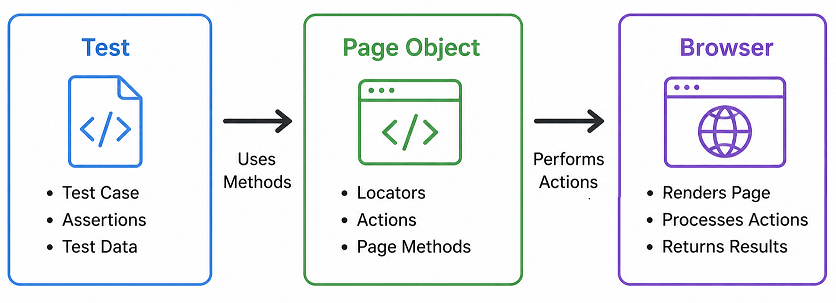
The pages folder contains page classes where UI interactions are defined. This follows the Page Object Model approach.
- Encapsulates locators and actions
- Improves reusability
- Keeps test files clean
Example: A LoginPage class will handle login actions instead of writing selectors directly in test files. These actions often include page navigation, which you can learn in detail in this guide on page navigation methods in Playwright TypeScript.
Utils Folder: Reusable Helper Functions
The utils folder stores common helper functions that can be reused across tests.
- Custom wait functions
- API helpers
- Data generators
This way, you don’t end up rewriting the same logic again and again in different test files.
Fixtures Folder: Shared Test Setup
The fixtures folder is used to manage reusable test setup logic using Playwright fixtures.
- Browser setup
- Authentication handling
- Common test context
Important note: Fixtures are one of the most powerful but often underused features in Playwright. They help reduce boilerplate setup code significantly.
Test Data Folder: Managing Input Data
The test-data folder stores static or dynamic data used in tests.
- JSON files
- Test inputs
- Environment-specific data
This keeps test logic separate from test data, which is a current best practice in automation.
Configuration Files: Project Control Center
Configuration files like playwright.config.ts and tsconfig.json control how your project runs.
- Browser settings
- Base URL
- Timeouts
- Test environment setup
In short, each folder in a Playwright project structure has a clear purpose. When used correctly, this structure makes your automation framework clean, scalable, and easy to debug.
Playwright Project Structure vs Test Automation Framework Design
Playwright project structure and test automation framework design are related but not the same. Structure defines how files and folders are organized, while framework design defines how tests are written, executed, and maintained.
Understanding this difference helps you build better automation systems.
| Aspect | Project Structure | Framework Design |
|---|---|---|
| Focus | Folder and file organization | Test architecture and patterns |
| Example | tests, pages, utils folders | Page Object Model, fixtures, hooks |
| Purpose | Code organization | Test execution and maintainability |
Simply put: structure organizes your files, while framework design defines how your automation works.
Once you understand the core folders, the next step is to see how everything comes together in a real project setup.
What Does a Real Playwright Project Structure Look Like?
A real Playwright project structure includes feature-based test organization, reusable page objects, utility layers, and configuration management. It is designed to support scalable automation in real-world applications where multiple testers and environments are involved.
Here is a practical real-world Playwright project structure used in TypeScript projects:
playwright-project/
│
├── tests/
│   ├── auth/
│   │   ├── login.spec.ts
│   │   └── signup.spec.ts
│   ├── dashboard/
│   │   └── dashboard.spec.ts
│
├── pages/
│   ├── LoginPage.ts
│   ├── DashboardPage.ts
│
├── utils/
│   ├── apiHelper.ts
│   ├── waitHelper.ts
│
├── fixtures/
│   └── baseFixture.ts
│
├── test-data/
│   └── users.json
│
├── playwright.config.ts
├── tsconfig.json
├── package.json
└── README.md
This is very close to what teams actually use in real projects. Tests are grouped by feature, page files handle UI interactions, and utilities take care of reusable logic.
Why This Structure Works Well in Real Projects
This structure works because it keeps responsibilities clearly separated and reduces dependency between files.
- Tests focus only on validation logic
- Page classes handle UI interactions
- Utilities reduce duplicate code
- Fixtures centralize setup and teardown
Here is where most beginners make mistakes: they directly write selectors and actions inside test files. This works initially but becomes hard to manage as test cases increase.
Feature-Based vs Flat Structure
Playwright projects can follow either a flat structure or a feature-based structure depending on complexity.
| Approach | Description | Best For |
|---|---|---|
| Flat Structure | All test files are placed in one folder | Small projects or learning |
| Feature-Based Structure | Tests are grouped by modules like auth, dashboard | Medium to large projects |
In short, feature-based structure is the current best practice for scalable Playwright automation projects.
Can You Customize Playwright Project Structure?
Yes, Playwright does not enforce a strict folder structure. You can customize it based on your project needs.
However, following a standard structure improves team collaboration and makes it easier for new developers to understand the project quickly.
At a practical level: starting with a standard structure and refining it as your project grows is the most reliable approach.
What Does an Advanced Playwright Project Structure Look Like in Real Teams?
An advanced Playwright project structure includes additional layers like environment management, test grouping strategies, reusable services, and reporting integration. This type of structure is commonly used in real-world teams working on large and complex applications.
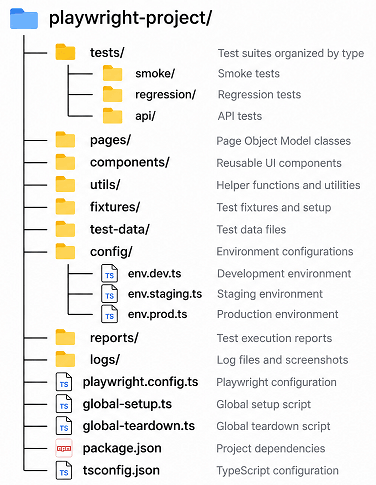
Unlike basic setups, advanced structures focus on scalability, parallel execution, maintainability, and team collaboration.
Here is an example of a more production-ready Playwright project structure:
playwright-project/
│
├── tests/
│   ├── smoke/
│   ├── regression/
│   ├── api/
│
├── pages/
├── components/
├── utils/
├── fixtures/
├── test-data/
│
├── config/
│   ├── env.dev.ts
│   ├── env.staging.ts
│   ├── env.prod.ts
│
├── reports/
├── logs/
│
├── playwright.config.ts
├── global-setup.ts
├── global-teardown.ts
├── package.json
└── tsconfig.json
Why Advanced Structure Matters in Large Projects
This structure improves test organization and helps teams manage large automation suites efficiently.
- Separate test types like smoke and regression
- Manage multiple environments easily
- Support parallel execution
- Enable better debugging with logs and reports
Real-world insight: In large teams, tests are often categorized by execution type such as smoke, regression, and API tests. This allows faster feedback during CI/CD pipelines.
What Is the Role of Config and Environment Files?
Environment-specific configuration files help manage different test environments like development, staging, and production without changing test code.
- Store environment URLs
- Manage credentials securely
- Switch environments easily during execution
This approach is widely used in real automation frameworks and aligns with current best practices.
Should You Always Use Advanced Structure?
No, you do not need an advanced structure for small projects. Start simple and gradually evolve your structure as your test suite grows.
In short: use a basic structure for learning, but adopt an advanced structure when working on real-world applications.
Now let’s move from theory to practical implementation and build a Playwright project structure step by step.
How to Create a Playwright Project Structure Step by Step?
You can create a Playwright project structure by initializing a Playwright project and then organizing folders for tests, pages, utilities, and configuration. This approach ensures your project is clean and scalable from the beginning.
Follow these steps to set up a proper Playwright project structure using TypeScript.
Step 1: Initialize a Playwright Project
Start by creating a new Playwright project using the official setup command. This generates a basic structure with configuration and sample tests. If you are new, follow this step-by-step Playwright TypeScript installation guide.
npm init playwright@latestThis command creates essential files like playwright.config.ts and a sample tests folder.
Step 2: Create Core Project Folders
Next, manually organize your project by creating standard folders used in real-world frameworks.
- tests
- pages
- utils
- fixtures
- test-data
You can create them using your IDE or terminal.
mkdir pages utils fixtures test-dataStep 3: Move and Organize Test Files
Move generated test files into the tests folder and group them by feature for better organization.
Example:
tests/auth/login.spec.ts
tests/dashboard/dashboard.spec.ts
This makes it much easier to find tests later and update them without digging through folders.
Step 4: Create Page Classes
Now create page classes inside the pages folder to implement the Page Object Model.
// pages/LoginPage.ts
import { Page } from '@playwright/test';

export class LoginPage {
  constructor(private page: Page) {}

  async login(username: string, password: string): Promise<void> {
    await this.page.fill('#username', username);
    await this.page.fill('#password', password);
    await this.page.click('#loginButton');
  }
}
This keeps your test files clean and reusable.
Step 5: Add Utility Functions
Create helper functions in the utils folder to avoid repeating logic across tests.
// utils/waitHelper.ts
import { Page } from '@playwright/test';

export async function waitForElement(
  page: Page,
  selector: string
): Promise<void> {
  await page.waitForSelector(selector);
}
Reusable utilities improve consistency and reduce duplication.
Step 6: Configure Playwright Settings
Update your playwright.config.ts file to define base URL, browser settings, and timeouts.
import { defineConfig } from '@playwright/test';

export default defineConfig({
  use: {
    baseURL: 'https://example.com',
    headless: true,
    viewport: { width: 1280, height: 720 },
    ignoreHTTPSErrors: true,
  },
  timeout: 30000,
});
You can think of this file as the place where you control how your tests run.
Step 7: Run Your First Structured Test
Finally, run your tests to verify everything is set up correctly.
npx playwright testIf everything is configured properly, your tests will execute using the structured setup. To understand how Playwright actually starts browsers during execution, check this guide on how Playwright launches browsers during test execution.
Quick tip: Always start with a simple structure and gradually enhance it with fixtures, environment configs, and reporting as your project grows.
Once your structure is in place, following best practices helps keep your framework clean and scalable over time.
What Are the Best Practices for Playwright Project Structure?
Playwright project structure best practices help you build automation frameworks that are scalable, maintainable, and easy to debug. These practices are based on real-world usage and align with current Playwright recommendations.
These are the practices that actually make a difference when your test suite starts growing.
Keep Tests Clean and Focused
Test files should only contain test logic, not implementation details. Avoid adding selectors or complex logic directly inside tests.
- Write readable test steps
- Avoid long test files
- Keep one scenario per test
The key idea: your test files should describe behavior, while implementation details stay in page classes and utilities.
Use Page Object Model Consistently
Always move UI interactions into page classes instead of repeating selectors in test files.
- Centralize locators
- Reuse methods across tests
- Reduce maintenance effort
This is one of the most important practices for long-term scalability.
Group Tests by Feature, Not by Type
Organize your tests based on application features like login, checkout, or profile instead of grouping by test type.
- Improves navigation
- Makes debugging easier
- Matches real application structure
Example: Keep login tests inside tests/auth/ instead of mixing them with unrelated tests.
Avoid Hardcoding Test Data
Store test data separately in JSON files or use dynamic data generators.
- Keeps test logic clean
- Supports multiple environments
- Improves reusability
This is a current best practice followed in modern automation frameworks.
Quick insight: If your test file crosses 200 to 300 lines, it is usually a sign that your structure needs improvement or logic should be moved to page or utility files.
Use Fixtures for Setup and Reusability
Leverage Playwright fixtures to manage setup logic like login sessions or browser context.
- Reduces duplicate setup code
- Makes tests faster
- Improves readability
Important note: Many beginners skip fixtures and repeat setup in every test, which leads to messy code.
Keep Configuration Centralized
Always manage environment settings inside playwright.config.ts instead of scattering them across files.
- Base URL
- Timeouts
- Browser configuration
This keeps everything in one place, so updating settings later does not turn into a guessing game.
Use Meaningful File and Folder Names
Use clear naming conventions so anyone can understand the project structure quickly.
login.spec.tsinstead oftest1.spec.tsDashboardPage.tsinstead ofpage2.ts
Good naming improves readability and team collaboration.
Keep Your Project Scalable from Day One
Even if your project is small, design the structure with scalability in mind.
This avoids major refactoring later when your test suite grows.
Simply put: a well-structured Playwright project saves time, reduces bugs, and makes automation easier to maintain.
How to Scale Playwright Project Structure for Large Applications?
You can scale a Playwright project structure by organizing tests by feature, using reusable components, managing environments, and optimizing execution strategies. This ensures your automation framework can handle hundreds or thousands of tests.
Here are key strategies used in real-world projects:
- Group tests into smoke, regression, and integration suites
- Use environment-based configuration files
- Separate UI and API tests
- Implement reusable components and services
- Use fixtures to manage shared setup
Important note: Scaling is not just about adding folders. It is about designing your structure to handle growth without slowing down development.
In short: a scalable Playwright structure supports faster execution, easier maintenance, and better team collaboration.
What Are Common Mistakes in Playwright Project Structure?
Common mistakes in Playwright project structure often come from poor organization, mixing responsibilities, and ignoring scalability. Identifying and fixing these early helps you avoid major maintenance issues as your test suite grows.
These are some common issues you will run into if the structure is not planned properly.
Putting Everything Inside Test Files
Many beginners write selectors, actions, and logic directly inside test files. This makes tests hard to read and maintain.
- Leads to duplicate code
- Makes debugging difficult
- Breaks reusability
Better approach: Move UI logic to page classes and keep tests focused on validation.
Not Using Page Object Model Properly
Some projects create page files but still keep most logic inside tests. This defeats the purpose of using a structured approach.
Tip: If your test file has too many selectors, your structure needs improvement.
Flat Folder Structure for Large Projects
A flat structure works for small demos but becomes messy in real projects.
- Hard to find test files
- Difficult to scale
- Increases confusion in teams
Better approach: Use feature-based folder organization.
Hardcoding Test Data in Scripts
Placing test data directly inside test files reduces flexibility and reusability.
- Difficult to update
- Not environment-friendly
- Increases maintenance effort
Best practice: Store data in JSON files or external sources.
Ignoring Fixtures and Reusability
Skipping fixtures leads to repeated setup code across multiple tests.
This makes tests longer, slower, and harder to maintain.
Real-world insight: Once your project crosses 20–30 test cases, not using fixtures becomes a major bottleneck.
Poor Naming Conventions
Using unclear file and folder names creates confusion, especially in team environments.
test1.tspage.ts
These names do not communicate purpose.
Better approach: Use meaningful names like login.spec.ts or CheckoutPage.ts.
No Separation Between Environments
Not handling different environments like staging and production properly can lead to unreliable tests.
Tip: Use configuration and environment variables to manage this cleanly.
Bottom line: most structure problems come from shortcuts. Investing time in organizing your project early prevents major issues later.
What Naming Conventions Should You Follow in Playwright Projects?
Using consistent naming conventions in a Playwright project structure helps improve readability, maintainability, and team collaboration. Clear names make it easier to understand the purpose of files and folders without opening them.
- Use
.spec.tsfor test files - Name files based on features like
login.spec.ts - Use PascalCase for page classes like
LoginPage.ts - Keep utility names descriptive like
apiHelper.ts
Quick tip: Avoid generic names like test1.ts or page.ts as they create confusion in large projects.
In short: meaningful naming improves code clarity and reduces onboarding time for new team members.
How Does Playwright Project Structure Work Across Different Languages?
Playwright project structure is mostly language-independent. However, the way you write page classes and tests slightly changes based on the programming language you use.
Here are simple examples in other supported languages so you can understand how the same structure applies across ecosystems.
JavaScript Example: Basic Page Class
This example shows how a Login page class looks in JavaScript using Playwright.
// pages/LoginPage.js
class LoginPage {
  constructor(page) {
    this.page = page;
  }

  async login(username, password) {
    await this.page.fill('#username', username);
    await this.page.fill('#password', password);
    await this.page.click('#loginButton');
  }
}

module.exports = { LoginPage };
Java Implementation: Page Object Pattern
This Java example demonstrates how the same login logic is implemented using Playwright Java.
// pages/LoginPage.java
public class LoginPage {
    private Page page;

    public LoginPage(Page page) {
        this.page = page;
    }

    public void login(String username, String password) {
        page.fill("#username", username);
        page.fill("#password", password);
        page.click("#loginButton");
    }
}
Python Example: Using Playwright Sync API
This Python example shows a simple page class using Playwright’s sync API.
# pages/login_page.py
class LoginPage:
    def __init__(self, page):
        self.page = page

    def login(self, username, password):
        self.page.fill("#username", username)
        self.page.fill("#password", password)
        self.page.click("#loginButton")
As you can see, the structure remains the same across languages. Only syntax changes, while the overall design approach stays consistent.
Does Playwright Enforce Project Structure?
No, Playwright does not enforce a strict project structure. You are free to organize your files and folders based on your project needs.
Is Page Object Model Mandatory in Playwright?
No, Page Object Model is not mandatory. However, it is highly recommended for medium to large projects to improve maintainability.
Can You Run Tests Without Pages Folder?
Yes, you can run tests without a pages folder. But this approach is only suitable for small projects or quick experiments.
What matters most: while Playwright gives flexibility, following a consistent structure makes your project easier to scale and maintain.
Summary: A Playwright project structure organizes tests, page objects, utilities, and configuration into separate layers to improve scalability, maintainability, and test reliability.
Conclusion
Understanding the Playwright Project Structure is a key step in building reliable and scalable automation tests. A clean structure helps you separate responsibilities, reduce duplication, and keep your test suite easy to manage.
In this guide, you explored how to organize folders, apply real-world practices, and avoid common mistakes that can slow down your automation efforts. These patterns are used by teams working on production-level projects.
If you are just getting started, begin with a simple structure and improve it as your project grows. Over time, a well-organized Playwright framework will save you significant time in debugging, maintenance, and collaboration.
Now that you understand the structure, try implementing it in your own Playwright project and gradually refine it as your test suite grows. This approach will help you build a clean, scalable, and production-ready automation framework.
Final takeaway: A well-designed Playwright project structure is the foundation of a scalable automation framework. By organizing tests, page objects, utilities, and configuration properly, you can build maintainable and efficient test suites for real-world applications.
FAQs
What is Playwright project structure?
Playwright project structure is the organized layout of folders and files in a Playwright automation framework. It separates test cases, page objects, utilities, and configuration to keep the code clean, scalable, and easy to maintain.
Why is project structure important in Playwright?
Project structure is important in Playwright because it helps manage test code efficiently as the project grows. A proper structure improves readability, reduces duplication, and makes debugging and collaboration easier.
What is the best Playwright project structure?
The best Playwright project structure separates tests, page objects, utilities, fixtures, and configuration into dedicated folders. A feature-based structure is recommended for real-world projects as it improves scalability, readability, and maintainability.
Does Playwright require a fixed project structure?
No, Playwright does not require a fixed project structure. However, following a standard structure is a current best practice to improve maintainability and team collaboration.
What folders are commonly used in Playwright projects?
Common folders in a Playwright project include tests, pages, utils, fixtures, and test-data. Each folder has a specific role, such as storing test cases, reusable UI logic, helper functions, and test data.
Can beginners start without Page Object Model?
Yes, beginners can start without Page Object Model in Playwright. However, using it early helps organize UI interactions and makes tests easier to maintain as the project grows.
Is Playwright project structure the same for all languages?
Yes, the overall Playwright project structure remains similar across TypeScript, JavaScript, Java, and Python. The folder organization stays the same, while only the syntax changes.
How do I scale a Playwright project for large applications?
You can scale a Playwright project structure by organizing tests by features, using reusable page objects, managing environments with configuration files, and using fixtures for shared setup. This approach supports large and complex automation projects.