Last updated on November 28th, 2025 at 05:26 am
Understanding Java data types is an important step for anyone learning Java or starting with Selenium WebDriver automation. In this Java data types tutorial, you will learn what data types in Java are, how they work, and how to use them in real test automation scenarios. Since data types decide the kind of values a program can store, they are an important part of writing clean and error-free code.
In Java, data types define what type of value a variable can store and how much memory is allocated. Java provides different primitive data types like byte, short, int, long, float, double, char, and boolean. You will use several of these primitive data types in real Selenium test cases. Some types like int, double, char, and boolean are used frequently, while types like byte and short are used rarely.
Below is a simple and complete guide that explains the most commonly used Java primitive data types and the String class with examples.
What Are Data Types in Java
Data types in Java define what type of value a variable can store and the range of that value. This helps the compiler understand how much memory to allocate for a variable. Java supports two categories of data types:
- Primitive data types
- Non primitive data types
Primitive data types in Java include values like numbers, decimals, characters, and boolean values. Non primitive types include classes, arrays, and interfaces. Even though String looks like a data type, it is actually a class.
Primitive Data Types in Java
Java provides eight primitive data types. Below are the ones frequently used in automation and basic Java programs.
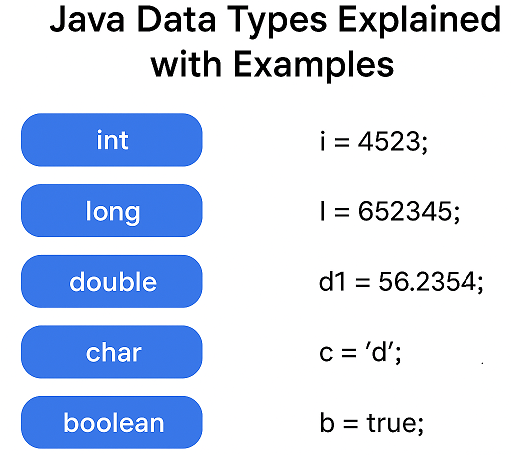
byte Data Type
The byte data type is useful to store very small integer values. It can store values from negative 128 to positive 127 and takes very little memory.
Example:
byte b = 120;short Data Type
The short data type is also used to store small integer values, but it can hold a slightly larger range compared to a byte. It stores 16-bit integer values.
Example:
short s = 30000;int Data Type
The int data type is used to store 32-bit integer values. It cannot store decimal numbers.
Example:
int i = 4523;long Data Type
The long data type is used to store 64-bit integer values. Use it when the value does not fit inside an int.
Example:
long l = 652345;float Data Type
The float data type stores 32-bit decimal values. It is useful when you want decimal values but do not need very high precision.
Example:
float f = 45.67f;double Data Type
The double data type stores 64-bit decimal values. It is used when you need fractional numbers.
Example:
double d1 = 56.2354;
double d2 = 12456;
char Data Type
The char data type stores a single character. It cannot store more than one character.
Example:
char c = 'd';boolean Data Type
The Boolean data type stores either true or false. It is often used in conditions if you want to check a specific logic.
Example:
boolean b = true;Non Primitive Types in Java
Here are non primitive data types in Java.
Arrays
An array is used to store multiple values of the same data type in a single variable. It helps you manage test data easily in automation scripts.
Example:
int numbers[] = {10, 20, 30};Classes
A class is a blueprint for creating objects. In Selenium automation, you will create multiple classes for test cases, page objects, utilities and more.
Example:
class Car {
    String model;
}
Interfaces
An interface contains method declarations without implementation. They are widely used in automation frameworks for defining structure and achieving loose coupling.
Example:
interface Animal {
    void sound();
}
Enums
Enums represent a fixed set of constants. They are useful when you want to define a fixed number of values, like browsers or environment names, in your Selenium framework.
Example:
enum Browser {
    Chrome, Firefox, Edge
}
String Class
String is not a primitive data type. It is a class used to store a group of characters. You will use String values in almost every Selenium WebDriver test script.
Example:
String str = "Hello World";Full Example with All Data Types
Below is a simple Java program that uses different Java data types. You can run this example in Eclipse or any Java editor.
public class DataTypesExample {

    public static void main(String[] args) {

        int i = 4523;
        long l = 652345;
        double d1 = 56.2354;
        double d2 = 12456;
        char c = 'd';
        boolean t = true;
        String str = "Hello World";

        System.out.println("Integer value: " + i);
        System.out.println("Long value: " + l);
        System.out.println("Double d1 value: " + d1);
        System.out.println("Double d2 value: " + d2);
        System.out.println("Char value: " + c);
        System.out.println("Boolean value: " + t);
        System.out.println("String value: " + str);
    }
}
Console Output:
Integer value: 4523
Long value: 652345
Double d1 value: 56.2354
Double d2 value: 12456.0
Char value: d
Boolean value: true
String value: Hello World
Conclusion
Understanding Java data types is an important part of learning Java and writing reliable Selenium WebDriver automation scripts. Each data type in Java stores a specific kind of value, which helps your program run efficiently and without errors. By practising with commonly used types like int, double, char, boolean, and String, you will become more confident in writing clean and readable code. As you continue learning Java, these basics will help you handle advanced concepts more easily and create better automation test cases.



great
very helpful for me, Thanks
Very Helpful for me, thanks
Good tutorial.
Greate Stuff…
Very clear and perfect…..
Awesome
Very helpfull
Very helpfull
Nice
Nice
excellent
Great!
easy to Bigginners,,and thanks to upload
Great
Like the introduction ..Hope I will be able to learn as easy as this 🙂
Very useful blog…Thanks…
great..thanks
Easy to learn for beginners..Nice..
its really useful and easy to learn…. great !!!
Easy to understand
Helpful indeed!
Good work.. Thank you… Very useful and easily understandable..
Hey helpful 🙂
float is also considered as one of the primitive DataTypes in java
Good work sir…Thank you
I liked the tutorial, thanks
It is good, thank you
Many thanks for great tutorials.
Very useful for me Thank you so much 🙂
Very useful to me thank you so much
Hey thanks for the tutorial, there is a small mistake in this statement "System.out.println("boolean Var str Is –> "+str); —- boolean should reflect as String.
Yes, last line should be: System.out.println("String Var str Is" + str);
very helpful
Thank you,
It would be great if you can include the minimum and maximum values that can be stored in various data types for example -66536 to 66536.
It's very easy to understand and helpful for beggineers
Thank you so much…
very basic and useful information
Vey basic and useful information
It would be great..Thank you so much.
nice article com blog..thanks for your valuable time, it really help me ..
nice one sir ji..carry on we except more,…..thansk for your valuable time
SUPER! Thank YOu!
please add the maximum value of each data type.
width minimum maximum
SIGNED
byte: 8 bit -128 +127
short: 16 bit -32 768 +32 767
int: 32 bit -2 147 483 648 +2 147 483 647
long: 64 bit -9 223 372 036 854 775 808 +9 223 372 036 854 775 807
UNSIGNED
char 16 bit 0 +65 535