Last updated on June 18th, 2025 at 12:35 pm
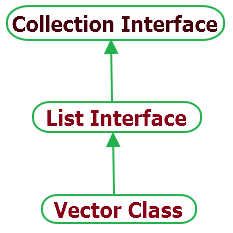
- Vector class in java implements List interface of collection framework.
- Vector class is synchronized.
- If you don’t know size of array then you can use vector class as size of vector can grow and shrink as per adding and removing items.
- As vector class is synchronized, It will give poor performance on add, delete, update and search operations.
- Elements of vector can be accessed using it’s integer index.
Important method of vector class
- void addElement(Object element) : It will add specified element at end of vector.
- int capacity() : It will return the current capacity of vector.
- int size() : This method will return current size of vector.
- void setSize(int size) : It will set size of vector using given size value.
- boolean contains(Object element) : It will return true if specified element present in vector. Else it will return false.
- boolean containsAll(Collection c) : It will return true if vector contains all values of given collection c.
- Object elementAt(int index) : It will return element which is located at specified index of vector.
- Object firstElement() : It will return first element of vector.
- Object lastElement() : It will return last element of vector.
- Object get(int index) : It will return element located at the specified index of vector.
- boolean isEmpty() : It will return true if vector is empty.
- boolean removeElement(Object element) : It will remove given element from vector.
- boolean removeAll(Collection c) : It will remove all elements of collection c from vector.
- void setElementAt(Object element, int index) : It will set specified element at given index of vector.
Bellow given sample program will show you how to use vector class and it’s different methods.
Vector class example
package JAVAExamples;

import java.util.Enumeration;
import java.util.Vector;

public class VectorExample {
 public static void main(String args[]) {
  //Initial vector capacity is 2. Increment it by 2 when required.
  Vector v = new Vector(2,2);
  System.out.println("Initial capacity of vector : "+v.capacity());
  v.addElement("one");
  v.addElement("two");
  v.addElement("three");
  System.out.println("Capacity of vector after adding 3 elements in vector : "+v.capacity());

  //Get size of vector.
  System.out.println("Size of vector : "+v.size());

  //Get first element of vector.
  System.out.println("First element of vector : "+v.firstElement());

  //Get last element of vector.
  System.out.println("Last element of vector : "+v.lastElement());

  //Add new element in vector.
  v.add(2, "New Element");

  //Print all elements of vector using Enumeration.
  Enumeration vEnum = v.elements();
  System.out.print("Current vector elements : ");
  while(vEnum.hasMoreElements()){
   System.out.print(vEnum.nextElement() + ", ");
  }

  System.out.println();

  //Check if vector is empty.
  System.out.println("Vector is empty? : "+v.isEmpty());
 }
}
Output :
Initial capacity of vector : 2
Capacity of vector after adding 3 elements in vector : 4
Size of vector : 3
First element of vector : one
Last element of vector : three
Current vector elements : one, two, New Element, three,
Vector is empty? : false
Above example shows you usage of mostly used methods of vector class.