
Last updated on March 18th, 2026 at 03:35 am
Playwright self healing locators are designed to make enterprise test automation resilient to UI changes without forcing teams to constantly fix broken tests. In a large Playwright framework, locators break not because tests are wrong, but because applications evolve frequently. Self-healing locators allow the framework to recover from these changes automatically while keeping test code clean and stable.
Fallback locators help to a certain extent, but they are not enough at scale. Over time, fallback lists grow, outdated locators remain active, and every test run repeatedly tries the same failing selectors. This increases execution time, creates noisy logs, and still requires manual cleanup. At the enterprise level, this approach becomes reactive rather than reliable.
Step 14 builds on Step 13 by introducing controlled, one-time locator healing. Instead of retrying locators on every run, the framework discovers stable alternatives once, validates them, stores them safely, and reuses them for future executions. This turns locator maintenance from a repeated firefight into a predictable, scalable system suitable for long-term Playwright automation.
This article belongs to the Playwright Enterprise Automation Framework series. Navigate to the previous or next step using the links below.
Previous article: How to Use Fallback Locators in Playwright Framework
Next article: How to Configure Browser in Playwright Framework
If you are new to this series, start with the main guide How to Build an Enterprise Playwright Automation Framework to understand the overall framework design.
- Why Playwright Self-Healing Locators Are Needed
- High-Level Architecture of Self-Healing Locators
- Configuration Driven Self Healing Control
- Stable Locator Discovery Logic
- Locator Validation Rules
- Merging Existing and Discovered Locators
- Locator Priority and Ordering Strategy
- Safe Locator File Update Mechanism
- Where Healed Locators Are Stored
- Test Execution Flow With Self-Healing Enabled
- Limitations of Self-Healing Locators
- Download Step 14 Self Healing Locator Source Code
- Best Practices for Self-Healing Locators
- Conclusion
- FAQs
Why Playwright Self-Healing Locators Are Needed
Modern web applications change frequently. Even small UI updates can break stable-looking locators and cause test failures that have nothing to do with application defects.
Locator breakages due to UI changes
IDs change, attributes are renamed, and accessibility labels evolve. When locators are tightly coupled to these attributes, tests fail even though user functionality still works.
Repeated locator maintenance effort
Without self-healing, teams spend a significant amount of time fixing the same locators again and again. This slows down releases and shifts focus away from real test coverage and quality improvements.
Uncontrolled self-healing causing flaky behavior
Some self-healing solutions try new locators on every run. This makes test behavior unpredictable. A test may pass today using one locator and fail tomorrow using another, creating flaky execution.
Risky automatic updates without safety
Automatically updating locator files without validation, ordering, or backups is dangerous. Incorrect updates can silently break multiple tests and make root cause analysis difficult in enterprise frameworks.
High-Level Architecture of Self-Healing Locators
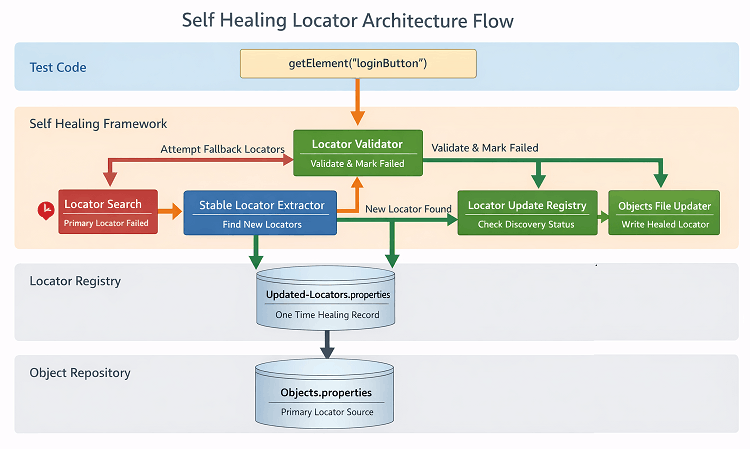
Self-healing is not a separate layer bolted onto the framework. It is deeply integrated into the existing locator resolution flow while keeping responsibilities clearly separated.
This implementation builds on the core locator concepts defined in the official Playwright locator documentation.
Where self-healing fits in the existing framework flow
Test classes remain unchanged and continue to call getElement() using logical keys. Self-healing logic executes internally only when a locator is resolved successfully or when a fallback is required. This ensures healing happens as part of normal execution, not as a separate process.
Relationship between test execution, getElement(), and locator resolution
Test execution triggers getElement(). That method handles key validation, fallback resolution, visibility checks, and uniqueness enforcement. Once an element is successfully resolved, self-healing logic is conditionally invoked to evaluate whether better or more stable locators can be discovered and reused.
Clear separation between discovery, validation, and update
Locator discovery focuses only on extracting stable attributes from the resolved element. Validation ensures unsupported, empty, or failed locators are ignored. Update logic is isolated and runs only after safety checks, such as one-time execution, backup creation, and ordering rules. This separation keeps the framework predictable and the enterprise safe.
Configuration Driven Self Healing Control
Self-healing behavior is fully controlled using configuration flags. This prevents surprises during execution and keeps the framework deterministic.
Purpose of auto.locator.healing.enabled
This flag acts as a master switch for self-healing. When enabled, the framework evaluates locator healing after a successful resolution. When disabled, locator resolution works exactly like Step 13 with fallback support, and no discovery or updates are performed.
Purpose of auto.locator.write.to.objects
This flag controls where healed locators are written. When set to false, discovered locators are stored in a separate auto-discovered file, keeping the original Objects file untouched. When enabled, the framework is allowed to update the main object repository in a controlled manner.
How configuration keeps behavior deterministic
Because healing can be fully turned on or off, test behavior remains predictable across environments. Teams can enable healing locally or in lower environments and disable it in production pipelines if required.
When self-healing runs and when it does not
Self-healing runs only after an element is resolved successfully and only if healing is enabled. It does not run for invalid locators, failed resolutions, disabled configurations, or keys already marked as updated unless a fallback was used.
One-Time Self-Healing Locator Discovery
Self-healing is designed as a one-time correction mechanism, not a recurring experiment. This is critical for enterprise stability.
Why locator discovery must run only once
Running discovery on every test execution increases execution time and introduces unpredictability. Once a stable locator is found, there is no value in rediscovering it repeatedly. One-time healing ensures consistency across runs.
How updated locator keys are tracked
Each logical locator key is tracked after it has been healed. Once marked, the framework knows that this key has already gone through the discovery process.
Role of the updated locators registry
A dedicated registry file stores healed locator keys. This registry is loaded at startup and updated only when healing occurs. It acts as a lightweight memory across executions.
How does this avoid repeated discovery on every run
Before running discovery, the framework checks the registry. If a key is already marked as updated and a fallback was not required, discovery is skipped. This keeps execution fast, stable, and predictable.
Stable Locator Discovery Logic
Stable locator discovery happens only after an element is successfully resolved. The framework analyzes the resolved Playwright locator instead of guessing from the DOM.
How Playwright Locator is analyzed
Once a locator uniquely identifies an element, its underlying attributes are inspected directly. Only attributes exposed by the resolved element are evaluated, ensuring discovery is based on a real, visible UI element.
Which attributes are considered stable
Attributes such as data-test-id, id, name, aria-label, placeholder, title, and alt text are considered. These attributes are commonly intended for identification and tend to remain stable across UI changes.
Which attributes are ignored, and why
Very short values, numeric-only values, autogenerated framework prefixes, and UUID-like patterns are ignored. These values are usually dynamic and lead to fragile locators.
How noise and dynamic values are filtered
Filtering rules remove values that change between runs or environments. This prevents polluted locator lists and ensures only meaningful, reusable locators are discovered.
Locator Validation Rules
Validation ensures that self-healing improves stability instead of introducing risk. Every locator is checked before it is ever used or stored.
Why must every discovered locator be validated?
Not every attribute found on an element is usable as a locator. Validation prevents empty, malformed, or unsupported locators from entering the system.
Supported locator types only
Only predefined locator types are allowed. This guarantees that all locators can be safely resolved by the framework and prevents runtime surprises.
How failed locators are permanently marked
When a locator fails during resolution, it is tagged as failed. These tags are persisted so the framework can recognize and demote them in future runs.
Preventing retry of known bad locators
Failed locators are skipped during resolution and pushed to the end during updates. This avoids wasting time retrying selectors that are already known to be unreliable.
Merging Existing and Discovered Locators
Self-healing does not replace the existing locator strategy. It enhances it in a controlled and reversible way.
How original locators are preserved
The winning locator is always kept at the top. Existing healthy locators remain in the list unless they are explicitly marked as failed.
How new locators are merged safely
Discovered stable locators are added only if they do not already exist. This prevents duplication and uncontrolled growth of locator definitions.
Why failed locators are always pushed to the end
Locators that failed during resolution are demoted and clearly marked. This ensures they are never tried before healthy locators.
How does this improves long term stability
Over time, locator lists become cleaner, better ordered, and more reliable. Tests converge toward stable selectors instead of accumulating technical debt.
Locator Priority and Ordering Strategy
Locator order directly affects how quickly and reliably an element is resolved. The framework enforces a strict priority model to keep execution predictable.
Forced priority for healthy locators
Only healthy locators are reordered using a predefined priority list. Failed locators are excluded from prioritization and handled separately.
Why data-testid and id come first
These attributes are usually created for automation and accessibility purposes. They are stable, readable, and least affected by UI layout changes.
Why is XPath intentionally deprioritized?
XPath locators are powerful but fragile. Minor DOM changes can break them, so they are placed lower in the priority chain to reduce long-term risk.
How ordering directly impacts execution reliability
High-quality locators are tried first, reducing resolution time and fallback usage. This leads to faster runs, fewer failures, and consistent behavior across environments.
Safe Locator File Update Mechanism
Updating locator files must be handled carefully because these files are shared across all future test runs.
Why direct file overwrite is dangerous
Direct overwrites can corrupt the file if the process crashes or execution stops midway. This can leave the framework in an unusable state.
One-time backup strategy
Before any update, the original locator file is backed up once. This guarantees a clean rollback point without creating multiple redundant copies.
Atomic file write approach
Updates are written to a temporary file first. Once the write completes successfully, the temporary file is atomically renamed to the original file name.
How corruption and partial writes are avoided
Because the original file is replaced only after a successful write, incomplete data is never exposed. This ensures locator files remain consistent and readable at all times.
Where Healed Locators Are Stored
Self-healing locators are stored based on an explicit configuration decision. This keeps updates predictable and review-friendly.
Updating Objects.properties vs auto discovered file
When auto.locator.write.to.objects=true, healed locators are written directly into Objects.properties. This is useful when teams want the framework to update the primary locator source automatically.
When auto.locator.write.to.objects=false, healed locators are written to auto-discovered-locators.properties. This keeps the original file untouched.
When each approach should be used
Direct updates to Objects.properties should be enabled only in controlled environments where automatic changes are acceptable. Writing to auto-discovered-locators.properties is recommended for most enterprise setups, especially when manual review is required before merging.
How does this support enterprise review workflows?
This switch allows teams to choose between automation speed and governance. By defaulting to a separate auto-discovered file, locator changes can be reviewed, approved, and then merged safely without risking unintended production changes.
Test Execution Flow With Self-Healing Enabled
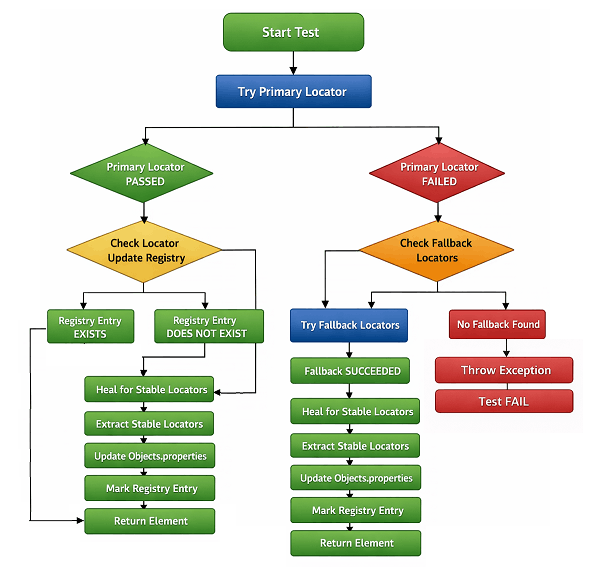
What happens during a normal passing run
When a locator successfully finds an element and that locator key has not been healed earlier, the framework triggers the self-healing flow. Stable alternative locators are discovered and stored once, while the current execution continues normally.
What happens when a locator fails
If the primary locator fails, the framework moves through the fallback locator chain. When any fallback locator successfully finds the element, self-healing is triggered to discover and store additional stable locators.
How healing is triggered only when required
Self-healing runs only when an element is successfully located and has not been healed before. It never runs for already healed keys and never runs when all locators fail. This keeps the behavior controlled and predictable.
What happens in subsequent executions
After healing is completed once, the locator key is marked in the updated locators registry. In future executions, the framework uses the stored stable locators directly and skips discovery entirely, ensuring consistent and reliable test runs.
Limitations of Self-Healing Locators
No AI guessing
The framework does not guess or infer locators using AI or heuristics. Only real, runtime-validated Playwright locators are considered. If a locator cannot be proven to work, it is ignored.
No blind retries
Failed locators are not retried endlessly. Once a locator is validated as broken, it is marked and skipped in future executions to avoid unnecessary delays and flaky behavior.
No automatic locator replacement on every run
Self-healing does not rewrite locators on each execution. Discovery runs only once per locator key, and subsequent runs use the stored stable locators without recalculation.
No test code changes
Test classes remain untouched. All self-healing logic is isolated inside the framework layer, keeping test code clean, readable, and stable over time.
Download Step 14 Self Healing Locator Source Code
⚠️ Important Note: This article is part of the Playwright Enterprise Automation Framework and covers Step 14 in a step-by-step build. The downloadable code is not standalone and depends on all previous steps in the series. If you landed here directly, please complete the earlier steps first to avoid setup or runtime issues.
Download Step 14 Updated Source Code Files
What the zip file contains
The zip file contains all the required framework-level files to implement Step 14 self-healing locators on top of Step 13. No test classes are included. Existing test cases work without any change.
Newly added locator classes (with location)
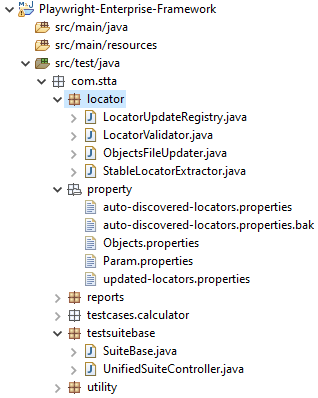
Add the following new files under:
src/test/java/com/stta/locator/
- StableLocatorExtractor.java
Extracts stable attributes from a successfully resolved Playwright locator. - LocatorValidator.java
Validates supported locator types and permanently blocks failed locators. - LocatorUpdateRegistry.java
Tracks one-time self-healing execution per locator key. - ObjectsFileUpdater.java
Handles safe, atomic updates to locator property files with backup support.
Updated existing framework files (with location)
- SuiteBase.java
Location:src/test/java/com/stta/testsuitebase/
Integrates self healing logic into the existinggetElement()fallback resolution flow.
Locator repository file (with location)
- Objects.properties
Location:src/test/java/com/stta/property/
Contains the baseline logical locators used by all test cases and acts as the primary locator source.
Updated configuration file
- Param.Properties
Location:src/test/java/com/stta/property/
New keys added:auto.locator.healing.enabledauto.locator.write.to.objects
Files created automatically at runtime
- updated-locators.properties
Location:src/test/java/com/stta/property/updated-locators.properties - This file is not part of the zip and is created automatically during execution when a locator key completes one-time self-healing.
How to plug it into an existing Step 13 setup
- Copy the four new locator classes into the
com.stta.locatorpackage. - Replace or merge the provided
Objects.propertieswith your existing object repository. - Update
SuiteBase.javato enable self-healing in thegetElement()resolution flow. - Add the new configuration flags in
Param.Properties. - Execute existing tests without modifying test classes or locator keys.
This keeps Step 14 config-driven, safe, and enterprise-ready, while preserving all guarantees of Step 13.
Best Practices for Self-Healing Locators
When to enable healing
Enable self-healing in controlled environments such as local runs or CI validation pipelines. This allows the framework to discover stable locators without impacting production test stability.
When to disable automatic updates
Disable automatic updates in shared or release critical pipelines. This ensures locators do not change silently and remain under review control.
How to review auto-discovered locators
Review newly discovered locators before promoting them to long-term use. Treat them as suggestions generated from real executions, not as blindly trusted replacements.
How to keep long-term stability
Rely on stable attributes like id and data-testid, limit healing to one-time discovery, and permanently block failed locators. This keeps executions predictable and prevents locator drift over time.
Conclusion
Summary of Step 14 value
Step 14 introduces controlled self-healing locators that reduce maintenance without sacrificing reliability. Locators are discovered once, validated strictly, and reused safely in future executions.
How does it complete the locator resilience layer?
With fallback locators from Step 13 and one-time self-healing from Step 14, the framework now has a complete locator resilience layer. It can recover from UI changes while staying deterministic and review-friendly.
FAQs
What are self-healing locators in Playwright?
Self-healing locators automatically discover and store additional stable locators for an element when it is successfully found. These locators are reused in future runs to reduce failures caused by UI changes.
Does self-healing change existing test code?
No. Self-healing works entirely inside the framework layer. Test classes continue to use getElement() without any changes.
Are locators healed on every test execution?
No. Locator discovery runs only once per logical locator key. After stable locators are stored, they are reused, and no further discovery is triggered.
Is this approach safe for enterprise-scale test suites?
Yes. Locator healing is configuration-driven, validated, deterministic, and reviewable. There is no AI guessing, no blind retries, and no uncontrolled file updates.