Last updated on August 2nd, 2026 at 03:33 pm
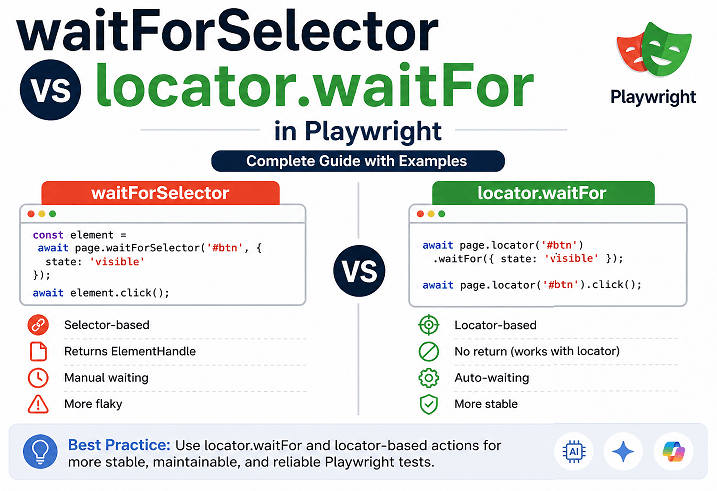
waitForSelector vs locator.waitFor in Playwright comes down to how you handle waiting for elements. waitForSelector works with selectors and returns an ElementHandle, while locator.waitFor works with locators and is part of Playwright’s modern auto-waiting system. For most real-world test cases, locator.waitFor is the recommended and more reliable approach.
To wait for a selector in Playwright, call page.waitForSelector('selector', { state: 'visible' }), or use the modern locator-based version: page.locator('selector').waitFor({ state: 'visible' }). Both pause your script until the element reaches the state you specify. Only the locator version is recommended for new tests. The rest of this guide covers exactly when to reach for each one.
If you have ever faced flaky tests or timing issues, this difference matters more than it seems. Many beginners start with waitForSelector, but modern Playwright projects rely heavily on locator-based APIs for better stability and cleaner code. If you are new to Playwright TS, You can explore this detailed Playwright TypeScript guide for a structured approach.
In this guide, you will learn the exact difference between these two methods, when to use each one, and what actually works in real-world automation frameworks. This will help you write faster, more stable, and maintainable Playwright tests.
Tip: If you are still using waitForSelector everywhere, you are likely slowing down your tests without realizing it.
This guide is verified against Playwright v1.62, the current stable release.
- What is the Difference Between waitForSelector and locator.waitFor in Playwright?
- What is waitForSelector in Playwright?
- What is locator.waitFor in Playwright?
- waitForSelector vs locator.waitFor in Playwright: Key Differences
- When Should You Use waitForSelector vs locator.waitFor?
- Common Mistakes When Using waitForSelector and locator.waitFor
- Does Playwright Auto-Wait Make waitForSelector Obsolete?
- Advanced Insights: Real-World Usage of waitForSelector vs locator.waitFor
- Examples in Other Languages
- Conclusion
- FAQs
What is the Difference Between waitForSelector and locator.waitFor in Playwright?
The difference between waitForSelector and locator.waitFor in Playwright is mainly about how they interact with elements. waitForSelector works directly with selectors and returns an ElementHandle, while locator.waitFor works with locators and waits for a specific condition without exposing the underlying element.
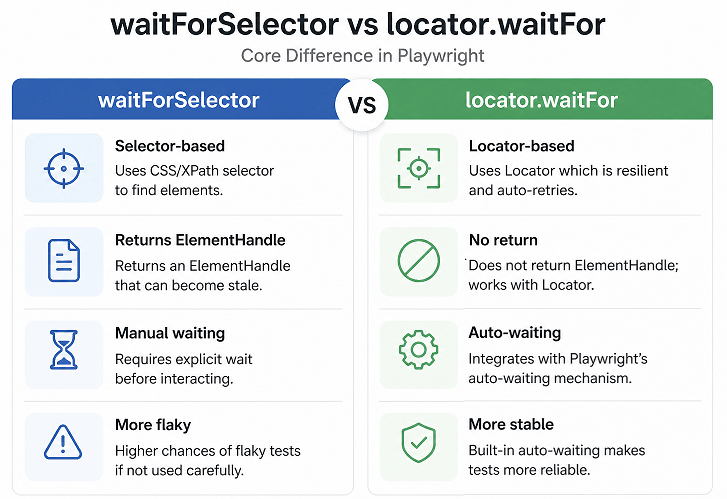
As shown above, locator.waitFor works better with Playwright’s locator-based APIs and retry mechanism, making it more reliable for handling dynamic elements. This is why modern Playwright best practices recommend using locator-based APIs instead of selector-based methods.
In practical terms, locator.waitFor fits better into Playwright’s design because it works with auto-waiting and avoids many timing issues that commonly appear in UI tests.
// Locator-based approach (recommended)
await page.locator('#loginButton').waitFor({ state: 'visible' });

// Selector-based approach
await page.waitForSelector('#loginButton', { state: 'visible' });
Quick takeaway: If you are writing new tests, prefer locator.waitFor. It keeps your code simpler and works more reliably with dynamic elements.
What is waitForSelector in Playwright?
waitForSelector in Playwright is used to wait until an element matching a selector appears in the DOM or reaches a specific state like visible or hidden. Once the condition is met, it returns an ElementHandle that you can use for further actions.
In earlier Playwright projects, this method was used quite often. However, in real-world testing today, it is mostly seen in older codebases or very specific low-level scenarios.
One important thing to understand is that waitForSelector works directly with selectors, not locators. That small difference becomes important when your application UI changes frequently.
Since waitForSelector works directly with selectors, understanding how selectors and locators differ is important. This complete Playwright locator guide explains how modern locator strategies improve test stability.
How does waitForSelector actually work?
Under the hood, waitForSelector keeps checking the DOM until the element meets the expected condition or the timeout is reached.
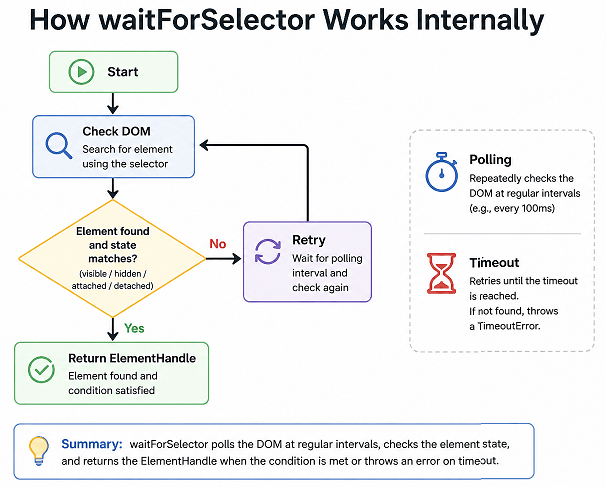
- Waits for the element to be attached to the DOM
- Supports states like visible, hidden, or detached
- Returns an ElementHandle for interaction
- Throws a timeout error if the condition is not met
TypeScript Example: Using waitForSelector
This example shows a typical pattern where the element is waited for before performing an action.
// Wait for element using selector
const element = await page.waitForSelector('#loginButton', { state: 'visible' });

// Perform action using ElementHandle
await element.click();
When should you actually use waitForSelector?
In modern Playwright usage, you will rarely need this method unless you have a specific reason.
- When working with legacy Playwright test code
- When you explicitly need an ElementHandle
- When debugging DOM-level behavior
Practical insight: In the test suites I have maintained over the years, most leftover waitForSelector calls were never a deliberate choice, they were just never revisited after the team switched to locators. That is usually the real reason it still shows up in older projects.
If waitForSelector is timing out in your own tests right now, this waitForSelector timeout troubleshooting guide walks through the common causes.
What is locator.waitFor in Playwright?
locator.waitFor in Playwright is a method that waits for a locator to reach a specific state such as visible, hidden, attached, or detached. It is part of the locator API, which is the current best practice for writing stable and maintainable Playwright tests.
Unlike waitForSelector, this method does not return an ElementHandle. Instead, it works directly with locators, which automatically handle retries and re-evaluate elements before every action. This makes it more reliable for dynamic web applications.
In real-world testing, locator.waitFor is mainly used when you need to explicitly wait for a state change such as a loader disappearing or an element becoming visible. In many cases, you do not need to call it at all because Playwright already waits automatically before performing actions like click() or fill().
According to the Playwright locator API documentation, locators are the recommended way to interact with elements because they provide built-in auto-waiting and better reliability compared to selector-based methods.
waitForSelector vs locator.waitFor in Playwright: Key Differences
The main difference between waitForSelector and locator.waitFor in Playwright is how they handle element interaction and waiting. waitForSelector works directly with selectors and returns an ElementHandle, while locator.waitFor works with locators and integrates with Playwright’s built-in auto-waiting system.
In modern Playwright testing, locator.waitFor is preferred because it reduces flaky behavior, simplifies code, and aligns with the locator-based architecture recommended by Playwright.
Comparison Table: waitForSelector vs locator.waitFor
This quick comparison helps you understand when to use each method.
| Feature | waitForSelector | locator.waitFor |
|---|---|---|
| API Type | Selector-based | Locator-based |
| Return Value | Returns ElementHandle | No return, works on locator |
| Auto-waiting Support | Partial | Full integration |
| Reliability | Can cause flaky tests | More stable in dynamic UI |
| Recommended Usage | Legacy or special cases | Modern best practice |
| Code Readability | Moderate | Cleaner and consistent |
| Handling Dynamic Elements | Less reliable | Highly reliable |
Which one should you use in Playwright?
You should use locator.waitFor in most cases because it follows Playwright’s modern design and reduces the need for manual waiting. It also works better with dynamic elements and auto-waiting behavior.
- Use locator.waitFor for new test automation projects
- Use waitForSelector only when ElementHandle is required
- Avoid mixing both approaches in the same test unnecessarily
In short, locator-based APIs are the recommended way to write stable and maintainable Playwright tests today.
When Should You Use waitForSelector vs locator.waitFor?
You should use locator.waitFor in most modern Playwright tests because it works seamlessly with auto-waiting and improves overall Playwright synchronization. It also helps reduce flaky tests in Playwright, which are often caused by incorrect waiting strategies. Use waitForSelector only in specific cases where you need direct access to an ElementHandle or are maintaining older test code.
At first glance, both methods look similar. However, in real projects, choosing the right one directly impacts test stability, readability, and long-term maintenance.
Use locator.waitFor for modern test automation
locator.waitFor is the preferred approach when working with dynamic web applications and modern Playwright frameworks. It keeps your test code clean and works naturally with Playwright’s built-in waiting behavior.
- Writing new Playwright test scripts
- Handling dynamic UI elements that load or change frequently
- Building scalable and maintainable automation frameworks
- Relying on Playwright’s auto-waiting instead of manual waits
Real-world insight: Most modern Playwright frameworks minimize explicit waits and rely primarily on locator actions and retrying assertions.
In most cases, locator-based actions like click() and fill() already handle waiting internally. This guide on Playwright actions in TypeScript shows how actions work with built-in auto-waiting.
Use waitForSelector only when necessary
waitForSelector is still useful in certain edge cases, but it should not be your default choice in modern Playwright testing.
- When you need an ElementHandle for low-level DOM operations
- When working with legacy Playwright test suites
- When debugging specific selector-related issues
Here is where many testers go wrong: Overusing waitForSelector creates unnecessary waiting logic and makes tests slower and harder to maintain.
Best practice for Playwright waiting (current approach)
The current best practice is to minimize explicit waits and let Playwright handle synchronization automatically whenever possible.
- Use locator-based actions like click(), fill(), and hover()
- Use assertions instead of manual waits for validation
- Use locator.waitFor only for specific state-based conditions
Web-first assertions are worth calling out specifically, since they both wait and validate in one step:
// Assertion-based waiting (recommended for validation)
await expect(page.locator('#successMessage')).toBeVisible();
This waits for the element and checks its state in the same line, so there is no separate wait call to maintain.
Simply put, the less manual waiting you write, the more stable and faster your Playwright tests will be.
Common Mistakes When Using waitForSelector and locator.waitFor
Many Playwright tests become slow or flaky because of incorrect waiting strategies and misuse of Playwright wait methods. Most of the time, the issue is not Playwright itself, but how waits are used in the test code.
Here are common mistakes developers make in real projects and how to fix them.
Mistake 1: Adding waitForSelector before every action
Calling waitForSelector before every click or interaction is unnecessary. Playwright already waits for elements to be ready before performing actions.
// Unnecessary pattern
await page.waitForSelector('#loginButton');
await page.click('#loginButton');

// Cleaner approach
await page.locator('#loginButton').click();
Fix: Remove redundant waits and rely on Playwright’s built-in auto-waiting.
Mistake 2: Mixing ElementHandle and locator APIs
Using ElementHandle from waitForSelector together with locator-based methods leads to inconsistent and harder-to-maintain code.
// Mixed approach
const element = await page.waitForSelector('#loginButton');
await element.click();

// Consistent locator approach
await page.locator('#loginButton').click();
Fix: Stick to locator-based APIs across your test suite for consistency and readability.
Mistake 3: Using waitForSelector for simple visibility checks
Many testers use waitForSelector just to check if an element is visible. This adds unnecessary complexity.
// Not ideal
await page.waitForSelector('#successMessage', { state: 'visible' });

// Better
await page.locator('#successMessage').waitFor({ state: 'visible' });
Better approach: Prefer locator.waitFor or assertions for state verification.
Mistake 4: Ignoring Playwright auto-waiting
Playwright automatically waits for elements to be visible, stable, and ready before performing actions. Ignoring this leads to unnecessary and complex code.
- Waits for element to be visible
- Ensures the element is actionable before interaction
- Retries actions until timeout
Fix: Trust Playwright’s default behavior instead of forcing manual waits.
Mistake 5: Adding arbitrary delays like waitForTimeout
Using fixed delays slows down tests and often hides real timing issues instead of solving them. Hardcoding a wait for 5 seconds guarantees your test is either too slow or, on a bad day, still not slow enough.
// Bad practice
await page.waitForTimeout(5000);
await page.click('#submitButton');

// Better approach
await page.locator('#submitButton').click();
Why this is a problem: Fixed waits make tests slower and unreliable because the actual application response time may vary. Sometimes 5 seconds is too long, and sometimes it is still not enough.
- Slows down the entire test suite
- Creates flaky timing behavior
- Hides real synchronization problems
- Makes tests harder to maintain
Quick tip: If your test only works with a delay, it usually means the waiting strategy needs improvement.
Does Playwright Auto-Wait Make waitForSelector Obsolete?
Playwright auto-waiting does not make waitForSelector completely obsolete, but it removes the need to use it in most cases. In modern Playwright tests, locator-based actions and built-in waiting handle synchronization automatically.
In practice, this means you rarely need to write explicit waits unless you are dealing with specific state changes like elements appearing or disappearing.
What is Playwright auto-waiting?
Playwright auto-waiting is a built-in mechanism that ensures elements are ready before performing actions. It automatically checks multiple conditions before interacting with an element.
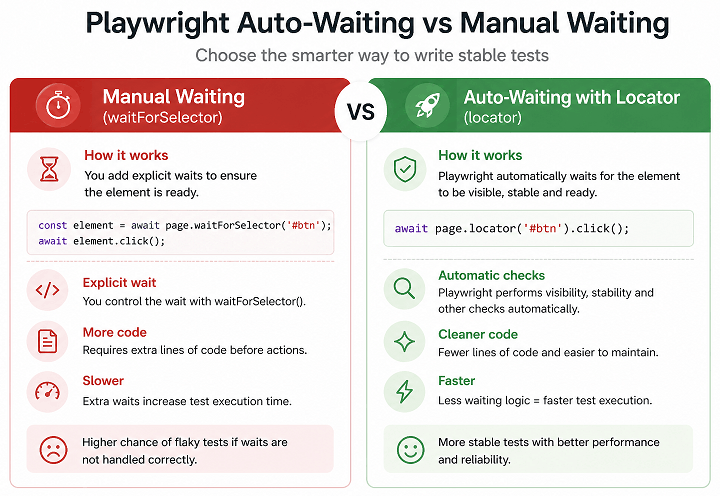
- Waits for the element to be visible
- Ensures the element is attached to the DOM
- Verifies the element is stable and not moving
- Retries the action until timeout if needed
These checks are applied automatically to actions like click(), fill(), and hover().
Example: Auto-waiting in action
This example shows how Playwright handles waiting automatically without explicit wait methods.
// No manual wait required
await page.locator('#loginButton').click();
Even if the element appears after a delay, Playwright waits until it is ready before performing the action.
When explicit waiting is still useful
Explicit waiting using locator.waitFor or waitForSelector is still useful in a few scenarios where auto-waiting does not cover the requirement.
- Waiting for loaders or spinners to disappear
- Waiting for UI state changes such as hidden or detached
- Validating elements that are not directly interacted with
// Wait for loader to disappear
await page.locator('#loader').waitFor({ state: 'hidden' });
Auto-waiting vs explicit waiting: quick comparison
This comparison helps you decide when to rely on each approach.
| Aspect | Auto-waiting | Explicit waiting |
|---|---|---|
| Usage | Before actions like click() | Manual control over conditions |
| Code simplicity | High | Moderate |
| Best for | Standard interactions | Custom state checks |
| Need extra code | No | Yes |
In short, rely on auto-waiting for most interactions and use explicit waits only when you need precise control over element states.
Advanced Insights: Real-World Usage of waitForSelector vs locator.waitFor
In real-world Playwright frameworks, experienced testers rarely rely on waitForSelector. Instead, they design tests around locators, assertions, and Playwright’s built-in auto-waiting to achieve consistent and stable results.
The key difference in production-level code is not just which method you use, but how you structure your tests to avoid unnecessary waiting altogether.
How modern Playwright frameworks handle waiting
In well-designed automation frameworks, explicit waits are minimized. Instead of manually waiting for elements, tests rely on locator actions and assertions that automatically handle timing.
- Use locator actions like click(), fill(), and press()
- Use assertions such as expect(locator).toBeVisible()
- Avoid chaining waits before every interaction
- Standardize locator usage across the framework
Real-world pattern: Teams that adopt locator-only strategies see fewer flaky tests and cleaner test code over time.
Production-level example (recommended approach)
This example shows how modern Playwright tests rely on auto-waiting and assertions instead of manual waits.
// Fill form fields
await page.locator('#username').fill('testuser');
await page.locator('#password').fill('password123');

// Perform action
await page.locator('#loginButton').click();

// Validate result using assertion
await expect(page.locator('#dashboard')).toBeVisible();
This pattern removes the need for explicit wait methods and keeps the test readable and reliable.
To structure your tests properly around locators and actions, it is important to follow a clean project setup. This Playwright project structure guide explains how to organize scalable test frameworks.
When locator.waitFor becomes necessary
The scenarios described earlier in this guide (loaders, UI transitions, and elements you are not directly interacting with) are exactly where locator.waitFor becomes necessary rather than optional. Here is what that looks like in code:
// Wait for loader to disappear
await page.locator('#loader').waitFor({ state: 'hidden' });
Performance impact of incorrect waiting
Improper use of waitForSelector can slow down your entire test suite. Each unnecessary wait increases execution time and reduces efficiency.
- Redundant waits increase total runtime
- Extra checks slow down large test suites
- Manual waits can hide real application issues
Important insight: Faster Playwright tests usually rely on built-in auto-waiting instead of manual wait logic.
Debugging flaky tests caused by waits
If your tests fail randomly, the root cause is often incorrect waiting strategy rather than application issues.
- Identify unnecessary waitForSelector usage
- Replace ElementHandle usage with locators
- Use Playwright trace viewer to analyze timing issues
Quick tip: If removing a wait breaks your test, it usually means the test logic needs improvement, not more waiting.
Key takeaway for modern Playwright users
The biggest shift in Playwright is moving from manual waiting to smart waiting. Locator-based APIs combined with assertions provide a cleaner and more reliable way to build automation tests.
Simply put, the less manual waiting you write, the better your tests will perform in terms of stability, speed, and maintainability.
Examples in Other Languages
Playwright APIs are consistent across languages such as JavaScript, Java, and Python. The difference between waitForSelector and locator.waitFor remains the same regardless of the language you use.
Below are simple examples to help you understand how these methods look in different languages.
JavaScript Example: waitForSelector vs locator.waitFor
This example shows both approaches using JavaScript syntax.
// waitForSelector (older approach)
const element = await page.waitForSelector('#loginButton');
await element.click();

// locator.waitFor (recommended)
const loginButton = page.locator('#loginButton');
await loginButton.waitFor({ state: 'visible' });
await loginButton.click();
Java Example: Using Playwright Wait Methods
This example demonstrates how waiting works in Java using Playwright.
// waitForSelector approach
ElementHandle element = page.waitForSelector("#loginButton");
element.click();

// locator.waitFor approach
Locator loginButton = page.locator("#loginButton");
loginButton.waitFor(new Locator.WaitForOptions().setState(WaitForSelectorState.VISIBLE));
loginButton.click();
Python Example: Locator-Based Waiting
Here is how you can use locator.waitFor in Python.
# waitForSelector approach
element = page.wait_for_selector("#loginButton")
element.click()

# locator.waitFor approach
login_button = page.locator("#loginButton")
login_button.wait_for(state="visible")
login_button.click()
Conclusion
Understanding waitForSelector vs locator.waitFor in Playwright is essential for writing stable and maintainable automation tests. While both methods help you wait for elements, their usage and reliability differ significantly in modern Playwright projects.
In most real-world scenarios, locator.waitFor and locator-based actions are the better choice. They align with Playwright’s auto-waiting system, reduce flakiness, and make your test code cleaner and easier to maintain. On the other hand, waitForSelector should be limited to specific use cases such as legacy code or when you need direct ElementHandle access.
If you are building new test automation, focus on locator APIs and let Playwright handle waiting internally. This approach follows modern Playwright best practices, improves performance, and aligns with the recommended Playwright wait methods used in scalable automation frameworks.
FAQs
What is the main difference between waitForSelector and locator.waitFor?
waitForSelector works with selectors and returns an ElementHandle, while locator.waitFor works with locators and follows Playwright’s modern auto-waiting approach.
Which is better for beginners in Playwright?
locator.waitFor is better for beginners because it simplifies code and reduces the need for manual waiting.
Can I use both waitForSelector and locator.waitFor together?
Yes, but it is not recommended. Mixing both approaches can make your code harder to maintain and less consistent.
Why are my Playwright tests flaky when using waitForSelector?
Flaky tests often occur due to unnecessary or incorrect manual waits. Using locator-based APIs and auto-waiting helps improve stability.
Is locator.waitFor always required before actions?
No, Playwright automatically waits before actions like click() and fill(), so explicit waiting is usually not needed.
Is locator.waitFor better than waitForSelector in Playwright?
Yes, locator.waitFor is generally better for modern Playwright tests because it integrates with auto-waiting and works with the locator API, making tests more stable and maintainable.
Can I replace waitForSelector with locator in Playwright?
Yes, in most cases you can replace waitForSelector with locator-based methods. Locators automatically handle waiting and reduce flaky behavior in Playwright tests.
Does locator.waitFor return an element in Playwright?
No, locator.waitFor does not return an element. It works directly on a locator, while waitForSelector returns an ElementHandle.
Is waitForSelector deprecated in Playwright?
No, waitForSelector is not deprecated, but it is not recommended for new Playwright projects. Locator-based APIs are preferred for better stability.
Do I need waitFor before click in Playwright?
No, Playwright automatically waits before actions like click(), so explicit waiting is usually not required.
What is the best wait strategy in Playwright?
The best wait strategy in Playwright is to rely on locator-based actions and auto-waiting instead of manual waits. This reduces flaky tests and improves test stability.