The best cloud hosting for Playwright tests helps you run your test suites faster, smoother, and without depending on local machines. Cloud hosting for Playwright tests gives you instant access to scalable browsers, real devices, and parallel execution so you can validate your web apps with higher speed and reliability.
If you want a clear answer, here it is. Cloud platforms are the most efficient way to run Playwright automation because they offer ready-made browser grids, zero setup, and higher test coverage. You also get support for CI CD pipelines, global data centers, and real-time debugging tools. This means you can run your Playwright tests on multiple browsers and device combinations without maintaining any local infrastructure.
In this guide, you will learn how cloud platforms work, what features matter, and which providers offer the most reliable performance. You will also see a simple code example that shows how to run your Playwright tests in the cloud. Each section is written to help beginners understand how to make the right choice based on speed, pricing, parallel execution, and integration needs.
- What Is Cloud Hosting for Running Playwright Tests
- How Cloud Platforms Improve Playwright Test Automation
- Key Features to Look for in the Best Cloud Hosting for Playwright Tests
- Top Cloud Hosting Providers for Running Playwright Tests
- CI CD Workflow: Integrate Playwright Cloud Testing
- Cloud-Based Real Device Testing for Playwright
- Conclusion
What Is Cloud Hosting for Running Playwright Tests
Cloud hosting for running Playwright tests means executing your test scripts on remote servers instead of your local machine. These servers are provided by cloud testing platforms that supply ready-made browsers, devices, and environments needed to run automated tests. You do not install anything locally, and you do not maintain any infrastructure.
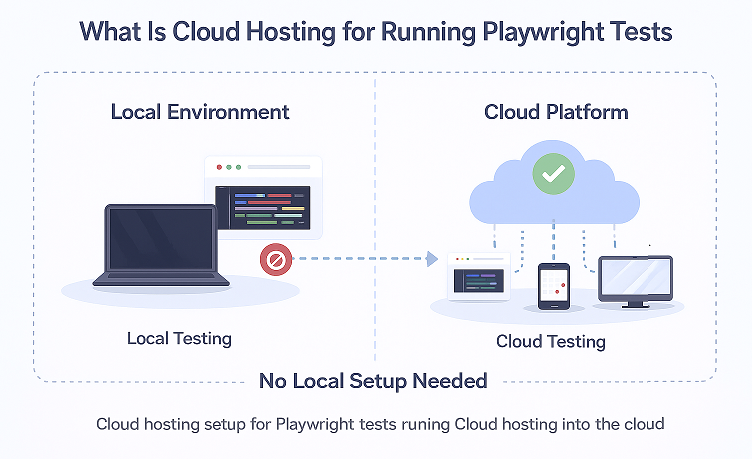
Cloud platforms work by offering a browser grid or device lab that is always online. When your Playwright tests start, the platform launches a fresh browser instance in the cloud, runs your test steps, records logs, captures screenshots, and sends results back to you. Everything happens in isolated environments, so each test starts clean. You only connect through an API or configuration file.
This setup helps you avoid common local issues. You no longer need to manage browser versions, system updates, device drivers, or performance limitations on your laptop. Tests do not slow down your machine because the heavy work runs in the cloud. You also avoid conflicts caused by multiple browser versions, unstable networks, or limited hardware.
Teams choose cloud hosting when they need speed, reliability, and scale. Cloud execution allows parallel testing, which cuts test time for large suites. It also supports global teams that need consistent environments across regions. Cloud platforms are helpful when you want real device coverage, integration with CI CD pipelines, and high availability without spending time on maintenance.
How Cloud Platforms Improve Playwright Test Automation
Cloud platforms make Playwright test automation faster, more reliable, and easier to scale. They remove the need for complex local setups and give you immediate access to high-performance environments that stay consistent across every execution. This improves both speed and accuracy, which is essential for growing test suites.
Benefits
Cloud testing platforms provide clean and controlled environments for your Playwright tests. You get consistent browser versions, isolated sessions, detailed logs, video recordings, and smart debugging tools. This reduces flakiness and makes your test results more trustworthy. The cloud also handles heavy workloads, so your local machine stays free.
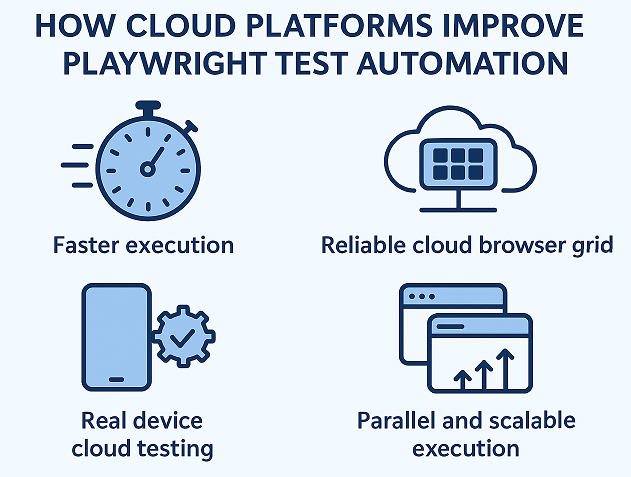
Faster Execution
Cloud servers are optimized for speed. They run on powerful hardware that can launch browsers quickly and handle multiple sessions at once. Your tests complete faster because they run on machines designed for automation workloads. The speed difference becomes more noticeable as your test suite grows.
Reliable Cloud Browser Grid for Playwright
A cloud browser grid gives you access to many versions of Chrome, Firefox, Safari, and Edge without installing anything. Each test runs in a clean environment so there is no cache or system conflict. The grid stays updated, which means your Playwright tests always run on the latest stable browsers. You also get tools like network logs, console logs, and screenshots for easier debugging.
Real Device Cloud Testing for Playwright
Cloud platforms also offer real mobile devices for Playwright testing. This is useful when you need to validate your UI on physical Android or iOS devices instead of simulators. Real device clouds help you test touch gestures, viewport behavior, network conditions, and browser compatibility without owning any hardware.
Parallel and Scalable Execution
Cloud platforms shine when you need parallel execution. Instead of running tests one by one, the cloud runs many tests at the same time on separate machines. This can reduce a one-hour test suite to only a few minutes. As your test suite grows, you simply increase parallel sessions to keep execution time low. The cloud scales on demand, which is difficult to achieve locally.
Integration with CI CD
Modern cloud providers integrate smoothly with CI CD tools like GitHub Actions, GitLab CI, Jenkins, and Azure DevOps. You can trigger your Playwright tests automatically on every commit, pull request, or deployment. This keeps your release pipeline clean and ensures your application is tested before it reaches production. Cloud execution also makes CI runs more consistent because the environment stays the same for every build.
Key Features to Look for in the Best Cloud Hosting for Playwright Tests
Choosing the best cloud hosting for Playwright tests depends on how well the platform supports speed, coverage, scalability, and integrations. A good cloud setup should reduce test flakiness, improve execution time, and fit smoothly into your existing workflow. Below are the key features that matter most when evaluating cloud providers.
Browser and device coverage
A strong cloud platform offers a wide range of browsers such as Chrome, Edge, Firefox, and Safari in multiple versions. It should also support desktop and mobile environments. Real device clouds are helpful when you want to test on physical Android or iOS devices without maintaining hardware. More coverage gives you better confidence in cross-browser and cross-device behaviour.
Speed and performance
Fast execution is essential when running automated tests. Cloud platforms use optimised machines that reduce startup time for browsers and speed up test completion. This becomes more important as your test suite grows. A good provider should offer stable performance even during peak usage.
Parallel test limits
Parallel execution helps teams complete large suites in less time. Check how many parallel sessions the provider allows at once and whether you can scale them as your workload increases. Higher parallel limits directly reduce execution time and improve productivity.
Smart reporting dashboards
Good reporting makes test analysis easier. Look for dashboards that include video recordings, screenshots, network logs, and console logs. Clear insights help you understand failures quickly. Some platforms also provide analytics for trends, flakiness, and slow tests.
CI CD tools
Your provider should integrate smoothly with common CI CD systems like GitHub Actions, GitLab CI, Jenkins, and Azure DevOps. This allows your Playwright tests to run automatically during builds, deployments, or pull requests. Seamless integration helps maintain consistent quality across releases.
Geo location testing
Some applications behave differently based on location. A cloud platform that supports geo-location testing lets you validate features such as currency, language, or region-based content. Testing from different regions is helpful for global applications.
Cost and scalability
Choose a provider that fits your budget without limiting your growth. Look for flexible pricing, free tiers, or usage-based billing. Scalability matters when you need more parallel sessions or additional device coverage. A good platform should grow with your needs.
Security requirements
Security is essential when running tests in the cloud. Check for features like encryption, secure tunnels, access control, and compliance standards. These features protect sensitive data and ensure your application is tested in a controlled environment.
Top Cloud Hosting Providers for Running Playwright Tests
BrowserStack Playwright Integration
BrowserStack is one of the most widely used cloud platforms for automating Playwright tests. It provides reliable infrastructure, real devices, and a large browser grid that helps teams run tests quickly without maintaining any local setup.
Benefits
Wide browser and OS coverage
BrowserStack supports many desktop and mobile browser versions. This helps you run Playwright tests across Chrome, Edge, Firefox, and WebKit without installing anything locally.
Real device cloud testing
You can run Playwright tests on real Android and iOS devices. This is helpful when you want to validate touch actions, viewport behavior, or mobile browser compatibility.
Parallel and scalable execution
BrowserStack allows many tests to run at the same time. This reduces your overall test time and improves productivity as your suite grows.
CI CD friendly
BrowserStack integrates smoothly with GitHub Actions, Jenkins, GitLab CI, Azure DevOps, and other pipelines. You can trigger Playwright tests automatically whenever code changes.
Rich debugging tools
Every test run includes video recordings, screenshots, console logs, and network logs. This makes it easier to understand why a failure happened.
Local and staging testing support
BrowserStack provides secure tunnel features so you can test applications running on local or private environments.
Limitations
Cost increases with scale
Large teams that require many parallel sessions or constant real device usage may see higher subscription costs.
Initial configuration setup
You need to configure capabilities such as browser choice, platform, credentials, and other settings before running Playwright tests.
Device availability during peak times
Real devices may not always be available if demand is high. Availability depends on your plan and testing region.
Internet dependency
Since everything runs in the cloud, an unstable local internet can affect file uploads or result synchronization.
When BrowserStack Works Best
- Strong cross browser testing becomes easier when the infrastructure is handled for you
- Real device coverage is available on demand
- Parallel execution helps speed up your entire test suite
- CI CD pipelines connect smoothly with most cloud platforms
- Clean and isolated test environments reduce setup time and maintenance
LambdaTest Playwright Integration
LambdaTest is a popular cloud testing platform that supports Playwright out of the box. It provides a scalable browser grid, real devices, and a simple setup that helps teams run tests faster without maintaining any local infrastructure.
Benefits
Large browser and device coverage
LambdaTest offers many versions of Chrome, Firefox, Edge, and WebKit. It also provides real mobile devices for testing Playwright scripts on Android and iOS.
High-speed execution
LambdaTest uses optimized cloud machines that reduce browser startup time. This improves overall test speed, especially when you run large suites.
Parallel execution at scale
LambdaTest lets you increase parallel sessions based on your plan. This helps teams complete long test suites in a short time and improves the productivity of CI pipelines.
Smart reporting features
LambdaTest provides video recordings, screenshots, network logs, console logs, and detailed reports. These tools help you quickly understand failures.
Easy CI CD integration
LambdaTest connects smoothly with GitHub Actions, Jenkins, CircleCI, GitLab, Azure DevOps, and other CI tools. This makes it simple to run tests automatically with each build.
Local and private environment testing
Using LambdaTest secure tunnels, you can run Playwright tests on apps hosted locally or on private environments.
Limitations
Parallel sessions depend on the pricing plan
The number of tests you can run at the same time depends on your selected plan. Higher parallel limits cost more.
Occasional device wait times
Real mobile devices may face delays during peak traffic hours, depending on your location and time of day.
Advanced analytics may require higher-tier plans
Some reporting or analytics features are available only on premium plans.
When LambdaTest Works Best
- Fast execution is possible when the platform provides a scalable cloud browser grid
- Desktop browsers and real device testing can be combined in a single environment
- CI CD pipelines work smoothly when the cloud provider offers native integration options
- Detailed reporting becomes easier with access to videos, logs, and trace files
- Platforms that offer flexible parallel testing options help you choose plans based on your budget
Microsoft Azure Playwright Testing
Microsoft Azure provides a flexible environment for running Playwright tests through services like Azure Pipelines, Azure VMs, and Azure Container Instances. While Azure is not a dedicated Playwright testing cloud, it gives you full control over infrastructure, scaling, and automation. This makes it a strong choice for teams that want an enterprise-level setup.
Benefits
Full control of test environments
Azure lets you create custom environments using VMs, containers, or Kubernetes clusters. You can install any browser version, system dependency, or Playwright configuration you need.
Smooth CI CD setup with Azure Pipelines
Azure Pipelines offers built-in tasks for Node projects, secret management, and workflow automation. You can run Playwright tests on every build, pull request, or release event.
Scalable execution
Azure allows you to scale containers or VMs on demand. This helps you run large test suites in parallel and reduce execution time.
Works well with the existing Microsoft ecosystem
Teams using GitHub, GitHub Actions, or Azure DevOps can integrate Playwright tests easily. The workflow remains consistent across tools.
Private and secure environments
Azure is helpful when you need strict security control, private networks, or compliance. You can test internal apps without exposing them to external clouds.
Limitations
More setup effort compared to BrowserStack or LambdaTest
You need to manage your own browsers, dependencies, and runtime setup. This requires more DevOps knowledge.
No built-in real device cloud
Azure does not provide physical mobile devices for testing. You need to integrate a separate device cloud provider if required.
Parallel execution depends on your infrastructure setup
Scaling is possible but requires configuration of VMs or containers.
When Microsoft Azure Works Best
- Full control over the test environment is easier to achieve when you manage the setup yourself
- Azure DevOps and GitHub users can integrate Playwright smoothly within the same cloud ecosystem
- Strong security needs, such as private access or enterprise-level compliance, are often easier to meet on controlled cloud resources
- Teams that prefer their own infrastructure can run Playwright without relying on shared cloud devices
- Virtual machines or containers allow flexible scaling based on workload and budget
Sauce Labs Playwright Cloud Execution
Sauce Labs is another trusted cloud platform that supports Playwright test execution at scale. It is known for its stable infrastructure and a wide range of browsers, versions, and operating systems.
Benefits
- Provides a secure and reliable cloud environment for running Playwright tests
- Supports cross-browser testing with multiple browser versions
- Offers detailed test insights that help beginners and teams troubleshoot faster
- Integrates smoothly with CI CD pipelines such as GitHub Actions, Jenkins, and GitLab
- Allows running Playwright tests in parallel for faster delivery
Limitations
- Pricing can increase as you scale parallel test sessions
- Real device options for Playwright are still limited compared to BrowserStack and LambdaTest
Sauce Labs is a solid choice for teams that want a stable and secure platform for Playwright cloud execution with strong reporting and CI CD support.
Playwright on AWS EC2 and Device Farm
Running Playwright tests on AWS gives teams full control over their infrastructure. AWS provides two main options: EC2 for customizable test environments and Device Farm for real device testing.
AWS EC2 for Playwright
EC2 lets you create your own virtual machines where you install Playwright, browsers, and dependencies. This setup is useful when you need a dedicated environment or want to optimise tests based on your own configuration.
Benefits
- Full control over operating system and browser versions
- Can scale vertically or horizontally based on test load
- Works well with CI CD tools like GitHub Actions, Jenkins, and Bitbucket
- Ideal for custom enterprise setups
Limitations
- Requires manual setup of Playwright, browsers, and updates
- Maintenance takes time and may require DevOps support
AWS Device Farm for Playwright
Device Farm provides real mobile devices that help test web apps in real-world conditions. While it is more commonly used for mobile app testing, it can also help run browser-based Playwright tests on real devices.
Benefits
- Access to real Android and iOS devices
- Useful for testing responsive layouts and real network conditions
- No need to maintain physical devices in-house
Limitations
- Not all Playwright features are available on mobile browsers
- Real devices are more expensive compared to virtual test environments
AWS is a powerful option if you want flexibility and control, especially when integrating Playwright into large-scale test automation pipelines.
Google Cloud with Playwright Docker Setup
Google Cloud is a strong option for teams who prefer container-based Playwright test execution. With a Playwright Docker image, you can run tests in a consistent, isolated environment across all stages of development and CI CD.
Why Use Docker for Playwright on Google Cloud
Docker ensures every test run uses the same browser versions, dependencies, and environment. This reduces flaky tests and removes configuration differences between local and cloud setups.
Benefits
- Fully consistent environment using a Playwright-ready Docker image
- Easy to deploy on Google Cloud Run, Google Kubernetes Engine, or Compute Engine
- Scales automatically based on how many test suites you need to run
- Works smoothly with CI CD systems such as GitHub Actions and GitLab CI
- Faster execution since containers start quickly and run in parallel without conflicts
Limitations
- Requires some understanding of Docker and container orchestration
- Kubernetes-based setups may be complex for beginners
- Need to manage resource allocation to avoid slowed execution
Typical Workflow
- Build a Docker image with Playwright and browsers installed.
- Push the image to Google Container Registry or Artefact Registry.
- Deploy it to Cloud Run or GKE for scalable execution.
- Trigger Playwright tests using your CI CD pipeline.
Google Cloud with Playwright Docker setup is a great fit for teams who want speed, consistency, and container-driven scalability without relying on traditional browser grids.
Other Modern Scalable Playwright Testing Clouds
Besides BrowserStack, LambdaTest, Sauce Labs, AWS, and Google Cloud, there are several other modern cloud platforms that support scalable Playwright testing. These providers focus on speed, parallel execution, real devices, and CI CD integration to help teams run tests efficiently.
Kobiton
Kobiton offers real device cloud testing and browser automation. It is useful for teams who want to test mobile web apps on physical Android and iOS devices. Playwright tests can be executed via their cloud API, enabling parallel runs and integration with CI pipelines.
Limitations: Limited desktop browser support compared to BrowserStack or LambdaTest.
Testim
Testim is primarily a codeless test automation platform, but it supports running custom Playwright scripts in the cloud. It provides scalable parallel execution, detailed reporting, and CI CD integration.
Limitations: Requires additional setup to run pure Playwright scripts efficiently.
CrossBrowserTesting by SmartBear
CrossBrowserTesting offers cloud browser grids and real devices. Teams can run Playwright tests across multiple desktop and mobile browsers, with video recording and logs for debugging.
Limitations: Parallel execution limits depend on subscription plans.
Why Choose These Modern Clouds
- They offer scalable Playwright testing cloud environments for small and large teams.
- Most integrate with CI CD pipelines, enabling automatic test execution on commits and deployments.
- They allow fast Playwright cloud testing with real devices or browser grids.
- Useful when you need alternatives for specific regions, devices, or budget considerations.
These modern cloud platforms provide flexible options for teams that need scalable, reliable, and fast Playwright test execution beyond the major providers.
CI CD Workflow: Integrate Playwright Cloud Testing
Integrating Playwright tests into your CI CD workflow ensures that tests run automatically on every code change. Cloud platforms make this process simple by providing ready-to-use browser grids, real devices, and parallel execution. Below is a beginner-friendly guide for popular CI CD tools.
GitHub Actions
GitHub Actions allows you to run Playwright tests in the cloud on each push or pull request. Using a workflow YAML file, you can specify your environment, dependencies, and cloud provider configuration.
Example:
name: Playwright Tests
on: [push, pull_request]

jobs:
  test:
    runs-on: ubuntu-latest
    steps:
      - uses: actions/checkout@v3
      - name: Setup Java
        uses: actions/setup-java@v3
        with:
          distribution: 'temurin'
          java-version: '17'
      - name: Install dependencies
        run: mvn install
      - name: Run Playwright tests in cloud
        run: mvn test
This workflow runs your Playwright tests automatically in the cloud and reports results directly in GitHub.
GitLab CI
GitLab CI lets you define pipelines in a .gitlab-ci.yml file. You can configure stages to install dependencies, set up cloud connections, and execute tests in parallel.
Example:
stages:
  - test

playwright_tests:
  stage: test
  image: maven:3.8.7-openjdk-17
  script:
    - mvn install
    - mvn test
Cloud browser grids can be used here to run tests across multiple environments.
Jenkins
Jenkins allows you to schedule Playwright test execution as part of a build or deployment pipeline. Using pipeline scripts or declarative pipelines, you can connect to your cloud provider and execute tests automatically.
Example (Declarative Pipeline):
pipeline {
    agent any
    stages {
        stage('Install') {
            steps {
                sh 'mvn install'
            }
        }
        stage('Run Playwright Tests in Cloud') {
            steps {
                sh 'mvn test'
            }
        }
    }
}
Azure DevOps
Azure DevOps pipelines integrate Playwright cloud testing seamlessly. You can define your pipeline with YAML, specifying build agents, tasks, and cloud browser capabilities.
Example:
trigger:
- main

pool:
  vmImage: 'ubuntu-latest'

steps:
- task: Maven@3
  inputs:
    mavenPomFile: 'pom.xml'
    goals: 'install'
- script: mvn test
  displayName: 'Run Playwright tests in cloud'
Tips for Playwright CI CD Integration
- Use environment variables to store cloud credentials securely
- Leverage parallel execution for faster test runs
- Monitor test reports directly in your CI CD tool
- Schedule nightly or on-demand runs for full regression suites
Integrating Playwright cloud testing into CI CD ensures automated, reliable, and scalable test execution for every code change.
Cloud-Based Real Device Testing for Playwright
Testing on real devices is important when you need to validate how your web application behaves on actual mobile phones or tablets. Cloud-based real device testing provides access to physical devices without requiring you to maintain your own device lab.
When to Use Real Devices
- Testing responsive layouts on different screen sizes
- Validating touch gestures like swipes, pinch, and scroll
- Checking real-world network behaviour and latency
- Ensuring compatibility with mobile browsers on Android and iOS
Real devices are especially useful for scenarios where emulators or simulators may not accurately represent user behaviour.
How Device Clouds Help
Device clouds provide:
- Remote access to real Android and iOS devices
- Parallel execution of Playwright tests across multiple devices
- Video recording, screenshots, and logs for easier debugging
- Integration with CI CD pipelines for automated testing
Using a device cloud removes the need to purchase, configure, or maintain physical hardware. Teams can scale testing across many devices efficiently and reliably.
Example Providers That Offer Mobile Browsers
- BrowserStack: Offers a wide range of real Android and iOS devices for Playwright testing.
- LambdaTest: Provides both real mobile devices and desktop browser grids for cross-browser testing.
- Kobiton: Focuses on real device testing with easy cloud integration for Playwright scripts.
Cloud-based real device testing ensures your Playwright automation covers real-world scenarios, improves test accuracy, and speeds up mobile web validation.
Conclusion
In this guide, we explored the best cloud hosting for Playwright tests and how it can improve your test automation workflow. You learned about the advantages of using cloud platforms, including faster execution, parallel testing, real device access, and seamless Playwright CI CD integration. We also covered top providers like BrowserStack, LambdaTest, Sauce Labs, AWS, and Google Cloud, along with modern, scalable options.
Beginners can start by running simple Playwright tests in the cloud and gradually explore parallel execution, device clouds, and CI CD workflows to maximise efficiency.
To get started with coding examples and step-by-step tutorials, check out our Playwright JavaScript tutorial and Playwright Java Tutorial guide.
Cloud execution makes it easier than ever to scale, maintain, and run your Playwright tests reliably without managing local infrastructure. For official guidance on running Playwright tests in the cloud, you can refer to BrowserStack’s Playwright documentation for more details.