Playwright Cloud SaaS is the easiest and most reliable way to run Playwright tests at scale. It gives you ready-to-use cloud browsers, fast parallel execution, and smooth integration with your CI pipeline. You do not need to install anything special, manage servers, or maintain your own grid. Everything runs on a secure cloud platform that stays updated, stable, and performance-ready.
If you want a short answer to what makes Playwright Cloud SaaS valuable, here it is. It helps you run tests faster, get stable results, test on more browsers, and scale your automation without extra setup. This is why teams that want quick feedback and reliable results prefer cloud-based execution for their Playwright test suites.
In this guide, you will learn how Playwright Cloud SaaS works, which platforms offer the best features, how to choose the right provider, and how to run your tests on a cloud grid with simple configuration steps. This sets the foundation for a complete and practical understanding of cloud-based Playwright testing.
- Comparison Table: Best Playwright Cloud SaaS Tools
- Why Choose Playwright Cloud SaaS for Test Automation
- Natural comparison to Selenium cloud testing
- How to Run Playwright Tests on Cloud SaaS Platforms
- How to Choose the Right Cloud SaaS Platform
- When to Use Playwright Cloud SaaS Instead of Local Execution
- Key Factors to Consider Before Choosing a Cloud SaaS Tool
- Conclusion
- Playwright Cloud SaaS Tools FAQs
- Why Choose Playwright Cloud SaaS for Test Automation
Comparison Table: Best Playwright Cloud SaaS Tools
The table below gives a quick side-by-side view of the most popular cloud SaaS platforms that support Playwright testing. It helps you compare browser coverage, parallel execution strength, CI CD flexibility, and unique features so you can choose the right tool for your project.
| Platform name | Browser support | Parallel runs | CI CD support | Chromium, Firefox, WebKit, and real mobile devices | Ideal for |
|---|---|---|---|---|---|
| BrowserStack | Chromium, Firefox, WebKit, real mobile devices | High parallel scaling | GitHub, GitLab, Jenkins, Azure, CircleCI | Real devices, video logs, network logs, easy debugging | Teams needing real device coverage |
| LambdaTest | Chromium, Firefox, WebKit, mobile simulators, real devices (enterprise) | Strong concurrency | GitHub, GitLab, Bitbucket, Jenkins, Azure | Smart test orchestration, AI insights, visual regression | Fast cloud execution and parallel testing |
| Sauce Labs | Chromium, Firefox, WebKit, mobile devices | Moderate to high | GitHub, Jenkins, GitLab, Azure, Bamboo | Sauce Orchestrate, strong analytics, secure containers | Enterprises needing compliance and stability |
| TestingBot | Chromium, Firefox, WebKit, mobile emulators | Medium scaling | GitHub, GitLab, Jenkins, Azure | Local testing tunnel, easy setup, visual testing | Small to medium teams |
| HeadSpin | Chromium, Firefox, WebKit, real devices | Custom concurrency | Jenkins, GitHub, Azure | Real device performance insights, network level data | Mobile intensive testing |
Why Choose Playwright Cloud SaaS for Test Automation
Playwright Cloud SaaS platforms offer a ready-to-use environment where your tests run on real browsers without any setup. This gives you a faster, cleaner, and more stable testing experience. You avoid managing infrastructure, and you get consistent browser behavior that matches real-world conditions. This makes cloud execution a smart choice for teams that want reliable results with minimal maintenance.
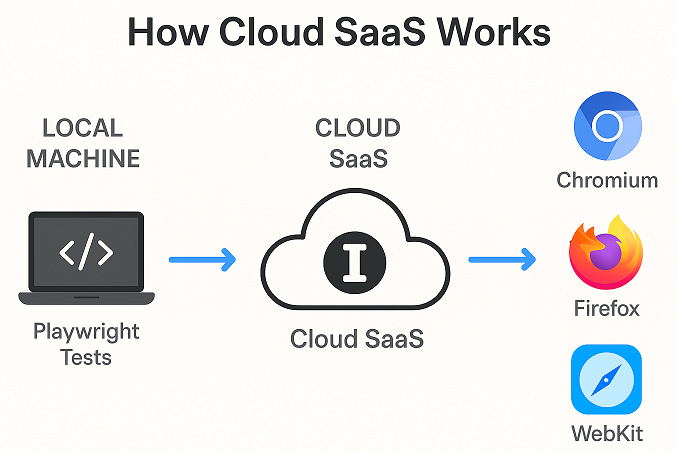
Benefits of cloud execution for Playwright tests
Running Playwright tests in the cloud helps you test faster, increase accuracy, and reduce local machine load. You also get preconfigured browser versions, automatic updates, and stable environments that behave the same across every run.
Key advantages include:
- No installation or server maintenance
- Faster parallel runs
- Real browser consistency
- Access to devices is not available locally
- Easy scaling for large test suites
Scalability and parallel sessions
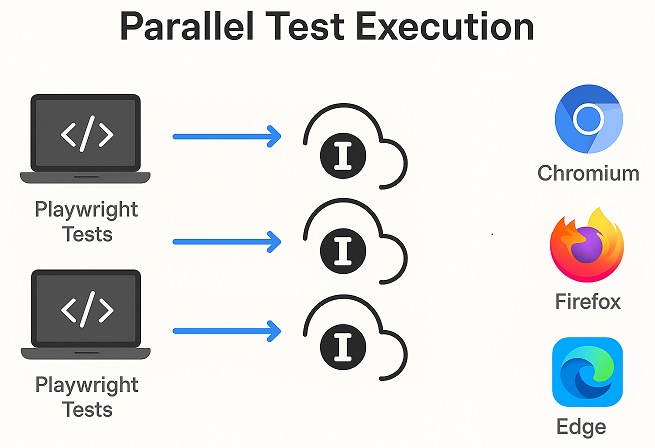
Playwright Cloud SaaS tools enable you to run multiple tests simultaneously. This reduces the total execution time and helps teams get results quickly. Parallel sessions are beneficial when your project grows, and you need fast feedback from CI pipelines.
Managed cloud browsers and device labs
Most platforms provide ready-to-use browsers and mobile devices hosted in secure data centers. You can run your tests on desktop browsers, Android devices, iOS devices, and even different operating systems. This saves time and lets you test real user conditions.
Natural comparison to Selenium cloud testing
Playwright cloud setups are often simpler than Selenium cloud grids because Playwright offers built in capabilities and a modern architecture. Cloud platforms support both tools, but Playwright tends to be faster and easier to configure for parallel runs. This makes it a good choice for teams upgrading from traditional Selenium testing.
How to Run Playwright Tests on Cloud SaaS Platforms
Running Playwright tests on a cloud SaaS platform is straightforward. You only need to set your project, add the provider-specific capabilities, and configure your CI pipeline. This section walks you through each step so you can move from local execution to a scalable cloud environment without changing your test logic.
Set up API keys and capabilities
Every cloud provider gives you an account dashboard where you can find your username, access key, or token. These are required to authenticate your Playwright sessions.
Basic steps:
- Create an account on the cloud platform
- Find your API key in the dashboard
- Add the key to your environment variables
- Use these variables in your test configuration
Cloud platforms usually provide a capability file or sample code. You only need to plug in your credentials.
If you are running your tests in Python, you can follow this Playwright Python setup guide, which covers installation, writing your first test, and preparing your project for cloud execution.
Playwright Java setup for cloud execution
After adding your credentials, the next step is to set the remote endpoint. Instead of launching a local browser, you connect to the cloud WebSocket URL provided by the platform.
Typical flow:
- Define the remote URL
- Set browser or device capabilities
- Add project-specific options
- Run tests like normal
Once linked, your test opens a browser in the cloud and behaves the same as local execution.
Parallel test execution setup
Most cloud SaaS platforms allow many parallel sessions. To enable parallel runs, you can:
- Add multiple workers in your Playwright config
- Use cloud provider concurrency settings
- Split tests into smaller test groups
Parallel execution reduces total run time and helps you get quick feedback during builds.
Debugging cloud test failures
Cloud platforms provide useful debugging information when a test fails. You can view:
- Video recordings
- Screenshots
- Network logs
- Console logs
- Traces of each test step
This helps you fix issues faster since you can replay the test exactly as it ran on the cloud.
Switching between local and cloud runs
Most teams run tests locally during development and run the same suite on the cloud during CI or release cycles. You can switch between local and cloud environments by toggling:
- The browser launch method
- The remote WebSocket URL
- Environment-based configuration
A simple flag or configuration file lets you move between both environments without rewriting tests.
How to Choose the Right Cloud SaaS Platform
Choosing the right cloud SaaS platform for Playwright testing depends on your team size, test coverage needs, and CI workflow. The goal is to find a service that gives stable browsers, fast execution, easy integration, and the right level of device coverage without adding extra complexity.
Evaluate browser and device coverage
Start by checking the browsers and devices you need. Some platforms offer desktop browsers only, while others also provide real mobile devices. If your product needs cross-device testing, pick a provider that offers a reliable mobile lab. For simple web apps, desktop browsers may be enough.
Check parallel run capacity
Parallel sessions help you complete large test suites faster. Look at how many parallel runs each provider offers and how they scale. Growing teams should choose a platform that allows easy upgrades and flexible concurrency.
Compare CI CD integrations
Make sure the cloud platform connects smoothly with your current CI setup. Providers that offer ready-to-use plugins for GitHub Actions, GitLab, Jenkins, or Azure pipelines save time and reduce setup effort. Good integration also helps you generate clean reports during builds.
Review debugging and reporting features
Cloud SaaS platforms differ in their debugging tools. Choose a provider that gives you:
- Video playback
- Screenshots
- Network logs
- Console logs
- Trace data
Better debugging tools reduce time spent fixing broken tests and help improve overall stability.
Look for stability, uptime, and support
Consistent uptime and strong customer support are important for teams that run tests frequently. Check if the provider offers:
- Reliable performance during peak hours
- Fast test startup times
- Helpful documentation
- Quick support responses
This is especially important for larger suites that depend on stable cloud infrastructure.
Match price with long-term needs
Cloud SaaS pricing varies based on concurrency, device access, data center locations, and advanced features. Instead of choosing the cheapest option, pick a provider that aligns with your long-term test strategy and can grow with your project.
When to Use Playwright Cloud SaaS Instead of Local Execution
Local execution is useful during early development, but it has limits. Playwright Cloud SaaS platforms remove those limits and give you a faster, more scalable, and more realistic testing environment. This section explains when cloud execution becomes the better choice for your team.
When your tests need real browser consistency
Local environments vary between machines. Cloud platforms provide the same browser versions, the same settings, and the same operating system every time. This makes your results more stable and easier to reproduce.
When your team is growing
A growing automation suite needs more speed. Cloud platforms let you run many tests at the same time using parallel sessions. This reduces feedback time and keeps development moving.
If you want to improve performance even further, you can explore how AI helps optimize scripts, reduce flakiness, and speed up execution. Our guide on AI for faster Playwright testing explains how AI-powered tools enhance test stability and performance in cloud environments.
When you need cross-browser or cross-device coverage
If your application must work on many browsers or mobile devices, a cloud provider is the best option. It lets you access real devices, desktop browsers, and different OS combinations that are hard to maintain locally.
When CI pipelines must stay fast
Long-running tests slow down your release cycles. Cloud platforms offload the heavy workload from your CI environment. This keeps your pipelines fast and prevents build delays.
When debugging complex failures
Cloud SaaS providers store video recordings, logs, and trace data for each test run. This makes it easier to understand failures and fix issues with accuracy. The ability to replay a test improves debugging speed.
When you need a secure and isolated environment
Some teams require secure testing environments that meet compliance needs. Many cloud providers offer isolated containers, private device labs, and strong access controls. This is useful for enterprise-level testing.
Key Factors to Consider Before Choosing a Cloud SaaS Tool
Choosing the right Cloud SaaS platform for Playwright testing requires careful evaluation. Below are the most important factors you should check before finalizing any tool.
Browser and Device Coverage
Always confirm that the platform supports all major browsers like Chromium, Firefox, and WebKit. Some tools also offer mobile device emulators, which are beneficial for responsive testing. Wide coverage ensures your tests match real user environments.
Speed and Parallel Execution
Parallel test execution dramatically reduces total test time. Tools that provide high concurrency or flexible parallel slot allocation allow faster feedback loops. This helps teams run large test suites efficiently.
Integration with CI CD Tools
Seamless CI CD integration is essential. Tools should work smoothly with GitHub Actions, GitLab CI, Jenkins, and CircleCI. Reliable integration ensures automated testing triggers on every commit or pull request.
Pricing and Scalability
Look for transparent pricing without hidden limits. A good SaaS tool should scale as your test suite grows. Plans should allow easy upgrades without service disruptions. Always compare the cost per parallel run if available.
Debugging and Reporting Capabilities
High-quality logs, screenshots, video recordings, and network traces are important for resolving failures quickly. Some platforms offer AI-driven error analysis that identifies root causes faster. Better debugging saves time and improves test reliability.
Security and Compliance
Cloud platforms must protect your code and test data. Choose vendors with SOC 2 Type II, GDPR, and ISO certified infrastructures. Secure data storage, encryption, role-based access control, and private test environments are added advantages.
Reliability and Uptime
Consistent uptime guarantees that your test pipelines do not break. Look for platforms with a strong uptime track record and reliable infrastructure. A platform should remain stable even under heavy parallel load.
Customer Support and Documentation
Good documentation speeds up onboarding. Responsive support through chat, email, or dedicated engineers helps with resolving issues during critical stages. Tools with active communities also offer long-term value.
Conclusion
Choosing the best Cloud SaaS tools for Playwright testing depends on your goals, team size, and scalability needs. The top platforms make it easy to run Playwright tests in the cloud with reliable performance, fast parallel execution, and smooth CI CD integration. Each option brings unique strengths, so the right choice is the one that fits naturally into your workflow.
Cloud execution helps you test faster, debug smarter, and scale without maintaining local infrastructure. As teams move toward continuous delivery, using a dependable Playwright cloud testing service becomes essential for stability and speed. By selecting a platform that aligns with your requirements, you can achieve consistent test results and streamline your automation strategy with confidence.
Playwright Cloud SaaS Tools FAQs
What are Cloud SaaS tools for Playwright testing?
Cloud SaaS tools for Playwright testing are online platforms where you can run Playwright test scripts on cloud-hosted browsers. They remove the need to maintain your own test infrastructure and offer features like parallel runs, CI CD integration, and advanced debugging.
Why should I use a Cloud SaaS platform instead of local testing?
Cloud SaaS platforms give you better scalability, faster execution with parallel tests, and access to multiple browser versions. Local testing is limited by system resources, while cloud platforms scale instantly.
Which is the best Cloud SaaS tool for Playwright testing?
There is no single best option. LambdaTest is great for fast parallel testing. BrowserStack offers wide device coverage. Sauce Labs focuses on enterprise-grade stability. HeadSpin excels in performance testing. Playwright Test Agents work well for teams needing full control over environments.
Do these tools support CI CD pipelines?
Yes. Most Cloud SaaS platforms easily integrate with CI CD tools such as GitHub Actions, GitLab CI, Jenkins, CircleCI, and Azure DevOps. Many also offer sample YAML files to speed up setup.
Can I run Playwright tests in parallel on these SaaS platforms?
Yes. Parallel execution is one of the biggest benefits. Cloud providers allow multiple simultaneous test sessions, significantly reducing total test time.
Are Cloud SaaS tools secure for enterprise teams?
Yes. Leading platforms follow compliance standards like SOC 2, ISO, and GDPR. They offer secure storage, encrypted traffic, and private test environments. Always check a provider’s security certifications before choosing.
Do these platforms support video recording and logs?
Most modern SaaS tools offer videos, screenshots, console logs, network logs, and trace files. These help you quickly diagnose and fix test failures.
Is cloud-based Playwright testing expensive?
Costs differ across platforms and depend on features like parallel runs. Small teams usually find entry plans affordable, while scaling teams benefit from faster feedback and reduced testing time.