
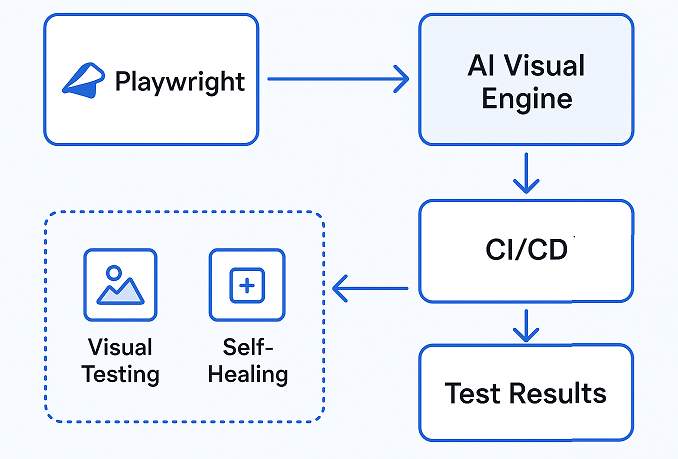
Playwright is a powerful end-to-end automation framework that provides fast execution, auto waits, robust locators, and reliable cross-browser support. AI for Playwright test speed is not part of Playwright core; instead, any AI-powered enhancements must come from external integrations or services that sit on top of Playwright. In other words, Playwright handles the automation fundamentals, and AI tools add extra layers like visual analysis or locator resilience.
Testers seek AI because modern apps change frequently, causing flakiness and high maintenance costs. AI integrations help by improving stability, automating visual regression detection, offering self-healing for broken locators, and reducing manual upkeep. Combined with Playwright’s core strengths, these integrations make test suites more resilient and easier to maintain while helping teams ship faster.
For a deeper understanding of Playwright automation and step-by-step examples, check out our complete Playwright automation guide, which serves as the ultimate reference for beginners and advanced users alike.
- How to Add Visual AI to Playwright (Visual Regression and UI Testing)
- Using Self-Healing and Locator Resilience via Third-Party Services
- AI-Powered Test Generation and Maintenance via External Tools and Agents
- Combining Playwright and AI Code Assistants in CI/CD Pipelines for Better Efficiency
- Pros and Cons: What AI and Playwright Can Handle and What They Can’t
- Practical Example: Playwright + Applitools Visual AI in TypeScript
- Conclusion
How to Add Visual AI to Playwright (Visual Regression and UI Testing)
One of the easiest ways to bring AI capabilities into Playwright is by integrating a Visual AI platform such as Applitools Eyes. Playwright itself does not perform AI-based visual comparisons, but with Applitools, you can add Visual AI checks to your existing tests with only a few lines of code. This integration helps detect meaningful UI changes while automatically ignoring minor visual noise that normally causes false positives.
Visual AI compares screenshots using advanced pattern recognition instead of pixel-to-pixel matching. This means your tests become much more stable and do not fail because of tiny rendering differences, browser-level variations, or anti-aliasing issues. It also helps teams catch real UI regressions such as broken layouts, shifted buttons, color changes, missing elements, or overlapping text. By combining Playwright automation with Visual AI, testers get stronger validation, fewer flaky results, and faster feedback during UI verification.
Using Self-Healing and Locator Resilience via Third-Party Services
Playwright provides strong locator strategies, but it does not include built-in self-healing capabilities. To add this functionality, many teams integrate Playwright with services such as BrowserStack Automate, which offers self-healing support for Playwright tests. These platforms monitor each test run, detect when a locator breaks, and automatically repair it by identifying an alternative element based on attributes, structure, and behavioral patterns.
Self-healing becomes valuable when the UI or DOM changes. For example, if an element’s ID or class is updated, traditional tests fail immediately. With a self-healing service, the system analyzes the page, finds the best match for the original locator, and continues executing the test without interruption. This reduces test flakiness, prevents unnecessary failures, and lowers maintenance time for large suites. As a result, testers spend less time fixing broken selectors and more time improving overall test quality and coverage.
AI-Powered Test Generation and Maintenance via External Tools and Agents
Playwright does not generate tests using AI, but there is a fast-growing ecosystem of external tools and agents that wrap around Playwright to help with test creation, refactoring, and maintenance. These tools analyze user flows, inspect the DOM, and generate draft Playwright scripts that testers can refine. Some also review existing test suites, recommend improvements, and highlight unstable areas that may slow down execution. They work outside Playwright and then export Playwright-compatible code, so the core framework stays stable while AI tools assist with the heavy lifting.
In the current landscape, the most realistic and production-ready solutions focus on generating test steps from user flows, creating draft selectors, and helping maintain existing scripts. More advanced ideas like fully autonomous test agents or AI that repairs every locator without human approval are still experimental and typically require careful validation. The practical approach today is to use AI for guidance and acceleration while keeping humans in control of the final Playwright test logic.
Combining Playwright and AI Code Assistants in CI/CD Pipelines for Better Efficiency
Many teams improve their Playwright workflow by combining the framework with AI-based code assistants and automated CI/CD pipelines. These assistants help developers write tests more efficiently by suggesting locator patterns, generating page object templates, and providing instant code completions based on the current DOM structure. They also help review existing Playwright scripts, identify repetitive logic, and recommend cleaner alternatives, which speeds up both test writing and ongoing maintenance.
When these AI-assisted workflows run inside CI/CD pipelines, the overall development cycle becomes smoother. Engineers can auto-generate boilerplate code, validate selectors early, and get faster feedback on failures. Pipelines can also run formatting tools, shared utility generators, and static checks that AI assistants suggest, reducing manual effort. By combining Playwright’s powerful engine with assistant-driven guidance and automated delivery pipelines, teams save time, minimize script duplication, and maintain a cleaner, more stable test suite.
Pros and Cons: What AI and Playwright Can Handle and What They Can’t
AI integrations bring several practical advantages when paired with Playwright. Visual AI tools help teams detect meaningful UI changes that normal assertions often miss. Self-healing capabilities from third-party platforms improve locator resilience and reduce flakiness when the DOM changes. Code assistants also speed up Playwright script creation, making test maintenance easier and reducing repetitive manual work. Together, these improvements help teams ship stable tests with less effort.
However, there are also limitations. All AI support for Playwright depends on external services, which means additional tools, subscriptions, and integrations to maintain. These solutions may introduce cost and require network access to cloud-based engines. Most importantly, none of these tools provides full autonomous testing. Human validation is still necessary, and Playwright itself remains the core engine while AI tools offer helpful layers around it.
Practical Example: Playwright + Applitools Visual AI in TypeScript
Below is a small, real-world, fully supported example of integrating Playwright with Applitools Eyes for Visual AI checks. This works today and requires only the official Applitools SDK and your API key.
Example: Visual AI Check with Playwright + Applitools (TypeScript)
import { test, expect } from '@playwright/test';
import { Eyes, ClassicRunner, Target } from '@applitools/eyes-playwright';

test('Visual AI Example with Playwright and Applitools', async ({ page }) => {
  const runner = new ClassicRunner();
  const eyes = new Eyes(runner);

  // Set your Applitools API key
  eyes.setApiKey(process.env.APPLITOOLS_API_KEY || "");

  try {
    await eyes.open(
      page,
      'Playwright Visual AI Demo',
      'Login page snapshot'
    );

    await page.goto('Login page URL');

    // Visual AI snapshot
    await eyes.check('Login Screen', Target.window().fully());

    await eyes.close();
  } finally {
    await eyes.abortIfNotClosed();
  }
});
Alternative: Self-Healing Locator Example (BrowserStack Automate)
BrowserStack provides self-healing locator support when running Playwright tests on their cloud grid.
This example shows how a typical Playwright JavaScript test runs with BrowserStack capabilities:
const { chromium } = require('playwright');

(async () => {
  const browser = await chromium.connectOverCDP(
    'wss://cdp.browserstack.com/playwright?caps=' +
      encodeURIComponent(JSON.stringify({
        browser: 'chrome',
        os: 'osx',
        osVersion: 'ventura',
        browserstackLocal: false,
        selfHeal: true   // Enable self healing locators
      }))
  );

  const context = await browser.newContext();
  const page = await context.newPage();

  await page.goto('Site URL');

  // BrowserStack self-healing will try to recover if this locator breaks
  await page.click('#loginButton');

  await browser.close();
})();
Conclusion
AI for Playwright test speed and stability works best when viewed as an enhancement layer rather than a complete solution. Playwright already delivers fast execution, auto waits, reliable locators, and strong cross-browser automation on its own. AI tools add value by improving visual validation, reducing flakiness, speeding up script creation, and helping maintain large suites, but they cannot replace the need for clean test design and human oversight. When used together, Playwright provides the solid foundation while AI integrations add smarter detection, resilience, and efficiency for teams aiming to build stable and scalable test automation.