Playwright security testing helps testers identify common web application security risks early by validating real user flows at the browser level. Using Playwright security testing, teams can simulate attacks like invalid input submission, unauthorized access attempts, and client-side vulnerabilities while running normal end-to-end tests. This approach enhances application safety without requiring in-depth security expertise or complex tools.
In simple terms, Playwright security testing focuses on checking how securely your application behaves when users interact with it in unexpected or malicious ways. By adding security-focused checks to existing Playwright tests, testers can catch issues such as weak authentication handling, improper input validation, and exposure to common OWASP risks before they reach production.
- Playwright Security Testing Basics Explained
- What Is Playwright Security Testing
- Why Use Playwright for Security Testing
- Security Testing Scope with Playwright
- Setting Up Playwright for Security Testing
- Automated Security Testing with Playwright
- Playwright Cross-Site Scripting XSS Testing
- Playwright Injection Attack Testing
- Authentication Testing with Playwright
- Playwright E2E Testing Security Scenarios
- Testing for Vulnerabilities with Playwright
- OWASP Top 10 Testing Using Playwright
- Limitations of Playwright for Security Testing
- When to Use Playwright vs Dedicated Security Tools
- Conclusion
- Security Testing Using Playwright FAQs
Playwright Security Testing Basics Explained
Playwright security testing means using Playwright automation to validate common security risks directly through real browser interactions. In simple terms, you simulate how an attacker might interact with your web application and verify that the app blocks unsafe behavior. This approach helps testers catch issues like XSS, injection risks, and authentication flaws early, using the same end-to-end flows that real users follow.
Below is a basic working example that shows how Playwright can be used to test unsafe input handling in a real browser session.
// Simulate malicious input
page.fill("#username", "<script>alert('xss')</script>");
page.fill("#password", "test123");
page.click("#loginBtn");
This simple test checks whether user input is safely handled by the application. If the injected script appears in the page output, it indicates a potential vulnerability.
Why Playwright Is Useful for Security Testing
Modern web applications rely heavily on client-side logic, APIs, and authentication tokens. Traditional security scans often miss issues that occur during real user flows. Playwright allows you to test security at the browser level, where many vulnerabilities actually surface.
With Playwright, you can:
- Validate how forms handle unsafe input
- Test authentication and authorization flows
- Verify protected routes and session behavior
- Detect client-side security weaknesses during E2E execution
Security Testing vs Functional Testing in Playwright
Functional tests verify that features work as expected. Security-focused tests go one step further by validating how the application behaves when something unexpected or unsafe happens.
For example:
- Functional test checks if login works
- Security test checks if login blocks invalid or malicious input
This provides Playwright with a strong foundation for automated security testing when combined with effective test design.
When to Use Playwright for Security Testing Basics
Playwright is best used for:
- Early detection of security issues
- Regression testing of previously fixed vulnerabilities
- Validating OWASP-related risks in real user flows
It is not a replacement for dedicated penetration testing tools, but it plays a critical role in preventing common security mistakes from reaching production.
In the next section, we will clearly define what Playwright security testing is and how it fits into a modern testing strategy.
What Is Playwright Security Testing
Playwright security testing is the practice of using Playwright to validate security-related behaviors of a web application during real user flows. It focuses on checking how an application handles untrusted input, authentication states, protected pages, and browser-level interactions. Instead of scanning the server directly, Playwright security testing works at the end-to-end level by simulating how an actual user or attacker might interact with the application through the browser.
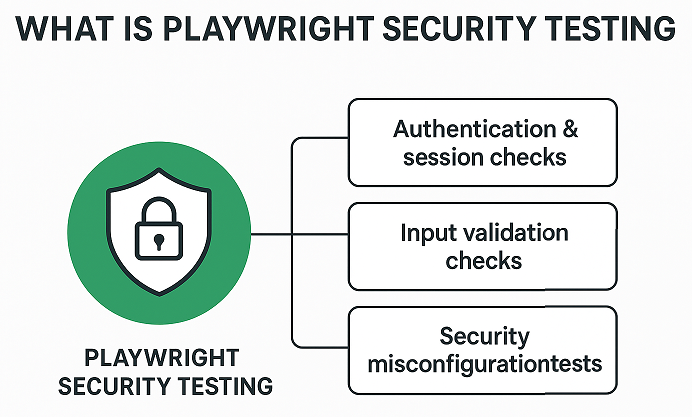
Using Playwright, testers can perform several types of security checks as part of automated testing. These include cross-site scripting input validation, basic injection attack testing through form fields, authentication and authorization testing, session handling verification, and access control checks for protected routes. Since Playwright runs in real browsers, it is especially useful for validating security issues that appear only during UI interactions or client-side execution.
However, it is important to set realistic expectations. Playwright is not a replacement for dedicated security scanners or penetration testing tools. It cannot discover deep server-side vulnerabilities, misconfigured infrastructure, or complex logic flaws on its own. Instead, Playwright security testing should be treated as a complementary layer that helps catch common security issues early during development and regression testing, especially those related to user flows and browser behavior.
Why Use Playwright for Security Testing
Playwright is a strong choice for security testing because it works at the real browser level. It interacts with the application the same way a real user does. This makes it effective for catching client-side security issues that only appear during actual user actions such as form submissions, navigation, and authentication flows. As a result, Playwright automation for security helps teams detect problems early in development.
Another key advantage is real user flow testing. With Playwright, you can validate security across complete journeys like login, checkout, and role-based access. This allows you to test how security behaves across multiple pages instead of isolated endpoints. In addition, Playwright supports automated execution in CI pipelines, making it easy to run security-focused tests on every build without slowing down delivery.
Playwright also provides reliable cross-browser security validation. Since it supports Chromium, Firefox, and WebKit, you can ensure that security behavior is consistent across browsers. This is important because some security issues appear only in specific browser engines. Combined with fast execution and stable selectors, Playwright becomes a practical tool for adding security checks to modern E2E testing workflows.
Security Testing Scope with Playwright
Playwright security testing focuses mainly on what happens in the browser and during real user interactions. It helps testers identify client-side vulnerabilities that appear when users interact with forms, buttons, URLs, and dynamic content. For example, you can verify whether unsafe input is reflected on the page, check if error messages expose sensitive information, and confirm that restricted pages are not accessible through direct navigation.
In addition, Playwright is effective for authentication and authorization checks. You can test secure login flows, validate role-based access, and ensure protected routes are blocked for unauthorized users. It also supports input validation testing by simulating invalid, malicious, or boundary inputs and observing application behavior. Session handling issues can be validated by testing cookie storage, session expiration, logout behavior, and access after session termination. However, Playwright is not designed for deep server-side vulnerability scanning, so it should be used as a complementary layer alongside dedicated security tools.
Setting Up Playwright for Security Testing
Before you start security-focused automation, you need a basic Playwright project set up. Since Playwright security testing builds on top of standard E2E automation, there is no special installation required beyond the regular Playwright setup. Once Playwright is installed correctly, you can extend the same project to validate security scenarios such as authentication checks, input validation, and session handling.
If you are new to Playwright or have not installed it yet, refer to these step-by-step guides before continuing:
- Playwright installation with Java
Use this guide if you are building security tests using Playwright Java and TestNG or JUnit. - Playwright installation with JavaScript
Follow this guide if you prefer Playwright with JavaScript or TypeScript for browser-based security testing.
After installation, your project structure remains the same as a regular Playwright automation framework. Security tests usually live alongside functional tests but focus on negative scenarios, invalid inputs, and unauthorized access paths.
For security-focused testing, a few configuration practices are recommended:
- Enable headless mode occasionally to visually observe security-related flows during debugging.
- Use isolated test data to avoid impacting real user accounts.
- Store authentication states carefully when testing protected routes.
- Run security-related tests as part of CI pipelines to catch issues early.
With this setup in place, you can start adding Playwright security testing scenarios without changing your core framework, making it easy to scale and maintain over time.
Automated Security Testing with Playwright
Automated security testing with Playwright works by simulating real user actions in the browser and validating how the application behaves under unsafe or unexpected conditions. Instead of scanning the server directly, Playwright drives the UI to test security-related scenarios such as unsafe inputs, broken authentication flows, unauthorized access, and improper session handling. Because tests run in a real browser, this approach helps catch security gaps that only appear during actual user interactions.
In a modern delivery pipeline, Playwright security tests fit naturally into CI CD workflows. These tests can run alongside functional E2E tests after each build or before release, ensuring security checks are part of continuous quality validation. For best results, security-focused E2E tests should be executed on critical user journeys such as login, checkout, and data submission flows. Running them regularly helps teams detect regressions early and strengthens application security without slowing down development.
Playwright Cross-Site Scripting XSS Testing
Cross-site scripting, commonly called XSS, is a security issue where an attacker injects malicious JavaScript into a web page that is then executed in a real user’s browser. This usually happens through input fields, search boxes, or URLs that reflect user input without proper validation or encoding. XSS can lead to data theft, session hijacking, or unwanted actions performed on behalf of the user.
Playwright security testing helps you detect basic XSS risks by validating how your application handles untrusted input during real browser interactions. Since Playwright runs tests in actual browsers, it is well-suited for checking reflected and DOM-based XSS scenarios during end-to-end flows.
How to Test XSS Using Playwright
The idea behind XSS testing with Playwright is simple. You inject a harmless script payload into input fields or URLs and then verify whether it gets executed or rendered unsafely on the page. If the payload appears as executable JavaScript instead of plain text, it indicates a potential vulnerability.
Below is a simple Java-based Playwright example that tests an input field for reflected XSS.
page.fill("#searchBox", "<script>alert('XSS')</script>");
page.click("#searchButton");

// Verify that script tag is not rendered
String pageContent = page.content();
Assert.assertFalse(
    pageContent.contains("<script>alert('XSS')</script>"),
    "XSS payload should not be rendered on the page"
);
This test ensures that user input is properly escaped and not reflected as executable code.
Example XSS Testing Scenarios with Playwright
Common XSS scenarios you can validate using Playwright include form input fields where user data is displayed after submission, search result pages that reflect query parameters, comment sections that render user-generated content, and error messages that display user input.
For reflected content testing, you can also validate that the page does not execute injected scripts by checking browser dialogs or unexpected JavaScript behavior.
page.onDialog(dialog -> {
    throw new AssertionError("XSS detected via alert dialog");
});
These tests do not replace advanced security scanners, but they add an important security layer to your Playwright automation for security. They help catch obvious XSS issues early during development and CI execution, before the application reaches production.
Playwright Injection Attack Testing
Injection attacks happen when an application accepts untrusted input and processes it without proper validation. Common examples include SQL injection, command injection, and script injection. Using Playwright security testing, testers can validate how the application behaves when malicious input is submitted through real user flows.
Playwright injection attack testing focuses on checking whether input fields safely handle unexpected or harmful values. The goal is not to hack the system, but to confirm that the application rejects unsafe input and responds securely.
Common Injection Types to Test
The most common injection attacks you can validate using Playwright include:
- SQL injection attempts in the login and search fields
- Command injection patterns in input parameters
- Script-based payloads that may trigger backend errors
- Special characters that could bypass validation logic
These checks help identify weak input validation early in the testing cycle.
Testing Input Fields for Injection Vulnerabilities
Input fields are the primary entry point for injection attacks. With Playwright automation for security, you can simulate how a real user enters malicious data and observe how the application responds.
Typical targets include:
- Login forms
- Search boxes
- Registration inputs
- URL query parameters
Playwright allows you to fill these fields, submit forms, and validate whether the application blocks unsafe input correctly.
Validating Server Responses
A secure application should never expose database errors or system details. After submitting an injection payload, always validate:
- No stack trace is visible on the UI
- Error messages are generic
- The application does not crash or redirect unexpectedly
These checks ensure that sensitive information is not leaked to attackers.
Negative Test Case Using Playwright Injection Testing
Below is a simple Java Playwright example that demonstrates injection attack testing on a login form.
// Simulated SQL injection payload
page.fill("#username", "admin' OR '1'='1");
page.fill("#password", "password");
page.click("#loginButton");

// Validate secure behavior
boolean errorVisible = page.locator(".error-message").isVisible();
boolean dashboardLoaded = page.url().contains("dashboard");

if (errorVisible && !dashboardLoaded) {
        System.out.println("Injection attempt blocked successfully");
} else {
        System.out.println("Potential injection vulnerability detected");
}
This negative test verifies that the application does not authenticate a user when malicious input is provided. If the login succeeds or exposes system errors, it may indicate a serious security issue.
Why Injection Testing Matters in Playwright Security Testing
Injection vulnerabilities are part of the OWASP Top 10 and remain one of the most common security risks. By adding injection attack testing to your Playwright E2E testing security strategy, you can detect issues early and prevent them from reaching production.
This approach strengthens your overall security posture while keeping tests aligned with real user behavior.
Authentication Testing with Playwright
Authentication testing ensures that only valid users can access protected parts of an application. With Playwright security testing, you can automate real login flows and verify how your application behaves when users are authenticated, logged out, or trying to bypass security controls. Since Playwright works at the browser level, it closely simulates how real users interact with authentication mechanisms.
Login Security Checks
Login security checks focus on validating correct and incorrect login behavior. You should verify that valid credentials allow access and invalid credentials are rejected without exposing sensitive information.
Common checks include:
- Valid username and password login
- Invalid password handling
- Error message visibility without revealing system details
Example using Playwright Java
page.navigate("Site URL/login");

// XSS test
page.fill("#searchBox", "<script>alert('XSS')</script>");
page.click("#searchButton");

// Verify that script tag is not executed or rendered
String pageContent = page.content();
Assert.assertFalse(pageContent.contains("<script>alert('XSS')</script>"), "XSS script should not be rendered");
This test confirms that the application blocks incorrect logins and shows a safe error message.
Session Persistence Testing
Session persistence testing verifies whether a user session behaves correctly after login. This includes checking if the user remains logged in after page refresh or navigation, and if the session ends after logout.
Key scenarios:
- User stays logged in after refresh
- The session cookie is cleared on logout
- Protected pages are inaccessible after logout
Example scenario
page.navigate("Site URL/dashboard");

boolean isRedirected = page.url().contains("/login");
Assert.assertFalse(isRedirected, "User should not be redirected to login page");
This ensures the session is still valid and the user is not redirected to the login page unexpectedly.
Role-Based Access Validation
Role-based access validation checks whether users can only access features allowed for their role. For example, a normal user should not access admin pages.
Tests should cover:
- Admin user access to admin pages
- Non-admin user blocked from admin pages
- Proper access denied responses
Example scenario
page.navigate("Site URL/admin");

String pageTitle = page.title();
Assert.assertTrue(pageTitle.contains("Access Denied"), "Page title should indicate Access Denied");
This confirms that restricted pages are protected based on user roles.
Unauthorized Access Testing
Unauthorized access testing verifies how the application behaves when users try to access protected resources without authentication. This is a critical part of testing for vulnerabilities with Playwright.
Scenarios to validate:
- Direct URL access without login
- Expired session handling
- Access after manual cookie deletion
Example scenario
context.clearCookies();
page.navigate("Site URL/profile");

Assert.assertTrue(page.url().contains("/login"), "User should be redirected to login page when accessing profile without auth");
This test ensures unauthenticated users are redirected to the login page instead of viewing sensitive content.
By covering login security checks, session handling, role validation, and unauthorized access, authentication testing with Playwright helps you catch common security flaws early while keeping tests realistic and maintainable.
Playwright E2E Testing Security Scenarios
End-to-end security testing with Playwright allows testers to validate real-world scenarios that mimic how users interact with a web application. By performing E2E security checks, you can ensure that navigation flows, protected routes, and sensitive data handling remain secure under various conditions.
Secure Navigation Testing
Playwright enables automated checks to ensure users cannot access pages they should not. For example, after logging out, attempting to navigate back to a secure page should redirect the user to the login page. This prevents unauthorized access through browser history manipulation.
Protected Routes Validation
Web applications often have routes restricted to specific roles. Using Playwright, you can simulate different user roles and verify that restricted pages remain inaccessible for unauthorized users. This includes testing role-based access control (RBAC) to confirm proper security enforcement.
Token and Cookie Related Checks
Tokens and cookies carry authentication and session information, making them critical for security. Playwright allows you to inspect cookies, validate that tokens expire as expected, and confirm that sensitive cookies are marked as HttpOnly and Secure. You can also simulate token tampering or missing tokens to verify that the application properly handles such scenarios.
By covering these E2E security scenarios, Playwright helps identify vulnerabilities that may be missed by unit or API-level security tests, ensuring a more comprehensive security posture for your application.
Testing for Vulnerabilities with Playwright
Playwright can be a valuable tool for detecting certain vulnerabilities during automated testing, complementing more specialized security tools. While it may not replace dedicated scanners, it provides early detection of common issues in web applications.
What Vulnerabilities Can Be Detected
Using Playwright, testers can identify issues such as input validation flaws, insecure redirects, cross-site scripting (XSS) in form inputs, broken authentication flows, and session handling problems. These are often visible during E2E interactions and can be caught by simulating real user behavior.
What Should Be Handled by Dedicated Security Scanners
Complex vulnerabilities like SQL injection, server misconfigurations, deep penetration testing, and advanced vulnerability exploits require specialized tools. Playwright alone cannot fully replicate attacks that need low-level network manipulation or extensive payload fuzzing.
How to Combine Both Approaches
The most effective strategy is to integrate Playwright tests with dedicated security scanning tools. For example, you can use Playwright to perform automated E2E checks for authentication, XSS, and token handling, while running periodic security scans with specialized tools for deeper vulnerabilities. This combined approach ensures early detection of obvious issues while maintaining coverage of critical security risks.
This strategy allows teams to maintain both functional and security confidence in their applications without relying solely on one tool.
OWASP Top 10 Testing Using Playwright
Playwright can be effectively used to test for many vulnerabilities listed in the OWASP Top 10, helping testers validate security in real-world scenarios. While it does not replace specialized penetration testing tools, it allows automated checks against common security risks during E2E testing.
Mapping Playwright Tests to OWASP Top 10
Playwright can cover several OWASP categories, including:
- Broken Authentication: Test login flows, session expiration, and role-based access control.
- Cross-Site Scripting (XSS): Validate that input fields and query parameters do not render malicious scripts.
- Sensitive Data Exposure: Check that cookies and tokens are properly secured with HttpOnly and Secure flags.
- Security Misconfigurations: Confirm proper redirection and access restrictions on sensitive routes.
Examples
- Broken Authentication: Automate login attempts with invalid credentials and ensure proper error handling and redirection.
- XSS: Inject test scripts in form inputs and validate that they are not executed or rendered on the page.
Practical Expectations
Playwright is best suited for detecting vulnerabilities visible in the user interface or during typical browser interactions. While it may not identify deep server-side flaws, combining these tests with regular security scans provides a strong foundation for maintaining web application security.
Using Playwright for OWASP Top 10 testing ensures that critical security flaws are caught early in the development and deployment cycle, improving overall application resilience.
Limitations of Playwright for Security Testing
While Playwright is a powerful tool for automating browser interactions and performing basic security checks, it has limitations that testers should be aware of. Understanding these boundaries helps set realistic expectations and ensures comprehensive security coverage.
What Playwright Cannot Replace
Playwright cannot fully replace specialized security testing tools. It is not designed for deep server-side vulnerability scanning, network-level attacks, or advanced penetration testing. Issues like SQL injection, buffer overflows, and complex authentication bypass scenarios require tools that operate at a lower level than browser automation.
When to Use Specialized Security Tools
For thorough security assessments, dedicated tools such as OWASP ZAP, Burp Suite, or Nessus are essential. These tools can perform exhaustive scanning, vulnerability fuzzing, and security configuration checks that go beyond what Playwright can detect in an E2E testing context.
Balanced View for Readers
Playwright should be viewed as a complement to a broader security strategy. It excels at identifying UI-level vulnerabilities, validating secure navigation, and automating repeated security checks during development. For deeper security assurance, combining Playwright with specialized security tools ensures both functional and security confidence in your application.
This balanced approach allows testers to benefit from automation without overestimating Playwright’s capabilities in security testing.
When to Use Playwright vs Dedicated Security Tools
Choosing between Playwright and dedicated security tools depends on the type of testing you need and the level of depth required. Each approach has its strengths, and using them together often provides the best results.
Playwright Strengths
Playwright excels at browser-level testing and simulating real user interactions. It is ideal for:
- Automating E2E security checks during development
- Validating authentication, session handling, and role-based access
- Detecting UI-level vulnerabilities like XSS or insecure redirects
- Integrating easily into CI/CD pipelines for continuous security checks
Tool Comparison Overview
Dedicated security tools such as OWASP ZAP, Burp Suite, and Nessus are designed to identify deeper vulnerabilities. They can perform:
- Network-level attacks
- SQL injection and complex injection testing
- Configuration and penetration testing
- Extensive scanning across multiple layers of the application
Recommended Hybrid Approach
The most effective strategy is to combine Playwright with specialized tools. Use Playwright for fast, automated E2E checks that catch UI-level vulnerabilities early. Periodically run dedicated security scanners to detect deeper, server-side, or network-level issues. This hybrid approach ensures comprehensive coverage while maintaining efficiency in automated testing pipelines.
By understanding the strengths and limitations of each approach, teams can implement a security testing strategy that balances speed, automation, and depth.
Conclusion
Playwright security testing provides a practical and efficient way to identify common vulnerabilities in web applications. By automating E2E tests, you can validate authentication flows, session handling, input validation, and other critical security aspects while integrating seamlessly into your development workflow.
While Playwright cannot replace specialized security scanners, it is highly effective for detecting UI-level issues and ensuring secure navigation, role-based access, and token management. Combining Playwright tests with dedicated security tools offers a comprehensive approach to safeguarding your application.
Adopting Playwright security testing in your test strategy encourages a proactive and continuous security mindset, helping teams catch vulnerabilities early and maintain robust, resilient web applications.
Security Testing Using Playwright FAQs
Q1: Can Playwright replace security scanners?
No, Playwright cannot fully replace dedicated security scanners. It is designed for browser-level testing and E2E automation, which helps detect UI-level vulnerabilities. For deeper server-side or network-level security testing, specialized tools like OWASP ZAP or Burp Suite are required.
Q2: Is Playwright suitable for penetration testing?
Playwright is not a replacement for full-scale penetration testing. It is best used to automate security checks visible through the browser, such as XSS, authentication flows, and session handling. For advanced penetration testing, dedicated tools and manual testing are necessary.
Q3: Can beginners use Playwright for security testing?
Yes, beginners can use Playwright to perform basic security testing. It provides an easy-to-learn API for automating browser interactions and testing common vulnerabilities, making it a practical starting point for those new to security testing.