
Last updated on December 19th, 2025 at 10:55 am
In Playwright, choosing the right locator is critical for writing fast, stable, and user-focused tests. One of the most powerful options available is the getByRole locator. It helps you select elements based on their ARIA roles and accessible names, just like real users or screen readers would. This not only improves test accuracy but also boosts accessibility coverage automatically.
This locator method is explained along with other concepts in our Playwright testing tutorial.
In this guide, you’ll learn:
- What Playwright getByRole() locator does
- How to use getByRole locator with real examples
- Supported roles
- Real-world examples
- Common mistakes to avoid
- Best practices
What is getByRole Locator in Playwright?
getByRole finds elements by their role and label. These roles follow ARIA standards. That means screen readers use them too. So, your tests mimic the behavior of real users.
For example:
page.getByRole('button', { name: 'Submit' });This finds a button with the name “Submit”.
Why Use getByRole Locator?
You should use it because it
- finds elements in a user-friendly way.
- makes tests more stable.
- helps with accessibility.
- forces better HTML practices.
Still using CSS or XPath? It’s time to upgrade.
getByRole Syntax and Options
Syntax
The syntax of the getByRole locator is given below.
page.getByRole(role, options);Options you can use:
- name: Text label (string or RegExp)
- exact: Set to true to match full text only
- hidden: Set to true to include hidden elements
Example:
page.getByRole('link', { name: 'Learn More' });Common Roles You Can Use
Playwright supports many roles. Here are the popular ones:
| Role | Used For |
| button | Buttons |
| link | Anchor tags |
| textbox | Input fields |
| checkbox | Checkboxes |
| radio | Radio buttons |
| heading | H1 to H6 tags |
| dialog | Modals |
| combobox | Dropdowns |
| list / listitem | Lists |
Important Note: Use the correct role in your HTML. Otherwise, Playwright may not find the element.
Essential Playwright Locators to Learn Next
- XPath Element Locator
- Text Element Locator
- ID Element Locator
- getByTitle Element Locator
- getByAltText Element Locator
- getByPlaceholder Element Locator
- getByLabel Element Locator
getByRole Locator Practical Examples
Let’s see how getByRole works in real scenarios. Each example shows a simple use case that mirrors how users interact with the page.
Click a Button Using getByRole Locator
const { test, expect } = require('@playwright/test');

test('Example: Locate button using getByRole locator.', async ({ page }) => {

  await page.goto('https://www.facebook.com/');

  //Locate Login button using getByRole
  await page.getByRole('button', { name: 'Log in' }).click();
});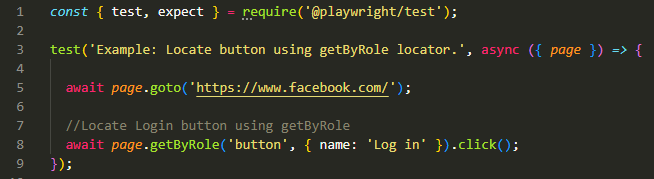
This clicks a button with the visible label “Log in”. Useful for form submissions or authentication flows.
Locate Checkbox Using getByRole
await page.getByRole('checkbox', { name: 'Accept Terms' }).check();Finds a checkbox labeled “Accept Terms” and checks it. Perfect for consent forms or agreements.
Use Partial Text Using RegExp
await page.getByRole('radio', { name: /United/i }).check();Uses a regular expression to match any radio button with text like “United States” or “United Kingdom”, case-insensitive. Great when text varies slightly.
Assert a Heading
await expect(page.getByRole('heading', { name: 'Features' })).toBeVisible();Verifies that a heading with the label “Features” is visible on the page. Helps confirm page content or section loading.
Match a Link
await page.getByRole('link', { name: 'Home' }).click();Clicks a link with the text “Home”. Ideal for navigation checks or verifying menu links.
getByRole locator is fast, readable, and works every time.
Best Practices
Here are tips to use getByRole the right way:
- Always use real HTML roles
- Add labels to your buttons and inputs
- Use RegExp for flexible matches
- Don’t match hidden content unless needed
- Combine with getByLabel, getByText, or locator() if needed
Frequently Asked Questions (FAQs)
1. What is getByRole in Playwright?
It’s a method to find elements by role and name. It helps you write accessible and robust tests.
2. How do I match part of the text?
Use a RegExp like getByRole(‘button’, { name: /submit/i }) to match part of the text.
4. Is getByRole better than getByText?
Yes. It works based on accessibility, which is more stable and future-proof.
What’s Next
Now that you know how to use the getByRole locator in Playwright to find elements by their accessibility roles, the next step is learning how to locate elements using their associated labels. This method is especially helpful when working with form fields and improving test readability. To continue enhancing your Playwright locator skills, check out How to Use getByLabel Locator in Playwright, where we walk through practical examples and best practices.
Final Words
To sum up, getByRole is a smart and powerful locator. It’s based on roles and labels, not on fragile selectors. It helps you write better, cleaner, and more accessible tests.