Many beginners start using Playwright by launching a browser and navigating to a page. However, learning how to validate page title is one of the most important steps in real test automation. It helps confirm that your test is interacting with the intended page and avoids executing steps on the wrong screen.
In this guide, you will learn how to validate page title and URL in Playwright Java with practical examples using page.title() and page.url() methods. We will explore different validation methods, assertions, and best practices used in real world automation frameworks.
By the end of this tutorial, you will be able to confidently verify page titles and URLs in your Playwright tests and avoid common mistakes that many beginners often face. Let’s start with how to validate the page title in Playwright Java.
- What is Page Title in Playwright and Why is it Important?
- How to Validate Page Title in Playwright Java?
- How to Validate Current URL in Playwright Java?
- How to Validate Page Title and URL Together in Playwright Java?
- Page Title vs URL vs Element Validation in Playwright
- How to Wait for Page Load Before Validating Title and URL in Playwright Java?
- How to Use Assertions to Validate Page Title and URL in Playwright?
- How to Handle Dynamic Titles and URLs in Playwright?
- Real World Example: Validate Title and URL After Login
- What Are Common Mistakes When Validating Page Title and URL in Playwright?
- How to Debug Title and URL Validation Failures in Playwright?
- What Are the Best Practices to Validate Page Title in Playwright?
- How to Validate Page Title and URL in Other Playwright Languages?
- Related Playwright Tutorials
- Conclusion
- FAQ: Validate Page Title and URL in Playwright
What is Page Title in Playwright and Why is it Important?
The page title in Playwright is the text displayed in the browser tab, which you can retrieve using the page.title() method. It is commonly used to verify that the correct page has loaded during test execution.
In automation testing, page title validation acts as a quick checkpoint before interacting with elements. It helps detect navigation failures, incorrect redirects, or unexpected page loads.
Key points about page title:
- Defined inside the HTML <title> tag
- Visible on the browser tab
- Useful for quick validation after navigation
- Helps identify incorrect or failed page loads
Real world example: After a successful login, the page title often changes to “Dashboard” or “Home”. Validating this ensures that login navigation worked correctly.
Important limitation: Page title alone is not always enough for validation. Some pages may have the same title but different content, so it is best used along with URL or element validation.
Now that you know how to validate the page title, the next step is to verify the URL to ensure correct navigation.
How to Validate Page Title in Playwright Java?
Validating page title in Playwright means verifying that the browser tab title matches the expected value after navigation. In Playwright Java, this is done using the page.title() method along with assertions to confirm that the correct page has loaded during test execution.
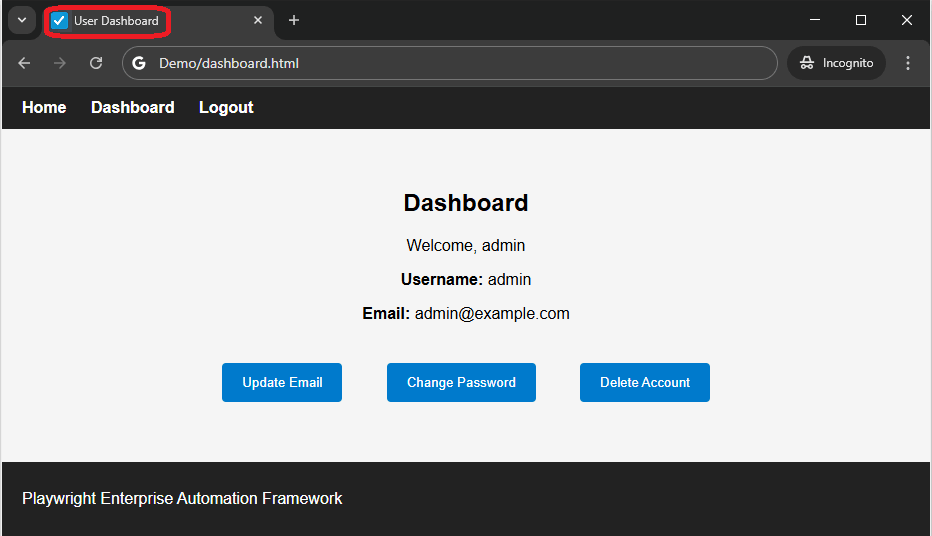
To check the page title in Playwright Java, use the page.title() method and compare it with the expected value.
This approach acts as a quick checkpoint before performing further actions in your test.
If you are new to this concept, you can first learn how to get page title in Playwright Java before performing validation.
import org.testng.*;

// Get page title
String actualTitle = page.title();

// Validate using assertion
Assert.assertEquals(actualTitle, "Expected Page Title");
You can also refer to the Playwright official documentation to understand how the page.title() method works internally and how it behaves in different scenarios.
Can Playwright validate page title without waiting?
No. You should wait for the page to load before validating the title to avoid flaky test failures.
How to Validate Current URL in Playwright Java?
You can validate the current URL in Playwright Java by using the page.url() method in Playwright and comparing it with the expected URL using assertions.
This validation confirms that navigation has reached the expected destination, especially after proper waiting for navigation to complete.
import org.testng.*;

// Get current URL
String actualUrl = page.url();

// Validate using assertion
Assert.assertEquals(actualUrl, "https://example.com/dashboard");
Steps to validate URL in Playwright:
- Navigate to the target page
- Use page.url() to get the current URL
- Store the value in a variable
- Compare it with expected URL using assertions
Example with partial URL validation:
// Validate partial URL for dynamic cases
Assert.assertTrue(page.url().contains("/dashboard"));
Real world scenario: After login, applications often redirect to URLs with dynamic query parameters or session IDs. In such cases, validating only the stable part of the URL is more reliable.
Quick tip: Always validate URL after actions like login, form submission, or redirects. This helps ensure your test is on the correct page before proceeding.
Does Playwright support URL validation after redirect?
Yes. You can validate the final URL after redirect using page.url() or waitForURL() for more accurate validation.
While validating title or URL individually is useful, combining both validations gives stronger confidence that the correct page has loaded.
How to Validate Page Title and URL Together in Playwright Java?
You can validate page title and URL in Playwright Java using page.title() and page.url() methods along with assertions like Assert.assertEquals or Playwright expect().

// Get actual values
String actualTitle = page.title();
String actualUrl = page.url();

// Validate both
Assert.assertEquals(actualTitle, "Dashboard");
Assert.assertEquals(actualUrl, "https://example.com/dashboard");
This approach provides stronger verification by checking both page identity and navigation flow together, which is a common practice in real automation frameworks.
Why validate both title and URL?
- Ensures correct navigation and page load
- Prevents false positives in tests
- Helps catch partial page loads or wrong redirects
- Improves overall test reliability
Important note before you proceed: In some applications, the URL may be correct but the page content might not load properly. Validating both title and URL helps avoid this issue.
At this point, you might wonder when to use title validation, URL validation, or element validation in real test scenarios.
Page Title vs URL vs Element Validation in Playwright
You can validate page title, URL, or UI elements in Playwright depending on your testing goal. Each validation type serves a different purpose and helps verify different aspects of your application.
Choosing the right validation approach improves test accuracy and prevents false assumptions during automation.
| Validation Type | Purpose | When to Use | Example |
|---|---|---|---|
| Page Title | Verify correct page is loaded | After navigation or login | page.title() |
| URL | Verify navigation path | After redirects or route changes | page.url() |
| Element | Verify UI content or component | To confirm page content or state | page.locator() |
Quick tip: Use title and URL validation for fast checks, and combine them with element validation for deeper UI verification.
Real world insight: In most production test frameworks, engineers validate URL and title first, then confirm key elements like headers or buttons to ensure the page is fully ready.
Before performing validation, it is important to ensure that the page has fully loaded. Otherwise, your tests may fail even if the application is working correctly.
How to Wait for Page Load Before Validating Title and URL in Playwright Java?
You should wait for the page to fully load before validating the title or URL in Playwright to avoid flaky test failures.
Playwright provides built in waiting methods like waitForLoadState() and waitForURL(), which are commonly used in Playwright Java examples to ensure the page is ready before validation.
To avoid flaky tests, it is important to properly handle waits in Playwright Java before performing any validation.
Example using waitForLoadState:
// Wait for page to load completely
page.waitForLoadState();

// Now validate title
Assert.assertEquals(page.title(), "Dashboard");
Example using waitForURL:
// Wait for specific URL
page.waitForURL("**/dashboard");

// Validate URL
Assert.assertTrue(page.url().contains("/dashboard"));
When should you use wait methods?
- After navigation using page.navigate()
- After login or form submission
- When dealing with redirects
- When page content loads dynamically
Here is the catch: Even if your test looks correct, skipping wait can silently break validation in real projects.
Here is where most beginners make mistakes: They validate title or URL immediately after navigation without waiting. This can cause tests to fail randomly because the page is still loading.
Best practice: Always wait for the page state or URL before performing validation to ensure stable and reliable test execution.
Does Playwright wait automatically before validating title or URL?
Playwright includes auto waiting for many actions, but methods like page.title() and page.url() do not wait for full page load. It is recommended to use waitForLoadState() or waitForURL() before validation.
Once you understand how to retrieve title and URL, the next step is to validate them using proper assertions.
How to Use Assertions to Validate Page Title and URL in Playwright?
You can use test framework assertions like TestNG or JUnit along with Playwright methods such as page.title() and page.url() to validate page title and URL effectively.
Assertions help you compare expected and actual values. However, modern Playwright also provides built in assertions with auto waiting support.
For a deeper understanding, you can explore Playwright Java assertions using TestNG and JUnit to write more reliable validation logic.
Using TestNG Assertions:
import org.testng.Assert;

// Validate title
Assert.assertEquals(page.title(), "Dashboard");

// Validate URL
Assert.assertEquals(page.url(), "https://example.com/dashboard");
Using JUnit Assertions:
import static org.junit.jupiter.api.Assertions.*;

// Validate title
assertEquals("Dashboard", page.title());

// Validate URL
assertEquals("https://example.com/dashboard", page.url());
Common assertion types you can use:
- assertEquals for exact match
- assertTrue for partial match or condition based validation
- assertNotEquals for negative testing
Assertion comparison table:
| Assertion Type | Use Case | Example |
|---|---|---|
| assertEquals | Exact match validation | Assert.assertEquals(page.title(), “Dashboard”) |
| assertTrue | Partial or condition based validation | Assert.assertTrue(page.url().contains(“/dashboard”)) |
| assertNotEquals | Negative testing | Assert.assertNotEquals(page.title(), “Error”) |
Real world tip: In many modern applications, titles or URLs may include dynamic values. In such cases, using partial validation with assertTrue is often more reliable than exact match.
Which is better for validation in Playwright, assertEquals or expect()?
Playwright expect() is better as it provides auto waiting and more reliable validation compared to traditional assertions.
Does Playwright expect() replace TestNG or JUnit assertions?
Yes. Playwright expect() can replace traditional assertions as it provides built in auto waiting and better reliability. However, TestNG or JUnit can still be used based on your framework setup.
In addition to traditional assertions, Playwright also provides a modern built in assertion approach that simplifies validation.
How to Validate Page Title and URL Using Playwright expect()?
You can validate page title and URL in Playwright using the built in expect() assertions provided by Playwright Test.
This is the latest and recommended approach as it includes auto waiting and better error messages compared to traditional assertions.
Example using expect() for title:
import static com.microsoft.playwright.assertions.PlaywrightAssertions.assertThat;

// Validate title with auto waiting
assertThat(page).hasTitle("Dashboard");
Example using expect() for URL:
// Validate URL with auto waiting
assertThat(page).hasURL("https://example.com/dashboard");
Why use Playwright expect()?
- Built in auto waiting reduces flaky tests
- Cleaner and more readable syntax
- Better error messages for debugging
- Recommended in latest Playwright best practices
Important note: If you are using Playwright Test, prefer expect() over TestNG or JUnit assertions for better reliability and maintainability.
In real world applications, titles and URLs are not always static. Let’s see how to handle dynamic values effectively.
How to Handle Dynamic Titles and URLs in Playwright?
You can handle dynamic titles and URLs in Playwright by using partial matching instead of exact comparison. This is useful when values change due to session IDs, query parameters, or user specific data.
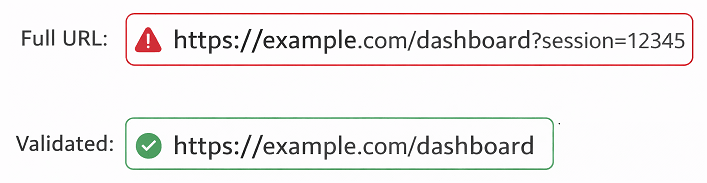
Instead of matching the full value, you validate only the stable part of the title or URL.
Example using partial validation:
// Validate dynamic title
Assert.assertTrue(page.title().contains("Dashboard"));

// Validate dynamic URL
Assert.assertTrue(page.url().contains("/dashboard"));
Steps to handle dynamic values:
- Identify the stable part of title or URL
- Avoid full string comparison
- Use contains or startsWith for validation
- Apply assertion based on partial match
Here is the catch: Many beginners try to validate the full URL which includes tokens or dynamic IDs. This often leads to flaky tests that fail randomly.
Best practice: Always validate only the meaningful and stable portion of the URL or title to keep your tests reliable and maintainable.
How do you validate URL with query parameters in Playwright?
You can validate URLs with query parameters by using partial matching methods like contains() or startsWith() instead of exact match to handle dynamic values.
Real World Example: Validate Title and URL After Login
In real test automation, title and URL validation is commonly used after login to confirm successful navigation to the dashboard page.
// Perform login action
page.fill("#username", "user");
page.fill("#password", "password");
page.click("#loginButton");

// Wait for navigation
page.waitForURL("**/dashboard");

// Validate title and URL
Assert.assertEquals(page.title(), "Dashboard");
Assert.assertTrue(page.url().contains("/dashboard"));
This approach ensures that login is successful before performing further actions in your test.
Even with correct implementation, small mistakes can lead to flaky or failing tests. Here are some common issues to watch out for.
What Are Common Mistakes When Validating Page Title and URL in Playwright?
You can avoid flaky tests in Playwright by understanding common mistakes in title and URL validation. Most failures happen due to timing issues, dynamic values, or incorrect assertions.
Here are the most common mistakes beginners make and how to avoid them.
1. Validating before page is fully loaded
- Tests fail because title or URL is not updated yet
- Always wait for navigation or use proper synchronization
2. Using exact match for dynamic values
- Fails when URL contains session IDs or query parameters
- Use contains or startsWith instead of full match
3. Ignoring redirects
- Final URL may differ after login or navigation
- Always validate the final resolved URL
4. Hardcoding incorrect expected values
- Small mismatch like extra space causes failure
- Double check expected title and URL
5. Not validating both title and URL
- Only validating one can miss real issues
- Combine both validations for stronger checks
Quick debugging tip: Print actual title and URL during test execution to quickly identify mismatches.
System.out.println("Actual Title: " + page.title());
System.out.println("Actual URL: " + page.url());
How to Debug Title and URL Validation Failures in Playwright?
You can debug title and URL validation failures in Playwright by logging actual values, checking timing issues, and verifying expected data.
Most validation failures happen due to incorrect expectations, dynamic values, or missing waits.
Steps to debug validation issues:
- Print actual title and URL in logs
- Check if page is fully loaded before validation
- Verify expected values are correct
- Handle dynamic values using partial match
- Check for redirects or delayed navigation
Example debug code:
System.out.println("Actual Title: " + page.title());
System.out.println("Actual URL: " + page.url());
Real world insight: In many cases, tests fail not because of bugs but due to incorrect assumptions about page behavior. Always verify actual values before updating assertions.
After understanding common mistakes, let’s look at best practices to make your validation more stable and reliable.
What Are the Best Practices to Validate Page Title in Playwright?
You can improve the stability and reliability of your Playwright tests by following a few best practices while validating page title and URL. These practices are based on real world automation scenarios and help reduce flaky test failures.
Below are the most effective best practices used in modern Playwright frameworks.
Recommended best practices:
- Always validate after navigation is complete
- Use partial match for dynamic content
- Avoid hardcoding values when possible
- Validate both title and URL together for better coverage
- Use meaningful assertion messages for debugging
Example with assertion message:
Assert.assertEquals(page.title(), "Dashboard", "Page title mismatch");
Assert.assertTrue(page.url().contains("/dashboard"), "URL validation failed");
Performance consideration: Title validation is faster than DOM validation, so it is often used as a quick checkpoint before performing heavy UI interactions.
This is the fastest way to do this: Use title validation immediately after navigation and before interacting with elements. This helps fail tests early and saves execution time.
If you are working with different languages, the same validation concepts apply. Here are examples in other Playwright-supported languages.
How to Validate Page Title and URL in Other Playwright Languages?
Playwright supports multiple languages, and the approach to validate page title and URL remains similar across them. Below are simple examples in JavaScript and Python for reference.
JavaScript Example: Validate Page Title and URL
This example shows how to validate both title and URL using Playwright in JavaScript. The logic is the same as Java.
// Validate title
const title = await page.title();
expect(title).toBe("Dashboard");

// Validate URL
const url = page.url();
expect(url).toContain("/dashboard");
Python Example: Validate Title and URL
In Python, the same validation can be done using Playwright methods and assertion statements.
# Validate title
assert "Dashboard" in page.title()

# Validate URL
assert "/dashboard" in page.url()
Note: The method names like page.title() and page.url() remain consistent across languages. Only the assertion syntax changes based on the framework used.
To continue building your Playwright knowledge, explore these related tutorials from the same series.
Related Playwright Tutorials
To build a strong foundation in Playwright automation, you can explore these related tutorials that cover essential concepts used in real world testing scenarios.
- How to launch a browser in Playwright Java step by step
- Playwright locators with Java complete guide
- How to perform click action in Playwright Java
- Handle multiple tabs and windows in Playwright Java
- Handle Dropdown in Playwright Java
Conclusion
Validating the page title is one of the most essential checks in any Playwright automation test. It helps confirm that your test is running on the correct page and reduces the chances of false positive results.
In this guide, you learned how to validate page title and URL in Playwright Java using different methods, assertions, and best practices. You also saw how to handle dynamic values and avoid common mistakes that can lead to flaky tests.
As a next step, try combining these validations with element interactions and assertions to build more reliable and production ready test cases.
FAQ: Validate Page Title and URL in Playwright
How do I validate page title in Playwright Java?
You can validate page title in Playwright Java using page.title() and comparing it with the expected value using assertions like Assert.assertEquals.
How do I validate URL in Playwright?
You can validate URL using page.url() method and verify it with expected value using assertions or partial matching.
Can I validate both title and URL together in Playwright?
Yes. You can use page.title() and page.url() in the same test and validate both using assertions for stronger validation.
How to handle dynamic URL in Playwright?
Use partial matching like contains or startsWith instead of exact match to handle dynamic URLs with parameters or session IDs.
What is the best way to validate page title in Playwright?
The best way is to validate the title after navigation using assertions and use partial match if the title contains dynamic values.