Last updated on April 18th, 2026 at 01:29 pm
Playwright vs Selenium in 2026 comes down to speed, stability, and use case. Playwright is better for modern web applications with faster execution and built in auto waiting, while Selenium remains a strong choice for legacy systems, wider browser support, and established frameworks.
Choosing between these two tools is one of the most common challenges for automation testers today. Both are powerful and widely used, but they differ in performance, reliability, setup, and real world usage.
If you are starting fresh or planning to switch tools, choosing the right tool early helps avoid rework and improves long term test stability. In this guide, you will learn how Playwright and Selenium compare across performance, features, learning curve, and real use cases so you can confidently choose the right tool.
If you are new to Playwright, you can also start with this Playwright testing tutorial for beginners to understand the basics before diving deeper.
- Which is Better Playwright vs Selenium in 2026?
- What is Playwright vs Selenium and How Do They Work?
- What is the Difference in Architecture Between Playwright and Selenium?
- What is the Difference Between Playwright and Selenium?
- Playwright vs Selenium Comparison Table
- Playwright vs Selenium Pros and Cons
- Playwright vs Selenium Performance Comparison
- Playwright vs Selenium Debugging Comparison
- Playwright vs Selenium for CI CD Pipelines
- How Does Playwright vs Selenium Handle Waiting and Synchronization?
- Is Playwright Easier Than Selenium for Beginners?
- When Should You Use Playwright or Selenium?
- Common Mistakes When Choosing Playwright vs Selenium
- What are the Limitations of Playwright and Selenium?
- Playwright vs Selenium Which One Should You Choose in 2026?
- Conclusion
- Frequently Asked Questions
Which is Better Playwright vs Selenium in 2026?
Playwright is better for modern web testing in 2026 due to faster execution, built in auto waiting, and more stable tests. Selenium remains a strong choice for legacy systems, wider browser support, and established frameworks.
If you need speed and reliability, choose Playwright. If you depend on older systems or an existing ecosystem, Selenium is still a solid option.
What is Playwright vs Selenium and How Do They Work?
Playwright and Selenium are web automation testing tools used to simulate user actions in a browser such as clicking, typing, and navigation. Playwright is a modern framework with built in features for faster and more reliable testing, while Selenium is a widely adopted tool known for its flexibility, broad browser support, and long established ecosystem.
However, they are built differently and follow different approaches when interacting with browsers. This is where most of the real differences begin.
What is Playwright?
Playwright is a modern automation framework developed by Microsoft. It is designed for fast, reliable, and stable testing of modern web applications.
If you want to see how Playwright works in practice, check this guide on how to launch a browser in Playwright Java.
It supports multiple browsers like Chromium, Firefox, and WebKit with a single API. It also includes built in features such as auto waiting, network interception, and parallel execution.
- Developed by Microsoft
- Supports Chromium, Firefox, and WebKit
- Built in auto wait and smart selectors
- Supports multiple languages including Java, JavaScript, Python, and C sharp
For official documentation and latest features, you can refer to the Playwright official documentation.
What is Selenium?
Selenium is one of the oldest and most widely used automation tools in the industry. It has been the standard choice for web automation for many years.
It works with WebDriver to control browsers and supports a wide range of programming languages and browsers.
- Open source and widely adopted
- Supports all major browsers
- Works with WebDriver architecture
- Large community and ecosystem
You can explore detailed usage and updates in the Selenium official documentation.
To understand why Playwright and Selenium behave differently in real projects, it is important to first look at how they are built internally.
What is the Difference in Architecture Between Playwright and Selenium?
The diagram below shows how Playwright and Selenium interact with browsers at a structural level.
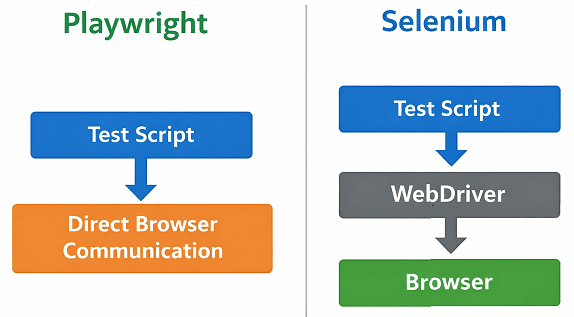
As you can see, Playwright communicates directly with the browser, while Selenium adds an extra WebDriver layer, which impacts speed and reliability.
The main difference in architecture between Playwright and Selenium is how they communicate with browsers. Playwright uses direct communication with browser engines, while Selenium relies on WebDriver, which acts as a middle layer between the test script and the browser.
This architectural difference directly impacts speed, reliability, and test stability.
- Playwright: Direct communication with browser engines like Chromium, Firefox, and WebKit
- Selenium: Uses WebDriver protocol to interact with browsers through drivers
- Playwright: Fewer communication layers and faster execution
- Selenium: More flexible but involves additional overhead
Important note. This architectural difference is one of the main reasons why Playwright tests are generally faster and more stable.
Now that you understand their architecture, let us simplify the key differences that directly impact performance, stability, and ease of use.
What is the Difference Between Playwright and Selenium?
The main difference between Playwright and Selenium lies in their architecture, performance, and built in capabilities. Playwright uses direct browser communication with modern APIs, while Selenium relies on WebDriver, which adds an extra layer between the test script and the browser.
- Architecture: Playwright uses direct communication, Selenium uses WebDriver
- Performance: Playwright is generally faster for modern applications
- Waiting: Playwright has built in auto waiting, Selenium requires manual waits
- Stability: Playwright tests are less flaky compared to Selenium
- Browser Support: Selenium supports more browsers including legacy ones
In simple terms, Playwright is optimized for modern web applications, while Selenium provides flexibility and broader compatibility across different environments.
If you prefer a quick overview, this table highlights the most important differences between Playwright and Selenium.
Playwright vs Selenium Comparison Table

Here is a quick comparison of Playwright vs Selenium based on important factors that matter in real automation projects.
| Feature | Playwright | Selenium |
|---|---|---|
| Architecture | Direct browser control using modern APIs | WebDriver based communication |
| Speed | Faster execution | Relatively slower |
| Auto Waiting | Built in auto wait | Manual waits required |
| Flaky Tests | Less flaky | More prone to flakiness |
| Browser Support | Chromium, Firefox, WebKit | All major browsers |
| Parallel Execution | Built in support | Requires setup |
| Setup Complexity | Easy | Moderate |
| Language Support | Limited but growing | Very wide support |
| Mobile Testing | Limited | Strong with Appium |
| Community Support | Growing | Very large and mature |
You may also want to compare Playwright with other tools like Puppeteer. Check this Playwright vs Puppeteer guide for a detailed breakdown.
This table gives you a high level overview. However, the real decision depends on your project requirements, which we will explore next.
Playwright vs Selenium Pros and Cons
Understanding the pros and cons of Playwright and Selenium helps you make a better decision based on your project requirements.
Playwright Pros
- Built in auto waiting reduces flaky tests
- Faster execution for modern applications
- Simpler setup without driver management
- Strong support for parallel execution
Playwright Cons
- Limited support for older browsers
- Smaller ecosystem compared to Selenium
- Less mature in enterprise environments
Selenium Pros
- Wide browser and language support
- Large community and ecosystem
- Strong integration with tools like Appium
- Suitable for legacy systems
Selenium Cons
- Manual wait handling increases complexity
- More prone to flaky tests
- Slower execution due to WebDriver
- Requires driver management
Performance is often the deciding factor when choosing an automation tool, especially for large test suites and CI CD pipelines.
Playwright vs Selenium Performance Comparison
Playwright is faster than Selenium in most modern web testing scenarios because it uses direct browser communication and built in optimizations. Selenium relies on WebDriver, which adds an extra layer and slows down execution.
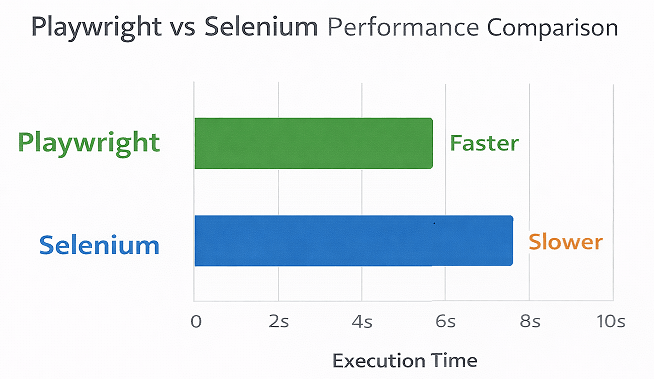
However, performance is not just about speed. Stability and reliability also play a major role when choosing an automation tool.
Why is Playwright Faster?
Playwright is designed for modern applications where speed and reliability are critical. It reduces delays by handling most synchronization internally.
- Direct communication with browser engines
- Built in auto waiting for elements
- Fewer network round trips
- Efficient parallel execution support
Why Selenium Can Be Slower?
Selenium uses the WebDriver protocol, which communicates with the browser through an external driver. This adds extra overhead during test execution.
- Requires separate driver for each browser
- More API calls between test and browser
- Manual wait handling increases delays
- Parallel execution needs additional configuration
Real World Performance Difference Between Playwright and Selenium
In real world scenarios, Playwright often performs faster and more consistently than Selenium, especially for modern web applications with dynamic content. This is because Playwright reduces delays caused by manual waits and handles browser interactions more efficiently.
- Playwright executes tests with fewer delays due to auto waiting
- Selenium may slow down due to WebDriver communication overhead
- Playwright handles dynamic elements more reliably
- Selenium may require additional tuning for stability
Performance differences become more noticeable when running large test suites or parallel executions. For small projects, the difference may be minimal, but at scale, Playwright often provides better consistency.
In large scale automation projects, even small delays in execution can significantly increase total pipeline time. This is where faster tools like Playwright provide a noticeable advantage.
Beyond execution speed, debugging failed tests quickly is equally important in real automation projects.
Playwright vs Selenium Debugging Comparison
Playwright provides a better debugging experience compared to Selenium due to built in tools like trace viewer, screenshots, and detailed error logs. Selenium debugging often requires additional setup and external tools.
Playwright Debugging Features
- Built in trace viewer to inspect test execution step by step
- Automatic screenshots and videos for failed tests
- Clear and detailed error messages
- Network request inspection without extra setup
You can also explore advanced scenarios like handling iframes in Playwright Java which often require debugging support.
Selenium Debugging Approach
- Requires manual screenshots and logging setup
- Relies on external tools for advanced debugging
- Error messages can be less descriptive
- More effort needed to trace failures
In real projects, this difference becomes clear when tests scale and failures need to be debugged quickly. Faster debugging means faster feedback and quicker releases. This is one of the practical advantages of Playwright in modern automation workflows.
Playwright vs Selenium for CI CD Pipelines
Playwright is generally better for CI CD pipelines because it offers faster execution, built in parallel testing, and more stable test results. Selenium can also be used in CI CD, but it often requires additional setup and maintenance.
In modern automation workflows, CI CD integration plays a critical role in delivering fast and reliable releases.
Why Playwright Works Better in CI CD
- Faster test execution reduces pipeline time
- Built in parallel execution without extra configuration
- Auto waiting reduces flaky failures in pipelines
- Easy integration with tools like GitHub Actions, Jenkins, and Azure DevOps
Challenges with Selenium in CI CD
- Requires additional setup for parallel execution
- Higher chances of flaky tests affecting pipeline stability
- Needs browser driver management in CI environments
- More maintenance effort for stable execution
Here is where many teams notice a real difference. Faster and more stable pipelines mean quicker feedback and better developer productivity. This makes Playwright a strong choice for modern CI CD based automation strategies.
In modern development workflows, automation tests are tightly integrated with CI CD pipelines, making stability and speed even more critical.
Which is better for CI CD Playwright or Selenium?
Playwright is better for CI CD pipelines because it provides faster execution, built in parallel testing, and more stable automation compared to Selenium.
One of the biggest differences between Playwright and Selenium appears in how they handle waiting and synchronization.
How Does Playwright vs Selenium Handle Waiting and Synchronization?
Playwright automatically waits for elements to be ready before performing actions, while Selenium requires manual waits like implicit wait or explicit wait. This makes Playwright more reliable and easier for beginners.
Synchronization is one of the biggest reasons test automation fails. Handling waits correctly can significantly improve test stability.
Playwright Auto Waiting Explained
Playwright handles most waiting scenarios internally. You do not need to write extra wait logic in most cases.
- Waits for elements to be visible before clicking
- Waits for network requests to complete
- Waits for page load automatically
- Retries actions until conditions are met
This reduces flaky tests and simplifies your test code.
For a deeper understanding, refer to this detailed guide on Playwright waits in Java.
Selenium Wait Mechanisms
Selenium provides multiple types of waits, but they must be implemented manually.
- Implicit wait
- Explicit wait using WebDriverWait
- Fluent wait for advanced control
If not handled properly, tests may fail due to timing issues.
Java Example: Waiting in Playwright
This example shows how Playwright performs actions without adding explicit waits.
// Playwright handles waiting automatically
page.locator("#loginButton").click();
The click will only happen when the element is ready.
Java Example: Waiting in Selenium
In Selenium, you need to explicitly wait before interacting with elements.
WebDriverWait wait = new WebDriverWait(driver, Duration.ofSeconds(10));
WebElement element = wait.until(ExpectedConditions.elementToBeClickable(By.id("loginButton")));
element.click();
This extra code increases complexity and maintenance effort.
Important note before you proceed. Improper wait handling is one of the biggest causes of flaky automation tests. This is where Playwright provides a clear advantage.
You will notice this difference more when testing dynamic applications where elements load asynchronously and timing issues are common.
Another important factor when choosing a tool is how quickly your team can learn and adopt it.
Is Playwright Easier Than Selenium for Beginners?
Playwright is easier to learn for beginners because it has a simpler setup, built in features, and less boilerplate code. Selenium has a steeper learning curve due to WebDriver setup and manual configurations.
Why Playwright is Beginner Friendly
Playwright reduces the amount of code you need to write, which makes it easier to get started quickly.
- No need to manage browser drivers manually
- Built in waiting reduces complexity
- Simple API design
- Better error messages for debugging
You can write stable tests with fewer lines of code.
Why Selenium Has a Learning Curve
Selenium requires understanding of multiple concepts before writing stable tests.
- WebDriver setup for each browser
- Handling waits manually
- Managing dependencies and configurations
- Integrating with testing frameworks
This makes the initial setup slightly complex for beginners.
Learning Curve Comparison Table
This table gives a quick overview of how both tools compare in terms of learning difficulty.
| Criteria | Playwright | Selenium |
|---|---|---|
| Setup Time | Quick | Moderate |
| Code Complexity | Low | Medium |
| Beginner Friendly | High | Medium |
| Debugging | Easier | Requires experience |
If you want to reduce setup time and start writing tests quickly, Playwright offers a smoother learning experience. However, teams already familiar with Selenium may find it easier to continue with their existing ecosystem.
Now that you understand the differences, let us look at real world scenarios where each tool performs best.
When Should You Use Playwright or Selenium?
Playwright is best suited for modern web applications that require fast and reliable automation, while Selenium is ideal for legacy systems, cross browser compatibility, and large enterprise frameworks.
Choosing the right tool depends heavily on how your application behaves and what your testing goals are.
When Should You Use Playwright?
Playwright works best when you are testing modern applications with dynamic content and frequent UI updates.
- Single Page Applications using React, Angular, or Vue
- Applications with heavy JavaScript rendering
- Projects that require fast execution and parallel testing
- Teams looking for less flaky and stable automation
It is also a strong choice for CI CD pipelines where speed matters.
When Should You Use Selenium?
Selenium is still widely used in enterprise environments and legacy systems.
- Applications that need support for older browsers
- Projects already built on Selenium frameworks
- Teams using multiple programming languages
- Mobile automation using Appium integration
It is often preferred when long term stability and ecosystem support are critical.
Quick Use Case Comparison
This table helps you quickly decide based on your project type.
| Use Case | Recommended Tool |
|---|---|
| Modern web apps | Playwright |
| Legacy systems | Selenium |
| Fast CI CD pipelines | Playwright |
| Mobile testing | Selenium |
| Multi language teams | Selenium |
In many real world scenarios, teams use both tools strategically. For example, Playwright can be used for modern UI testing, while Selenium continues to support older systems within the same organization.
Even after understanding the differences, many teams still make avoidable mistakes when selecting the right tool.
Common Mistakes When Choosing Playwright vs Selenium
Common mistakes when choosing between Playwright vs Selenium include selecting a tool based on trends, ignoring project requirements, and underestimating long term maintenance. These mistakes can lead to unstable test suites and costly rework later.
Understanding these common mistakes can help you make a better decision from the start.
Choosing Based Only on Popularity
Just because a tool is trending does not mean it is the right fit for your project.
- Playwright is growing fast, but may not fit legacy systems
- Selenium is widely used, but may not be ideal for modern apps
Always evaluate based on your requirements, not hype.
Ignoring Project Requirements
This is one of the biggest mistakes teams make.
- Browser support needs
- Application type such as SPA or legacy UI
- Team skill set and experience
If these are ignored, switching tools later becomes costly.
Underestimating Maintenance Effort
Automation is not just about writing tests. Maintaining them is the real challenge.
- Selenium tests may require more maintenance due to flakiness
- Playwright reduces maintenance but still needs good practices
Stable tests save more time than fast tests.
Not Considering Team Experience
If your team already has strong experience with Selenium, switching to Playwright may require training and adjustment.
On the other hand, new teams can benefit from starting directly with Playwright.
Ignoring Future Scalability
Think long term before choosing a tool.
- Will your test suite grow?
- Do you need parallel execution?
- Will you integrate with CI CD?
Choosing the wrong tool early can slow down your entire automation strategy later.
Important note. The best tool is not the most popular one. It is the one that fits your project perfectly.
No tool is perfect, and understanding the limitations of both Playwright and Selenium helps you make a more realistic decision.
What are the Limitations of Playwright and Selenium?
Both Playwright and Selenium have limitations that should be considered before choosing a tool. Understanding these limitations helps avoid issues during long term automation.
Playwright Limitations
- Limited support for legacy browsers like Internet Explorer
- Smaller community compared to Selenium
- Less support for mobile automation
Selenium Limitations
- Requires manual wait handling
- Higher chances of flaky tests
- Slower execution for modern applications
- More complex setup and maintenance
Here is where many teams struggle. Ignoring limitations early often leads to major issues when scaling automation.
After comparing all major aspects, let us simplify the final decision based on different project needs.
Playwright vs Selenium Which One Should You Choose in 2026?
You should choose Playwright for modern applications that need speed, reliability, and low maintenance. Choose Selenium if you work with legacy systems, require wide browser support, or already have an established framework.
This decision becomes easier when you evaluate your project based on a few key factors.
The decision flow below helps you quickly choose between Playwright and Selenium based on your project requirements and testing goals.
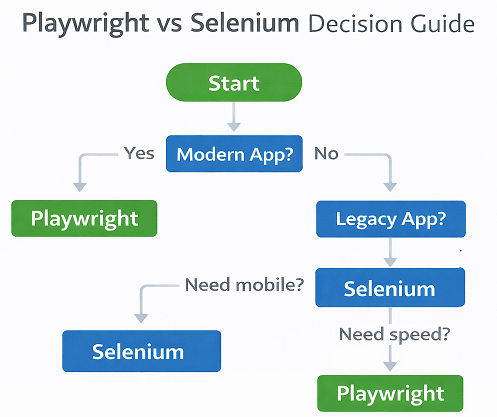
As shown above, Playwright is ideal for modern applications and speed focused testing, while Selenium remains the better choice for legacy systems and mobile automation needs.
Choose Playwright If
Playwright is a better fit when you want faster execution and stable tests with minimal setup.
- You are testing modern web applications
- You want less flaky tests
- You need built in parallel execution
- You prefer simpler setup and faster development
Choose Selenium If
Selenium works better in environments where flexibility and long term ecosystem support are required.
- You are working on legacy applications
- You need support for older browsers
- You have an existing Selenium framework
- You require strong integration with mobile testing tools
Quick Decision Guide Playwright vs Selenium
If you want a quick answer, this table helps you decide between Playwright and Selenium based on your project needs, speed requirements, and long term goals.
| Scenario | Best Choice |
|---|---|
| Starting a new automation project | Playwright |
| Maintaining existing framework | Selenium |
| Speed and reliability priority | Playwright |
| Cross platform and flexibility | Selenium |
This is the fastest way to decide. If you are still unsure, start with Playwright for new projects and continue Selenium where it already works well.
If you are new to Playwright, start with this complete Playwright automation tutorial for beginners.
Also, explore automation tester salary in USA to understand career growth and earning potential.
Let us quickly summarize the key takeaways to help you make a confident decision.
Conclusion
Choosing between playwright vs selenium in 2026 depends on your project requirements, team experience, and long term goals. Both tools are powerful, but they solve problems in different ways.
Playwright is designed for modern testing needs with features that simplify automation and reduce maintenance effort. Selenium continues to be a reliable option for projects that depend on its mature ecosystem and wide compatibility.
If you are starting a new automation project, Playwright is often the better choice. However, if you already have a stable Selenium framework, continuing with it can be more practical. Choose the tool that aligns best with your needs and helps you build reliable automation in the long run.
Frequently Asked Questions
Is Playwright better than Selenium?
Yes, Playwright is often preferred for modern web applications because it simplifies test automation with built in features like auto waiting and better handling of dynamic elements. Selenium is still useful for legacy systems and broader ecosystem support.
Can Playwright replace Selenium?
Playwright can replace Selenium for many modern testing needs. However, Selenium is still widely used in enterprise environments and may not be replaced completely.
Which tool is faster Playwright or Selenium?
Playwright is generally faster than Selenium due to direct browser communication and fewer dependencies.
Is Selenium outdated in 2026?
No, Selenium is not outdated. It is still actively used and maintained, especially for large scale and legacy automation frameworks.
Which is easier to learn Playwright or Selenium?
Playwright is easier to learn than Selenium because it requires less setup, includes built in features, and reduces the need for complex configurations.
Can Playwright be used for mobile testing?
Playwright has limited mobile testing support. Selenium with Appium is a better choice for mobile automation.