Last updated on February 27th, 2026 at 03:16 am
The Playwright enterprise automation framework is built to support large-scale test execution, where Skip Suite in Playwright becomes essential for maintaining control and stability. In enterprise test automation, running every test suite in every execution is neither practical nor efficient. Without proper execution control, even a well-structured automation testing framework can quickly become slow, fragile, and hard to manage.
This is why skipping an entire suite at execution time is far more effective than skipping individual tests. The Skip Suite in Playwright approach ensures that unwanted suites do not start execution at all, keeping pipelines clean and predictable.
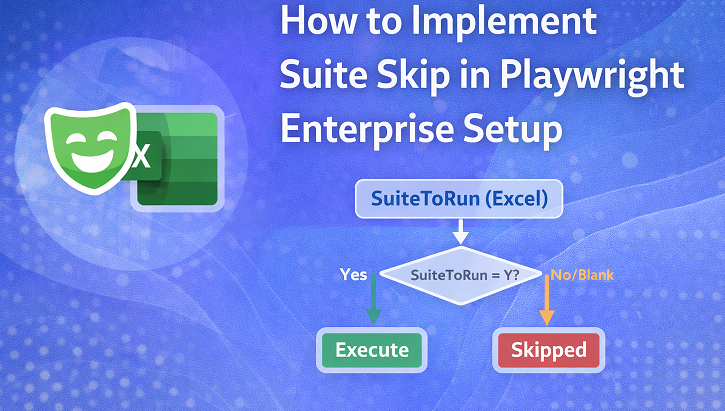
In this step, suite execution is managed using an Excel-driven control mechanism. A simple flag in Excel decides whether a suite should run or be skipped, providing a centralized and non-code solution for enterprise-scale automation.
This article is part of the Playwright Enterprise Automation Framework step-by-step tutorial series.
Previous article: How to Scale Tests in Playwright Enterprise Setup (Step 3)
Next article: How to Skip Test in Playwright Enterprise Framework (Step 5)
If you are new to this series or want a full overview of the framework architecture, design principles, and roadmap, start with the main guide below.
Playwright Enterprise Automation Framework Complete Guide
- What We Have Built So Far in This Framework
- What Does Skip Suite Mean in Playwright Enterprise Automation
- Problems Without Suite Skip in Large Automation Frameworks
- Excel Driven Suite Control Design
- Suite Skip Execution Flow in Playwright Framework
- Reporting Skipped or Executed Status Back to Excel
- Get the Updated Playwright Suite Skip Implementation
- Impact on Test Classes and DataProviders
- Conclusion
- FAQs
What We Have Built So Far in This Framework
Playwright is a modern end-to-end testing framework designed for reliable and fast automation across browsers, making it a strong foundation for enterprise test automation.
Before diving into the suite skip feature, it’s helpful to briefly recap what has been built so far in the Playwright Enterprise Automation Framework. In the earlier steps, we set up the foundation of the enterprise framework, implemented Excel-driven test data handling, and scaled the execution to support larger and more complex test suites.
What Does Skip Suite Mean in Playwright Enterprise Automation
In Playwright Enterprise Automation, skip suite refers to the ability to skip the execution of an entire test suite instead of individual test cases. This means that all test classes, test methods, and associated data for that suite are completely bypassed during a test run.
Skipping a suite is different from skipping a single test case. When you skip a test case, only that specific test is ignored, while the rest of the suite continues to execute. With suite skipping, the framework prevents all tests within that suite from running, saving time and resources, and avoiding unnecessary interactions with shared data or environments.
Implementing suite skip is considered a best practice in test automation for enterprise pipelines. It ensures that only relevant suites run based on configuration, making the framework more scalable and reliable. This approach helps maintain faster execution, cleaner CI/CD pipelines, and reduces the risk of failures caused by running unnecessary or unstable suites.
Problems Without Suite Skip in Large Automation Frameworks
In large automation frameworks, not having a suite skip mechanism can create several challenges. One major issue is the dependency on multiple TestNG XML files to control which suites should run. Managing and maintaining these files becomes cumbersome as the number of suites grows, increasing the risk of errors.
Another common problem is the need for manual commenting or exclusion of suites. Testers or developers often have to remember which suites to include or exclude for a particular execution, which is time-consuming and error-prone.
Without a centralized skip mechanism, there is also a risk of accidental execution. Running long or environment-specific suites unintentionally can lead to false failures, unnecessary resource consumption, and delays in the testing cycle.
These issues become especially critical in continuous integration testing, where pipelines must be fast, predictable, and reliable. Overall, managing execution without a suite skip feature highlights several test automation challenges in enterprise environments, emphasizing the need for a more scalable and controlled approach.
Excel Driven Suite Control Design
In the Playwright Enterprise Automation Framework, Excel is used as the execution controller because it provides a simple, centralized, and non-code way to manage which suites should run. Testers and automation engineers can easily update execution flags without modifying code or TestNG XML files, making the framework more accessible and maintainable.
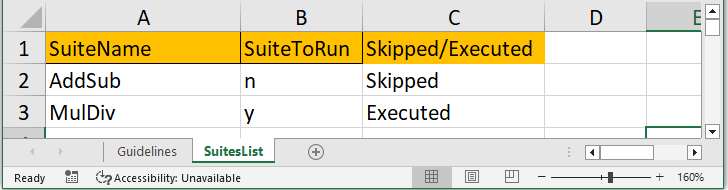
The file TestSuiteList.xls acts as the central configuration source for all test suites. Within this Excel file, the SuitesList sheet contains the master list of suites along with execution control information. Each row represents a suite, and columns hold relevant data, including execution flags and status reporting.
The SuiteToRun column is the key flag that determines whether a suite should execute. Its values have the following meanings:
Y→ The suite will execute, and all associated test classes and data will be processedNor blank → The suite will be skipped entirely.
Using Excel in this way enables test data management and supports a scalable enterprise testing strategy, allowing teams to control execution flow efficiently across multiple environments and pipelines.
Suite Skip Execution Flow in Playwright Framework
The suite skip execution flow in the Playwright Enterprise Automation Framework is designed to provide centralized control over which suites run, ensuring efficiency and reliability in large automation pipelines.
At the suite level, TestNG provides a built-in SkipException mechanism that allows frameworks to programmatically skip execution before any test methods run.
When a TestNG suite is triggered, the suite name is passed from the TestNG XML file to the framework. This allows the framework to identify which suite is being executed without hardcoding names in the test classes.
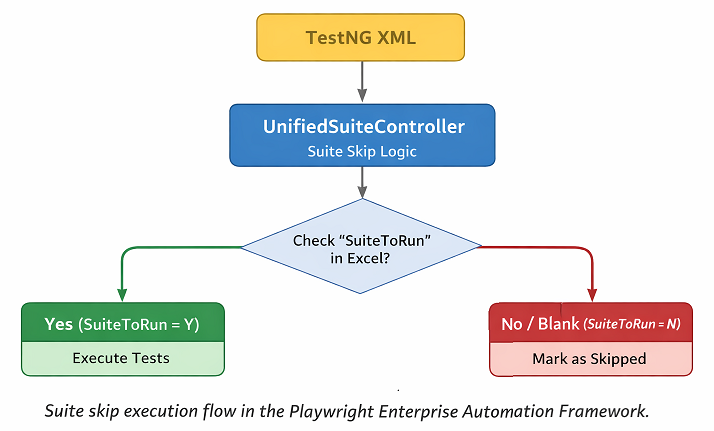
The core decision point is the @BeforeSuite(alwaysRun = true) method in the UnifiedSuiteController. This method runs once before any test class in the suite executes, acting as a centralized gatekeeper. It reads the suite name, checks the SuiteToRun flag from the SuitesList sheet in Excel, and decides whether the suite should proceed.
- When
SuiteToRunis Y:
The suite is allowed to execute. All test classes,@BeforeTestmethods, and DataProviders run normally. The framework also records the execution status as Executed in the Excel sheet. - When
SuiteToRunis N or blank:
The suite is skipped entirely. TestNG throws aSkipExceptionat the@BeforeSuitestage, preventing any test class or DataProvider from running. The Excel sheet is updated with the status Skipped, providing an audit trail.
This approach ensures a clean automation framework design, avoids accidental execution, and supports faster, more predictable runs in CI CD pipeline testing, making the framework scalable and enterprise-ready.
UnifiedSuiteController Design and Responsibility
The UnifiedSuiteController is introduced in the Playwright Enterprise Automation Framework to centralize and standardize suite-level execution control. Instead of placing execution logic in multiple test classes or relying on manual TestNG XML edits, this controller provides a single point of decision for all suites.
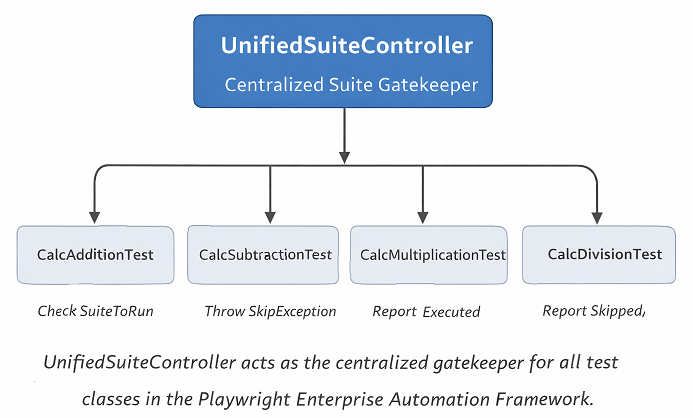
At the suite level, the UnifiedSuiteController is responsible for:
- Reading the suite name from TestNG XML
- Checking the
SuiteToRunflag in the SuitesList Excel sheet - Deciding whether to execute or skip the entire suite
- Updating the Excel sheet with the execution status as Executed or Skipped
By acting as a single execution gatekeeper, it ensures consistency across all test classes and prevents accidental runs of suites that should be skipped. This approach reduces errors, improves maintainability, and allows teams to manage execution centrally without touching individual test classes.
All test classes extend UnifiedSuiteController so they automatically inherit this suite-level decision logic. This design eliminates redundancy, enforces consistent execution policies, and forms the backbone of a robust enterprise automation framework with a clean and scalable test automation architecture.
Reporting Skipped or Executed Status Back to Excel
In enterprise automation, execution reporting is critical for maintaining transparency and tracking the progress of test suites. It allows teams to quickly identify which suites ran successfully, which were skipped, and ensures accountability across multiple environments and pipelines.
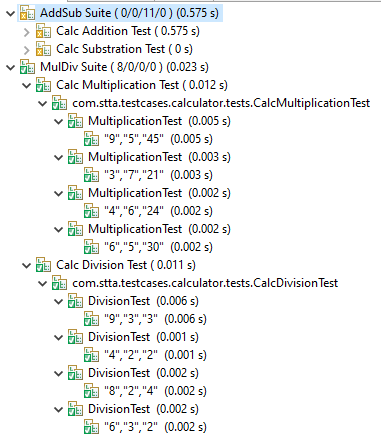
TestNG report displaying skipped and executed suites in Playwright Enterprise Automation Framework highlighting how SuiteToRun flag in Excel controls test executionThe framework distinguishes between two statuses in the SuitesList sheet:
- Executed – The suite ran successfully, and all associated test classes and DataProviders were executed.
- Skipped – The suite was intentionally bypassed based on the
SuiteToRunflag, preventing unnecessary execution and resource usage.
The UnifiedSuiteController automatically updates this information back to the Excel sheet during the @BeforeSuite phase. When a suite is allowed to run, it writes Executed, and when a suite is skipped, it writes Skipped. This creates a clear and reliable record of suite-level execution decisions.
Having an execution audit trail provides multiple benefits:
- Facilitates debugging and root cause analysis
- Helps in compliance and reporting for enterprise QA teams
- Improves pipeline visibility and reliability
- Supports faster decision-making in quality assurance automation initiatives
This approach integrates seamlessly into the framework, combining control with transparency, and strengthens test execution reporting across all enterprise-level test suites.
Get the Updated Playwright Suite Skip Implementation
⚠️ Important Note: This article is part of the Playwright Enterprise Automation Framework and covers Step 4 in a step-by-step build. The downloadable code is not standalone and depends on all previous steps in the series. If you landed here directly, please complete the earlier steps first to avoid setup or runtime issues.
To help you try out the Skip Suite in Playwright feature immediately, you can download a ZIP folder containing all the modified framework files. These files include the latest changes to support suite-level skipping, Excel-driven execution control, and reporting of Skipped or Executed status.
The ZIP includes:
UnifiedSuiteController.java– Handles suite skip decision and Excel reportingCalcAdditionTest.java– Example addition test class with suite skip integrationCalcSubtractionTest.java– Example subtraction test class with suite skip integrationCalcMultiplicationTest.java– Example multiplication test class with suite skip integrationCalcDivisionTest.java– Example division test class with suite skip integration
You can download the ZIP, add or replace these files in your existing Playwright Enterprise Automation Framework, and experiment with the suite skip functionality immediately. This allows you to see the execution flow in action, test different SuiteToRun flags in Excel, and observe how the framework updates the execution status automatically.
[Download ZIP of Updated Suite Skip Implementation]
Tip: After replacing the files, try setting SuiteToRun to Y or N in the SuitesList sheet of TestSuiteList.xls to see how the framework behaves for executed versus skipped suites. This hands-on approach is the fastest way to understand and validate the feature in your own setup.
Impact on Test Classes and DataProviders
One of the key advantages of the Skip Suite in Playwright approach is that test class logic remains unchanged. All existing test methods, assertions, and DataProvider references continue to work as before when the suite is allowed to run. This ensures backward compatibility and avoids any need to modify individual test classes.
When a suite is permitted to execute (SuiteToRun = Y), the @BeforeTest methods in each test class run normally. DataProviders are invoked as usual, fetching test data from Excel sheets, and the tests execute in a standard, predictable manner.
Even when a suite is skipped (SuiteToRun = N or blank), the framework prevents the test methods from actually executing, but DataProviders are still evaluated, and the test data from Excel appears in the TestNG report. TestNG marks the tests as skipped, showing the SkipException reason, but no test logic is executed. This ensures that the suite is skipped in practice, while the report still provides a clear view of which test methods were part of the suite.
This design supports data-driven testing while providing visibility in reports and helps improve test automation optimization, ensuring that large frameworks remain efficient, scalable, and maintainable even as the number of suites and test cases grows.
Conclusion
In this step, we implemented Skip Suite in Playwright using an Excel-driven execution control mechanism. This allows teams to decide at runtime which suites to execute, providing better control, faster pipelines, and a clean audit trail.
Key takeaways:
- The
UnifiedSuiteControlleracts as a central execution gatekeeper for all test suites. - The SuiteToRun flag in Excel determines whether a suite runs or is skipped.
- Skipped suites are marked in TestNG reports, and their data is still visible, giving a full overview without executing unnecessary tests.
- This approach strengthens enterprise automation frameworks and supports scalable, maintainable, and reliable test automation architecture.
With this foundation, your framework is now ready for more advanced execution strategies in the upcoming steps.
FAQs
How do I skip a suite in Playwright without changing code?
You can skip a suite by setting the SuiteToRun column to N or leaving it blank in the SuitesList sheet of TestSuiteList.xls. The framework will automatically skip the suite during execution.
What happens to DataProviders when a suite is skipped?
In the current framework, DataProviders still execute and fetch Excel data even for skipped suites. TestNG marks the test methods as skipped, but the test logic does not run.
Can suite execution be controlled from CI pipelines?
Yes. By modifying the SuiteToRun flag in Excel before triggering the pipeline, CI/CD tools can control which suites execute. This provides centralized and predictable execution.
Is Suite Skip suitable for large enterprise projects?
Absolutely. Skipping entire suites at runtime helps manage long-running tests, environment-specific suites, and unstable tests, making it ideal for scalable enterprise automation frameworks.
Why does test data still appear in reports for skipped suites?
TestNG evaluates the DataProviders before the suite skip is enforced. This means Excel test data is loaded and displayed in the report, but the test methods themselves do not execute.