
You can handle cookies in Playwright Java using the BrowserContext API to add, get, and clear cookies during test execution. This allows you to manage user sessions, authentication, and browser state without repeating login steps.
In real-world testing scenarios, cookies are used to skip login steps, validate session persistence, and simulate user behavior across different pages.
In this guide, you will learn how to add, get, and clear cookies in Playwright Java with practical examples and current best practices. If you are new to Playwright, you can also check our Playwright Java tutorial for beginners to understand core concepts before handling cookies.
How to Handle Cookies in Playwright Java?
You can handle cookies in Playwright Java by using the BrowserContext API to add, get, and clear cookies during test execution.
Playwright Java cookies handling is done using BrowserContext, which allows you to add cookies using addCookies(), retrieve them using cookies(), and remove them using clearCookies().
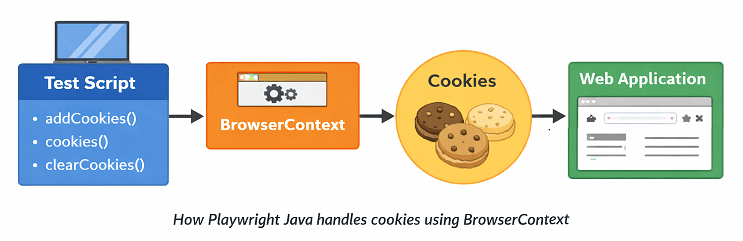
These methods help you control session data, authentication, and browser state efficiently during automation testing.
To manage cookies in Playwright Java:
- Use addCookies() to set cookies
- Use cookies() to retrieve cookies
- Use clearCookies() to remove cookies
This approach is useful for managing login sessions, testing user state, and controlling browser behavior without repeating steps like logging in every time.
For a deeper understanding of available methods and options, you can refer to the official Playwright BrowserContext API documentation.
import java.util.Arrays;
import java.util.List;
import com.microsoft.playwright.options.Cookie;
import com.microsoft.playwright.BrowserContext;

// Add cookie
context.addCookies(Arrays.asList(
    new Cookie("session", "123456")
        .setDomain("Domain")
        .setPath("/")
));

// Get cookies
List<Cookie> cookies = context.cookies();

// Clear cookies
context.clearCookies();
What is Cookies Handling in Playwright Java?
Cookies handling in Playwright Java means adding, retrieving, and deleting browser cookies using BrowserContext during test execution. These cookies store user specific data like session IDs, authentication tokens, and preferences.
Playwright uses the BrowserContext to manage cookies. This means cookies are isolated per context, which helps simulate multiple users or sessions without interference.
Playwright uses the BrowserContext to manage cookies. To understand this better, you can explore how BrowserContext in Playwright Java works and how it isolates sessions.
In automation testing, cookies handling is commonly used to maintain login sessions, bypass authentication steps, and validate how applications behave with stored user data.
- Store login sessions without repeated login
- Test authenticated and unauthenticated states
- Simulate multiple users using different contexts
- Validate cookie based features like remember me
Quick Tip: Cookies in Playwright are tied to BrowserContext, not directly to the Page. This is where many beginners make mistakes.
What Are Different Types of Cookies in Browser Testing?
In browser automation, cookies are not all the same. Understanding cookie types helps you test real-world scenarios more effectively.
Common types of cookies used in testing:
- Session Cookies: Temporary cookies that expire when the browser is closed
- Persistent Cookies: Stored with expiry and reused across sessions
- Secure Cookies: Sent only over HTTPS connections
- HttpOnly Cookies: Not accessible via JavaScript, used for security
- SameSite Cookies: Control cross site request behavior
In Playwright Java, you can simulate all these cookie types using different attributes like setSecure(), setHttpOnly(), and setSameSite().
This helps in testing authentication, security, and cross domain behavior more accurately.
How to Add Cookies in Playwright Java?
You can add cookies in Playwright Java using the addCookies() method from BrowserContext by defining cookie properties such as name, value, domain, and path.
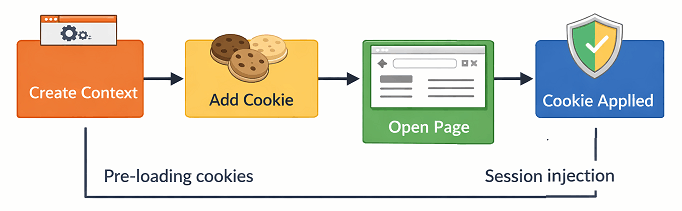
Steps to add cookies in Playwright Java:
- Create a BrowserContext
- Define cookie details
- Call addCookies()
- Navigate to the target URL
This allows you to set cookies before or during test execution to simulate user sessions.
This is commonly used to inject session data directly into the browser context.
If you are not familiar with browser context, refer to our guide on how to launch browser in Playwright Java to understand BrowserContext creation
This example shows how to add a cookie before loading the page.
import com.microsoft.playwright.*;
import com.microsoft.playwright.options.Cookie;

Playwright playwright = Playwright.create();
Browser browser = playwright.chromium().launch();
BrowserContext context = browser.newContext();

// Add cookie
context.addCookies(Arrays.asList(
    new Cookie("session", "abc123")
        .setDomain("Domain")
        .setPath("/")
));

Page page = context.newPage();
page.navigate("Domain");
This approach ensures the cookie is already available when the page loads.
What Cookie Properties Are Required in Playwright?
When adding cookies, you must provide certain required fields to ensure proper behavior.
| Property | Description |
|---|---|
| Name | Unique name of the cookie |
| Value | Value stored in the cookie |
| Domain | Domain where cookie is valid |
| Path | URL path for which cookie applies |
Important note before you proceed: Domain must match the website you are testing. Otherwise the cookie will not be applied.
What Are Advanced Cookie Attributes in Playwright?
In Playwright Java, cookies support advanced attributes such as Secure, HttpOnly, SameSite, and expiry. These attributes control how cookies behave in real browser scenarios.
Understanding these attributes is important when working with authentication, security testing, and cross-site behavior.
| Attribute | Description |
|---|---|
| Secure | Cookie is sent only over HTTPS connections |
| HttpOnly | Prevents JavaScript from accessing the cookie |
| SameSite | Controls cross-site request behavior |
| Expires | Defines when the cookie will expire |
This example shows how to set advanced cookie attributes in Playwright Java.
import com.microsoft.playwright.options.Cookie;
import com.microsoft.playwright.options.SameSiteAttribute;

context.addCookies(Arrays.asList(
    new Cookie("secure_cookie", "value123")
        .setDomain("Domain")
        .setPath("/")
        .setSecure(true)
        .setHttpOnly(true)
        .setSameSite(SameSiteAttribute.LAX)
));
Important note: These attributes are critical when testing authentication flows, security restrictions, and cross-domain behavior.
How to Check Cookie Expiry in Playwright Java?
You can check cookie expiry by accessing the expires property from the Cookie object returned by cookies().
import com.microsoft.playwright.options.Cookie;

List<Cookie> cookies = context.cookies();

for (Cookie cookie : cookies) {
    System.out.println(cookie.name + " expires at " + cookie.expires);
}
This is useful when validating session timeout behavior.
Can You Add Cookies After Page Load in Playwright?
Yes, you can add cookies after the page loads. However you may need to reload the page to apply those cookies properly.
Why Add Cookies Instead of Logging In?
Adding cookies directly is faster and more stable compared to UI login. It reduces test execution time and avoids failures caused by UI changes.
Real-world tip: In large test suites, teams store authentication cookies and reuse them across tests to avoid repeated login flows.
Now that you know how to add cookies, the next step is to retrieve and validate them during test execution.
How to Get Cookies in Playwright Java?
You can get cookies in Playwright Java using the cookies() method from BrowserContext, which returns all cookies for the current context.
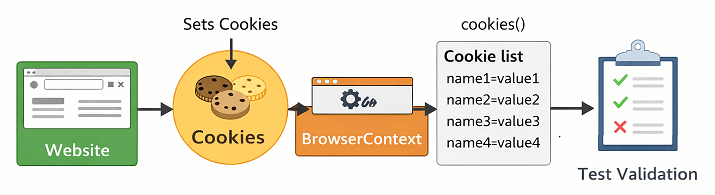
Steps to get cookies in Playwright Java:
- Navigate to the target page
- Call cookies()
- Store or iterate through cookies
This is useful when validating session data, debugging authentication issues, or verifying how cookies impact application behavior.
You can also combine this with Playwright locators to validate UI behavior based on cookie values.
This example shows how to fetch all cookies from the current context.
Browser browser = playwright.chromium().launch();
BrowserContext context = browser.newContext();
Page page = context.newPage();

page.navigate("https://example.com");

// Get cookies
List<Cookie> cookies = context.cookies();

// Print cookies
for (Cookie cookie : cookies) {
    System.out.println(cookie.name + " = " + cookie.value);
}
What Does cookies() Method Return in Playwright Java?
The cookies() method returns a list of Cookie objects that include details like name, value, domain, path, expiry, and security flags.
Can Playwright Get Cookies Without Navigating?
No, cookies are usually available only after the page is loaded or after the server sets them during a request.
Does Playwright Automatically Handle Cookies?
Yes, Playwright automatically manages cookies within a BrowserContext, but you can manually control them when needed.
Can You Get Cookies for a Specific URL in Playwright Java?
Yes, you can pass a URL to the cookies() method to retrieve cookies only for that specific URL.
List<Cookie> cookies = context.cookies("https://example.com");How to Validate a Specific Cookie Value in Playwright Java?
You can loop through the cookie list and check for a specific cookie name and value.
List<Cookie> cookies = context.cookies();

for (Cookie cookie : cookies) {
    if ("session".equals(cookie.name)) {
        System.out.println("Session Cookie Found: " + cookie.value);
    }
}
Here is where most beginners make mistakes: They try to fetch cookies before page navigation. Always ensure the page is loaded so cookies are available.
How to Assert Cookies in Playwright Java Using TestNG?
You can assert cookies in Playwright Java by combining cookie retrieval with testing frameworks like TestNG or JUnit.
import org.testng.Assert;

List<Cookie> cookies = context.cookies();

Assert.assertTrue(
    cookies.stream().anyMatch(c -> c.name.equals("session"))
);
This helps validate session data as part of your automated tests.
After cookie assertion, you may need to clear them to reset the session or test different user scenarios.
How to Clear Cookies in Playwright Java?
You can clear cookies in Playwright Java using the clearCookies() method from BrowserContext to remove all stored cookies from the session.
Steps to clear cookies in Playwright Java:
- Use an existing BrowserContext
- Call clearCookies()
- Continue testing with a clean session
This is useful when you want to reset session state, test logout scenarios, or ensure test isolation between executions.
This example shows how to clear all cookies.
Browser browser = playwright.chromium().launch();
BrowserContext context = browser.newContext();
Page page = context.newPage();

page.navigate("https://example.com");

// Clear cookies
context.clearCookies();
After clearing cookies, the browser behaves like a new session for that context.
When Should You Clear Cookies in Playwright Java?
You should clear cookies when testing logout functionality, switching users, or ensuring no session data affects your test results.
Does clearCookies() Affect All Pages in Playwright Java?
Yes, it clears cookies for all pages within the same BrowserContext because cookies are shared at the context level.
Is It Better to Clear Cookies or Create a New Context in Playwright Java?
Creating a new BrowserContext is generally a cleaner approach for complete isolation. However clearing cookies is faster when you only need to reset session data.
Real-world insight: Most frameworks prefer creating a new context per test instead of clearing cookies to avoid hidden state issues.
After understanding how to manage cookies, let’s explore how they are used in real-world automation scenarios.
What Are Common Cookie Use Cases in Playwright Automation?
Cookies are widely used in Playwright automation to manage sessions, improve test speed, and simulate real user behavior without repeating steps.
In real projects, cookie handling is not just about adding or clearing data. It plays a key role in making tests faster, stable, and scalable.
Here are the most common real-world use cases.
- Start tests in an already authenticated state
- Reuse session across multiple tests
- Validate remember me functionality
- Test user specific behavior using different cookies
- Simulate logged in and logged out states
- Test session expiration and timeout behavior
- Handle session based feature toggles
How to Use Cookies to Skip Login in Playwright?
You can skip login by adding authentication cookies before navigating to the application.
// Add login session cookie
context.addCookies(Arrays.asList(
    new Cookie("auth_token", "your_token_here")
        .setDomain("example.com")
        .setPath("/")
));

Page page = context.newPage();
page.navigate("https://example.com/dashboard");
This directly opens the authenticated page without performing UI login.
How to Handle Authentication Using API and Cookies in Playwright?
You can handle authentication in Playwright more efficiently by combining API login with cookie injection. This approach avoids UI login completely and speeds up test execution.
Instead of logging in through the UI, you can send an API request to authenticate and then set the returned cookies in the BrowserContext.
Follow these steps to implement this approach.
- Send a login request using Playwright APIRequestContext
- Capture authentication cookies from the response
- Add those cookies to BrowserContext
- Navigate to the application as an authenticated user
This example shows a simplified workflow.
import com.microsoft.playwright.options.RequestOptions;
import com.microsoft.playwright.APIRequestContext;

Playwright playwright = Playwright.create();

// Step 1: API login
APIRequestContext request = playwright.request().newContext();

request.post("https://example.com/api/login",
    RequestOptions.create()
        .setData("{\"username\":\"user\",\"password\":\"pass\"}")
);

// Step 2: Save storage state
String storageState = request.storageState();

// Step 3: Use in browser
Browser browser = playwright.chromium().launch();
BrowserContext context = browser.newContext(
    new Browser.NewContextOptions().setStorageState(storageState)
);

Page page = context.newPage();
page.navigate("https://example.com/dashboard");
Real-world insight: This method is widely used in automation frameworks to reduce execution time and avoid flaky UI login tests.
Can Cookies Be Reused Across Tests in Playwright Java?
Yes, you can reuse cookies across tests by saving them and loading them in another BrowserContext. This helps maintain session continuity without logging in again.
In most cases, cookies are stored in a file and injected into a new context before test execution. However for better reliability, Playwright recommends using storage state instead of manually managing cookies.
How to Save Cookies for Reuse in Playwright Java?
You can save cookies for reuse by fetching them using the cookies() method and storing them in a JSON file. This allows you to reuse the same session in multiple test runs.
A more efficient approach is to use Playwright storage state, which stores cookies along with local storage and can be reused directly in new test contexts.
Quick tip: For long term reuse, consider using storage state instead of manually managing cookies.
Why Do Cookies Improve Test Performance in Playwright?
Cookies improve test performance by eliminating repeated login steps and reducing unnecessary UI interactions. This allows tests to start directly in an authenticated state.
As a result, tests become faster, more stable, and less dependent on UI changes.
This is the fastest way to do this: Use cookies or storage state to directly start tests in a logged in state.
While cookies are powerful, there are certain limitations you should be aware of when using them in automation.
What Are Common Mistakes in Playwright Java Cookies Handling?
Many beginners face issues with cookies in Playwright Java due to small mistakes that are easy to miss. Fixing these early can save a lot of debugging time.
Here are the most common mistakes and how to avoid them.
- Adding cookies before setting correct domain
- Trying to get cookies before page navigation
- Using wrong cookie path or missing path
- Expecting cookies to persist across contexts
- Not reloading page after adding cookies dynamically
Why Are Cookies Not Being Applied in Playwright?
Cookies may not be applied if the domain does not match or if they are added at an incorrect stage during execution.
Fix: Always ensure the domain matches and add cookies before navigation whenever possible.
Why cookies() Returns Empty List?
The cookies() method returns an empty list when no cookies are available in the current BrowserContext, usually because the page has not been loaded or cookies are not yet set.
Fix: Navigate to the page first and wait for it to load.
Why Added Cookies Do Not Reflect on Page?
If cookies are added after page load, they may not take effect immediately.
Fix: Reload the page after adding cookies.
Do Cookies Persist Across BrowserContext?
No, cookies do not persist across different BrowserContext instances. Each context is isolated.
Important: This isolation is intentional and helps simulate multiple users independently.
How to Debug Cookie Issues in Playwright Java?
You can print all cookies using cookies() method to verify if they are correctly set.
// Get all cookies
List<Cookie> cookies = context.cookies();

// Print cookie details
for (Cookie cookie : cookies) {
    System.out.println(
        "Name: " + cookie.name +
        ", Value: " + cookie.value +
        ", Domain: " + cookie.domain +
        ", Path: " + cookie.path
    );
}
Here is the catch: Most cookie issues are not Playwright problems. They are usually due to incorrect domain, path, or timing.
What Are Cookie Limitations in Playwright?
Cookies in Playwright are domain specific, which means they only work for the domain they are created for. You cannot reuse cookies from one domain on another domain.
This limitation is important in cross domain testing scenarios where authentication or session data does not carry over automatically between different websites.
Understanding these limitations also helps you avoid common mistakes during implementation.
To avoid these issues, it is important to follow best practices when handling cookies in Playwright Java.
What Is the Best Way to Manage Cookies in Playwright Java?
The best way to manage cookies in Playwright Java is to use BrowserContext effectively and prefer storage state for long term session reuse. This ensures clean, fast, and reliable test execution.
Instead of manually handling cookies in every test, you can follow a structured approach that aligns with current best practices.
Recommended Best Practices for Cookies Handling
These practices are used in real automation frameworks to improve stability and performance.
- Prefer adding cookies before page navigation for consistent behavior
- Use storage state instead of manual cookie management for authentication
- Create a new BrowserContext for each test to ensure isolation
- Avoid modifying cookies during active test flows unless required
- Validate cookies only when necessary to avoid extra overhead
What Is Storage State in Playwright?
Storage state is a built in Playwright feature that saves cookies and local storage together. It allows you to reuse authenticated sessions easily.
How to Save Storage State in Playwright Java?
This example shows how to save cookies and storage into a file.
import java.nio.file.Paths;

// Save storage state
context.storageState(new BrowserContext.StorageStateOptions()
    .setPath(Paths.get("auth.json")));
How to Load Storage State in Playwright?
This example shows how to reuse saved session data.
// Load storage state
BrowserContext context = browser.newContext(
    new Browser.NewContextOptions()
        .setStorageStatePath(Paths.get("auth.json"))
);
This helps you start tests in a logged in state without adding cookies manually.
Cookies vs Storage State Comparison
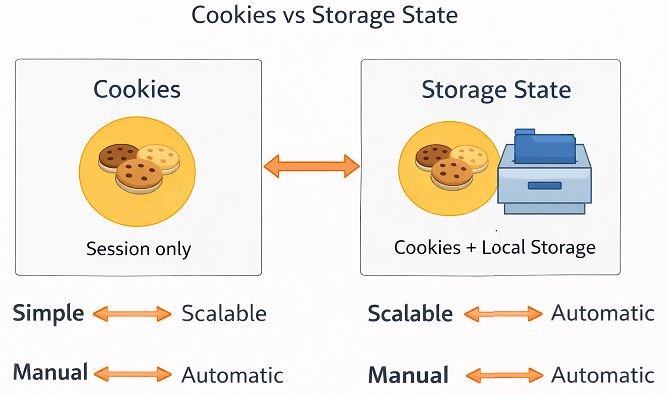
Here is a quick comparison between cookies and storage state in Playwright Java.
| Feature | Cookies | Storage State |
|---|---|---|
| Ease of Use | Manual setup required | Automatic and reusable |
| Scope | Only cookies | Cookies and local storage |
| Best For | Quick session setup | Full authentication reuse |
| Maintenance | Higher | Lower |
Real-world recommendation: Use cookies for simple scenarios. Use storage state for scalable and maintainable automation frameworks.
Playwright Java Cookies Methods Quick Summary
| Action | Method | Description |
|---|---|---|
| Add Cookies | addCookies() | Used to inject cookies into browser context |
| Get Cookies | cookies() | Returns all cookies from current context |
| Clear Cookies | clearCookies() | Removes all cookies from context |
Now that you understand cookies handling, you can continue learning other important Playwright concepts to strengthen your automation skills.
Related Playwright Tutorials
To deepen your understanding of Playwright Java and build a strong automation framework, explore these related tutorials that cover essential concepts like locators, actions, waits, and browser handling.
- Playwright locators in Java with real examples
- How to handle waits in Playwright Java effectively
- Playwright Java assertions using TestNG and JUnit
- Browser vs Context vs Page in Playwright Java explained
- Handle multiple tabs and windows in Playwright Java
Now here is something important: If your tests rely heavily on login flows, switching to cookie or storage state based authentication can significantly reduce execution time and improve stability.
Now that you understand cookies handling in Playwright Java, try implementing storage state in your framework to eliminate repeated login steps and improve test performance.
Playwright Cookies Handling Interview Questions
Here are some commonly asked questions related to cookies in Playwright Java.
What is the role of BrowserContext in cookies handling?
BrowserContext is responsible for storing and managing cookies in Playwright Java. It ensures that cookies are isolated per context, allowing you to simulate multiple users or sessions independently without sharing session data between tests.
Can cookies be shared between contexts?
No, cookies cannot be shared between different BrowserContext instances. Each context is completely isolated, which helps in running parallel tests and simulating different users without interference.
What is the best way to reuse login sessions?
The best way to reuse login sessions in Playwright Java is by using storage state. It allows you to save cookies and local storage together and reuse them across tests, avoiding repeated login steps.
When should you avoid using cookies directly?
You should avoid manually handling cookies in large or scalable automation frameworks. Instead, using storage state is preferred because it simplifies session management and reduces maintenance effort.
Conclusion
Playwright Java cookies handling is a powerful feature that helps you control browser sessions, improve test performance, and simulate real user behavior. By using methods like addCookies(), cookies(), and clearCookies(), you can easily manage authentication and session data in your tests.
In this guide, you learned how to add, get, and clear cookies along with real-world use cases, common mistakes, and best practices. You also saw how storage state provides a more scalable approach compared to manual cookie handling.
Now you can use Playwright Java cookies handling effectively to build faster, stable, and production ready automation tests. As a next step, try integrating storage state into your framework to simplify authentication across test suites.
FAQs
What is cookies handling in Playwright Java?
Cookies handling in Playwright Java means adding, retrieving, and deleting browser cookies using BrowserContext to manage session and user data during tests.
How do I add cookies in Playwright Java?
You can add cookies in Playwright Java using context.addCookies() by providing name, value, domain, and path before navigating to the page.
How to get cookies in Playwright Java?
Use context.cookies() to retrieve all cookies or pass a URL to get cookies for a specific domain.
How to clear cookies in Playwright Java?
Use context.clearCookies() to remove all cookies from the current BrowserContext.
Can I reuse cookies across tests in Playwright?
Yes, you can save cookies and reuse them, but using storage state is a better and scalable approach.
Why are cookies not working in Playwright?
Cookies may not work due to incorrect domain, wrong path, or adding them after page load without refreshing.
What is the difference between cookies and storage state in Playwright?
Cookies store session data, while storage state stores both cookies and local storage, making it better for authentication reuse.
Do cookies persist across BrowserContext in Playwright?
No, cookies are isolated per BrowserContext and do not persist across different contexts.
Can I skip login using cookies in Playwright?
Yes, you can add authentication cookies before navigation to directly access logged in pages.
Is it better to clear cookies or create a new BrowserContext?
Creating a new BrowserContext is recommended for better test isolation, while clearing cookies is useful for quick resets.