Last updated on April 18th, 2026 at 06:49 am
In this article, We will learn how to get the title of the page in playwrite using simple code examples for JavaScript/TypeScript
In Playwright automation testing, you frequently need to verify the page’s title. You need a page title to check the correctness of the web page. In Playwright, you can use the page.title() method to extract and retrieve the title of the web page. page.title() returns a string with the current page’s <title> value.
Why Get Page Title in Playwright?
In real-world scenarios, you need a page title to verify that the correct page is loaded after navigation, to debug unexpected redirections, get a dynamically changing title, or to validate a multipage workflow.
In most test cases, you will not just retrieve the title but also verify it to make sure the page has loaded correctly. Here is how you can verify page titles in Playwright using built-in assertions.
Playwright: Get Page Title in JavaScript
Using the page.title() method, you can easily grab the page title in Playwright. Here is a practical example.
Example Code (JavaScript)
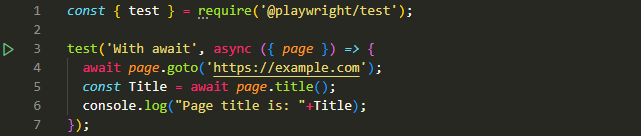
const { test } = require('@playwright/test');

test('Get Page Title', async ({ page }) => {
  await page.goto('https://example.com');
  const Title = await page.title();
  console.log("Page title is: "+Title);
});
Output
When you run the above test case in VS Code, it will get and print the page title in the console.
Page title is: Example DomainCode Breakdown
Here is a code breakdown.
- await page.goto(‘https://example.com’);: It will navigate to the URL
- const Title = await page.title();: It will get the title of the current page using page.title() and store it in a constant variable “Title”.
- console.log(“Page title is: “+Title);: This syntax will print the page title in console.
Along with the page title, you may also need to check the current URL to validate navigation during tests. You can also learn how to get the current page URL in Playwright for better validation.
Basic Playwright Tutorial Quick Links
- Click a Button Using the click() Method
- Get the Current Page URL Using page.url()
- Fill Text Using the Fill() method
- Select DropDown Value Using selectOption()
- Simulate the Right Click Using the click() method
Pro Tip: Wait Before Getting the Title
Sometimes, the title is set after the page has loaded completely, especially in SPA(Single Page Applications). So, it is advised to wait for the page to load completely before getting the title of the page. To make sure the page is loaded completely, you can use the page.waitForLoadState(‘domcontentloaded’). This method waits until the entire DOM content is fully loaded, ensuring that the web page is ready before performing any actions.
Here’s a Playwright example that waits for the DOM content to be fully loaded before retrieving the page title.
await page.waitForLoadState('domcontentloaded');
const title = await page.title();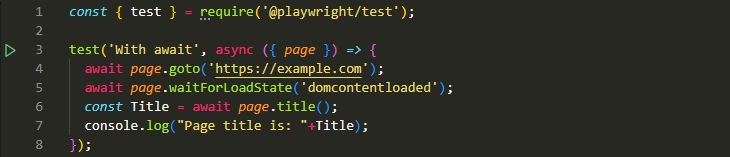
If you try to get the title too early, you may end up with incorrect results because the page is not fully loaded yet. In such cases, it helps to wait for the element or page to be visible before proceeding.
Final Thoughts
page.title() in Playwright is a simple yet powerful tool. You can use it to retrieve the page title and validate whether it matches the expected value.