Last updated on March 17th, 2026 at 02:45 am
Playwright Browser vs Context often confuses testers when they start working with modern automation frameworks. Simply put, Browser represents the actual browser process, BrowserContext works like an isolated session, and Page is a single tab inside that session. In this guide, you will clearly understand how Browser, Context, and Page work in Playwright, when to use each one, and how they impact test isolation, performance, and scalability using clear Java examples.
Playwright Browser vs Context vs Page
Playwright Browser vs Context can be understood by separating responsibilities clearly. The Browser is the actual browser process, like Chrome or Firefox, that Playwright controls. A BrowserContext is an isolated session inside that browser, similar to a fresh user profile with its own cookies and storage. A Page is a single tab opened within that context where your test interacts with the application. In simple terms, one Browser can have multiple isolated contexts, and each context can have one or more pages.
Real-world analogy:
Think of the Browser as a real laptop, BrowserContext as different user accounts on that laptop, and Page as individual browser tabs opened by each user. Users stay isolated from each other, but they all run on the same machine.
JavaScript example: Browser, Context, and Page creation
const { test, expect, chromium } = require('@playwright/test');

test('open page example', async ({}) => {
  // Launch the browser
  const browser = await chromium.launch();

  // Create a new isolated browser context
  const context = await browser.newContext();

  // Open a new page in the context
  const page = await context.newPage();

  // Navigate to the desired URL
  await page.goto('Page URL');

  // Example check (optional)
  await expect(page).toHaveTitle(/Page title/);

  // Close the browser
  await browser.close();
});
If you are new to Playwright with JavaScript, you can follow this step-by-step Playwright JavaScript installation guide to set up your project and start writing tests quickly.
Java example: Browser, Context, and Page creation
Playwright playwright = Playwright.create();

// Launch the browser process
Browser browser = playwright.chromium().launch();

// Create an isolated session
BrowserContext context = browser.newContext();

// Open a new tab inside the session
Page page = context.newPage();

// Use the page for testing
page.navigate("Page URL");
For those getting started with Playwright in Java, this Playwright setup with Java guide walks you through the complete setup process, including Maven configuration and writing your first automated test.
This structure allows Playwright to run fast, isolated, and reliable tests without repeatedly launching new browser processes.
Playwright Architecture Explained
Playwright uses a layered architecture that separates the browser process, user sessions, and tabs to keep automation fast and reliable. Internally, Playwright launches a single Browser process and then creates multiple BrowserContext objects inside it. Each BrowserContext represents a clean, isolated session with its own cookies, storage, cache, and permissions, while sharing the same underlying browser engine. Inside every context, Playwright opens one or more Page objects where actual user interactions happen.
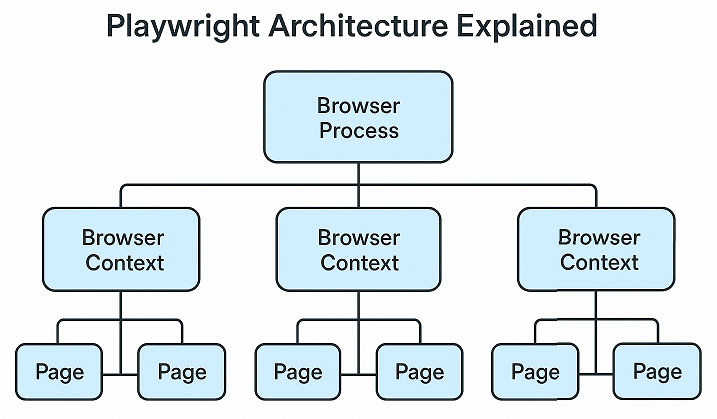
The relationship is hierarchical and intentional. A Browser sits at the top and controls the real browser instance. Each BrowserContext lives under that browser and acts as an independent session. Pages belong to a specific context and behave like browser tabs within that session. Because contexts do not share state, actions performed in one test do not affect another test, even though they run in the same browser process.
This design significantly improves test reliability and performance. By reusing the same Browser while isolating sessions through BrowserContext, Playwright avoids expensive browser restarts and eliminates flaky failures caused by shared cookies or storage. Tests run faster, remain independent, and scale better when executed in parallel, which makes this architecture ideal for modern, large automation suites.
What is a Browser in Playwright
In Playwright automation, the Browser represents the actual browser application, such as Chromium, Firefox, or WebKit, that runs on your machine or CI server. It is the top-level object responsible for starting, controlling, and closing the real browser process. The Browser itself does not store cookies, login state, or test data. Its main role is to act as a container that hosts one or more isolated BrowserContext sessions.
During test execution, the browser lifecycle is usually simple and efficient. The browser is launched once at the beginning of the test run and stays alive while multiple tests execute. Each test then creates its own BrowserContext for isolation. After all tests finish, the browser is closed. This approach avoids the overhead of repeatedly launching and shutting down the browser for every test.
It is important to understand the difference between a browser instance and a session. The browser instance refers to the single running browser process. A session refers to the isolated user state created using BrowserContext. Multiple sessions can exist at the same time inside one browser instance without interfering with each other.
Java example: Launching a browser
Playwright playwright = Playwright.create();

// Launch the browser process
Browser browser = playwright.chromium().launch();

// Browser stays alive while tests run
// Sessions are created using BrowserContext
By separating the browser process from user sessions, Playwright achieves faster execution and better test stability.
What Is BrowserContext in Playwright
A BrowserContext in Playwright represents an isolated user session within a browser. Each context behaves like a fresh browser profile with its own cookies, local storage, session storage, cache, and permissions. Even though multiple contexts run inside the same browser process, they remain completely independent from each other.
BrowserContext is the key component that enables Playwright test isolation. When each test runs inside its own context, no state is shared between tests. Login data, cookies, and stored values from one test never leak into another. This isolation prevents flaky behavior and makes parallel test execution reliable without launching multiple browser processes.
A BrowserContext also controls environment-level settings for its pages. Cookies and storage are scoped to the context, permissions like camera or location access are granted per context, and viewport size or device emulation is configured at the context level. All pages created inside the same context automatically inherit these settings.
Java example: Creating an isolated BrowserContext
Playwright playwright = Playwright.create();
Browser browser = playwright.chromium().launch();

// Create a fresh isolated session
BrowserContext context = browser.newContext();

// All pages inside this context share the same session
Page page = context.newPage();
page.navigate("https://example.com");
Using a new BrowserContext for each test is the recommended approach for building fast, stable, and scalable Playwright test suites.
What Is Page in Playwright
In Playwright, a Page represents a single browser tab where your test interacts with the application. All actions like clicking elements, filling forms, navigating URLs, and validating UI behavior happen on a Page. It is the object that testers work with most often during automation.
A Page always belongs to a specific BrowserContext. This relationship is important because the page inherits session data such as cookies, storage, permissions, and viewport settings from its context. If multiple pages are created from the same context, they share the same session state, which makes it easy to handle workflows involving multiple tabs or pop-ups.
You can think of Page as an actual tab opened by a user within a browser session. Closing a page only closes that tab, while the context and browser continue to run. This separation allows Playwright to manage multiple tabs efficiently without breaking session isolation.
Java example: Creating a Page inside a context
Playwright playwright = Playwright.create();
Browser browser = playwright.chromium().launch();

// Create an isolated session
BrowserContext context = browser.newContext();

// Open a new tab within the session
Page page = context.newPage();
page.navigate("https://example.com");
By keeping Page tied to BrowserContext, Playwright ensures predictable behavior and consistent session handling across tests.
BrowserContext vs Page in Playwright
Understanding BrowserContext vs. Page in Playwright becomes easier when you focus on their responsibilities. A BrowserContext is responsible for managing session-level data, including cookies, storage, permissions, and viewport settings. A Page is responsible for interacting with the user interface inside that session. In short, BrowserContext controls isolation, while Page controls actions.
You should create a new BrowserContext whenever you need a clean and independent user session. This is common when running multiple tests, executing tests in parallel, or validating scenarios like different user roles or fresh logins. Creating a new context ensures that no data from previous tests affects the current one.
You should reuse the same context when multiple pages need to share the same session state. For example, if a test opens multiple tabs, handles a pop-up, or navigates between pages that require the same login, reusing the same context is the correct approach. In this case, you create multiple pages using the same context rather than creating new contexts.
By separating session management from page interactions, Playwright provides a clean and predictable model that improves test stability and keeps automation code easy to maintain.
browser.newContext vs browser.newPage
The difference between browser.newContext vs browser.newPage lies in how sessions are created and managed. When you call browser.newContext(), you explicitly create a fresh, isolated session and then open pages inside it. When you call browser.newPage(), Playwright implicitly creates a new BrowserContext behind the scenes and immediately opens a page inside that hidden context.
Explicit context creation using browser.newContext() gives you full control over test isolation, configuration, and lifecycle management. You can define permissions, viewport size, storage state, and device settings before any page is opened. This approach is predictable and recommended for structured test frameworks.
Using browser.newPage() may look convenient, but it is not recommended for large test suites. Since the context is created implicitly, it becomes harder to manage and close properly. This can lead to hidden sessions, higher memory usage, and reduced clarity when debugging or running tests in parallel.
Java comparison example
// Recommended approach: explicit context creation
BrowserContext context = browser.newContext();
Page page1 = context.newPage();

// Shortcut approach: implicit context creation
Page page2 = browser.newPage();
For scalable and maintainable automation, explicitly creating BrowserContext objects provides better control, clearer intent, and more reliable test execution.
Playwright Multiple Tabs in Same Context
Playwright supports handling multiple tabs by creating multiple Page objects within the same BrowserContext. When pages are created from the same context, they automatically share login state, cookies, local storage, and session storage. This means actions performed on one page, such as logging in, are immediately available to other pages in the same context without any extra setup.
A common real-world scenario involves applications that open links in new tabs or display pop-ups. For example, a user logs into an application on the main page and then clicks a link that opens a dashboard in a new tab. By keeping both pages in the same context, the new tab already has access to the authenticated session, allowing the test to continue without relogging in.
Using the same context is essential for session reuse. If a new context is created instead, the new tab would behave like a fresh user with no cookies or stored data. By reusing the same BrowserContext, Playwright ensures consistent behavior across tabs and enables reliable automation for workflows that depend on shared user state.
Browser Instance vs Session in Playwright
In Playwright, a browser instance refers to the actual running browser process, such as Chromium, Firefox, or WebKit. This process is launched once and is responsible for rendering pages and executing browser-level operations. The browser instance itself does not hold user data like cookies or login information.
A session in Playwright is mapped to a BrowserContext. Each BrowserContext represents an independent user session with its own cookies, storage, cache, and permissions. Multiple sessions can exist at the same time within a single browser instance, and they remain fully isolated from each other.
This separation is critical for parallel execution. By running multiple BrowserContext sessions inside one browser instance, Playwright allows tests to execute in parallel without sharing state. This approach reduces resource usage, speeds up execution, and prevents test interference, which makes the browser instance vs session design ideal for scalable and reliable automation.
When to Use Browser, Context, or Page
Choosing between Browser, BrowserContext, and Page becomes simple once you understand their purpose. Use a single Browser to control the actual browser process and keep it running for the entire test run. The Browser should rarely be created or closed inside individual tests because starting a browser is an expensive operation.
Use a new BrowserContext for each test or logical test group that needs a clean session. This is the best choice for single tests that require isolation and for parallel tests where shared state can cause failures. Creating separate contexts instead of multiple browsers improves performance while keeping tests independent and reliable.
Use Page whenever you need to interact with the application under test. For most scenarios, one page per test is enough. When a workflow involves multiple tabs or pop-ups, create additional pages within the same context to reuse the session. This balance between reuse and isolation helps maintain fast execution, stable results, and scalable Playwright automation suites.
In real automation frameworks, browser, context, and page objects must be managed carefully to avoid resource issues and improve test stability. To see how this is implemented in a scalable setup, learn how to manage the Playwright browser lifecycle in a framework.
Conclusion
Playwright Browser vs Context becomes simple once you understand the separation of responsibilities. The Browser controls the real browser process, BrowserContext represents an isolated user session, and Page acts as a single tab where test actions happen.
Keeping this mental model clear helps you write faster, more reliable, and scalable tests. By reusing the browser, isolating tests with separate contexts, and using pages correctly, you follow Playwright best practices naturally and avoid common automation pitfalls.